
1. Introduction
Thank you for choosing the Generic Smart Bluetooth Body Fat Scale. This device is designed to help you monitor your body weight and various body composition metrics with high accuracy. By utilizing advanced BIA technology and Bluetooth connectivity, it provides comprehensive data for effective health and fitness management. Please read this manual thoroughly before use to ensure proper operation and maintenance.
2. Product Overview
Key Features:
- High Accuracy: Equipped with 4 high-sensitive electrodes and 4 high-precision E-shape sensors for accurate measurements within 0.2lb/100g.
- Smart Bluetooth Connectivity: Seamless data transfer to your smartphone or fitness tracking apps for progress monitoring.
- Rechargeable Battery: USB charging with a built-in battery, offering extended use on a single charge.
- Step-on Technology: Provides instant and accurate measurements upon stepping onto the scale.
- Durable Design: Features a 6mm tempered glass platform for durability and comfort.
- LCD Backlight Display: Clear and easy-to-read display.
- Unit Conversion: Supports measurement in lb/kg.
- Auto Power On/Off: Automatically powers on when stepped on and off after approximately 8 seconds of inactivity.
What's in the Box:
- 1 x Bluetooth Smart Scale
- 1 x User Manual
- 1 x USB charging cable

Image: Angled view of the pink Generic Smart Bluetooth Body Fat Scale, showcasing its tempered glass platform and sleek design.
3. Setup
3.1 Initial Charging
Before first use, ensure the scale is fully charged. Connect the provided USB charging cable to the scale's charging port and a compatible USB power source (e.g., computer, power bank, wall adapter). The display will indicate charging status. A full charge can last for several months.
3.2 App Installation
- Scan the QR code provided in the manual or on the scale packaging, or search for the designated app (e.g., 'OKOK International' or similar, as indicated on the scale's instructions) in your smartphone's app store (App Store for iOS, Google Play for Android).
- Download and install the app on your mobile device.
- Register an account and create your personal profile within the app, entering details such as gender, height, and age for accurate body composition analysis.
3.3 Bluetooth Pairing
- Ensure Bluetooth is enabled on your smartphone.
- Open the installed app.
- Step onto the scale to activate it. The scale's display will light up.
- The app should automatically detect and connect to the scale. Follow any on-screen prompts within the app to complete the pairing process.
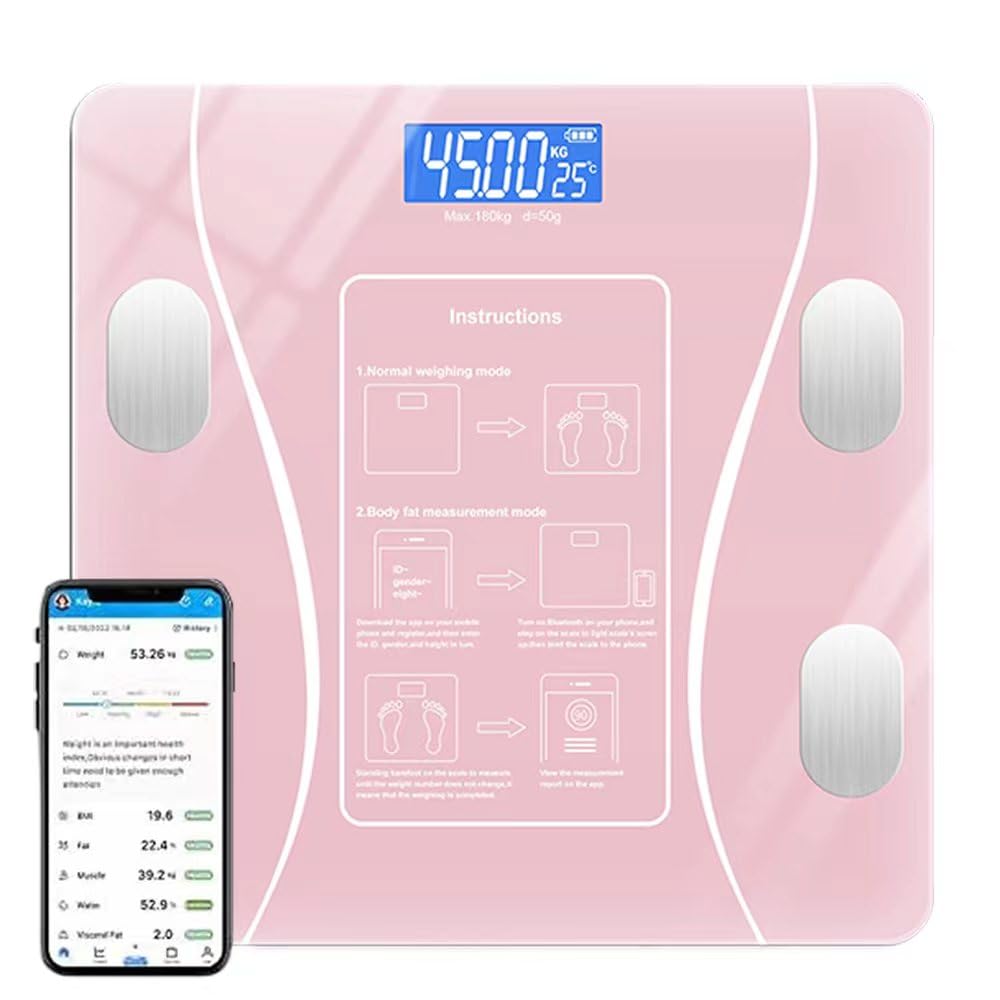
Image: The pink smart scale displaying a weight measurement, positioned next to a smartphone screen showing the detailed interface of its companion health tracking application.
4. Operating Instructions
4.1 Normal Weighing Mode
- Place the scale on a hard, flat surface. Avoid carpets or uneven floors, as this can affect accuracy.
- Gently step onto the scale with bare feet. The scale will automatically power on and display your weight.
- Stand still until the weight reading stabilizes and flashes, indicating the measurement is complete.
- The scale will automatically power off after approximately 8 seconds of inactivity.

Image: A person's bare feet are shown stepping onto the pink smart scale, demonstrating the correct posture for taking a weight measurement.
4.2 Body Fat Measurement Mode (with App)
For body composition analysis (body fat, muscle mass, etc.), ensure the scale is paired with the app and your profile is set up.
- Open the app on your smartphone and ensure Bluetooth is active.
- Step onto the scale with bare feet, ensuring your feet make contact with the four metal electrodes on the scale's surface.
- Stand still. The scale will measure your weight, and then the app will begin to analyze your body composition.
- Once the measurement is complete, the data will automatically sync to the app, providing a detailed breakdown of various metrics.

Image: A close-up view of the smart scale's digital display, showing a weight reading in kilograms and temperature. Simplified instructions for both normal weighing and body fat measurement modes are visible on the scale's surface.
4.3 Unit Conversion
The scale supports measurement in pounds (lb) and kilograms (kg). The unit can typically be changed via a button on the underside of the scale or within the companion app settings.

Image: A top-down view of the pink smart scale, clearly showing the printed instructions on its surface for both normal weighing and body fat measurement modes, along with the digital display.
5. Maintenance
5.1 Cleaning
To clean the scale, wipe the surface with a soft, damp cloth. Do not use abrasive cleaners or immerse the scale in water. Avoid using chemical cleaning agents as they may damage the surface.
5.2 Storage
Store the scale in a cool, dry place. Avoid extreme temperatures and direct sunlight. Do not place heavy objects on the scale when not in use.
6. Troubleshooting
- No Display/Scale Not Turning On: Ensure the scale is charged. Connect it to a USB power source and allow it to charge for a period before attempting to use it again.
- Inaccurate Readings:
- Ensure the scale is placed on a hard, flat, and level surface.
- Step onto the scale with bare feet and stand still.
- Ensure the scale is clean and free of debris.
- Calibrate the scale if necessary (refer to app instructions or step on/off quickly to reset).
- Bluetooth Connectivity Issues:
- Ensure Bluetooth is enabled on your smartphone.
- Make sure the app is open and running in the foreground.
- Restart your phone and the scale.
- Ensure the scale is within range of your phone.
- Body Composition Data Not Showing: Ensure you are stepping on the scale with bare feet, making full contact with all four electrodes. Verify your profile information (gender, height, age) is correctly entered in the app.
7. Specifications
| Feature | Specification |
|---|---|
| Product Dimensions | 10.23 x 10.23 x 1 inches |
| Weight | 2 Pounds |
| Brand | Generic |
| Color | Pink |
| Special Feature | Bodyweight, Smart |
| Display Type | LCD |
| Weight Limit | 396 Pounds (180 kg) |
| Sensor Type | Fifth Generation High-precision Sensor |
| Power Supply | USB charging with built-in battery |
8. Important Health Information
This scale is intended for general health and fitness tracking. It is not a medical device. Consult with a healthcare professional for medical advice or diagnosis. Changes in body composition can be influenced by various factors and should be interpreted in context with professional guidance.

Image: A person is shown stretching during a workout, with the pink smart scale visible in the foreground. This image illustrates how the scale can be used to track and manage fitness progress over time.