1. Product Overview
The Hilitand Multifunctional Electric Forklift Programmer is a handheld unit designed for advanced diagnostics and programming of electric forklift controllers. It facilitates controller programming, program copying, and viewing of electric forklift fault codes, enhancing maintenance efficiency and accuracy.

Image 1.1: Front view of the Hilitand Multifunctional Electric Forklift Programmer, showing the display screen and control buttons.
Key Features:
- Multifunctional Capability: Supports controller programming, program copying, and electric forklift fault code viewing.
- Intuitive Interface: Features a clear screen and convenient buttons for ease of use and data viewing.
- Program Management: Enables easy copying and backup of controller programs.
- Durable Construction: Housed in a sturdy ABS plastic shell, providing strong toughness and high strength for various operating environments.
- Large Display Screen: High-resolution display shows multiple parameters simultaneously, suitable for low-light conditions.
2. Setup Instructions
The Hilitand Electric Forklift Programmer is designed for direct use. No complex assembly is required. It must be used in conjunction with a compatible electric forklift controller.
Initial Setup:
- Unpack the Device: Carefully remove the programmer and its accessory from the packaging.
- Inspect for Damage: Before use, visually inspect the programmer and its accessory for any signs of damage during transit.
- Connect to Controller: Connect the programmer to the electric forklift's controller using the provided accessory cable. Ensure a secure connection.

Image 2.1: The handheld programmer shown alongside an electric forklift, illustrating its intended application for controller interaction.
The programmer cannot operate independently and requires connection to the forklift's controller for full functionality.
3. Operating Instructions
This section outlines the primary functions and general operation of the Hilitand Electric Forklift Programmer.
Interface and Navigation:

Image 3.1: A close-up view of the programmer's display screen, showing menu options and data fields.
The programmer features a clear LCD screen and a set of intuitive buttons for navigation and input. The main menu typically includes options such as "PROGRAM," "TESTER," "SAVE," "RESTORE," "ALARMS," "PROGRAM PEDAL," and "MOTOR DATA."
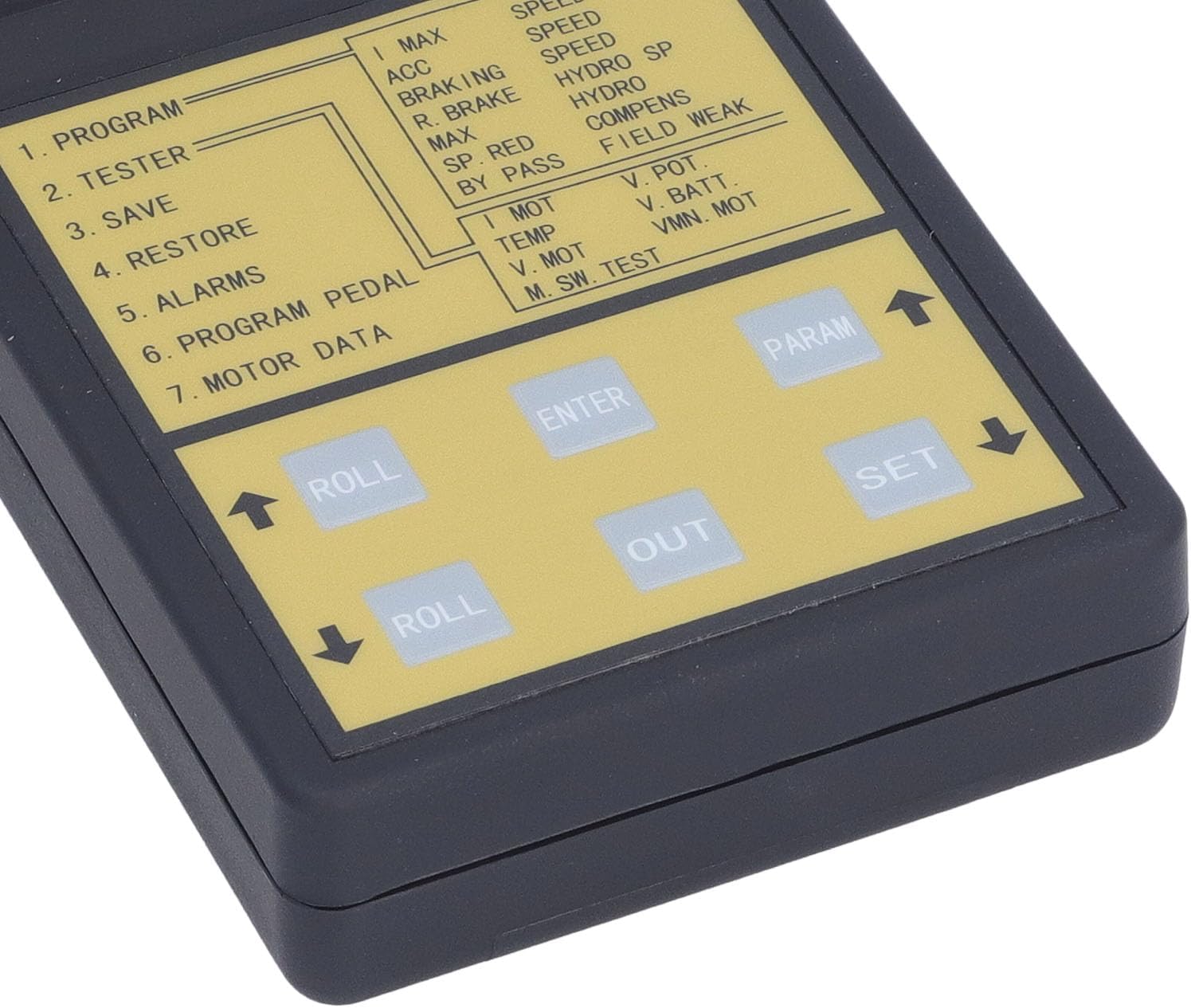
Image 3.2: A close-up view of the programmer's control buttons, including "ROLL" (up/down arrows), "ENTER," "OUT," "PARAM," and "SET."
- ROLL Buttons (Up/Down Arrows): Used to navigate through menu options or adjust parameter values.
- ENTER Button: Confirms selections or enters sub-menus.
- OUT Button: Exits current menu or cancels an operation.
- PARAM Button: Accesses parameter settings for selected functions.
- SET Button: Saves changes or confirms parameter adjustments.
Core Functions:
- Controller Programming:
Select the "PROGRAM" option from the main menu. Follow the on-screen prompts to modify or update the forklift controller's software. Refer to the specific forklift controller's documentation for compatible programming parameters and procedures.
- Program Copying and Backup:
Use the "SAVE" function to store the current controller program. The "RESTORE" function allows loading a previously saved program onto a controller. This is crucial for maintaining consistent settings across multiple forklifts or for restoring configurations after maintenance.
- Fault Code Viewing:
Navigate to the "ALARMS" or "TESTER" section to view active and historical fault codes from the forklift controller. These codes provide diagnostic information to identify and troubleshoot issues within the forklift's electrical or mechanical systems.
- Motor Data Monitoring:
The "MOTOR DATA" option allows real-time monitoring of various motor parameters, such as speed, temperature, and voltage. This data is essential for performance analysis and diagnostic purposes.

Image 3.3: The handheld programmer positioned in an industrial setting with a forklift, demonstrating its operational environment.
Always ensure the forklift is in a safe, stationary position and powered off before connecting or disconnecting the programmer. Consult the forklift's service manual for detailed information regarding controller compatibility and specific programming requirements.
4. Maintenance and Care
Proper maintenance ensures the longevity and reliable operation of your Hilitand Electric Forklift Programmer.
- Cleaning: Use a soft, dry cloth to clean the exterior of the device. For stubborn dirt, a slightly damp cloth with mild soap can be used, ensuring no liquid enters the device. Do not use abrasive cleaners or solvents.
- Storage: Store the programmer in a cool, dry place away from direct sunlight, extreme temperatures, and high humidity. Keep it in its original packaging or a protective case when not in use to prevent physical damage.
- Handling: The device features a sturdy ABS plastic housing, but avoid dropping or subjecting it to severe impacts, which could damage internal components or the display screen.
- Cable Care: Regularly inspect the accessory cable for any signs of wear, cuts, or damage. Replace damaged cables immediately to ensure safe and reliable connection.
5. Troubleshooting
This section provides general guidance for common issues encountered with the Hilitand Electric Forklift Programmer.
| Problem | Possible Cause | Solution |
|---|---|---|
| Device does not power on. | No power from the forklift controller or faulty connection. |
|
| Cannot connect to forklift controller. | Incorrect cable, loose connection, or incompatible controller. |
|
| Display is blank or unreadable. | Power issue, display damage, or extreme environmental conditions. |
|
| Programming errors occur. | Incorrect parameters, incompatible firmware, or communication issues. |
|
If you encounter issues not listed here or if the suggested solutions do not resolve the problem, please refer to the support section for further assistance.
6. Product Specifications
| Attribute | Detail |
|---|---|
| Item Type | Handheld Unit Programmer |
| Material | ABS Plastic |
| Functions | Controller programming, program copying, electric forklift fault code viewing |
| Model Number | Hilitandcwx4q3egsa |
| Item Weight | 1.22 pounds (approx. 0.55 kg) |
| Package Dimensions | 10.63 x 5.12 x 3.54 inches (approx. 27 x 13 x 9 cm) |
| Manufacturer | Hilitand |
7. Warranty and Support
Warranty Information:
Specific warranty details for the Hilitand Multifunctional Electric Forklift Programmer may vary. Please refer to the warranty card included with your product or contact the seller/manufacturer directly for comprehensive warranty terms and conditions.
Customer Support:
For technical assistance, troubleshooting, or inquiries regarding your Hilitand product, please contact your point of purchase or the Hilitand customer support team. Contact information can typically be found on the product packaging or the official Hilitand website.
For general inquiries, you may visit the Hilitand store on Amazon: Hilitand Store
