
Introduction
This manual provides comprehensive instructions for the assembly, operation, and maintenance of your Bigzzia Gaming Chair, Model X23F00M020. Please read this manual thoroughly before assembling or using the chair to ensure safe and correct operation. Keep this manual for future reference.
Safety Information
- Maximum Weight Capacity: The chair is designed to support a maximum weight of 300 lbs (136 kg). Do not exceed this limit.
- Stable Placement: Always ensure the chair is placed on a stable, level floor surface to prevent tipping.
- Assembly: Follow all assembly instructions carefully. Improper assembly can lead to instability and injury.
- Children: Keep children away from moving parts during assembly. Do not allow children to play on or around the chair unsupervised.
- Maintenance: Regularly check all bolts and screws to ensure they are tight. Retighten as necessary.
- Moving the Chair: When moving the chair, lift it rather than dragging it to prevent damage to the base or floor.
Package Contents
Before beginning assembly, ensure all parts are present and undamaged. A detailed instruction guide with all necessary accessories is included in the package. If any parts are missing or damaged, please contact customer support.
Typical components include:
- Backrest
- Seat Base
- Armrests (Left and Right)
- Gas Lift Cylinder
- Star Base
- Casters (Wheels)
- Mechanism Plate
- Headrest Pillow
- Lumbar Support Pillow
- Hardware (Screws, Washers, Allen Key)

Image: Exploded view of chair components.
Setup and Assembly
Assembly of the Bigzzia Gaming Chair is designed to be straightforward. Please refer to the detailed instruction manual included in your package for step-by-step guidance. Ensure all parts are correctly aligned and securely fastened.
Assembly Overview Video
Video: An overview of the Bigzzia Gaming Chair, demonstrating its features and adjustments.
Operating Instructions
Your Bigzzia Gaming Chair offers multiple adjustment options to customize your seating experience for comfort and ergonomic support.
1. Seat Height Adjustment
To adjust the seat height, locate the lever on the right side beneath the seat. Pull the lever upwards while taking your weight off the seat to raise it. To lower the seat, pull the lever upwards while remaining seated. Release the lever to lock the height.
2. Backrest Recline
The backrest can be reclined from an upright 90° to a relaxed 155° angle. Use the recline lever, typically found on the left side of the seat, to adjust the angle. Pull the lever up and lean back to recline, or lean forward to bring the backrest upright. Release the lever to lock the backrest in position.
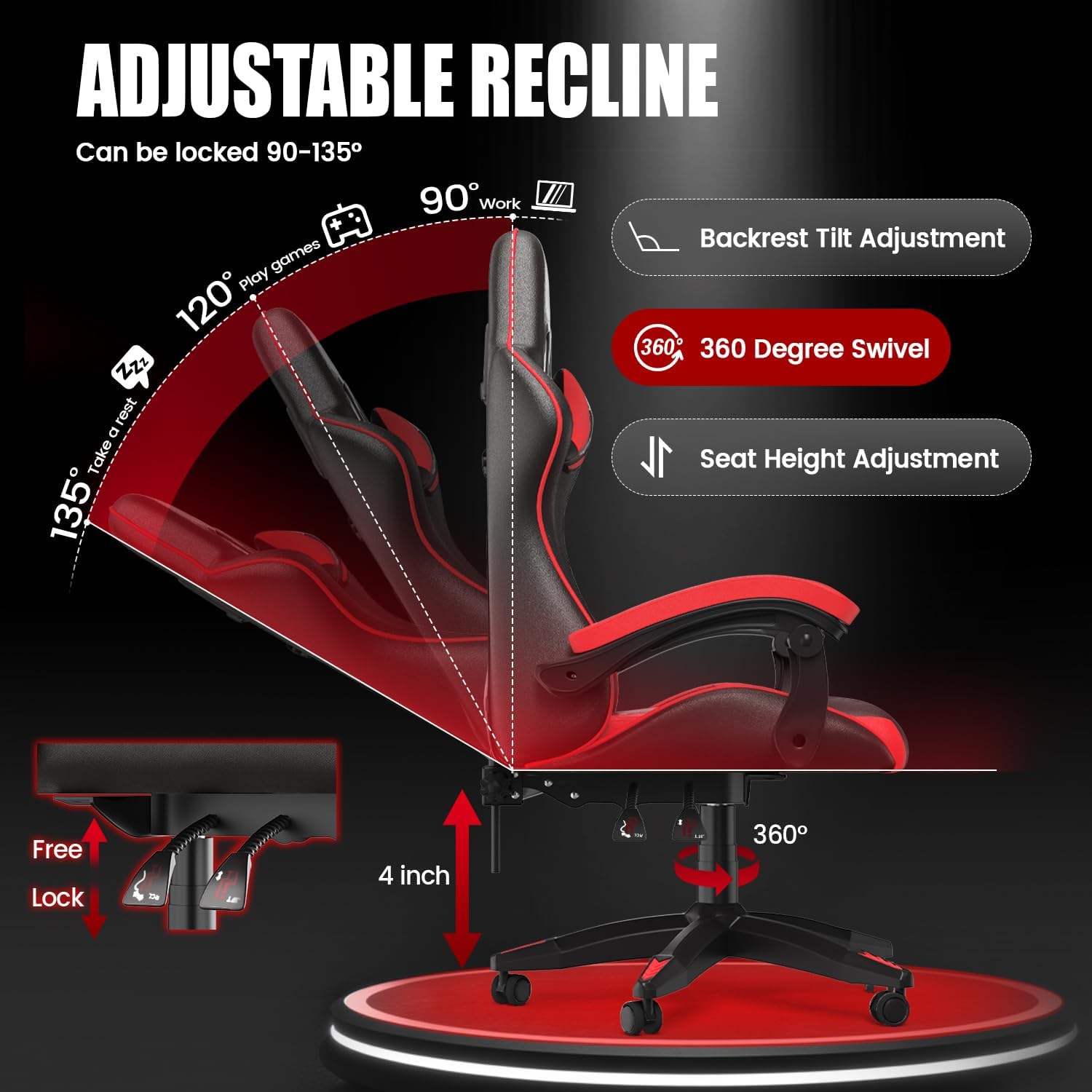
Image: Illustration of the chair's adjustable recline and seat height mechanisms.
3. 360° Swivel Function
The chair features a 360° swivel seat, allowing for easy rotation without moving the base.
4. Lumbar Support and Headrest Pillow
The chair includes a detachable lumbar support pillow and a headrest pillow. These can be adjusted vertically or removed to suit your comfort preferences and promote a healthy posture.
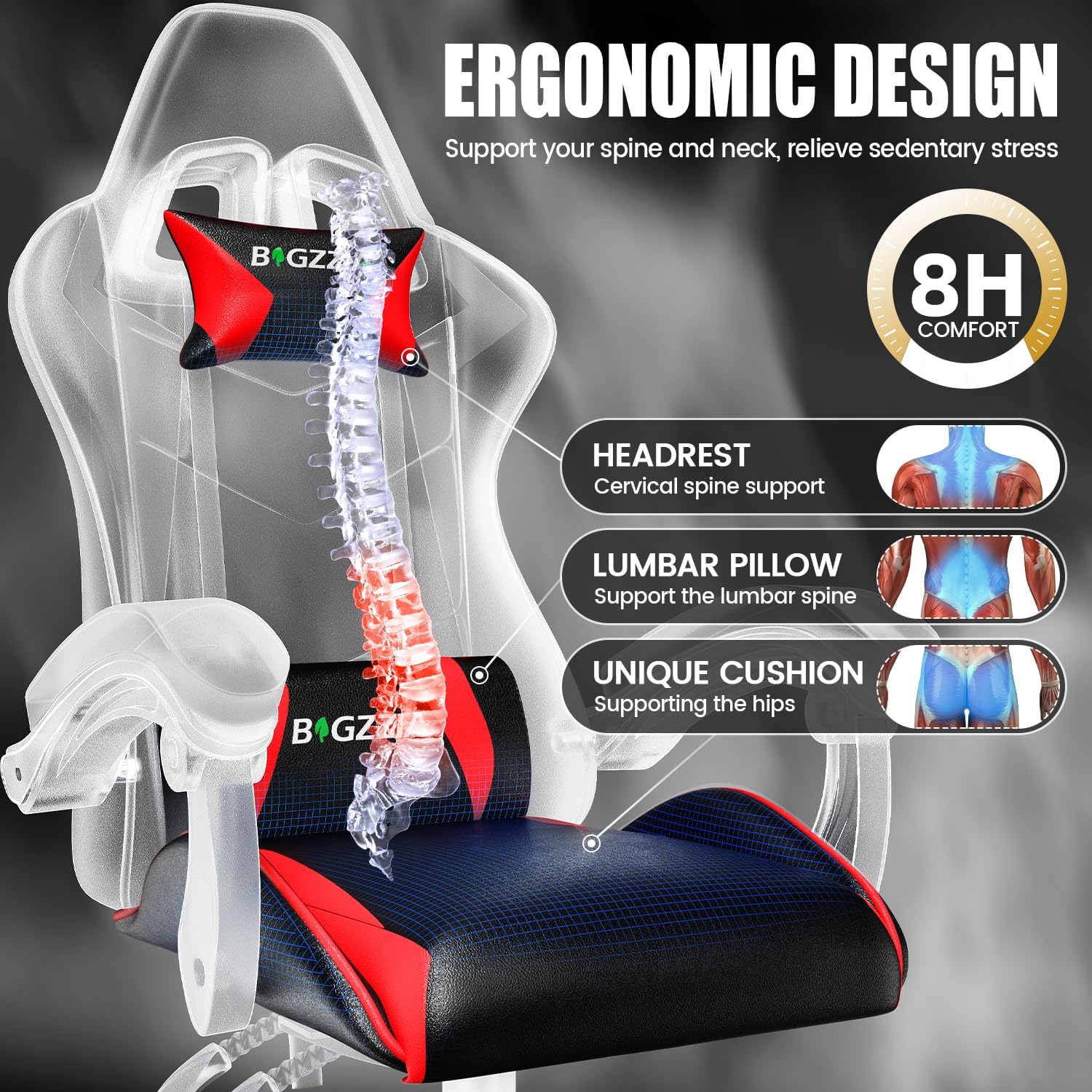
Image: Ergonomic design features including headrest and lumbar support.
5. Linkage Padded Armrests
The armrests are designed to move with the recline of the backrest, providing continuous support for your arms and preventing elbow strain.

Image: Detail of the linkage padded armrests.
Operating Features Video
Video: Demonstrates the various adjustable features of the Bigzzia Gaming Chair.
Maintenance
To ensure the longevity and appearance of your Bigzzia Gaming Chair, follow these simple maintenance guidelines:
- Cleaning: Wipe clean with a damp cloth. Avoid harsh chemicals or abrasive cleaners, which can damage the PU leather.
- Inspection: Periodically inspect all moving parts, bolts, and connections. Tighten any loose fasteners to maintain stability and safety.
- Avoid Direct Sunlight: Prolonged exposure to direct sunlight can cause the material to fade or crack.
- Spills: Clean up spills immediately to prevent staining.
Troubleshooting
If you encounter any issues with your Bigzzia Gaming Chair, please refer to the following common solutions:
- Chair is Wobbly: Check all assembly bolts and screws. Ensure they are tightened securely. Verify that the base is properly attached to the gas lift.
- Seat Height Adjustment Not Working: Ensure the gas lift lever is fully engaged. If the issue persists, the gas lift cylinder may need replacement.
- Backrest Not Reclining/Locking: Check the recline lever mechanism for any obstructions. Ensure it is fully engaged or disengaged as intended.
- Squeaking Noises: Apply a small amount of lubricant to moving parts or connections, especially where metal meets metal. Check for any loose bolts.
If these steps do not resolve the issue, please contact Bigzzia customer support for further assistance.
Specifications
| Feature | Detail |
|---|---|
| Brand | Bigzzia |
| Model Name | Red Bigzzia Gaming Chair |
| Item Model Number | X23F00M020 |
| Color | Red and Black |
| Product Dimensions | 23.23"D x 11.42"W x 31.1"H |
| Maximum Weight Recommendation | 300 Pounds |
| Material | Leather, Memory Foam |
| Special Features | Adjustable Height, Arm Rest, Ergonomic, Head Support, Reclining |
| Back Style | Solid Back |
| Reclining Position Count | 3 Position (90-155 degrees) |
| Furniture Base Movement | Swivel (360 degrees) |
| Item Weight | 33 pounds |
| Assembly Instructions | Included |
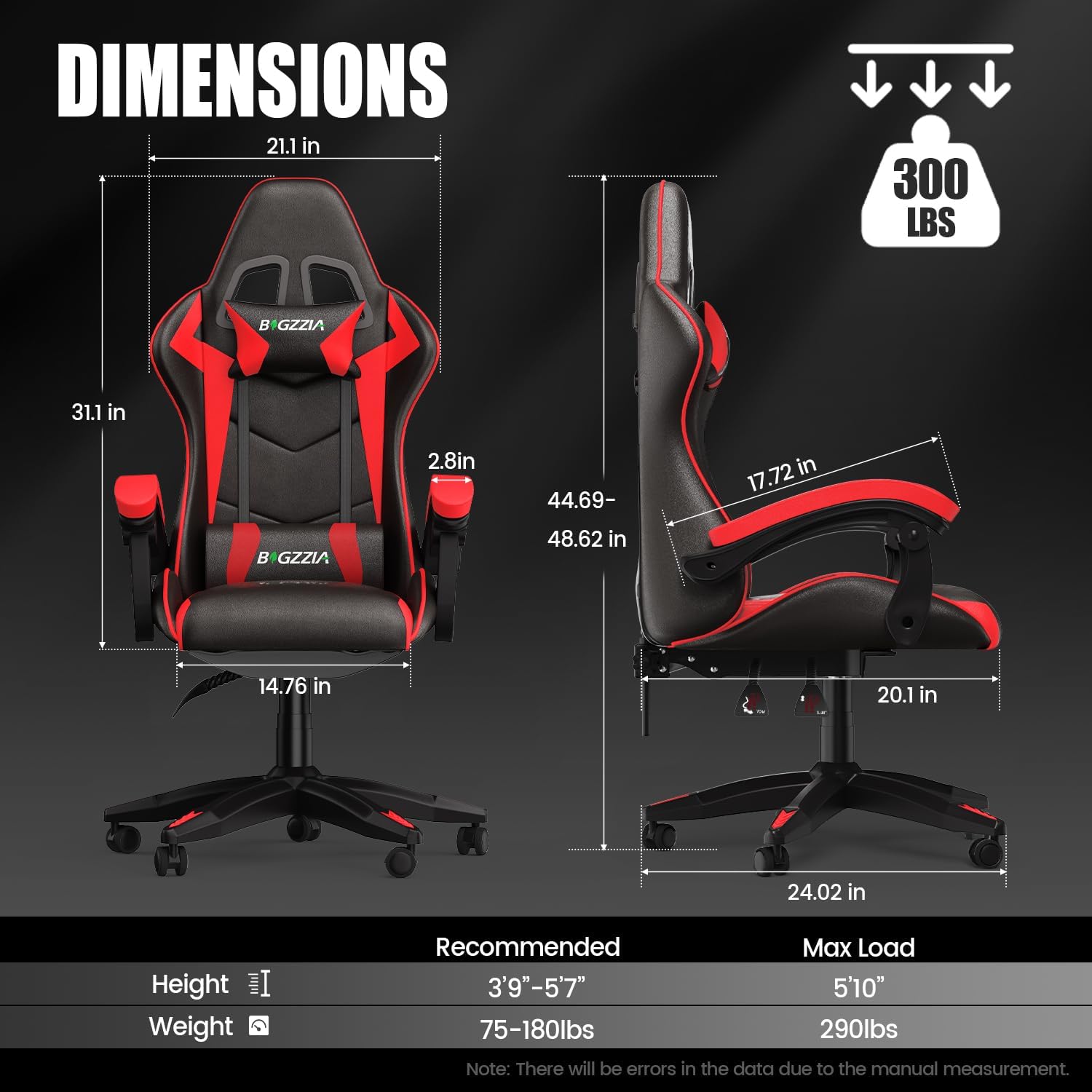
Image: Detailed dimensions of the Bigzzia Gaming Chair.
Warranty and Support
Bigzzia is committed to providing quality products and excellent customer service. While specific warranty details are not provided in this manual, Bigzzia has a dedicated after-sale service team ready to assist you with any problems or questions you may have regarding your gaming chair.
For support, please refer to the contact information provided with your purchase or visit the official Bigzzia website.