
RSRVFDOT CIPR-GA70B4031ABBA
AC Drive GA700 User Manual
Model: CIPR-GA70B4031ABBA
1. Introduction
This manual provides essential information for the safe and efficient operation, installation, and maintenance of the RSRVFDOT AC Drive GA700. Please read this manual thoroughly before using the product and keep it for future reference.
The GA700 series AC Drive is a versatile DC/AC inverter designed for various industrial applications, offering precise motor control and energy efficiency.
2. Safety Information
WARNING:
- Risk of electric shock. Always disconnect power before installation, maintenance, or inspection.
- Wait at least 5 minutes after disconnecting power for capacitors to discharge before opening the unit.
- Ensure proper grounding to prevent electrical hazards.
- Only qualified personnel should perform installation and wiring.
- Do not operate the drive with damaged cables or if the enclosure is open.
Refer to the warning labels on the product for specific safety instructions.

Image: Close-up view of the GA700 AC Drive showing warning labels and control panel.
3. Product Overview
The GA700 AC Drive is designed for precise motor control with features that ensure stable and efficient operation. It offers quick response times for start and stop commands and provides high torque even at low speeds.

Image: Front view of the GA700 AC Drive, highlighting the digital operator panel and control buttons.
Key Features:
- Easy Operation and Wiring: Simple screw-terminal connections for straightforward setup.
- Variable Frequency Drive: Quick start and stop response, providing large torque even at low speeds.
- Enhanced Durability: The product casing is designed with multiple holes, providing sufficient space for cooling between components, extending its service life.
- Low Noise and EMI: This product has the advantages of low noise and low electromagnetic interference.
Applicable Motors:
This drive is suitable for a wide range of motor applications, including:
- Spindles
- Routers
- Flywheels
- Engraving machines
- Winding machines
- Mixers
- Extruders
- Slitters
- Winders
- Compressors
- Ventilation equipment
- Pumps
- Grinders
- Conveyors
- Elevators
- Centrifuges
- Other speed-controlled machinery.
4. Setup and Installation
4.1 Unpacking and Inspection
Upon receiving the GA700 AC Drive, carefully unpack it and inspect for any signs of damage during transit. Ensure all components listed in the packing list are present.

Image: The GA700 AC Drive still in its protective plastic wrapping, indicating new condition.
4.2 Mounting
Mount the drive vertically on a flat, stable surface. Ensure adequate clearance around the unit for proper ventilation. The design incorporates multiple holes for cooling, which requires sufficient airflow.

Image: Side view of the GA700 AC Drive, highlighting the cooling fins and ventilation design.
4.3 Wiring
Wiring should be performed by a qualified electrician. Follow all local and national electrical codes. The GA700 supports 400V 3-phase input.
- Power Input: Connect the 3-phase 400V AC power supply to the designated input terminals.
- Motor Output: Connect the motor to the output terminals.
- Grounding: Ensure the drive is properly grounded.
- Control Wiring: Connect control signals (e.g., start/stop, speed reference) as per your application requirements.
To connect wires, remove the screws on the terminals, insert the wire, and tighten the screws securely.
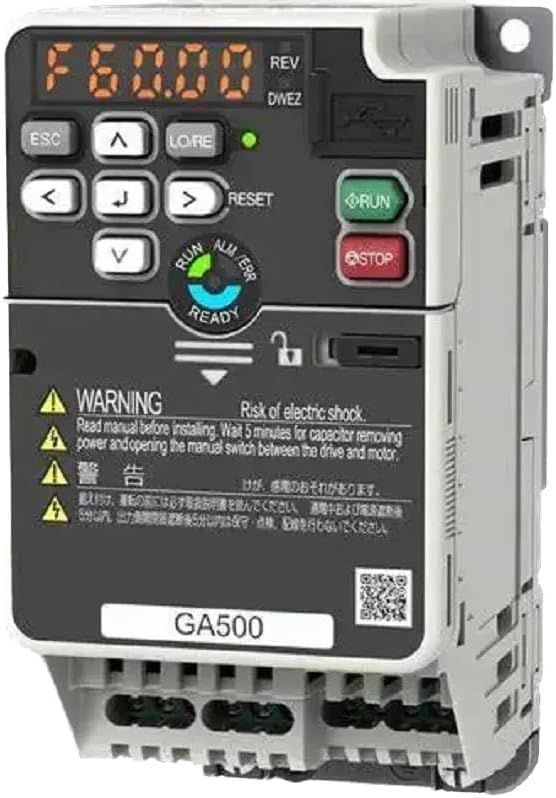
Image: Bottom view of the GA700 AC Drive, showing the various wiring terminals for power input, motor output, and control signals.
5. Operating Instructions
5.1 Control Panel Overview
The GA700 features a user-friendly digital operator panel for monitoring and control.

Image: Angled view of the GA700 AC Drive, showing the digital display and control buttons for operation and parameter settings.
5.2 Basic Operation
- Power On: After completing all wiring and safety checks, apply power to the drive. The display will illuminate.
- Start: Press the RUN button to start the motor.
- Stop: Press the STOP button to stop the motor.
- Speed Adjustment: Use the arrow keys (▲ / ▼) to adjust the motor speed.
- Reset: Press the RESET button to clear any faults.
5.3 Parameter Settings
The GA700 allows for detailed parameter configuration to optimize performance for specific applications. Refer to the full technical manual for a complete list of parameters and their functions.
- Access parameter menus using the navigation buttons on the digital operator.
- Common parameters include motor data, acceleration/deceleration times, and control modes.
6. Maintenance
Regular maintenance ensures the longevity and reliable operation of your GA700 AC Drive.
6.1 Routine Checks
- Visual Inspection: Periodically check for dust accumulation, loose connections, or signs of overheating.
- Cooling System: Ensure the cooling fins and ventilation openings are clear of obstructions. Clean with compressed air if necessary.
- Terminal Tightness: Verify that all wiring terminals are securely tightened.
6.2 Cleaning
Before cleaning, always disconnect power and wait for capacitors to discharge. Use a soft, dry cloth to wipe the exterior. For internal cleaning (only by qualified personnel), use compressed air to remove dust from components and heat sinks.
7. Troubleshooting
This section provides solutions for common issues. For complex problems, contact technical support.
| Problem | Possible Cause | Solution |
|---|---|---|
| Drive does not power on | No input power; Blown fuse; Internal fault | Check power supply; Replace fuse; Contact support |
| Motor does not run | Incorrect wiring; Fault code displayed; Parameter settings incorrect | Verify wiring; Check fault code and reset; Review parameter settings |
| Overheat error | Insufficient ventilation; Excessive load; Ambient temperature too high | Ensure proper airflow; Reduce load; Improve cooling in environment |
| Abnormal noise | Loose components; Motor issue; Drive fault | Check for loose parts; Inspect motor; Contact support |
8. Specifications
| Attribute | Value |
|---|---|
| Model Number | CIPR-GA70B4031ABBA |
| Output Power | 11KW / 15KW (depending on variant) |
| Input Voltage | 400V 3-Phase |
| Type | DC/AC Inverter |
| Brand | RSRVFDOT |
| Dimensions (approx.) | 2.54 x 2.54 x 2.54 cm |
| Weight (approx.) | 200 g |
| First Available Date | August 5, 2024 |
Note: The provided dimensions and weight (2.54 x 2.54 x 2.54 cm; 200 g) appear to be for packaging or a small component, not the full drive unit. Please refer to the product's physical label or detailed technical datasheet for precise specifications.
9. Warranty and Support
For warranty information and technical support, please contact the seller, YiYi Global Business, or refer to the documentation included with your purchase.
Seller: YiYi Global Business
For general inquiries or assistance, please visit the Amazon Order History for your purchase.
Ask a question about this manual
Ask about setup, troubleshooting, compatibility, parts, safety, or missing instructions. Manuals+ will review the question and use this page’s manual context to help answer it.