
1. Product Overview
The Podofo 7-inch Wireless CarPlay Motorcycle Screen is a portable, waterproof touchscreen display designed for motorcycles. It integrates wireless Apple CarPlay and Android Auto functionalities, allowing riders to access navigation, music, calls, and messages directly from their smartphone on the motorcycle's display. The device features dual Bluetooth connectivity, a high-resolution IPS screen, and support for external memory cards.
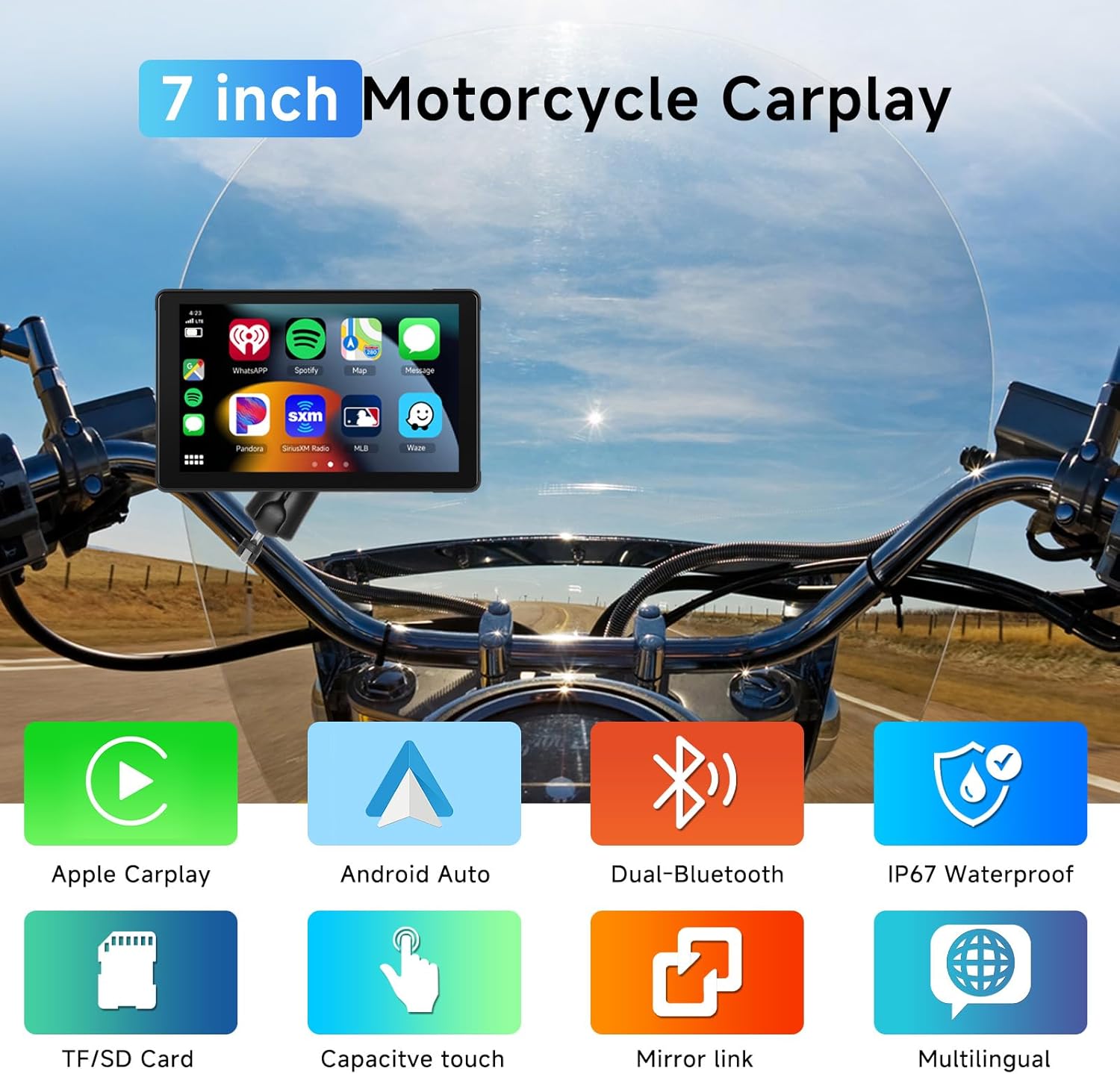
Image: The Podofo 7-inch display mounted on a motorcycle, illustrating its key features including Apple CarPlay, Android Auto, Dual Bluetooth, IP67 Waterproof rating, TF/SD Card support, Capacitive touch, Mirror link, and Multilingual interface.
2. Setup and Installation
Follow these steps to properly install your Podofo 7-inch Wireless CarPlay Motorcycle Screen:
- Attach the Mount: Secure the universal mount to your motorcycle's handlebar using a Phillips screwdriver. Ensure it is firmly attached.
- Clamp the Connecting Rod: Attach the connecting rod to the mount. The mount allows for 360-degree adjustment to achieve the optimal viewing angle.
- Insert Device and Adjust: Insert the display device onto the connecting rod and adjust its position as desired. Tighten the adjustment ring to secure the device in place.
- Wiring: Connect the power cable. The red wire (Power Wire) should be connected to the motorcycle battery's positive terminal, and the black wire (Ground Wire) to the negative terminal. For optimal battery life and to prevent drain when the motorcycle is off, it is recommended to connect the power wire to a switched power source (e.g., ACC power) that turns off with the ignition, rather than directly to the battery. Add an inline fuse for protection.

Image: Step-by-step installation guide for mounting the display on a handlebar and connecting the power wires to the motorcycle's battery terminals.
3. Operating Instructions
3.1 Wireless CarPlay and Android Auto
The device supports wireless Apple CarPlay and Android Auto. This allows you to mirror your smartphone's interface for navigation, music, calls, and messages directly on the 7-inch display.
- Enable Wireless Functions: On your smartphone, ensure Wi-Fi and Bluetooth are enabled.
- Pair Bluetooth: On the Podofo screen, navigate to the Bluetooth settings and search for your smartphone. Pair the devices.
- Initiate CarPlay/Android Auto: Once paired via Bluetooth, the system will prompt you to connect via CarPlay or Android Auto, typically using Wi-Fi for data transfer. Confirm the connection on both devices.
- Voice Assistant: Utilize Siri or Google Assistant for hands-free control of navigation, music, and calls.

Image: The display showing both Wireless CarPlay and Wireless Android Auto interfaces, highlighting features like voice assistant, online music, navigation, and hands-free calling.
3.2 Dual Bluetooth Connection
This unit features an upgraded dual Bluetooth mode, allowing simultaneous connection of your smartphone and a Bluetooth helmet or headset.
- Connect Smartphone: First, connect your smartphone to the display via Bluetooth for CarPlay or Android Auto functionality.
- Connect Helmet/Headset: Then, connect your Bluetooth helmet or headset to the display. This enables audio output (music, navigation prompts, calls) directly to your helmet speakers.

Image: A visual representation of the dual Bluetooth connection, showing the display connected to both a smartphone (for CarPlay/Android Auto) and a Bluetooth helmet/headset.
3.3 Media Playback via TF Card
The device supports TF (MicroSD) cards up to 64GB (not included). You can store music, videos, and other media files on the card and play them directly on the display, even without an internet connection.
- Insert TF Card: Locate the TF card slot on the device and insert your formatted TF card.
- Access Media: Navigate to the media player application on the display to browse and play content from the TF card.

Image: The display showing video playback, emphasizing its support for a 64GB TF card for offline media consumption.
4. Maintenance
4.1 Waterproof and Sun-Resistant Display
The navigation display is IP67 waterproof, ensuring reliable operation in various weather conditions, including rain. It also features a sunshade to improve visibility in bright sunlight.
4.2 Operating Temperature
The screen is designed to operate in a wide temperature range, from -4°F to 149°F (-20°C to 65°C), making it suitable for outdoor riding in diverse climates.
4.3 Adjustable Brightness
The display brightness can be adjusted to suit different lighting conditions, ensuring clear visibility whether riding during the day or at night.

Image: The display shown in various environmental conditions, highlighting its IP67 waterproof rating, adjustable brightness for different times of day, and wide operating temperature range.
5. Troubleshooting
- Device Not Powering On: Ensure all power connections are secure. If connected to a switched power source, verify the motorcycle ignition is on. If connected directly to the battery, check for any inline fuse issues.
- Battery Drain: If the device is connected directly to the motorcycle battery, it may remain in standby mode and drain the battery when the motorcycle is off. It is highly recommended to connect the power wire to a switched power source (e.g., ACC) that cuts power when the ignition is off.
- CarPlay/Android Auto Connection Issues:
- Ensure Wi-Fi and Bluetooth are enabled on your smartphone.
- Verify that your phone is paired correctly via Bluetooth to the display.
- Restart both your smartphone and the Podofo display.
- Check for any software updates for your smartphone's operating system or the CarPlay/Android Auto app.
- No Audio Output to Helmet/Headset:
- Ensure your Bluetooth helmet/headset is properly paired to the Podofo display.
- Check the volume levels on both the display and your helmet/headset.
- Some older Bluetooth devices may have compatibility issues.
- Screen Instability/Flickering with Engine Running: If the display flickers or becomes unstable when the engine is running, but stabilizes when the engine is off, this may indicate electrical interference or an unstable power supply from the motorcycle. Ensure proper grounding and consider installing a power filter if the issue persists.
6. Specifications
| Feature | Specification |
|---|---|
| Brand | Podofo |
| Model Number | A3501AM24DE |
| Screen Size | 7 Inches |
| Display Type | IPS Touch Screen |
| Resolution | 1024 x 600 |
| Operating System Compatibility | iOS (CarPlay), Android (Android Auto) |
| Connectivity Technology | Bluetooth, Wi-Fi (for CarPlay/Android Auto) |
| Bluetooth Support | Yes (Dual Bluetooth) |
| Waterproof Rating | IP67 |
| Memory Card Support | Up to 64GB TF Card (not included) |
| Power Input | 12V |
| Item Weight | 848 grams |
| Dimensions (Package) | 26.3 x 15.6 x 11.3 cm |
7. What's in the Box
The product package includes the following components:
- 7-inch Player x 1
- Universal Mount x 1
- User Manual x 1
- Power Cable x 1
- Accessories x 1 (likely mounting hardware)

Image: An illustration of the package contents, including the main unit, power cable, mounting accessories, and user manual, along with a diagram of the product's dimensions and ports (TF Card, Type-C).
8. Warranty and Support
For warranty information, technical support, or any product-related inquiries, please refer to the contact details provided in the included user manual or visit the official Podofo website. Keep your purchase receipt for warranty claims.