
1. Introduction
The NN BEN NEVIS Potty Training Watch is designed to assist parents and toddlers during the potty training process. This digital watch features various reminder modes, countdown timers, and a durable, waterproof design to make learning fun and effective. This manual provides detailed instructions for setting up, operating, maintaining, and troubleshooting your new potty training watch.

The NN BEN NEVIS Potty Training Watch, designed for effective and fun learning.
2. Product Features
- Fun & Effective Potty Training: Features 15 sets of alarm clocks and 3 reminder modes (music, vibration, or music+vibration).
- Long Battery Life: The watch displays power and offers up to 20 days of standby time on a full charge, with a convenient USB charging interface.
- Cyclic Timers: Includes 8 sets of cyclic timers (5/10/15/30/45/60/120/180 minutes). The display shows "go go" when the countdown reaches zero.
- Waterproof & Durable: Constructed with soft, anti-allergic silicone and stainless steel. It is water-resistant for daily use, but not recommended for swimming, hot baths, or saunas.
- Thoughtful Design: Equipped with a distance light sensor, allowing the watch to be placed in a direction of no obscuration to avoid disturbance from alarms.
- Time Display: Supports 12/24-hour time formats.

Key features of the NN BEN NEVIS Potty Training Watch.
3. Setup Guide
3.1 Charging the Watch
Before first use, ensure the watch is fully charged. The watch features a USB charging interface. Simply connect the provided charging cable to the watch's magnetic charging port and plug the USB end into a compatible power source (e.g., computer, USB wall adapter). The watch can stand by for up to 20 days on a full charge.

Magnetic charging port for easy recharging.
3.2 Initial Time Setting
The watch has two buttons for operation. The top button is primarily for checking time, alarm status, and battery level. The bottom button is used for setting reminders and navigating menus.
- To set the time, press the top button to display the current time.
- Hold the top button for 3 seconds to enter time setting mode.
- Use the bottom button to adjust the hours, then press the top button to confirm and move to minutes.
- Repeat for minutes and then for 12/24-hour format selection.
4. Operating Instructions
4.1 Setting Cyclic Countdown Timers
The watch offers 8 sets of cyclic countdown timers to remind your child to go to the toilet at regular intervals.
- Press the bottom button until the display shows "Cd".
- Hold the bottom button for 3 seconds, then press it again to cycle through the available intervals: 5, 10, 15, 30, 45, 60, 120, and 180 minutes.
- Once you select your desired interval, hold the bottom button for 3 seconds until the countdown appears.
- When the countdown reaches zero, the watch will display "go go" and play music or vibrate as a reminder.

Steps for setting the cyclic countdown timer.
4.2 Setting Alarm Clocks
The watch supports 15 sets of alarm clocks with LED marquees flashing when the alarm strikes.
- Press the top button to cycle through the display modes until you reach the alarm setting.
- Hold the top button for 3 seconds to enter the alarm setting mode.
- Use the bottom button to adjust the alarm time (hours and minutes), confirming each with the top button.
- Select your preferred reminder mode: music, vibration, or music+vibration.
4.3 Warm Reminder Feature (Distance Light Sensor)
The watch includes a distance light sensor. This feature ensures the watch only goes off when it is worn on the hand or when its bottom cover does not touch an obstacle. If the sensor is covered (e.g., by clothing or a surface), the reminder will not activate, preventing unnecessary disturbances.
4.4 Visualizing Potty Time
The watch is designed to make potty training engaging. The display shows clear digital numbers and the "go go" message to encourage children.

The watch helps make potty time a fun and interactive experience.
4.5 Instructional Videos
Kid & Mom Approved
This video demonstrates the watch's features and how it aids in potty training from a parent and child perspective, highlighting ease of use and effectiveness.
Effective Training & Toddler Love
Watch how the potty training watch effectively reminds toddlers and how they positively respond to its features.
Helpful in Potty Training
This video illustrates the practical benefits of the watch in a real-world potty training scenario.
Perfect Fit for Young Children
See how the watch comfortably fits on young children's wrists and its role in their training journey.
Cute Potty Training Watch
A brief overview showcasing the appealing design and basic functionality of the watch.
5. Maintenance
5.1 Cleaning
To clean the watch, wipe it gently with a soft, damp cloth. Avoid using harsh chemicals or abrasive materials that could damage the watch's surface or silicone strap.
5.2 Water Resistance
The watch is water-resistant for daily use, meaning it can withstand splashes and brief exposure to water. However, it is not recommended to wear it while swimming, in hot baths, or saunas, as prolonged exposure to water or high temperatures can compromise its water resistance.

The watch is designed for daily water resistance, but avoid prolonged submersion.
5.3 Battery Care
To maximize battery life, charge the watch fully when the battery indicator is low. Avoid completely draining the battery frequently. Store the watch in a cool, dry place when not in use for extended periods.
6. Troubleshooting
6.1 Watch Not Turning On or Responding
- Check Battery: Ensure the watch is fully charged. Connect it to the charger and observe if the charging indicator appears.
- Reset: Try holding both buttons simultaneously for 10-15 seconds to perform a soft reset.
6.2 Alarms/Reminders Not Activating
- Check Settings: Verify that the alarm times and reminder modes (music/vibration) are correctly set as per the Operating Instructions.
- Distance Light Sensor: Ensure the watch is worn correctly on the wrist and the bottom sensor is not obstructed by clothing or other objects, as this can prevent the warm reminder from activating.
- Volume/Vibration: Confirm that the volume is not muted or vibration is not turned off if you expect an audible or tactile alert.
6.3 Inaccurate Time Display
- Re-sync Time: Follow the "Initial Time Setting" steps to re-synchronize the watch's time.
7. Specifications
| Attribute | Detail |
|---|---|
| Package Dimensions | 3.03 x 3.03 x 2.32 inches |
| Item Weight | 2.89 ounces |
| Manufacturer Recommended Age | 3 years and up |
| Item Model Number | 2024 |
| Date First Available | June 5, 2023 |
| Manufacturer | NN BEN NEVIS |
| Clasp Type | Tang Buckle |
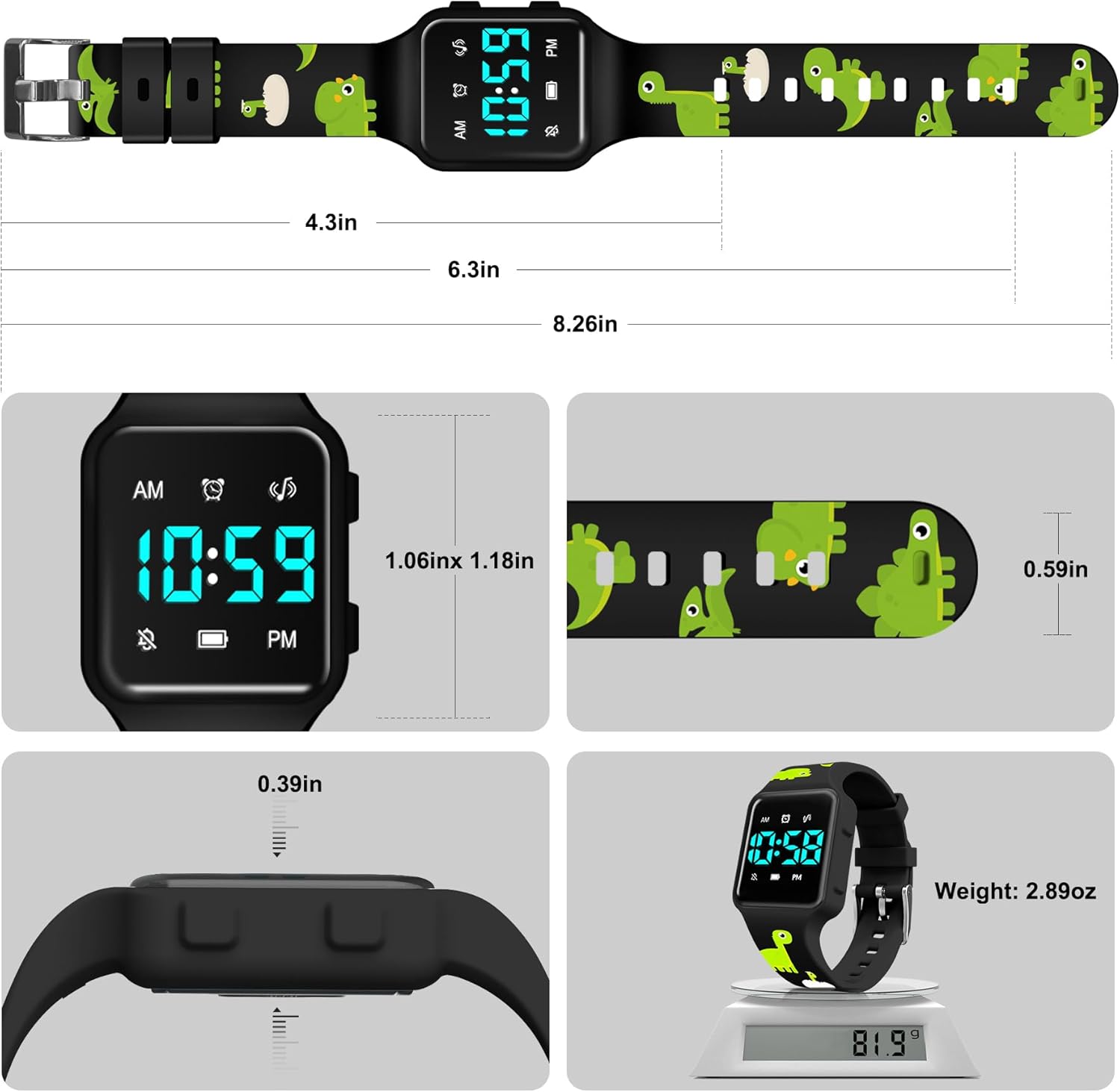
Detailed dimensions and weight of the watch.
8. Warranty and Support
For any questions about the NN BEN NEVIS Potty Training Watch, please contact the seller directly. They are committed to providing satisfactory solutions and support for your product.