Introduction
Welcome to your new Mersoco M415-BLACK Portable 3-Speed Bluetooth Suitcase Vinyl Record Player. This manual provides essential information for setting up, operating, and maintaining your device. Please read it thoroughly before use to ensure proper function and longevity of your record player.
Package Contents
The following items are included with your Mersoco M415-BLACK record player:
- Suitcase record player
- Power Adapter
- 45 RPM Adapter
- Instruction Manual
- RCA Cable
- AUX Cable
- Installation Drivers and Utilities CD (for LP recording)
Product Overview
This section details the main parts and functionalities of your record player.

A view of the Mersoco M415-BLACK portable record player in its open position, highlighting the turntable platter, tonearm with stylus, and the integrated stereo speakers on the front.
- Turntable Platter: Supports your vinyl records during playback.
- Tonearm: Holds the stylus and tracks the record grooves.
- Stylus: A durable ruby stylus designed for accurate sound reproduction.
- Built-in Stereo Speakers: Provide integrated audio output.
- Speed Selector: Allows selection of 33 1/3, 45, or 78 RPM playback speeds.
- Auto-Stop Switch: Stops the platter rotation automatically at the end of a record.
- Bluetooth Receiver: For wireless audio streaming from compatible external devices.
- RCA Line Out: Connects to external amplifiers or powered speakers for enhanced audio.
- AUX-in Jack: Connects external audio sources such as MP3 players or tablets.
- Headphone Jack: For private listening.
- USB Port: For converting vinyl to digital formats (MP3/WAV) via a PC.
- Power Input: Connects to the provided power adapter.

This image displays the rear panel of the record player, detailing the 3.5mm headphone jack, RCA output jacks for connecting to external speakers, and the AUX-in jack for connecting other audio devices. It also shows the speed selector for 33, 45, and 78 RPM records.
Setup
Follow these steps for initial setup of your record player:
- Unpacking: Carefully remove all components from the packaging. Retain packaging for future transport or storage.
- Power Connection: Connect the power adapter to the DC IN port on the back of the unit and then to a standard wall outlet.
- Platter Protection: Remove any protective packaging or ties from the turntable platter and tonearm.
- Stylus Protection: Gently remove the clear plastic stylus protector from the needle. Be careful not to bend the stylus.
- 45 RPM Adapter: If you plan to play 45 RPM records, place the included 45 RPM adapter on the center spindle of the turntable.
Operating Instructions
Playing Vinyl Records
- Open the lid of the record player.
- Place a vinyl record on the turntable platter.
- Select the appropriate speed (33 1/3, 45, or 78 RPM) using the speed selector switch located on the unit.
- When placing a 12-inch vinyl record on the turntable, gently tilt it toward the tonearm to ensure proper playback and avoid contact with the edge.
- Push the auto-stop switch to the ON position if you want the platter to stop spinning automatically at the end of the record.
- Gently lift the tonearm using the cueing lever and position it over the desired track on the record.
- Lower the tonearm slowly onto the record using the cueing lever.
- Adjust the volume using the volume knob.
- To stop playback, lift the tonearm, return it to its rest, and engage the tonearm lock.
Bluetooth Mode
- Turn on the record player.
- Switch the function selector to Bluetooth mode. The Bluetooth indicator light will flash, indicating it is ready for pairing.
- On your Bluetooth-enabled device (e.g., smartphone, tablet), search for available Bluetooth devices in the settings.
- Select "Turntable" from the list to pair. Once connected, the indicator light will stop flashing and remain solid.
- Play audio from your device. The sound will be output through the record player's built-in speakers.

This image illustrates the process of connecting a smartphone to the record player via Bluetooth. The phone screen shows "Turntable" as a connected device, indicating successful pairing.
AUX-in Mode
- Connect one end of the AUX cable (included) to the AUX-in jack on the record player.
- Connect the other end to the audio output of your external device (e.g., MP3 player, tablet).
- Switch the function selector to AUX-in mode.
- Play audio from your external device. The sound will be played through the record player's speakers.
RCA Line Out
- Connect an RCA cable (included) to the RCA Line Out jacks on the back of the record player.
- Connect the other end of the RCA cable to the audio input of an external amplifier or powered speakers.
- Ensure the external audio system is powered on and set to the correct input.
- Adjust volume on both the record player and the external system as needed.
Headphone Use
- Plug 3.5mm headphones into the headphone jack on the back of the unit.
- Audio will be routed to the headphones, silencing the built-in speakers for private listening.
LP Recording to MP3/WAV (USB)
The record player can convert vinyl records to digital MP3/WAV files via a USB connection to a computer. This feature requires specific software.
- Connect the record player to your computer using a USB cable (not explicitly listed as included, but implied by "Installation Drivers and Utilities CD").
- Install the provided software from the "Installation Drivers and Utilities CD" on your computer.
- Follow the software instructions to record and convert your vinyl audio to the desired digital format.

This image shows the record player connected to a laptop via a USB cable, with audio editing software visible on the laptop screen, demonstrating the capability to convert vinyl records to digital formats.
Maintenance
Care and Cleaning
- Cleaning the Unit: Wipe the exterior of the record player with a soft, dry cloth. Do not use harsh chemicals, abrasive cleaners, or waxes, as these can damage the finish.
- Stylus Care: The stylus is delicate. Avoid touching it with your fingers. Clean it gently with a soft brush designed for stylus cleaning, moving from back to front. Replace the stylus if you notice significant wear or damage, as a worn stylus can damage your records.
- Record Care: Keep records clean and free of dust. Store them vertically in their protective sleeves to prevent warping and scratches.
- Dust Cover: Keep the lid closed when the record player is not in use to protect the turntable and stylus from dust and debris.
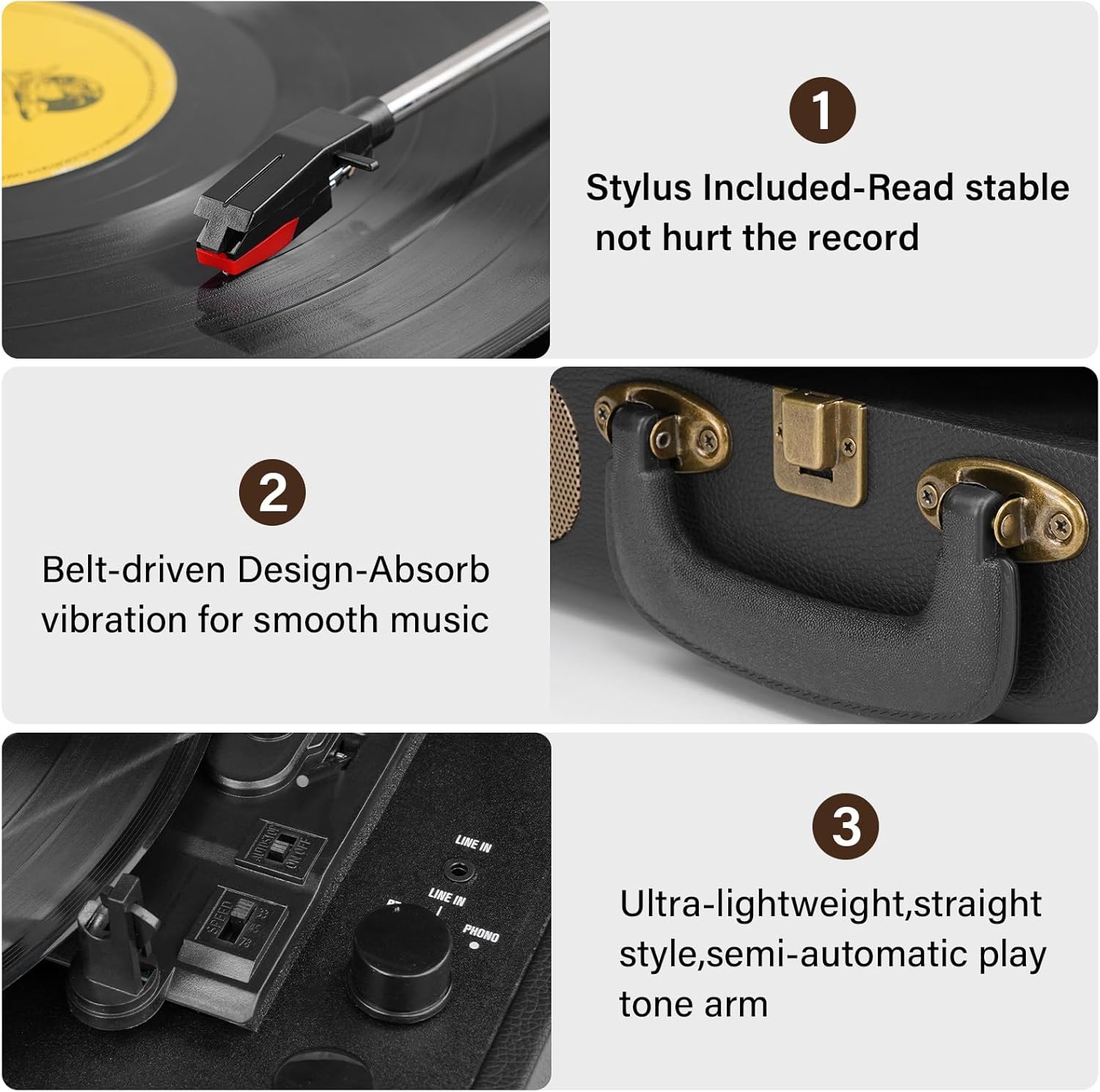
Close-up views of the record player's components, including the stylus for stable reading, the belt-driven design for vibration absorption, and the semi-automatic tonearm.
Troubleshooting
If you encounter any issues with your record player, please refer to the table below for common problems and their solutions.
| Problem | Solution |
|---|---|
| No power | Ensure the power adapter is securely connected to the unit and a working power outlet. Check if the power outlet is functional. |
| No sound from speakers | Check the volume level on the record player. Ensure the correct input mode (Phono, Bluetooth, AUX) is selected. If using external speakers, check their connection, power, and input selection. Ensure headphones are not plugged in. |
| Record skips or sound distortion | Ensure the record player is placed on a stable, level surface to prevent vibrations. Clean the record and stylus. Check if the stylus is damaged or worn and replace if necessary. |
| Bluetooth not connecting | Ensure the record player is in Bluetooth pairing mode (indicator light flashing). Make sure your device's Bluetooth is enabled and within range (approx. 10 meters). Try restarting both the record player and your Bluetooth device. |
| Platter not spinning | Check power connection. Ensure the tonearm is lifted from its rest. If the auto-stop switch is ON, the platter will stop at the end of a record; ensure it's not stopping prematurely. |
Specifications
Key technical specifications for the Mersoco M415-BLACK record player:
- Model: M415-BLACK
- Brand: Mersoco
- Product Dimensions: 16.02 x 12.8 x 6.38 inches
- Item Weight: 5.72 pounds
- Supported Speeds: 33 1/3, 45, 78 RPM
- Drive Type: Belt-driven
- Stylus: Ruby stylus
- Connectivity: Bluetooth, AUX Input, RCA Line Out, Headphone Jack, USB
- Built-in Speakers: Yes
- Material: Wood
- On-mode Power Consumption: 5 watts
Warranty and Support
Manufacturer's Warranty
This product comes with a standard manufacturer's warranty. For details regarding warranty coverage, duration, and claims, please refer to the warranty card included in your package or contact Mersoco customer support directly.
Customer Support
If you encounter any issues or have questions not covered in this manual, please contact Mersoco customer support. Contact information can typically be found on the manufacturer's website or on the product packaging. Please have your model number (M415-BLACK) and purchase date ready when contacting support.


