
1. Introduction
This manual provides comprehensive instructions for the safe and effective use of your SVAKOM Cici Plus 2 App-Controlled G-Spot Warming Vibrator. Please read this manual thoroughly before first use and retain it for future reference.
2. Safety Information
- Clean the device thoroughly before and after each use with a toy cleaner or mild soap and water.
- Do not use with silicone-based lubricants, as these may damage the silicone material. Use water-based lubricants only.
- Discontinue use immediately if you experience any discomfort or irritation.
- Keep out of reach of children.
- Do not expose the device to extreme temperatures or direct sunlight for prolonged periods.
- This device is designed for external use only.
3. Package Contents
- SVAKOM Cici Plus 2 Vibrator
- USB Charging Cable
- User Manual (this document)
4. Product Overview
The SVAKOM Cici Plus 2 is an app-controlled G-spot warming vibrator made from liquid silicone. It features an ultra-slim, semi-flexible shaft and a flexible clitoral stimulator.

Figure 1: Front view of the SVAKOM Cici Plus 2 vibrator. This image displays the overall lavender-colored device with its curved main shaft and smaller clitoral stimulator arm. Two control buttons are subtly integrated on the side.
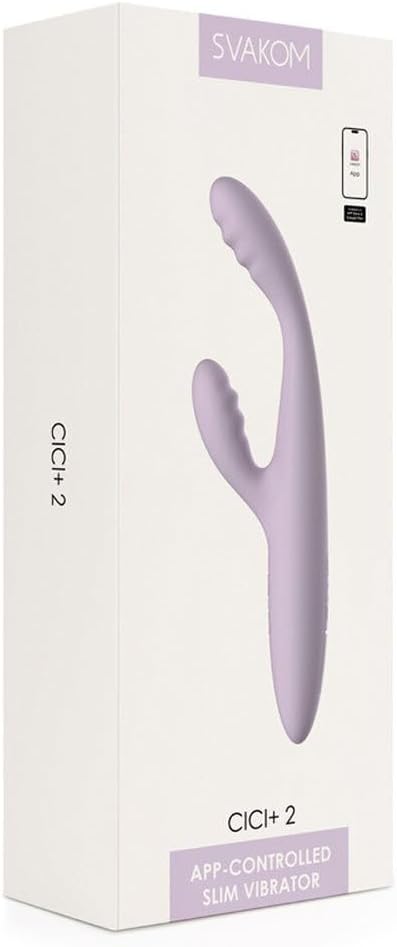
Figure 2: Close-up view of the control buttons on the SVAKOM Cici Plus 2. The buttons are subtly integrated into the silicone body, indicating power and mode controls.
5. Charging the Device
Before first use, fully charge the SVAKOM Cici Plus 2. A full charge typically takes approximately 2-3 hours.
- Locate the charging port cover on the device.
- Gently open the charging port cover.
- Insert the small end of the provided USB charging cable into the device's charging port.
- Connect the larger end of the USB cable to a USB power adapter (not included) or a computer's USB port.
- The indicator light on the device will illuminate or flash during charging. Refer to the device's specific light indicators for charging status (e.g., solid light for charging, off for full charge).
- Once fully charged, disconnect the cable and securely close the charging port cover to maintain waterproofing.

Figure 3: View of the charging port on the SVAKOM Cici Plus 2. The image shows the device's base with a small, discreet cover for the USB charging port, indicating its waterproof design.
6. Setup and App Connection
6.1 Initial Setup
Ensure the device is fully charged before initial use.
6.2 Connecting to the SVAKOM App
- Download the official SVAKOM App from your device's app store (iOS or Android).
- Turn on the SVAKOM Cici Plus 2 by pressing and holding the power button (refer to Section 7.1).
- Enable Bluetooth on your smartphone.
- Open the SVAKOM App and follow the on-screen instructions to pair your device. The app will guide you through the connection process.
- Once connected, you can control the device's functions, customize patterns, and explore interactive features through the app.
7. Operating the Device
7.1 Basic Controls (On-Device)
- Power On/Off: Press and hold the power button (usually the 'S' button) for 2-3 seconds.
- Change Vibration Modes: Short press the mode button (usually the 'A' button) to cycle through 5 different vibration modes.
- Adjust Intensity: Within each mode, use the '+' and '-' buttons (if present, or repeated presses of the mode button) to adjust between 5 intensity levels.
- Warming Function: The device features an arousing heating function that warms to 38°C. Activate or deactivate this function via the app or a dedicated button if available (refer to app instructions for precise control).
7.2 App Control
The SVAKOM App offers advanced control and customization:
- Customizable Settings: Create and save your own vibration patterns.
- Long-Distance Control: Allow a partner to control the device remotely.
- Interactive Play: Explore various app-exclusive features.
- Heating Function Control: Precise control over the warming feature.
The device is designed to resume on the last mode used, preventing accidental turn-ons.
8. Maintenance
8.1 Cleaning
The SVAKOM Cici Plus 2 is waterproof. Clean it thoroughly before and after each use.
- Wash the device with warm water and a mild, antibacterial soap or a specialized toy cleaner.
- Rinse thoroughly to remove all soap residue.
- Pat dry with a lint-free cloth or allow it to air dry completely before storage.
8.2 Storage
Store the device in a clean, dry, and cool place, away from direct sunlight and extreme temperatures. Keep it separate from other toys made of different materials to prevent material degradation.
9. Troubleshooting
| Problem | Possible Cause | Solution |
|---|---|---|
| Device does not turn on. | Low battery. | Charge the device fully (refer to Section 5). |
| Device does not turn on. | Incorrect power-on procedure. | Press and hold the power button for 2-3 seconds. |
| Cannot connect to SVAKOM App. | Bluetooth is off or device is not discoverable. | Ensure Bluetooth is enabled on your phone and the device is turned on. Restart both the device and the app. |
| Warming function not working. | Function not activated or low battery. | Activate the warming function via the app. Ensure the device is sufficiently charged. |
10. Specifications
- Model: Cici Plus 2
- Item Model Number: 54058660000
- Brand: SVAKOM
- Material: Liquid Silicone
- Dimensions: 2.17 x 0.98 x 7.01 inches
- Weight: 2.54 ounces
- Battery: 1 Lithium Polymer (included)
- Charging Voltage: 3 volts
- Warming Temperature: Up to 38°C
- Waterproof: Yes
11. Warranty and Support
For warranty information, technical support, or customer service inquiries, please visit the official SVAKOM website or contact their customer support directly. Retain your proof of purchase for warranty claims.
Manufacturer: SVAKOM
Date First Available: August 3, 2024


