
Introduction
This manual provides detailed instructions for the installation, operation, and maintenance of your Nexete Smart Wi-Fi Ceiling Fan Wall Remote Control Kit. This kit allows you to control your ceiling fan and light using a wired wall remote, a smartphone application, or voice commands via Alexa and Google Home. Please read this manual thoroughly before installation and use to ensure proper function and safety.
Safety Information
- WARNING: To avoid possible electrical shock, turn off the electricity at the main fuse box or circuit breaker panel before beginning installation.
- All wiring must be in accordance with national and local electrical codes. If you are unfamiliar with wiring, consult a qualified electrician.
- Do not use this product with solid-state speed controls.
- Ensure the receiver is installed in a location where it will not be exposed to water or excessive moisture.
- This device is for indoor use only.
Package Contents
Verify that all components are present before installation:
- Wi-Fi Receiver Module
- Wired Wall Remote Control
- Mounting Screws and Wire Nuts
- User Manual (this document)
Setup and Installation
1. Power Off
Before starting any electrical work, ensure the power to the ceiling fan circuit is turned off at the circuit breaker.
2. DIP Switch Settings
The receiver and wall remote control use 4 DIP switches for pairing. Ensure the DIP switch settings on both the receiver and the wall remote match. This allows the remote to communicate with the specific receiver. For example, if DIP switch 1 is ON on the receiver, it must also be ON on the wall remote.
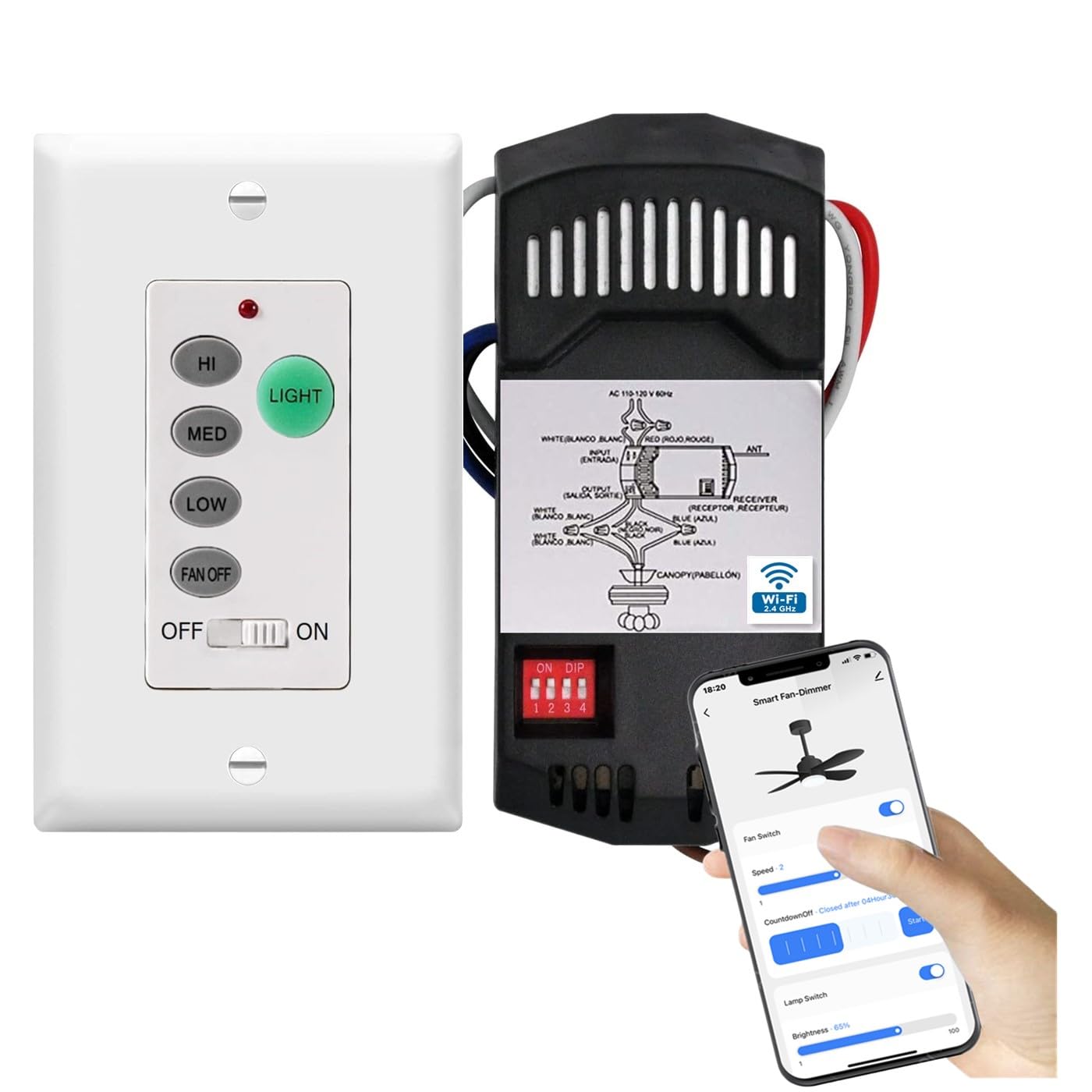
Figure 1: Matching DIP Switch Settings. This image illustrates the importance of setting the 4 DIP switches on both the receiver and the wall remote to identical positions for proper communication.
3. Receiver Wiring
Install the Wi-Fi receiver module into the ceiling fan's canopy. Follow the wiring diagram carefully:
- Connect the BLACK wire from the receiver to the LIVE (L) wire from the ceiling.
- Connect the WHITE wire from the receiver to the NEUTRAL (N) wire from the ceiling.
- Connect the BLUE wire from the receiver to the LIGHT wire of the fan.
- Connect the YELLOW wire from the receiver to the FAN wire of the fan.
- Ensure all connections are secure with wire nuts.
Figure 2: Receiver Wiring Diagram. This diagram shows how to correctly connect the receiver's wires to the ceiling fan and household electrical wires.
4. Wall Remote Installation
Install the wired wall remote control into a standard wall switch box. Connect the appropriate wires as per the diagram provided with the remote. Ensure the DIP switches match the receiver.
5. Power On and Test
Restore power at the circuit breaker. Test the fan and light functions using the wall remote control.
6. Smart Life App Pairing
- Download the "Smart Life" app from your smartphone's app store.
- Register or log in to your Smart Life account.
- In the app, tap "+" to add a device. Select "Lighting" > "Ceiling Fan Light".
- Follow the in-app instructions to connect the device to your 2.4GHz Wi-Fi network. You may need to put the receiver into pairing mode (often by cycling power to the fan several times).
- Once connected, you can control your fan and light via the app.
7. Voice Assistant Integration (Alexa/Google Home)
After successfully pairing with the Smart Life app:
- For Alexa: Open the Alexa app, go to "Skills & Games", search for "Smart Life", enable the skill, and link your Smart Life account. Then, discover devices.
- For Google Home: Open the Google Home app, tap "+", select "Set up device" > "Works with Google", search for "Smart Life", link your account, and assign the device to a room.
Operating Instructions
Using the Wall Remote Control
- Fan ON/OFF: Press the fan button to turn the fan on or off.
- Fan Speed: Press the speed buttons (e.g., Low, Medium, High) to adjust fan speed.
- Light ON/OFF: Press the light button to turn the light on or off.
- Light Dimming: Press and hold the light button to dim or brighten the light.
Using the Smart Life App
Open the Smart Life app and select your ceiling fan device. You will find controls for:
- Turning the fan on/off and adjusting speed.
- Turning the light on/off and adjusting brightness (dimming).
- Setting schedules or timers for fan and light operation.
Voice Control
Once integrated with Alexa or Google Home, use voice commands such as:
- "Alexa, turn on the living room fan."
- "Hey Google, set the bedroom fan to medium."
- "Alexa, dim the kitchen light to 50%."
- "Hey Google, turn off the dining room light."
Maintenance
- Cleaning: Wipe the wall remote control and receiver (if accessible) with a soft, dry cloth. Do not use abrasive cleaners or solvents.
- Battery Replacement: The wall remote control is wired and does not require batteries.
- Firmware Updates: Ensure your Smart Life app is up to date to receive any potential firmware updates for the receiver, which may improve performance or add features.
Troubleshooting
- Fan/Light Not Responding:
- Check if the power to the fan is on at the circuit breaker.
- Verify that the DIP switch settings on the receiver and wall remote match exactly.
- Ensure all wiring connections are secure.
- If using the app, check your Wi-Fi connection and ensure the receiver is online.
- Wi-Fi Connection Issues:
- Ensure your Wi-Fi network is 2.4GHz. This device does not support 5GHz Wi-Fi.
- Move your Wi-Fi router closer to the fan or consider a Wi-Fi extender.
- Restart your Wi-Fi router and try pairing again.
- Perform a factory reset on the receiver (refer to Smart Life app instructions for device-specific reset procedures, often involves cycling power).
- Voice Control Not Working:
- Confirm the Smart Life skill is enabled and linked in your Alexa/Google Home app.
- Ensure the device is discovered and named appropriately in the voice assistant app.
- Check your internet connection.
Specifications
| Brand | Nexete |
| Model | B0DC4HRCZR |
| Connectivity Technology | Wi-Fi (2.4GHz only) |
| Compatible Devices | Ceiling Fans with Lights |
| Control Methods | Wired Wall Remote, Smart Life App, Voice Control (Alexa, Google Home) |
| Maximum Range (Remote) | 50 Feet |
| Max Number of Supported Devices | 16 (via Smart Life App) |
Warranty Information
This Nexete product comes with a 1-year limited warranty from the date of purchase. This warranty covers defects in materials and workmanship under normal use. It does not cover damage caused by improper installation, accident, abuse, misuse, or unauthorized modifications. Please retain your proof of purchase for warranty claims.
Customer Support
For technical assistance, troubleshooting, or warranty inquiries, please contact Nexete customer support. Refer to the product packaging or the Nexete official website for the most current contact information.
Please note: Always ensure you have your product model number (B0DC4HRCZR) and proof of purchase ready when contacting support.