1. Introduction
Thank you for choosing the Generic T10PRO PLUS Smart Watch. This manual provides essential information for setting up, operating, and maintaining your device. Please read it carefully to ensure optimal performance and longevity of your smartwatch.
2. Package Contents
Verify that all items are present in your package:
- T10PRO PLUS Smart Watch
- Magnetic Charging Cable
- 3 x Additional Straps
- User Manual (this document)
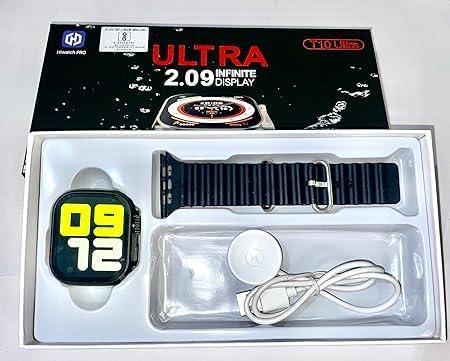
Image: The T10PRO PLUS Smart Watch, magnetic charging cable, and an extra strap neatly arranged within its retail packaging.
3. Product Overview
The T10PRO PLUS Smart Watch features a 2.30-inch display and offers various functionalities to enhance your daily life. Key features include Bluetooth connectivity for smartphone pairing, notification alerts, and basic health tracking capabilities.

Image: A close-up of the T10PRO PLUS Smart Watch, showcasing its vibrant display and sleek design.
4. Setup
4.1. Charging the Smart Watch
- Connect the magnetic charging cable to a USB power adapter (not included) or a computer's USB port.
- Align the magnetic end of the cable with the charging contacts on the back of the smartwatch. The watch will snap into place and display a charging indicator.
- Charge the watch fully before first use. A full charge typically takes 1-2 hours.
4.2. Installing/Changing Straps
The T10PRO PLUS comes with interchangeable straps. To install or change a strap:
- Locate the quick-release pins on the back of the strap.
- Slide the pin inwards and align the strap with the lug on the watch body.
- Release the pin to secure the strap. Gently pull on the strap to ensure it is properly locked.
- Repeat for the other side.

Image: Several T10PRO PLUS Smart Watches displayed with different colored straps, illustrating the interchangeable strap feature.
4.3. Pairing with Your Smartphone
- Ensure your smartphone's Bluetooth is enabled.
- Download the companion app (refer to the watch screen or packaging for app name/QR code) from your phone's app store.
- Open the app and follow the on-screen instructions to create an account and pair your smartwatch.
- Confirm the pairing request on both your phone and the smartwatch.
5. Operating Instructions
5.1. Basic Navigation
- Touch Screen: Tap to select, swipe left/right/up/down to navigate menus and screens.
- Side Button: Typically used to wake the screen, return to the home screen, or access the app menu.
5.2. Key Features
- Notifications: Receive alerts for calls, messages, and app notifications directly on your wrist after pairing with your smartphone.
- Health Tracking: Monitor basic health metrics (e.g., steps, heart rate) through the watch and companion app.
- Customizable Watch Faces: Change the appearance of your watch face through the companion app.
6. Maintenance
6.1. Cleaning
- Wipe the watch screen and body with a soft, damp, lint-free cloth.
- Avoid using harsh chemicals or abrasive materials.
- Ensure the charging contacts are clean and dry before charging.
6.2. Battery Care
- Avoid extreme temperatures, which can affect battery life.
- Do not leave the watch uncharged for extended periods.
7. Troubleshooting
- Watch not turning on: Ensure the watch is fully charged. Connect it to the magnetic charger and wait a few minutes.
- Cannot pair with smartphone:
- Make sure Bluetooth is enabled on your phone.
- Ensure the companion app is installed and running.
- Restart both your phone and the smartwatch.
- Check if the watch is already paired with another device.
- Notifications not received:
- Verify that the watch is successfully paired with your phone.
- Check notification settings in the companion app and on your phone.
- Ensure the app has necessary permissions to access notifications.
8. Specifications
| Brand Name | Generic |
| Model Name | T10PRO PLUS |
| Item Model Number | T10PRP PLUS |
| Screen Size | 2.30 inches |
| Item Shape | Rectangular |
| Operating System | Smart Watch OS |
| Special Features | Notifications |
| Connectivity Technology | Bluetooth |
| Wireless Communication Standard | Bluetooth |
| Battery Cell Composition | Lithium Ion |
| GPS | GPS via Smartphone |
| Package Dimensions | 21.2 x 11.4 x 2.2 cm; 50 grams |
9. Warranty and Support
For warranty information and customer support, please refer to the retailer where you purchased the product or contact the manufacturer directly. Keep your proof of purchase for any warranty claims.