
Introduction
This manual provides essential information for the safe and efficient installation, operation, and maintenance of your Fablestoryem 14000W DC 24V Wind Turbine Generator. This wind generator features an aluminum body, stainless steel tail, and nylon fiber blades, designed for high power efficiency and ease of installation. It utilizes a three-phase magnet motor and an external MPPT controller for optimal performance.

Image: Features of the nylon fiber blades, highlighting lightweight, high intensity, low vibration, automatic windward adjustment, and double ball bearings.
Setup
Careful assembly and wiring are crucial for the proper function of your wind turbine. Ensure all components are present and undamaged before beginning installation.
Unpacking and Component Identification
Upon unpacking, verify that all items listed in the packing list are included:
- Wind Turbine unit
- 8 Blades
- Controller
- Blade Cover
- User Manual (this document)
- Fastening Kit

Image: All components included in the product package, laid out on a surface.
Installation Procedure
- Mount the wind turbine onto the tower mast and securely tighten the mounting hoop bolts.
- Connect the three wires from the wind turbine to the transmission cable. Ensure each pair of wires has at least 30mm of exposed conductor, and tape the connection end at 100mm for insulation.
- Connect the wind turbine's cable to the controller. It is critical that the battery is connected to the controller BEFORE wiring the turbine to the controller.

Image: A six-panel diagram illustrating the step-by-step installation process of the wind turbine blades and nose cone onto the main unit.
Wiring the Controller
The wind turbine generates three-phase AC power. The included controller is designed to convert this to DC for battery charging. Connect the three blue wires from the turbine to the corresponding blue input terminals on the controller. The red and black wires from the controller are for connecting to your battery (red to positive, black to negative). The controller features an unload function that shorts out the turbine when the battery reaches full charge, acting as a wind brake to prevent overcharging.
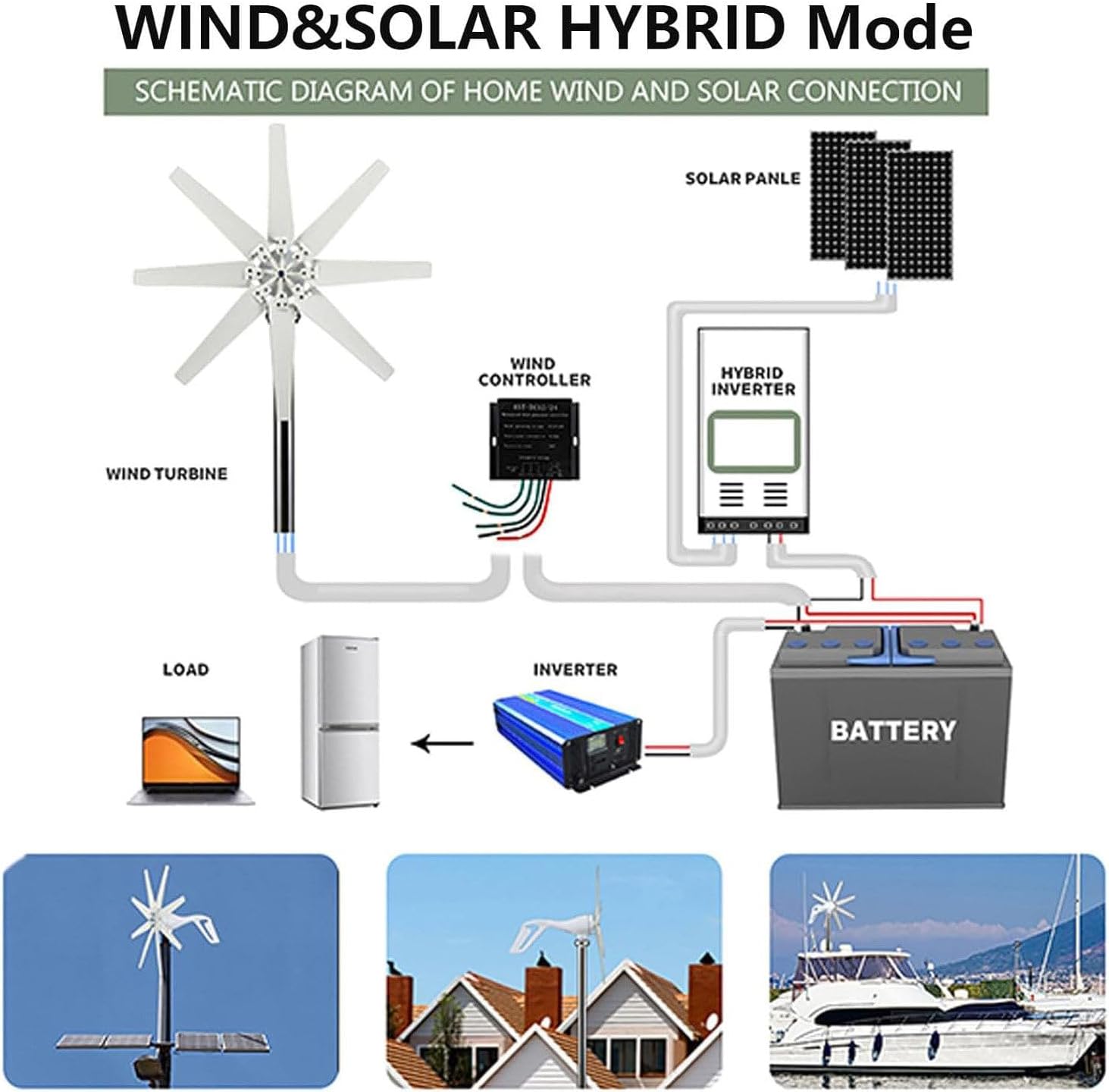
Image: A schematic diagram illustrating a home wind and solar hybrid connection, showing the wind turbine, wind controller, solar panels, hybrid inverter, battery, and load connections.
Operating
The Fablestoryem wind turbine is designed for efficient power generation even in low wind conditions.
Wind Speed Requirements
- Start-up Wind Speed: 2 m/s (approximately 4.5 mph)
- Rated Wind Speed: 13 m/s (approximately 29 mph)
- Safe Wind Speed: 50 m/s (approximately 112 mph)
The turbine will begin generating power once the start-up wind speed is met. The integrated controller manages the charging process and acts as a wind brake when the battery is fully charged or there is no load, preventing damage to the system.
Maintenance
Regular inspection and minimal maintenance will ensure the longevity and optimal performance of your wind turbine.
- Visual Inspection: Periodically check all visible components, including blades, tail, and mounting hardware, for any signs of wear, damage, or loose connections.
- Blade Condition: The nylon fiber blades are designed to be waterproof and corrosion-resistant. However, inspect them for cracks, chips, or debris accumulation that could affect balance or efficiency.
- Mounting Security: Ensure all bolts and connections to the mast are tight and secure.
- Wiring Integrity: Check all wiring connections for corrosion or damage. Ensure insulation is intact.
- Bearing Check: The thickened ball bearings contribute to low vibration. Listen for unusual noises during operation, which could indicate a need for professional inspection.
Troubleshooting
If you encounter issues with your wind turbine, refer to the following common problems and solutions:
- No Power Output:
- Verify that the wind speed meets or exceeds the start-up wind speed (2 m/s).
- Check all wiring connections between the turbine, controller, and battery. Ensure they are secure and correctly polarized (red to positive, black to negative for DC output).
- Confirm that the three blue wires from the turbine are correctly connected to the controller. The turbine generates 3-phase AC, and the controller rectifies it to DC. The order of these three wires typically does not matter for AC input to the rectifier.
- Ensure the battery is connected to the controller before the turbine is connected.
- Turbine Not Spinning Freely:
- Inspect blades for obstructions or damage.
- Check for any mechanical binding in the turbine head or yaw mechanism.
- Overcharging Battery:
- The controller is designed to prevent overcharging by acting as a wind brake. If overcharging occurs, inspect the controller for malfunction.
Specifications
| Feature | Specification |
|---|---|
| Brand | Fablestoryem |
| Model Name | Fablestoryem Wind Turbine |
| Item Model Number | 8851112524630 |
| Maximum Power | 14000W |
| Rated Voltage | 24V (DC) |
| Number of Blades | 8 |
| Blade Material | Nylon Fiber |
| Generator Case Material | Casting Aluminum Alloy |
| Tail Material | Stainless Steel |
| Blade Length | 40cm / 15.75in |
| Fan Diameter | 90cm / 35.4in |
| Start-up Wind Speed | 2 m/s |
| Rated Wind Speed | 13 m/s |
| Safe Wind Speed | 50 m/s |
| Working Temperature | -40 ~ 80 ℃ / -40 ~ 176 ℉ |
| Noise Level | ≤40db |
| Item Weight | 19.8 pounds |
| Package Dimensions | 27.17 x 11.61 x 7.68 inches |

Image: Detailed product information including dimensions of the wind turbine and blades.
Warranty and Support
Information regarding warranty coverage and customer support for the Fablestoryem 14000W DC 24V Wind Turbine Generator is not available in this manual. Please refer to the product packaging or contact the retailer for details on warranty terms and support options.