
A ALPS T15E-White-V1
A ALPS T15E-White-V1 Girls Watch User Manual
Model: T15E-White-V1
1. Introduction
Thank you for choosing the A ALPS T15E-White-V1 Girls Watch. This digital watch is designed for children, offering not only timekeeping but also basic fitness tracking functionalities. It features a clear digital display, a comfortable silicone strap, and a built-in USB charging port for convenience. This manual will guide you through the setup, operation, and maintenance of your new watch.

The A ALPS T15E-White-V1 Girls Watch, showcasing its sleek white design and clear digital display.

Key features of the T15E-White-V1 watch, including time/date, pedometer, calorie tracking, distance tracking, stopwatch, alarm, backlight, USB charging, and 5 ATM water resistance.
2. Setup and Initial Use
2.1 Charging the Watch
Before first use, ensure the watch is fully charged. The watch features a built-in USB charging port. Gently remove the watch module from the strap to reveal the USB connector. Plug it directly into any standard USB-A port (e.g., computer, wall adapter, power bank).
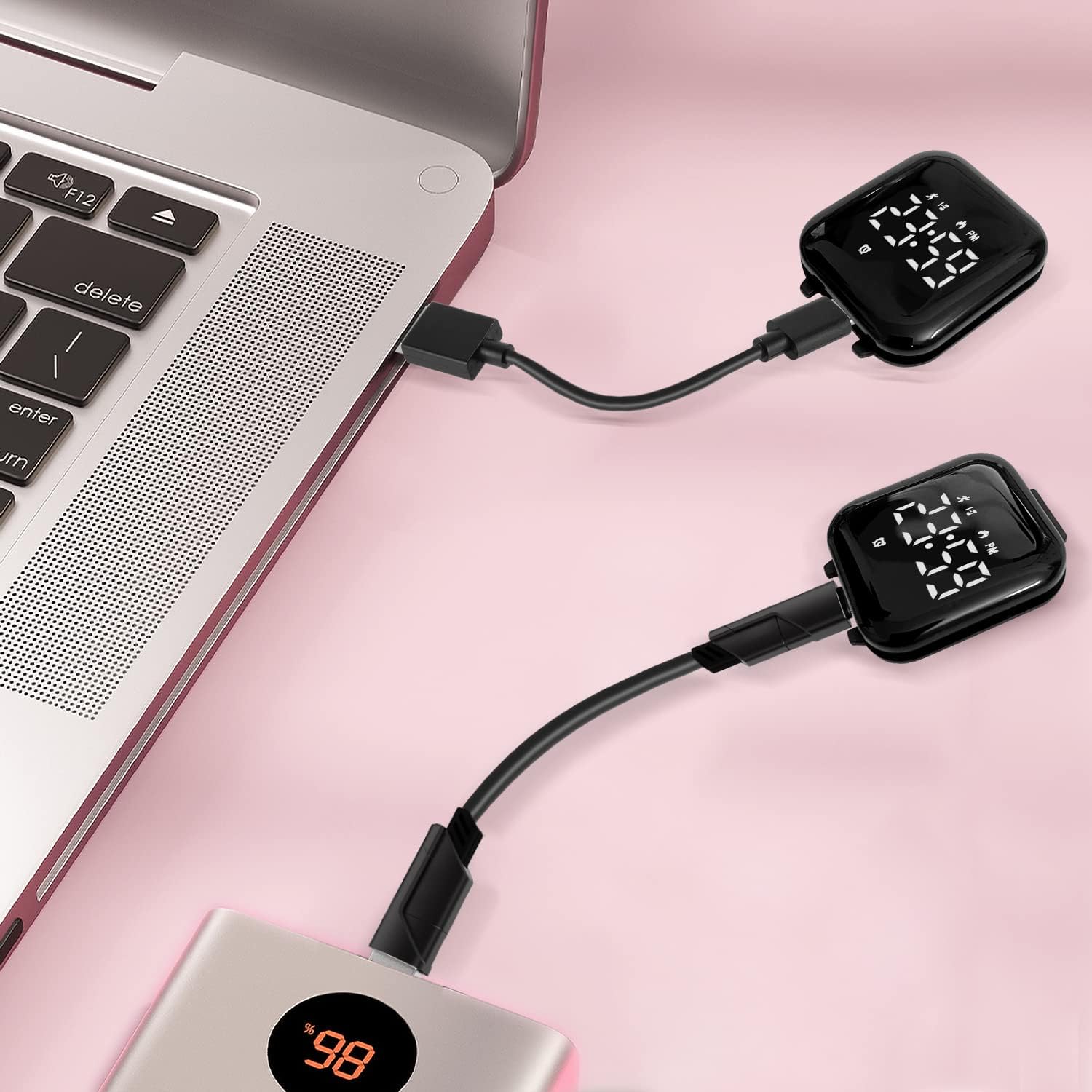
The watch module can be directly plugged into a USB port for charging.
A charging indicator will appear on the screen. Charging typically takes 1-2 hours for a full charge.
2.2 Setting Time and Date
The watch usually has one or two buttons on the side or bottom of the display. Press and hold the main button (often indicated by a small icon or located on the right side) to enter setting mode. Short presses will cycle through settings (hours, minutes, month, day, year, 12/24-hour format). Long presses will confirm the selection and move to the next setting. Refer to the on-screen prompts for specific adjustments.
2.3 Wearing the Watch
Once charged and set, reinsert the watch module firmly into the silicone strap. Adjust the strap to fit comfortably on the wrist, ensuring it is snug but not too tight. For accurate fitness tracking, the watch should be worn securely on the wrist.

Wear the watch comfortably on the wrist for daily use and activity tracking.
3. Operating the Watch
3.1 Basic Navigation
Short press the main button to cycle through different display modes: Time, Date, Steps, Distance, Calories, Alarm, and Stopwatch. The current mode will be indicated on the screen.
3.2 Fitness Tracking
The watch automatically tracks steps, distance, and calories burned throughout the day. These metrics are displayed when you cycle to their respective screens. The watch does not require linking to a phone for these basic tracking functions.

The watch functions as a fitness tracker, monitoring steps, distance, and calories without needing a phone connection.
3.3 Alarm Function
To set an alarm, navigate to the alarm screen. Press and hold the main button to enter alarm setting mode. Use short presses to adjust the hour and minute, and long presses to confirm. The watch features a vibrating alarm.

The watch includes a vibrating alarm function, suitable for gentle wake-up calls.
3.4 Stopwatch
Navigate to the stopwatch screen. A short press of the main button will start/pause the stopwatch. A long press will reset it.
3.5 EL-Backlight
The watch features an EL-Backlight for visibility in low-light conditions. Typically, a short press of the button will activate the backlight for a few seconds.
4. Maintenance
4.1 Cleaning
Wipe the watch and strap regularly with a soft, damp cloth. Avoid using harsh chemicals or abrasive materials, as these can damage the watch's finish or screen.
4.2 Water Resistance
The watch is rated 5 ATM water resistant. This means it can withstand splashes, rain, and brief immersion in water (e.g., hand washing). It is not suitable for swimming, diving, or showering with hot water, as steam and prolonged immersion can damage the internal components.
4.3 Battery Care
To prolong battery life, avoid fully discharging the watch frequently. Charge it when the battery indicator is low. Store the watch in a cool, dry place when not in use for extended periods.
5. Troubleshooting
- Watch not turning on: Ensure the watch is fully charged. Re-insert the module into the USB port to confirm charging.
- Incorrect time/date: Re-enter the setting mode and adjust the time and date as described in Section 2.2.
- Fitness tracking inaccurate: Ensure the watch is worn snugly on the wrist. Excessive movement or very loose fit can affect accuracy.
- Screen unresponsive: Try charging the watch. If the issue persists, allow the battery to fully drain and then recharge it.
6. Specifications
| Feature | Specification |
|---|---|
| Model Number | T15E-White-V1 |
| Manufacturer | A ALPS |
| Product Dimensions | 1 x 1 x 1 cm |
| Watch Weight | 20 g |
| Battery Capacity | 50 mAh |
| Dial Dimensions | 4.5 x 4.1 cm |
| Strap Width | 2.1 cm |
| Watch Circumference | 13 - 19.5 cm |
| Water Resistance | 5 ATM |

Detailed dimensions and key specifications of the T15E-White-V1 watch.
7. Warranty and Support
Information regarding product warranty and customer support was not available in the provided product data. Please refer to the product packaging or the manufacturer's official website for details on warranty coverage and how to contact customer support for your A ALPS T15E-White-V1 Girls Watch.
Ask a question about this manual
Ask about setup, troubleshooting, compatibility, parts, safety, or missing instructions. Manuals+ will review the question and use this page’s manual context to help answer it.