
OIKSPY OI-4000
OIKSPY OI-4000 Digital Camera User Manual
Model: OI-4000
1. Introduction
This manual provides detailed instructions for the OIKSPY OI-4000 Digital Camera. Please read this manual thoroughly before using the device to ensure proper operation and to maximize its features. This compact digital camera is designed for capturing photos and 1080P videos, featuring a 1.4-inch LCD screen and a 32GB memory card for storage.
2. Package Contents
The OIKSPY OI-4000 Digital Camera package includes the following items:
- 1 x OIKSPY OI-4000 Digital Camera
- 1 x 32GB Memory Card
- 1 x USB-C Charging Cable
- 1 x Strap
- 1 x Keychain
- 1 x User Manual (this document)
- 1 x Charging Dock

Image: The OIKSPY OI-4000 Digital Camera shown with its included accessories: a smaller view of the camera, the charging base, and a 32GB memory card.
3. Product Overview
Familiarize yourself with the camera's components and controls:
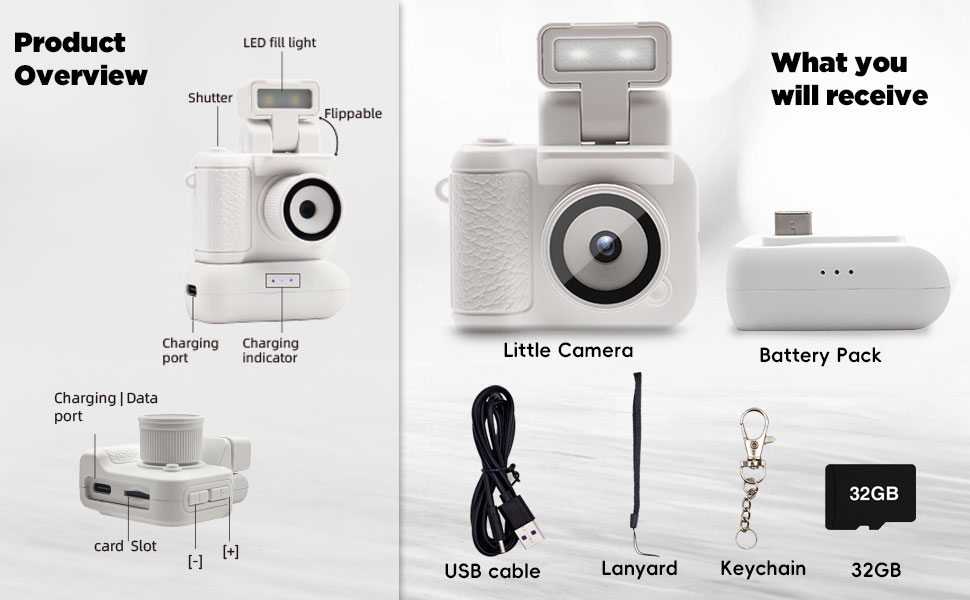
Image: A detailed diagram illustrating the various parts of the OIKSPY OI-4000 Digital Camera, including the shutter button, LED fill light, flippable screen, charging port, charging indicator, and card slot.
- Shutter Button: Press to capture photos or start/stop video recording.
- LED Fill Light: Provides additional illumination in low-light conditions.
- Flippable Screen: The 1.4-inch LCD screen can be adjusted for various viewing angles.
- Charging Port: USB-C port for connecting to the charging dock or directly to a power source.
- Charging Indicator: Lights indicate charging status.
- Card Slot: Insert the 32GB SDXC memory card here.
- +/- Buttons: Used for navigation and zoom functions.

Image: The OIKSPY OI-4000 Digital Camera shown next to a smartphone for size comparison, highlighting its compact dimensions of approximately 1.8 inches (4.6 cm) in height and width.
4. Setup
4.1. Charging the Camera
Before initial use, fully charge the camera's internal battery. The camera includes a dedicated charging dock for convenience.
- Connect the provided USB-C charging cable to the charging dock and then to a compatible USB power adapter (not included) or a computer's USB port.
- Place the OIKSPY OI-4000 Digital Camera onto the charging dock. Ensure proper alignment for connection.
- The charging indicator lights on the dock will illuminate to show the charging status. A full charge typically takes approximately 1-2 hours.

Image: The OIKSPY OI-4000 Digital Camera connected to its external battery pack, which also serves as a charging base. The image indicates that the external battery pack provides up to 80 minutes of additional working time.
4.2. Inserting the Memory Card
The camera requires a memory card to store photos and videos. A 32GB SDXC memory card is included in the package.
- Locate the card slot on the side of the camera.
- Gently insert the 32GB memory card into the slot with the metal contacts facing downwards, until it clicks into place.
- To remove the card, push it inwards slightly until it springs out.
5. Operating the Camera
5.1. Power On/Off
To power on the camera, press and hold the power button located on the device. To power off, press and hold the same button until the screen turns off.
5.2. Taking Photos
In photo mode, aim the camera at your subject and press the shutter button firmly. The camera will capture a still image with an effective resolution of 0.3 MP.
5.3. Recording Videos
To record video, switch to video mode (if applicable, or press the designated video record button). Press the shutter button once to start recording and press it again to stop. The camera records 1080P Full HD videos at 30 frames per second in MP4 format.

Image: The OIKSPY OI-4000 Digital Camera displaying its 1.4-inch LCD screen, showing a captured image. Icons indicate its capability for 1080P video and 8MP photos, along with real-time monitoring and playback features.
5.4. Using the LCD Screen
The 1.4-inch LCD screen provides a real-time view of what the camera is capturing. It also allows for playback of recorded photos and videos directly on the device.
5.5. Activating the LED Fill Light
For improved visibility in low-light environments, activate the integrated LED fill light. Refer to the camera's on-screen menu or a dedicated button for this function.
5.6. Applying Filter Effects
The camera offers 5 distinct filter effects to enhance your photos and videos:
- Normal
- Orange
- Green
- Blue
- Black/White
These effects can be selected through the camera's menu settings before capturing media.

Image: A visual demonstration of the OIKSPY OI-4000 Digital Camera's five filter effects: Normal, Orange, Green, Blue, and Black/White, applied to the same image.
5.7. Transferring Files to a Computer
To transfer your captured photos and videos to a computer:
- Ensure the camera is powered on.
- Connect the camera to your computer using the provided USB-C cable.
- The camera should appear as a removable storage device on your computer.
- Navigate to the camera's storage and copy the desired files to your computer.

Image: The OIKSPY OI-4000 Digital Camera connected via its charging base and USB-C cable to a laptop, illustrating the process of outputting files (photos and videos) to a computer.
6. Maintenance
Proper care will extend the life of your OIKSPY OI-4000 Digital Camera:
- Cleaning: Use a soft, dry, lint-free cloth to clean the camera body and screen. For the lens, use a specialized lens cleaning cloth. Avoid using harsh chemicals or abrasive materials.
- Storage: When not in use, store the camera in a cool, dry place, away from direct sunlight and extreme temperatures.
- Battery Care: Avoid fully discharging the battery frequently. If storing for an extended period, charge the battery to about 50% capacity.
- Water Resistance: This camera is not water resistant. Avoid exposure to water or high humidity.
7. Troubleshooting
If you encounter issues with your OIKSPY OI-4000 Digital Camera, refer to the following common problems and solutions:
| Problem | Possible Cause | Solution |
|---|---|---|
| Camera does not power on. | Low or depleted battery. | Charge the camera fully using the charging dock and USB-C cable. |
| Cannot take photos or record videos. | Memory card full or not inserted correctly. | Ensure the 32GB memory card is correctly inserted. Transfer files to a computer to free up space if the card is full. |
| Poor image/video quality. | Insufficient lighting; dirty lens. | Ensure adequate lighting conditions. Activate the LED fill light if necessary. Clean the camera lens with a soft cloth. |
| Battery drains quickly. | Normal operation for compact devices; heavy usage. | Utilize the included external battery pack for extended working time (up to 80 minutes). Ensure the camera is fully charged before use. |
| Camera not recognized by computer. | Faulty USB cable; incorrect connection. | Ensure the USB-C cable is securely connected to both the camera and the computer. Try a different USB port or cable. |
8. Specifications
Key technical specifications for the OIKSPY OI-4000 Digital Camera:
- Brand: OIKSPY
- Model Name: OI-4000
- Video Resolution: 1080p
- Photo Sensor Resolution: 0.3 MP Effective Still Resolution
- Screen Size: 1.4 Inches (OLED Display)
- Memory Storage: 32 GB (SDXC card included)
- Battery Type: Lithium Polymer / Lithium Ion
- Connectivity: USB
- Item Weight: 0.1 Kilograms
- Image Stabilization: Digital
- Supported File Formats: JPEG (photos), MP4 (video), AAC (audio)
- Maximum Aperture: 2.8 Millimeters
- Shutter Speed: 1/30 to 1/4000 seconds
- Focus Type: Auto Focus (Contrast Detection AF)
- Color: White
- Water Resistance Level: Not Water Resistant
9. Warranty and Support
9.1. Manufacturer's Warranty
The OIKSPY OI-4000 Digital Camera is covered by a 1-year manufacturer's warranty from the date of purchase. This warranty covers defects in materials and workmanship under normal use.
9.2. Customer Support
For any questions, technical assistance, or warranty claims, please contact OIKSPY customer support. You can typically reach us through the 'Contact Seller' option within your order history on the platform where the product was purchased.
Ask a question about this manual
Ask about setup, troubleshooting, compatibility, parts, safety, or missing instructions. Manuals+ will review the question and use this page’s manual context to help answer it.