
KLUFO 101N0650
SECOP DC 12/24V 101N0650 Compressor Driver User Manual
Model: 101N0650 | Brand: KLUFO
1. Introduction
This manual provides comprehensive instructions for the installation, operation, and maintenance of the KLUFO SECOP DC 12/24V 101N0650 Variable Frequency Compressor Driver. This driver is designed to be compatible with various compressor models, offering precise control and robust protection features for optimal performance.
Key Features:
- Adaptation Function: Widely compatible with various brands and models of compressors, facilitating easy replacement and upgrade.
- Drive Function: Serves as the core control component, converting electrical energy into mechanical energy to drive the compressor's normal operation.
- Speed Regulation Function: Automatically adjusts motor speed based on compressor working needs, achieving accurate flow and pressure control.
- Protection Function: Incorporates multiple protection features including overload protection, short circuit protection, and undervoltage protection, ensuring safe shutdown under abnormal conditions and preventing equipment damage.
- Monitoring Function: Provides real-time monitoring of compressor operating status and parameters (e.g., current, voltage, temperature) for fault diagnosis and performance optimization.
2. Safety Instructions
Please read and understand all safety instructions before installing or operating the device. Failure to follow these instructions may result in electric shock, fire, or serious injury.
- Always disconnect power before performing any installation, maintenance, or troubleshooting.
- Ensure that the power supply voltage matches the specifications of the compressor driver (12V/24V DC).
- Installation should be performed by qualified personnel only.
- Avoid exposing the device to moisture, extreme temperatures, or corrosive environments.
- Do not attempt to open or repair the device yourself. Refer to qualified service personnel.
- Ensure proper grounding to prevent electrical hazards.
3. Product Overview and Components
The SECOP DC 12/24V 101N0650 compressor driver is a compact and robust unit designed for efficient compressor control. Below are images illustrating the device and its key connection points.

Figure 3.1: Top view of the SECOP 101N0650 compressor driver. This image shows the main body of the driver, the yellow label with "SECOP 101N0650" and "12/24 Vdc" markings, and the six-pin connector. The pins are labeled with symbols for positive (+), negative (-), F, D/I, O, P, and T, indicating various connection points for power, control, and feedback.
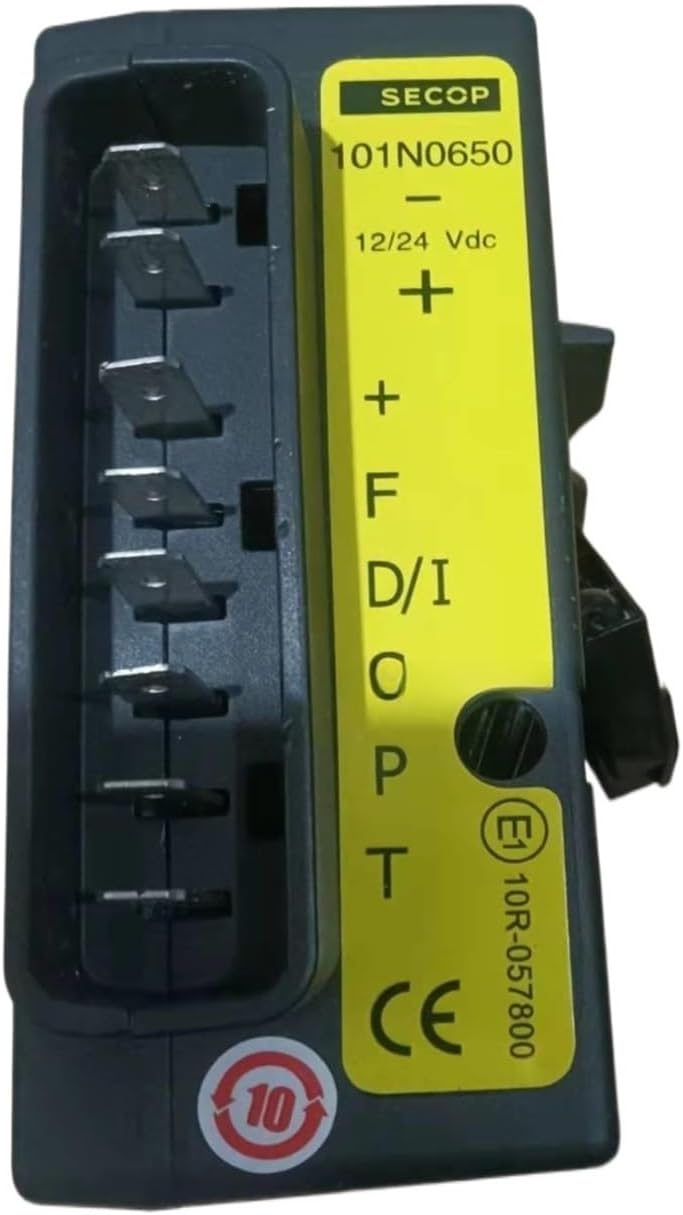
Figure 3.2: Side view of the SECOP 101N0650 compressor driver. This perspective highlights the vertical orientation of the connector pins and provides a clearer view of the labels on the yellow strip, including the CE mark and E1 10R-057800 certification number.

Figure 3.3: Bottom view of the SECOP 101N0650 compressor driver. This image reveals the internal circuitry and components of the driver, including a circuit board and wiring, indicating the sophisticated electronics responsible for its variable frequency control capabilities. A QR code and text "ID: 111637315470, Date: 1637, Ver: 01, Text: SW 1.01" are also visible, likely for manufacturing tracking.
4. Installation and Setup
Proper installation is crucial for the optimal performance and longevity of your compressor driver. Follow these steps carefully:
- Prepare the Installation Area: Ensure the mounting surface is clean, dry, and free from vibrations. The area should allow for adequate ventilation to prevent overheating.
- Mount the Driver: Securely mount the compressor driver using appropriate fasteners. Ensure it is firmly attached to prevent movement during operation.
- Wiring Connections:
- Power Supply (12V/24V DC): Connect the positive (+) terminal of your DC power supply to the '+' pin on the driver and the negative (-) terminal to the '-' pin. Ensure correct polarity.
- Compressor Motor Connections: Connect the compressor motor wires to the appropriate output terminals (F, D/I, O, P, T) as per your compressor's wiring diagram. Refer to your compressor's specific manual for detailed wiring instructions.
- Control Signals: If applicable, connect any external control signals (e.g., thermostat, pressure switch) to the designated input pins (D/I, O, P, T) according to your system's requirements.
Note: Incorrect wiring can damage the driver and/or the compressor. If unsure, consult a qualified electrician or technician.
- Verify Connections: Double-check all wiring connections to ensure they are secure and correctly terminated.
- Initial Power-Up: Apply power to the system. Observe the driver for any indicator lights or initial operational sounds.
5. Operation
Once installed and powered, the SECOP 101N0650 driver will manage the compressor's operation based on the input signals and its internal programming.
- Automatic Speed Regulation: The driver automatically adjusts the compressor's motor speed to maintain desired cooling capacity or pressure, optimizing energy consumption.
- Monitoring: The driver continuously monitors critical parameters such as current, voltage, and temperature. This data is used for internal protection and can often be accessed for diagnostic purposes (depending on the system integration).
- Protection Activation: In case of abnormal conditions (e.g., overload, short circuit, undervoltage), the driver will activate its protection functions, safely shutting down the compressor to prevent damage.
For specific operational modes or adjustments, refer to the manual of the compressor or the overall system in which this driver is integrated, as the driver acts as a control component within a larger system.
6. Maintenance
The SECOP 101N0650 compressor driver is designed for low maintenance. However, periodic checks can help ensure its long-term reliability.
- Regular Inspection: Periodically inspect the driver and its connections for any signs of wear, corrosion, or loose wiring.
- Cleanliness: Keep the driver free from dust, dirt, and debris. Use a soft, dry cloth for cleaning. Do not use liquid cleaners or solvents.
- Ventilation: Ensure that the ventilation openings (if any) are not obstructed to allow for proper heat dissipation.
- Environmental Conditions: Verify that the operating environment remains within the specified temperature and humidity ranges.
No user-serviceable parts are inside the driver. Do not attempt to open the casing.
7. Troubleshooting
This section provides guidance for common issues you might encounter. For more complex problems, contact technical support.
| Problem | Possible Cause | Solution |
|---|---|---|
| Compressor not starting | No power supply; Incorrect wiring; Protection activated; Faulty compressor. | Check power connections and voltage; Verify all wiring according to diagrams; Check for error codes or indicator lights on the driver; Test compressor independently if possible. |
| Intermittent operation | Loose connections; Overheating; Fluctuating power supply. | Secure all connections; Ensure adequate ventilation; Check power supply stability. |
| Driver feels hot | Insufficient ventilation; Overload condition. | Ensure clear airflow around the unit; Check compressor load and ensure it's within specifications. |
| Unusual noises from compressor | Compressor issue; Incorrect driver settings (less likely for this model). | Consult compressor manual; Ensure driver is correctly matched to compressor. |
8. Technical Specifications
| Parameter | Value |
|---|---|
| Brand | KLUFO |
| Model | 101N0650 (Compatible with Danfoss) |
| Input Voltage | DC 12V / 24V |
| Item Weight | 1.76 ounces |
| Package Dimensions | 1.18 x 0.79 x 0.39 inches |
| Manufacturer | xiwrenkai |
| ASIN | B0DBZ8J56X |
| First Available Date | August 2, 2024 |
9. Warranty Information
Specific warranty terms and conditions for the KLUFO SECOP DC 12/24V 101N0650 compressor driver may vary. Please refer to the warranty card included with your product packaging or contact the seller/manufacturer directly for detailed information regarding warranty coverage, duration, and claims process.
10. Customer Support
For technical assistance, troubleshooting beyond this manual, or inquiries regarding your KLUFO SECOP DC 12/24V 101N0650 compressor driver, please contact your point of purchase or the manufacturer directly. Have your product model number (101N0650) and purchase date ready when contacting support.
Manufacturer: xiwrenkai
Ask a question about this manual
Ask about setup, troubleshooting, compatibility, parts, safety, or missing instructions. Manuals+ will review the question and use this page’s manual context to help answer it.