
1. Introduction
Thank you for choosing the CollaredEagle Twin Size Metal Platform Bed Frame. This manual provides essential information for the safe assembly, operation, and maintenance of your new bed frame. Please read these instructions carefully before beginning assembly and retain them for future reference.

Image 1.1: The CollaredEagle Twin Size Metal Platform Bed Frame, featuring a black finish, integrated LED headboard, and under-bed storage space.
2. Safety Information
To ensure safe use of this product, please adhere to the following guidelines:
- Always assemble the bed frame according to the provided instructions to ensure stability and prevent collapse.
- Do not exceed the maximum weight capacity to maintain the bed frame's integrity and safety. The maximum weight capacity for this Twin size frame is 700 lbs.
- Regularly check all bolts and screws to ensure they remain tight. Loose connections can lead to instability and potential injury.
- Keep children away from the assembly area during installation to prevent accidents.
- Ensure the bed frame is placed on a level surface to prevent wobbling.
- Do not jump on the bed frame.
- Avoid placing heavy objects on the headboard or charging station.
3. Setup and Assembly
The CollaredEagle bed frame is designed for easy assembly. All necessary tools and an installation manual are included in the packaging. Each part is labeled with corresponding numbers for straightforward identification.
3.1. Before You Begin
- Unpack all components and verify against the parts list in the included installation manual.
- Clear a spacious area for assembly.
- Ensure all parts are present and undamaged. Contact customer support if any parts are missing or defective.
3.2. Assembly Steps
Refer to the detailed step-by-step instructions provided in the physical "Installation Manual" included with your product. The general process involves:
- Assemble the headboard and footboard sections.
- Attach the side rails to the headboard and footboard.
- Install the metal slats onto the frame. Ensure they are securely fastened to provide proper mattress support.
- Mount the LED light strip and charging station according to the manual's diagrams.
- Tighten all connections.

Image 3.1: The bare metal frame structure of the bed, illustrating the slat system and support legs before mattress placement.
4. Operating Instructions
4.1. Multi-Function RGB LED Lighting
Your bed frame is equipped with an RGB LED light strip integrated into the headboard. This lighting system offers customizable colors, brightness, modes, and timer settings.
- Control Methods: The LED lights can be controlled via a mobile application (available for download, refer to the included light kit manual for details) or a remote control.
- Features:
- Over 60,000 colors for personalized ambiance.
- Music Mode: Lights synchronize with music.
- Mic Mode: Lights react to sound.
- Timing Mode: Set schedules for lights to turn on/off.
- Adjustable brightness and various dynamic modes.

Image 4.1: The bed frame with its RGB LED lighting system active, demonstrating the range of colors and control options via a mobile app and remote.
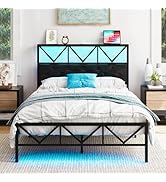
Image 4.2: A detailed view of the LED lighting display and the mobile application interface for controlling colors, modes, and timing.
4.2. Integrated Charging Station
The bed frame includes a convenient charging station located on the headboard for easy access to power your devices.
- Ports: The charging station features 2 standard AC outlets, 1 USB port, and 1 Type-C port.
- Usage: Simply plug your devices into the appropriate ports to charge them while you relax.
- Power Cord: Ensure the bed frame's power cord is securely plugged into a wall outlet for the charging station to function.

Image 4.3: A close-up view of the charging station, showing the AC outlets, USB port, and Type-C port in use, with a tablet connected for charging.

Image 4.4: A detailed image highlighting the various ports of the charging station, including the power cord, USB, and Type-C connections.
5. Maintenance
Proper maintenance will extend the life and appearance of your bed frame.
- Cleaning: Wipe the metal frame with a soft, damp cloth. Avoid abrasive cleaners or harsh chemicals that could damage the finish.
- Fastener Check: Periodically inspect all bolts and screws. Re-tighten any loose fasteners to maintain structural integrity and prevent noise.
- LED Lights: The LED strip is designed for long-term use. If issues arise, consult the light kit manual or contact customer support. Do not attempt to repair the LED strip yourself.
- Charging Station: Keep the charging ports free of dust and debris. Do not expose the charging station to liquids.
6. Troubleshooting
This section addresses common issues you might encounter with your bed frame.
| Problem | Possible Cause | Solution |
|---|---|---|
| Bed frame is wobbly or noisy. | Loose bolts or uneven placement. | Ensure all bolts are securely tightened. Verify the bed frame is on a flat, level surface. Add felt pads under legs if the floor is uneven. |
| LED lights are not working. | Power connection issue, remote battery dead, or app malfunction. | Check if the LED power cord is properly connected. Replace remote batteries. Restart the mobile app or re-pair the device if using Bluetooth control. Consult the LED light kit manual. |
| Charging station is not providing power. | Bed frame's main power cord is unplugged or outlet issue. | Ensure the bed frame's main power cord is firmly plugged into a functional wall outlet. Test the wall outlet with another device. |
| Under-bed storage space is insufficient. | Incorrect storage solution or expectation. | The bed frame provides 11.4 inches of clearance. Utilize compact storage bins or drawers designed for under-bed use. |

Image 6.1: A visual representation of the 11.4-inch under-bed clearance, ideal for storage solutions.
7. Specifications
Key specifications for the CollaredEagle Twin Size Metal Platform Bed Frame:
| Feature | Detail |
|---|---|
| Size | Twin |
| Product Dimensions (L x W x H) | 78.3" x 38.2" x 35.9" |
| Weight Capacity | 700 lbs |
| Under-bed Clearance | 11.4" |
| Special Features | Charging Station, RGB LED Lighting, No Box Spring Needed, Space Saving |
| Color | Classic Black |
| Material | Metal |
| Charging Station Ports | 2 AC outlets, 1 USB port, 1 Type-C port |
| Assembly Required | Yes |
| Included Components | Headboard, Installation Manual, Light kit |

Image 7.1: A diagram illustrating the precise dimensions of the bed frame, including length, width, height, and under-bed clearance.
8. Warranty and Support
For warranty information or technical support, please contact CollaredEagle customer service. Refer to the contact details provided in your product packaging or visit the official CollaredEagle website.
When contacting support, please have your model number (B0DBYZT4JR) and purchase date available.