
1. Product Overview
The OIKSPY OI-4000 is a compact digital camera designed for capturing photos and videos. It features a 1.4-inch LCD screen, 1080P Full HD video recording, and comes with a 32GB memory card. Its miniature size and user-friendly controls make it suitable for various uses.
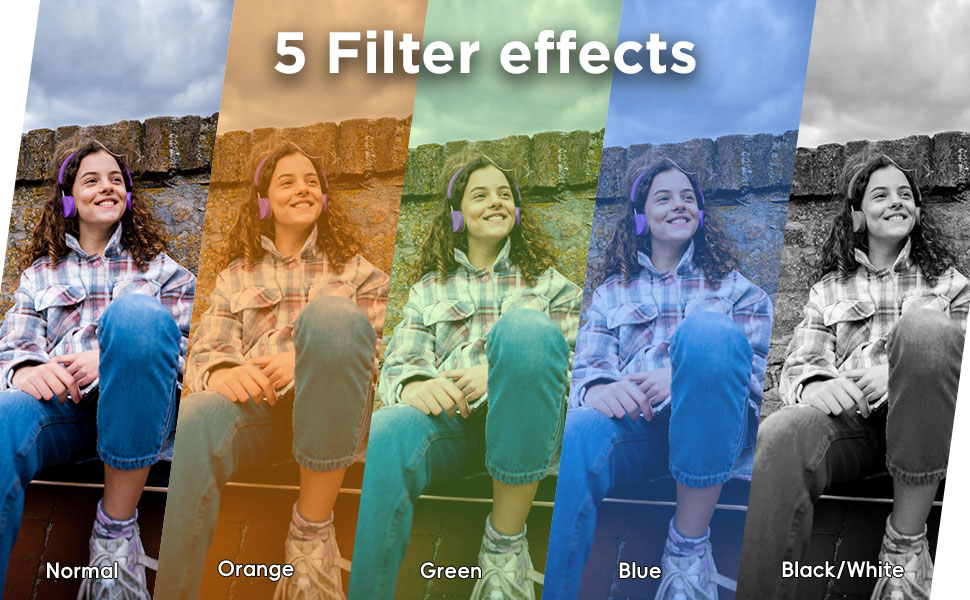
Figure 1: Product Overview and Included Components. This image shows the camera, battery pack, USB cable, lanyard, keychain, and 32GB memory card.
2. Package Contents
Please verify that all items are present in the package:
- 1 x OIKSPY OI-4000 Digital Camera
- 1 x 32GB Memory Card
- 1 x USB-C Charging Cable
- 1 x Strap (Lanyard)
- 1 x Keychain
- 1 x User Manual (this document)
3. Setup
3.1. Inserting the Memory Card
Locate the memory card slot on the side of the camera. Gently insert the provided 32GB memory card into the slot until it clicks into place. Ensure the card is inserted in the correct orientation.
3.2. Charging the Camera
Connect the USB-C charging cable to the camera's charging port and the other end to a USB power adapter (not included) or a computer's USB port. The charging indicator light will illuminate during charging and turn off when fully charged. The camera also includes an extra battery pack for extended use, which can be charged similarly.

Figure 2: Charging the camera and extra battery pack. The extra battery pack provides up to 80 minutes of additional working time.
3.3. Powering On/Off
Press and hold the power button (usually located on the top or side) for a few seconds to turn the camera on or off. The 1.4-inch LCD screen will display the startup sequence.
4. Operating Instructions
4.1. Taking Photos
With the camera powered on, ensure it is in photo mode. Frame your shot using the 1.4-inch LCD screen. Press the shutter button (typically on top) to capture a photo. The camera supports various filter effects to enhance your images.
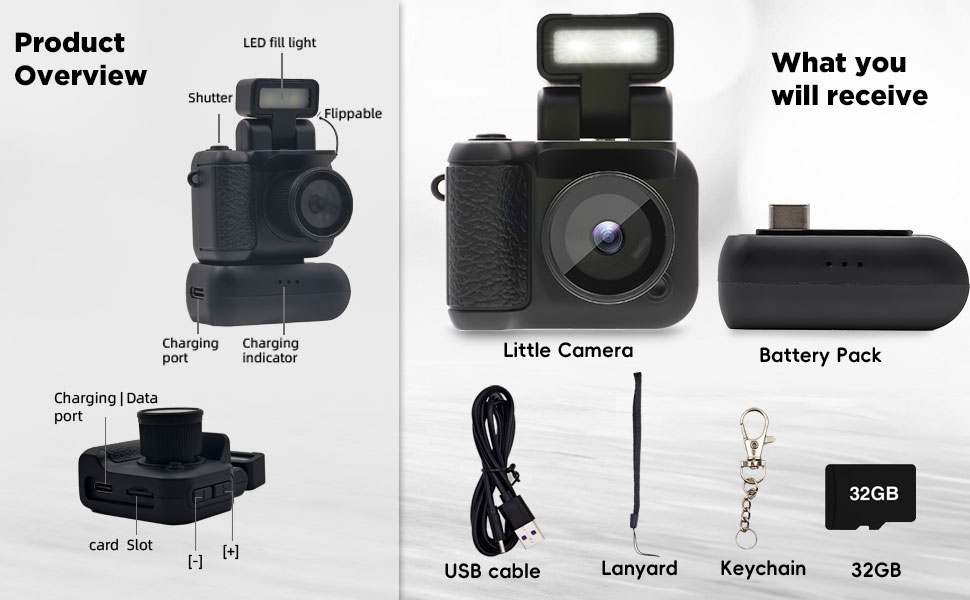
Figure 3: Available filter effects for photos and videos.
4.2. Recording Videos
Switch the camera to video recording mode. Press the shutter button once to start recording and again to stop. The camera records in 1080P Full HD. The LCD screen provides real-time monitoring during recording.

Figure 4: The 1.4-inch LCD screen for monitoring and playback.
4.3. Using the LED Fill Light
The camera features a built-in LED fill light that can be flipped up. Activate it in low-light conditions to improve photo and video quality. Refer to the camera's on-screen menu or dedicated button for activation.

Figure 5: Demonstration of the LED fill light in low light conditions.
4.4. Transferring Files to a Computer
To transfer photos and videos, connect the camera to your computer using the provided USB-C cable. The camera will appear as a removable storage device. You can then copy files directly to your computer.

Figure 6: Connecting the camera to a PC to output videos and photos.
4.5. Official Product Video
Video 1: An official product video demonstrating the OIKSPY Digital Camera's features, compact size, and sample photo/video output.
5. Maintenance
5.1. Cleaning the Camera
Use a soft, dry cloth to clean the camera body. For the lens and screen, use a specialized lens cleaning cloth and solution to avoid scratches. Do not use harsh chemicals or abrasive materials.
5.2. Battery Care
To prolong battery life, avoid exposing the camera to extreme temperatures. Charge the battery regularly, even if the camera is not in frequent use. The camera uses a Lithium Polymer battery.
5.3. Storage
When not in use, store the camera in a cool, dry place away from direct sunlight and moisture. It is not water-resistant.
6. Troubleshooting
6.1. Camera Not Turning On
- Ensure the battery is sufficiently charged. Connect the camera to a power source and allow it to charge for at least 30 minutes before attempting to power on again.
- Verify the memory card is correctly inserted.
6.2. Unable to Record/Take Photos
- Check if the memory card has sufficient free space. Delete unnecessary files or replace the card if full.
- Ensure the camera is in the correct mode (photo or video).
6.3. Poor Image/Video Quality
- Ensure the lens is clean and free from smudges.
- Use the LED fill light in low-light environments.
- Hold the camera steady during capture.
7. Specifications
| Feature | Detail |
|---|---|
| Brand | OIKSPY |
| Model Name | OI-4000 |
| Photo Sensor Technology | CMOS |
| Effective Still Resolution | 0.3 MP |
| Video Resolution | 1080p |
| Screen Size | 1.4 Inches |
| Display Type | OLED |
| Memory Storage Capacity | 32 GB (included) |
| Connectivity Technology | USB |
| Battery Type | Lithium-Ion Polymer |
| Item Weight | 0.09 Kilograms |
| Special Feature | Built-In Microphone |
| Water Resistance Level | Not Water Resistant |
| Skill Level | Novice |
8. Warranty and Support
The OIKSPY OI-4000 Digital Camera comes with a one-year manufacturer's warranty. This warranty covers defects in materials and workmanship under normal use.
For any questions, technical assistance, or warranty claims, please contact OIKSPY customer support through the "Contact Seller" option in your order history on Amazon. Our team is available to assist you with any issues you may encounter.