
Introduction
This manual provides comprehensive instructions for the assembly, operation, and maintenance of your HOMCOM TV Stand. Designed to enhance your living space, this entertainment center offers practical storage solutions for your media devices and accessories. Please read this manual thoroughly before assembly and use to ensure safe and proper operation.
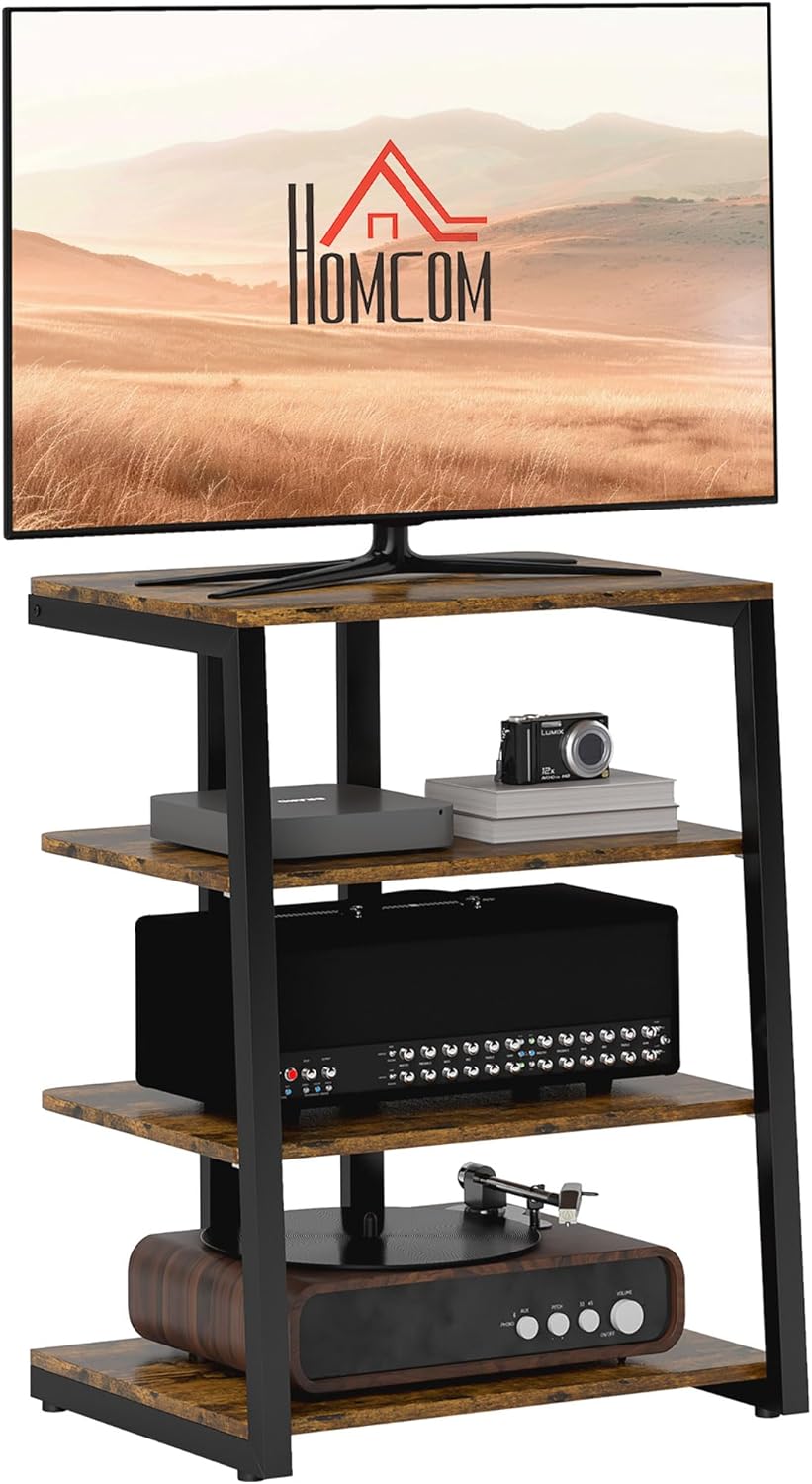
Image: The HOMCOM TV Stand, showcasing its rustic brown finish and black steel frame, holding a television and various media components.
Safety Information
WARNING: Failure to follow these safety instructions could result in injury or damage.
- Ensure proper assembly by following all steps in this manual.
- Adhere strictly to the specified load capacities for each shelf and the overall unit. Overloading can cause instability and collapse.
- To prevent tip-over risks, especially with children, always secure the TV stand to a wall using appropriate anti-tip hardware (if included or recommended by local regulations).
- Do not allow children to climb on the TV stand.
- Place the TV stand on a flat, stable, and level surface.
- Keep all small parts and packaging materials away from children during assembly.
Parts List
Before beginning assembly, verify that all parts listed below are present and undamaged. If any parts are missing or damaged, please contact customer support.
| Part | Description | Quantity |
|---|---|---|
| A | Top Shelf | 1 |
| B | Adjustable Shelves | 2 |
| C | Bottom Shelf | 1 |
| D | Steel Frame Legs | 4 |
| E | Extension Lead Holder | 1 |
| F | Adjustable Foot Pads | 4 |
| G | Assembly Hardware (Screws, Allen Wrench, etc.) | 1 Set |
Note: The exact number and type of hardware may vary slightly. Refer to the packaging for precise details.
Setup and Assembly Instructions
Assembly is required for this TV stand. It is recommended to have two people for assembly. Please follow these steps carefully.
- Step 1: Unpack and Identify Parts
Carefully remove all components from the packaging. Lay them out on a clean, soft surface (like a blanket or carpet) to prevent scratches. Identify all parts against the provided parts list. - Step 2: Assemble the Steel Frame
Attach the four steel frame legs (Part D) together using the provided hardware (Part G). Ensure all connections are secure but do not fully tighten screws until all major components are in place.
Image: An assembled HOMCOM TV Stand positioned in a living room, illustrating its compact design and sturdy frame.
- Step 3: Attach the Bottom Shelf
Secure the bottom shelf (Part C) to the assembled steel frame using the appropriate hardware. Make sure it is level and firmly attached. - Step 4: Install Adjustable Shelves
Insert the adjustable shelf supports into the desired slots on the steel frame. Place the two adjustable shelves (Part B) onto these supports. You can customize the height of these shelves to accommodate your media devices.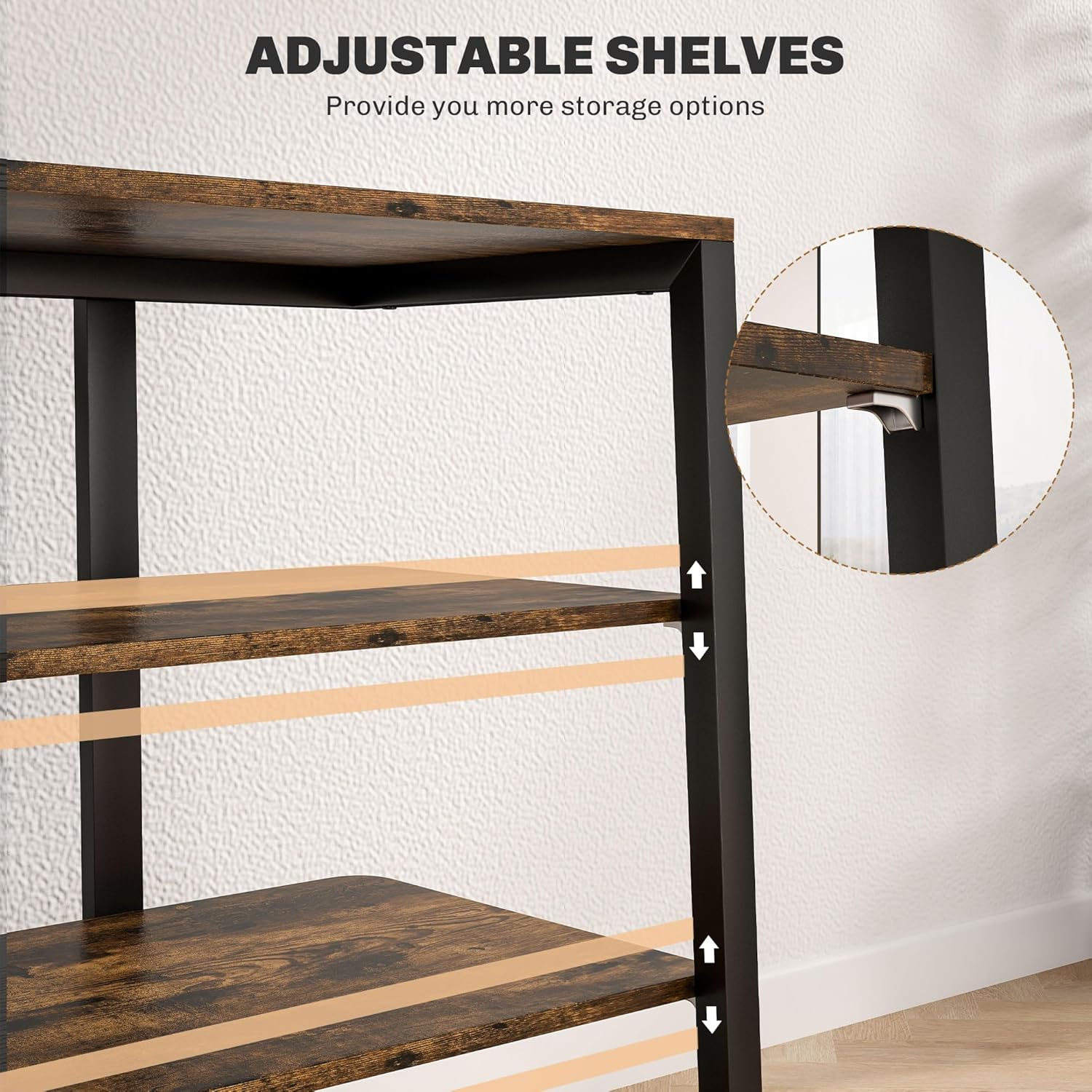
Image: A detailed view of the adjustable shelf mechanism on the HOMCOM TV Stand, highlighting how shelves can be repositioned.
- Step 5: Attach the Top Shelf
Secure the top shelf (Part A) to the top of the steel frame. This shelf is designed to hold your television. - Step 6: Install Extension Lead Holder
Attach the extension lead holder (Part E) to the designated area on the back or side of the stand, as indicated in the assembly diagram. This helps manage cables.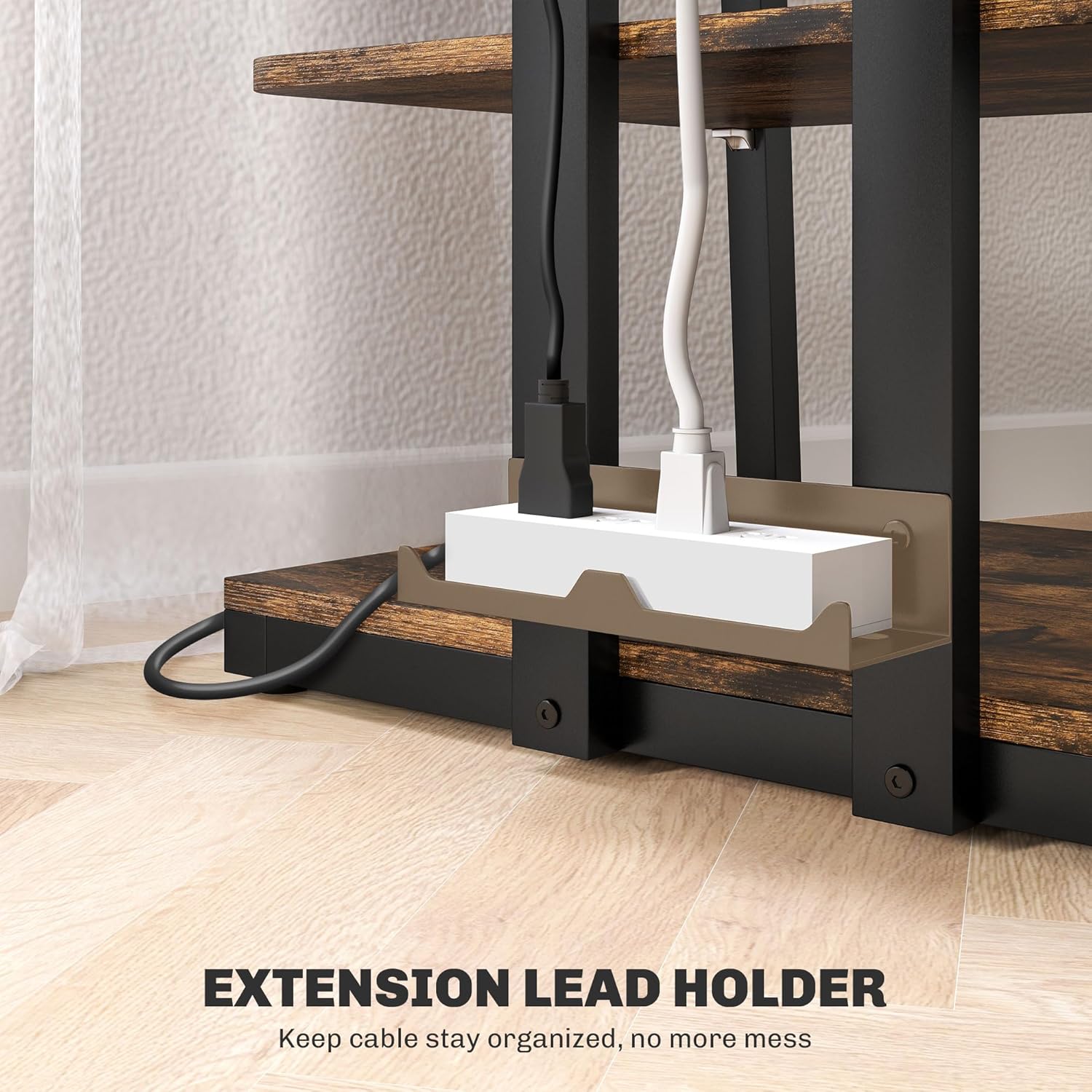
Image: A close-up of the integrated extension lead holder on the HOMCOM TV Stand, demonstrating its function in organizing power strips and cables.
- Step 7: Attach Adjustable Foot Pads
Screw the adjustable foot pads (Part F) into the bottom of the steel frame legs. These pads allow for minor leveling adjustments on uneven floors.
Image: A composite image detailing the corner design, elevated base, and adjustable foot pads of the TV stand, highlighting stability and adaptability.
- Step 8: Final Tightening and Placement
Once all parts are assembled, fully tighten all screws. Carefully move the assembled TV stand to its desired location. Ensure it is stable and level.
Operating Instructions
Your HOMCOM TV Stand is designed for straightforward use. Here are some key operational aspects:
- Placement of TV: Place your television centrally on the top shelf. Ensure the TV's base fits within the dimensions of the top shelf and does not overhang excessively. This stand is suitable for TVs up to 28 inches.
- Utilizing Storage Space: The open shelves provide ample space for media players, gaming consoles, soundbars, books, and decorative items. Arrange items to ensure proper ventilation for electronic devices.

Image: The HOMCOM TV Stand highlighting its generous open shelf storage and tabletop, filled with various media components and accessories.
- Adjusting Shelves: To adjust the height of the middle shelves, carefully remove any items, lift the shelf, and reposition the shelf supports into the desired slots. Ensure the shelf is securely seated before placing items back.
- Cable Management: Use the integrated extension lead holder to neatly route and conceal power cords and signal cables, preventing tangles and maintaining a tidy appearance.
Maintenance
Proper care will extend the life and appearance of your TV stand.
- Cleaning: Wipe surfaces with a soft, damp cloth. Avoid harsh chemicals or abrasive cleaners, which can damage the melamine finish.
- Dusting: Regularly dust the stand to prevent buildup.
- Hardware Check: Periodically check all screws and connections to ensure they remain tight. Retighten if necessary.
- Avoid Overloading: Do not exceed the specified weight capacities for the shelves or the overall unit.
- Protect from Moisture: Avoid prolonged exposure to moisture or direct sunlight, which can cause warping or fading.
Troubleshooting
If you encounter any issues with your HOMCOM TV Stand, refer to the following common problems and solutions:
- Stand is Wobbly:
- Ensure all assembly screws are fully tightened.
- Adjust the foot pads on the bottom of the legs to level the stand on uneven floors.
- Verify the stand is placed on a flat, stable surface.
- Shelf Does Not Fit:
- Check that you are using the correct shelf for the position (e.g., top, adjustable, bottom).
- Ensure the shelf supports are correctly inserted into the frame slots.
- Missing Parts:
- Double-check all packaging materials.
- Contact HOMCOM customer support with your model number and a description of the missing part.
Specifications
| Feature | Detail |
|---|---|
| Brand | HOMCOM |
| Model Number | 83B-021V80RB |
| Color | Rustic Brown |
| Product Dimensions (D x W x H) | 23.8"D x 23.6"W x 31.1"H |
| Weight Capacity (Total) | 110 lbs (50 kg) |
| Weight Capacity (Top Shelf) | 44 lbs |
| Weight Capacity (Each Adjustable Shelf) | 22 lbs |
| Material | Engineered Wood (Melamine finish), Steel Frame |
| Number of Shelves | 3 (1 fixed top, 2 adjustable, 1 fixed bottom) |
| Special Feature | Adjustable Shelves, Extension Lead Holder |
| Assembly Required | Yes |
| Item Weight | 36.4 pounds |
| UPC | 196393043158 |
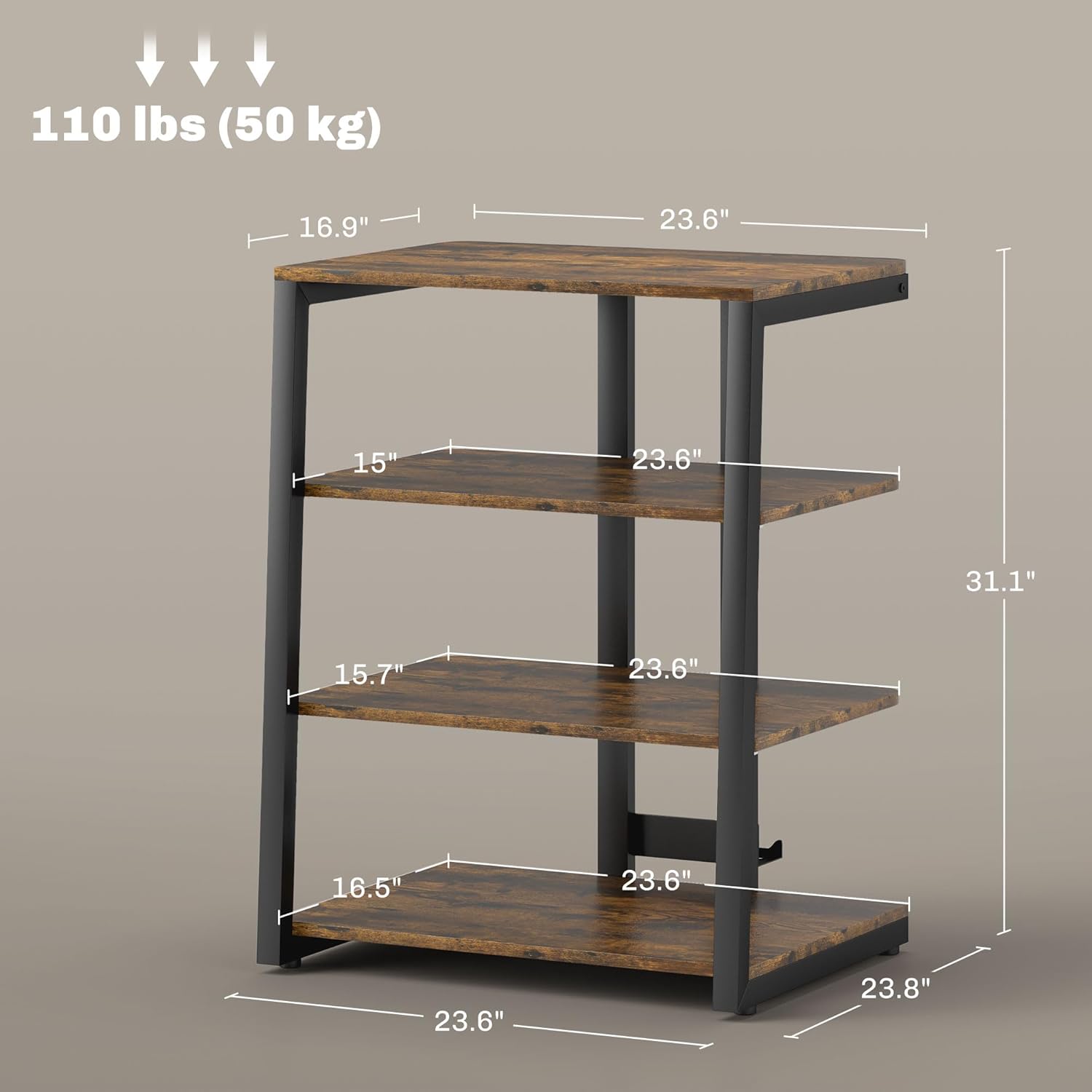
Image: A technical diagram illustrating the precise dimensions and weight capacities of the HOMCOM TV Stand.
Customer Support
For further assistance, missing parts, or warranty inquiries, please contact HOMCOM customer support. Refer to your purchase documentation for specific contact details or visit the official HOMCOM website.
Online Resources: Visit the HOMCOM Store on Amazon