1. Product Overview
The LONPOO Portable CD Player (Model LP-D12) is a versatile audio device designed for various listening experiences. It supports multiple playback modes including CD, FM Radio, Bluetooth, USB, and AUX input. This manual provides detailed instructions for setup, operation, and maintenance to ensure optimal performance and longevity of your device.

Figure 1.1: Front view of the LONPOO Portable CD Player, showcasing its compact design and speaker grilles.
1.1 Key Features
- Multi-format CD Playback: Supports CD, CD-R, CD-RW, MP3, and WMA formats.
- FM Radio: Wide frequency range of 87.5-108MHz with a retractable antenna for strong reception.
- Bluetooth 5.3 Connectivity: Seamlessly connect to smartphones, tablets, and other Bluetooth-enabled devices.
- USB Playback: Play audio files directly from a USB drive.
- AUX Input: Connect external audio devices via a 3.5mm auxiliary cable.
- Headphone Jack: For private listening.
- Dual Power Options: Operates on AC power or batteries for portability.
- High Definition LCD Display: With ice blue backlight for easy operation in low light.

Figure 1.2: The 6-in-1 functionality of the LONPOO Portable CD Player, highlighting its versatile playback options.
1.2 Package Contents
Please check the package for the following items:
- 1 x LONPOO Portable CD Player
- 1 x AC Power Cable
- 1 x 3.5mm AUX Cable
- 1 x User Manual
2. Setup
2.1 Power Supply
The LONPOO Portable CD Player can be powered by either AC (alternating current) or DC (direct current) batteries.
2.1.1 AC Power Connection
To use AC power, connect the provided AC power cable to the AC input jack on the back of the unit and then plug the other end into a standard wall outlet (AC 220V/50Hz). Ensure the power switch on the back of the unit is in the 'ON' position.
2.1.2 Battery Power (DC)
For portable use, the unit requires 6 x C-size batteries (not included). Open the battery compartment cover on the bottom of the unit and insert the batteries, ensuring correct polarity (+/-) as indicated inside the compartment. Close the cover securely.

Figure 2.1: Illustrations of the AC power input and the battery compartment for DC power supply.
3. Operating Instructions
Familiarize yourself with the control panel and ports before operation. Refer to Figure 3.1 for a visual guide.
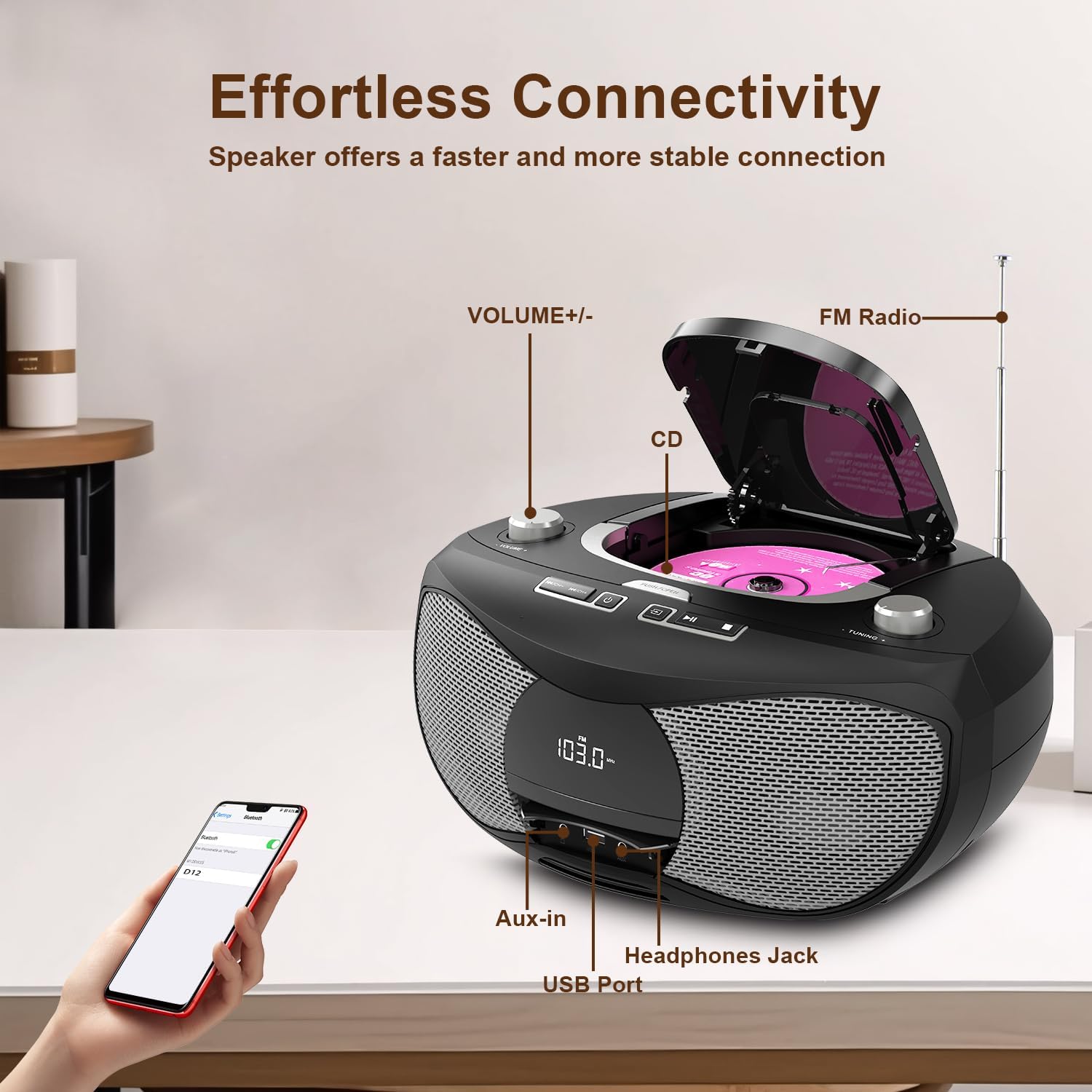
Figure 3.1: Labeled components of the LONPOO Portable CD Player, including volume control, CD compartment, FM radio antenna, AUX-in, headphone jack, and USB port.
3.1 CD Playback
- Insert CD: Gently open the CD compartment cover. Place a CD (CD, CD-R, CD-RW, MP3, or WMA format) onto the spindle with the label side facing up. Close the cover firmly.
- Select CD Mode: Press the "MODE" button repeatedly until "CD" appears on the LCD display.
- Playback: The CD will begin playing automatically. Use the "PLAY/PAUSE" button to pause or resume playback.
- Skip Tracks: Press the "SKIP FORWARD" or "SKIP BACKWARD" buttons to navigate between tracks.
- Fast Forward/Rewind: Press and hold the "SKIP FORWARD" or "SKIP BACKWARD" buttons during playback.
- Repeat Modes: Press the "REPEAT" button to cycle through repeat modes (e.g., repeat one, repeat all, random).
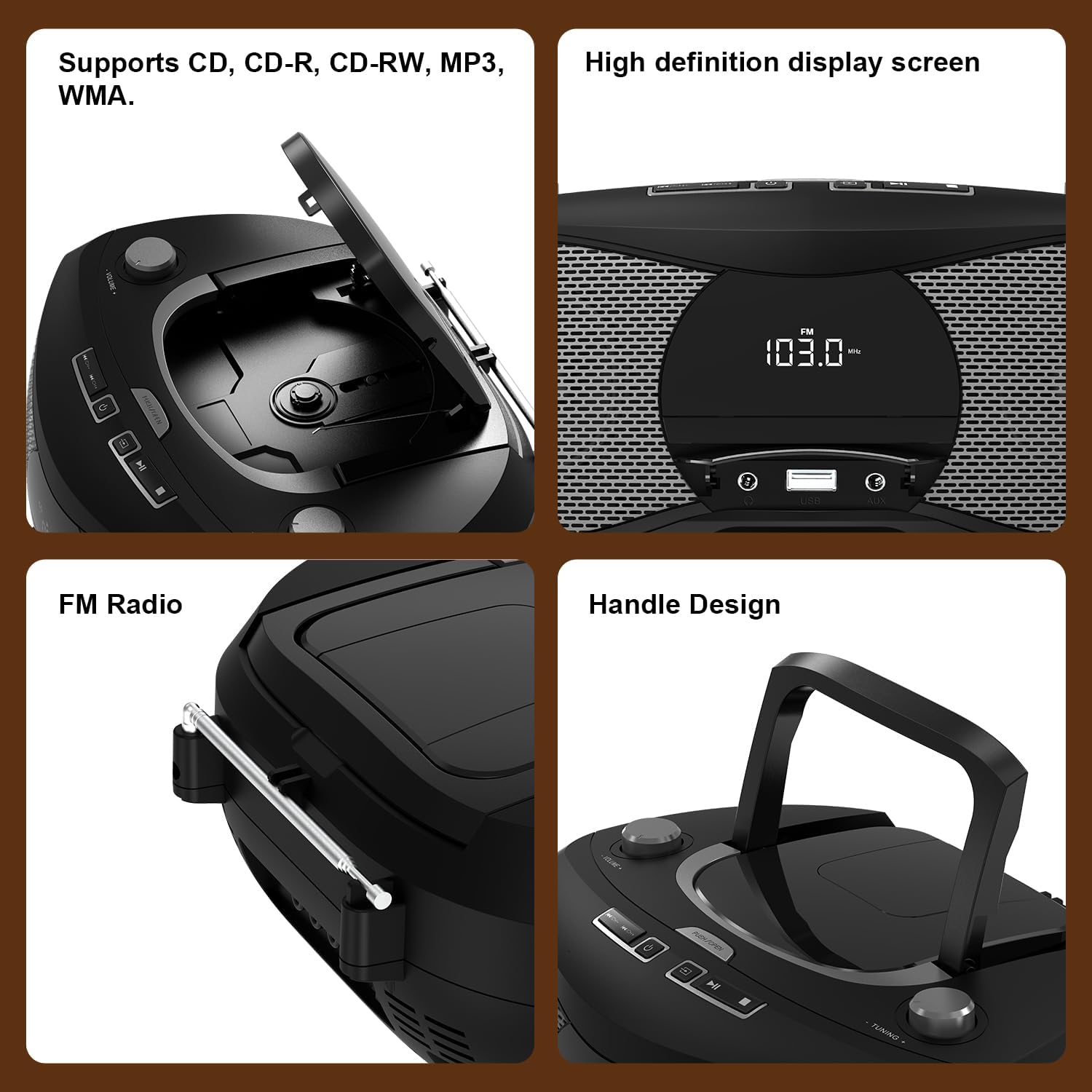
Figure 3.2: Detailed views of the CD compartment, high-definition LCD display, retractable FM antenna, and integrated handle design.
3.2 FM Radio Operation
- Extend Antenna: Fully extend the telescopic FM antenna for optimal reception.
- Select FM Mode: Press the "MODE" button repeatedly until "FM" appears on the LCD display.
- Auto Scan: Press and hold the "PLAY/PAUSE" button to automatically scan and save available FM stations.
- Manual Tuning: Use the "TUNING" knob to manually tune to a specific frequency.
- Navigate Presets: Use the "SKIP FORWARD" or "SKIP BACKWARD" buttons to cycle through saved stations.

Figure 3.3: The portable CD player with its FM antenna extended, displaying an FM frequency on the screen.
3.3 Bluetooth Mode
- Select Bluetooth Mode: Press the "MODE" button repeatedly until "BT" (Bluetooth) appears on the LCD display. The unit will enter pairing mode, indicated by a flashing "BT" icon.
- Enable Bluetooth on Device: On your smartphone, tablet, or other Bluetooth-enabled device, go to its Bluetooth settings and turn on Bluetooth.
- Pairing: Search for "LP-D12" in the list of available devices and select it to pair. Once connected, the "BT" icon will stop flashing and remain solid.
- Playback: You can now play audio from your connected device through the LONPOO CD player. Control playback (play/pause, skip) from your device or the CD player's controls.

Figure 3.4: The portable CD player demonstrating Bluetooth connectivity with various devices such as a smartphone, tablet, and computer.
3.4 USB Playback
- Insert USB Drive: Insert a USB flash drive into the USB port on the front of the unit.
- Select USB Mode: Press the "MODE" button repeatedly until "USB" appears on the LCD display.
- Playback: The unit will automatically detect and begin playing compatible audio files (MP3, WMA) from the USB drive.
- Control Playback: Use the "PLAY/PAUSE", "SKIP FORWARD", and "SKIP BACKWARD" buttons to control playback.
3.5 AUX Input
- Connect AUX Cable: Connect one end of the supplied 3.5mm AUX cable to the AUX-in port on the front of the unit and the other end to the headphone jack or audio output of your external device (e.g., smartphone, MP3 player).
- Select AUX Mode: Press the "MODE" button repeatedly until "AUX" appears on the LCD display.
- Playback: Play audio from your external device. Volume can be controlled on both the external device and the CD player.

Figure 3.5: The portable CD player connected to a smartphone using the AUX input, demonstrating wired audio playback.
3.6 Headphone Use
To enjoy private listening, plug your headphones (not included) into the 3.5mm headphone jack on the front of the unit. The sound will automatically switch from the speakers to the headphones.
4. Specifications
| Feature | Specification |
|---|---|
| Model Number | LP-D12 |
| CD Compatibility | CD, CD-R, CD-RW, MP3, WMA |
| FM Frequency Range | 87.5 - 108 MHz |
| Bluetooth Version | 5.3 |
| Connectivity | Bluetooth, USB, AUX (3.5mm), Headphone (3.5mm) |
| Power Output | 4 Watts |
| Power Source | AC 220V/50Hz or 6 x C-size Batteries |
| Dimensions (L x W x H) | 32 x 25 x 13 cm (approx. 12.5 x 9.8 x 5.1 inches) |
| Speaker Type | Stereo |
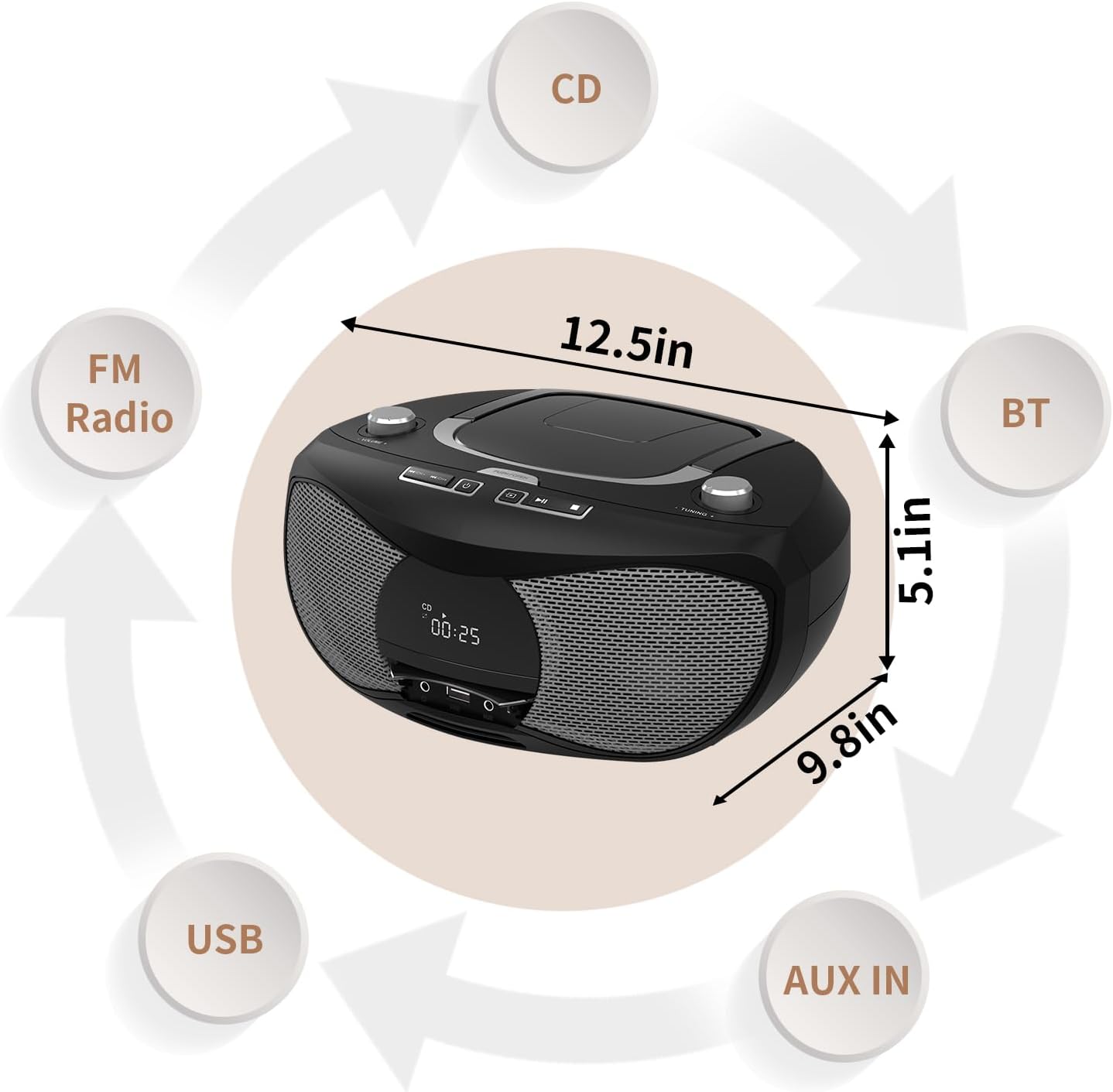
Figure 4.1: Approximate dimensions of the portable CD player and a visual representation of its supported modes: CD, Bluetooth, AUX In, USB, and FM Radio.
5. Troubleshooting
If you encounter any issues with your LONPOO Portable CD Player, please refer to the following common problems and solutions:
| Problem | Possible Cause / Solution |
|---|---|
| No power |
|
| CD not playing / "NO DISC" error |
|
| Poor FM radio reception |
|
| Bluetooth pairing failed |
|
| No sound from speakers/headphones |
|
6. Maintenance
6.1 Cleaning the Unit
To clean the exterior of the unit, use a soft, slightly damp cloth. Do not use abrasive cleaners, waxes, or solvents as they may damage the finish. Ensure no liquids enter the unit.
6.2 Cleaning the CD Lens
If CD playback issues persist after cleaning the disc, the CD lens may be dirty. Use a specialized CD lens cleaner disc (not included) to clean the lens. Do not touch the lens directly with your fingers or any tools.
6.3 Storage
When not in use for extended periods, disconnect the power cable and remove batteries. Store the unit in a cool, dry place away from direct sunlight, dust, and extreme temperatures.
7. Warranty and Support
7.1 Manufacturer's Warranty
This LONPOO product comes with a 1-year manufacturer's warranty. Please retain your proof of purchase for warranty claims. The warranty covers defects in materials and workmanship under normal use. It does not cover damage caused by misuse, accident, unauthorized modification, or normal wear and tear.
7.2 Customer Support
For technical support, warranty service, or any questions regarding your LONPOO Portable CD Player, please contact LONPOO customer service through the retailer where you purchased the product or visit the official LONPOO website for contact information.


