
JackonLux CP-BL06-8IN-E
JackonLux Large Rechargeable Emergency LED Bulb with Remote Control
Model: CP-BL06-8IN-E | Brand: JackonLux
Introduction
The JackonLux Large Rechargeable Emergency LED Bulb is designed to provide versatile lighting solutions for both daily use and unexpected power outages. This innovative light automatically charges during regular operation and seamlessly switches to battery backup mode when power fails, ensuring continuous illumination. It offers customizable lighting with adjustable brightness and color temperatures, controlled conveniently via a remote.

Image: The JackonLux rechargeable LED bulb, remote control, E26 lamp socket adapter, power hook, and mounting hardware.
Product Features
- Dual Functionality: Operates as a standard ceiling light and automatically charges its internal battery for emergency backup.
- Fast Charging: Reaches full charge in 5-6 hours when continuously powered, with automatic stop charging.
- Extended Runtime: Provides 2-24 hours of continuous light during power outages, depending on brightness settings.
- Customizable Lighting: Features 10 dimmable brightness levels and 5 color temperatures (2700K to 6000K) in AC mode.
- Remote Control: Full control over brightness, color temperature, and timer functions.
- Portable Design: Can be easily converted into a portable light using the included Light Sand and Power Hook accessories.
- Versatile Applications: Suitable for various indoor spaces like hallways, kitchens, bedrooms, and also portable outdoor use.

Image: This illustration highlights the multi-functional capabilities of the JackonLux light, showing it working as a normal light, providing illumination during a power outage, and being used as a portable light source.
What's in the Box
Your JackonLux Emergency LED Bulb package includes the following components:
- JackonLux Large Rechargeable Emergency LED Bulb
- Remote Control
- E26 Lamp Socket Adapter
- Power Hook
- Light Sand (base for portable use)
- Mounting Screws and Anchors
Image: A visual representation of all items included in the product package: the LED bulb, remote control, E26 socket adapter, power hook, and mounting hardware.
Setup
The JackonLux LED Bulb offers multiple installation and usage options:
- Standard E26 Socket Installation:
Simply screw the LED bulb into any standard E26 lamp socket. This allows the bulb to function as a regular light and automatically charge its internal battery.

Image: The bulb being screwed into a standard E26 light socket for easy installation and daily use.
- Secure Mounting with E26 Base:
If you do not have an existing E26 socket or prefer a more permanent fixture, use the included E26 lamp socket adapter. Mount this adapter to a ceiling or wall using the provided screws and anchors, then screw the LED bulb into the adapter.

Image: Instructions showing how to securely mount the E26 base to a surface using screws for a stable lighting solution.
- Portable Use with Power Hook:
For portable lighting, attach the Power Hook accessory to the bulb. This allows you to hang the light in various locations such as tents, closets, or during outdoor activities. Ensure the bulb is fully charged before portable use.

Image: The Power Hook accessory being attached to the bulb, demonstrating its transformation into a portable hanging light.
- Portable Use with Light Sand:
After using the Power Hook, or for tabletop use, place the bulb on the Light Sand accessory. This provides a stable base for the light on any flat surface, offering cord-free illumination wherever needed.

Image: The light placed on the Light Sand accessory, illustrating its use as a stable, portable light source on a flat surface.

Image: A composite image showing the four primary ways to use the JackonLux light: installed in an E26 socket, with the power hook, and with the light sand base.
Operating Instructions
The JackonLux LED Bulb is controlled using the included remote. Familiarize yourself with the remote's functions for optimal use.
Remote Control Functions:

Image: A detailed diagram illustrating each button on the remote control and its corresponding function, including ON/OFF, brightness adjustment, color temperature adjustment, and timer settings.
- ON/OFF: Press the "ON" button to turn the light on, and "OFF" to turn it off.
- Brightness Adjustment (AC Mode): Use the brightness up (☀+) and brightness down (☀-) buttons to adjust the light intensity from 10% to 100%.
- Color Temperature Adjustment (AC Mode): Use the CCT- and CCT+ buttons to cycle through 5 color temperatures, ranging from 2700K (warm white) to 6000K (cool white).
- Daylight Mode (DL): Press the "DL" button for a quick switch to 100% brightness with a natural daylight color temperature.
- Timer Function: Set the light to automatically turn off after 15, 30, or 60 minutes using the corresponding buttons. Press the "L OFF" button to cancel the timer.
- DC Mode Only: When operating on battery power (during an outage or portable use), use the "DC MODE ONLY" buttons to adjust brightness. This mode offers 10 brightness levels for 2-24 hours of continuous illumination.

Image: A visual representation of the light's brightness being adjusted from 10% to 100% using the remote control.

Image: A series of images demonstrating the five available color temperatures (2700K, 3000K, 4000K, 5000K, 6000K) and how to adjust them with the remote.

Image: A visual guide showing the range of color temperatures from 2700K to 6000K and how to select them using the CCT- and CCT+ buttons on the remote.

Image: Demonstrates the "DL" button on the remote, which instantly sets the light to 100% brightness, simulating natural daylight for optimal visibility.

Image: The remote control displaying options to set a timer for 15, 30, or 60 minutes, allowing the light to automatically shut off.

Image: A visual explanation of the timer function, showing how the light automatically turns off after the selected duration (15, 30, or 60 minutes).

Image: Shows the remote control's "DC MODE ONLY" buttons, used to adjust brightness when the light is operating on its internal battery during a power outage, providing 2-24 hours of light.
Product Video Demonstration:
Video: An official product video demonstrating the features and versatility of the JackonLux Rechargeable Semi-Flush Mount Ceiling Light with Remote, including its daily use, emergency backup, and portable capabilities.
Maintenance
To ensure the longevity and optimal performance of your JackonLux LED Bulb, follow these simple maintenance guidelines:
- Cleaning: Gently wipe the surface of the light with a soft, dry cloth. Avoid using abrasive cleaners, solvents, or excessive moisture, as these can damage the finish or internal components.
- Storage: If storing the light for an extended period, ensure it is fully charged. Store in a cool, dry place away from direct sunlight and extreme temperatures.
- Battery Care: For best battery health, avoid completely draining the battery frequently. Regular use and charging (as designed for daily operation) will help maintain battery performance.
Troubleshooting
If you encounter any issues with your JackonLux LED Bulb, please refer to the following common solutions:
| Problem | Possible Cause | Solution |
|---|---|---|
| Light does not turn on in AC mode. | No power to the socket; bulb not screwed in properly; remote battery low. | Check power supply to the socket. Ensure the bulb is securely screwed in. Replace remote control battery. |
| Light does not turn on during power outage (DC mode). | Battery is not charged; light was not in AC mode to charge. | Ensure the light was connected to AC power for at least 5-6 hours to fully charge the battery. |
| Brightness decreases over time in DC mode. | Normal battery discharge. | This is expected behavior as the battery depletes. The light will return to full brightness once recharged via AC power. |
| Remote control is unresponsive. | Remote battery low or depleted; obstruction between remote and light. | Replace the remote control battery. Ensure there is a clear line of sight between the remote and the light. |
Specifications
| Attribute | Detail |
|---|---|
| Brand | JackonLux |
| Model Name | CP-BL06-8IN-E |
| Light Type | LED |
| Wattage | 2.8 watts |
| Brightness | 2000 Lumen (AC mode), 500 Lumen (DC mode) |
| Color Temperature | 2700K to 6000K Adjustable |
| Bulb Base | E26 |
| Voltage | 100-120 Volts (AC) |
| Battery | 2000mAh LFP (Lithium Polymer) |
| Runtime (DC Mode) | 2-24 hours (depending on brightness) |
| Charging Time | 5-6 hours (full charge) |
| Material | Plastic, Polycarbonate (PC) |
| Product Dimensions | 7 x 7 x 4.1 inches |
| Item Weight | 1.15 pounds |
| Controller Type | Remote Control |
| Indoor/Outdoor Usage | Indoor (with portable options for outdoor) |
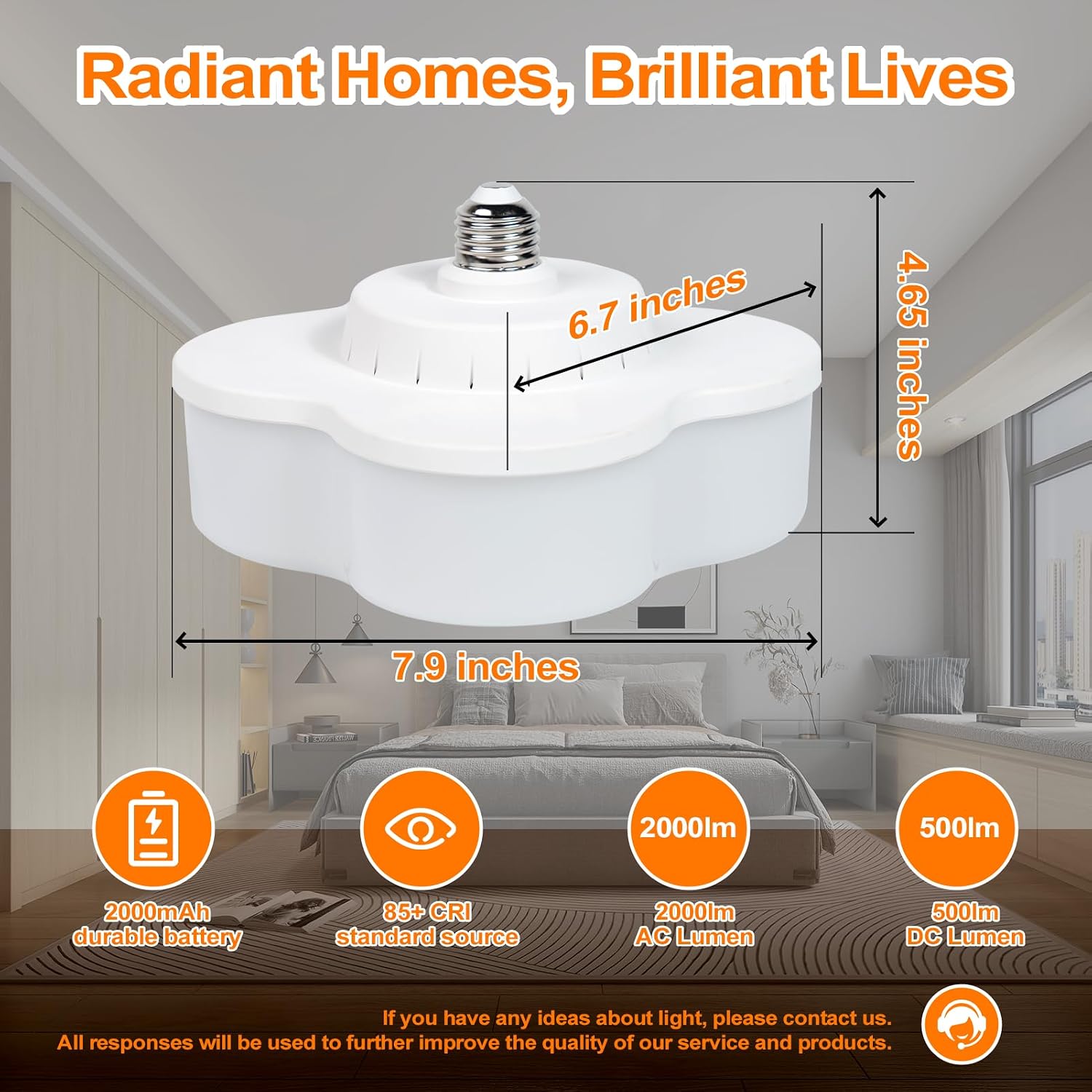
Image: A diagram showing the physical dimensions of the JackonLux LED bulb, including its length (7.9 inches), width (6.7 inches), and height (4.65 inches).
Warranty and Support
JackonLux stands behind the quality of its products. Your purchase includes:
- 12-Month Warranty: Covers manufacturing defects and ensures product reliability.
- 30-Day Money-Back Guarantee: Provides peace of mind for your purchase.
- 24/7 Customer Service: Our dedicated customer service team is available around the clock to address any concerns or questions you may have.
For support, please refer to the contact information provided with your product packaging or visit the official JackonLux store on Amazon.
Ask a question about this manual
Ask about setup, troubleshooting, compatibility, parts, safety, or missing instructions. Manuals+ will review the question and use this page’s manual context to help answer it.