
1. Product Overview
The Aramox Smart Thermostat is designed for electric heating systems, offering precise temperature control and a clear LCD display. It integrates a highly reliable single-chip microcomputer for accurate temperature regulation and strong anti-interference capabilities. The thermostat provides a wide temperature measurement range and adjustable settings for a comfortable indoor environment.

Figure 1: Aramox Smart Thermostat installed in a room, displaying temperature.
2. Package Contents
Upon opening the package, ensure all the following items are present:
- 1 x Aramox Smart Thermostat Unit
- 2 x Mounting Screws
- 1 x Wiring Harness
- 1 x User Manual (this document)
3. Setup and Installation
Warning: Electrical installation should be performed by a qualified professional to prevent electric shock or damage to the device. Always turn off power at the circuit breaker before beginning installation.
3.1 Mounting the Thermostat
- Choose a suitable location on an interior wall, away from direct sunlight, drafts, or heat sources.
- Carefully remove the front panel of the thermostat to access the mounting holes.
- Mark the positions for the mounting screws on the wall.
- Drill pilot holes if necessary and secure the thermostat base to the wall using the provided screws.
3.2 Wiring Instructions
Refer to the wiring diagram on the back of the thermostat and the provided wiring harness. Ensure connections are secure and correct for your electric heating system.

Figure 2: Rear view of the thermostat with wiring terminals labeled.
- Connect the Live (L) wire from your power supply to the L terminal on the thermostat.
- Connect the Neutral (N) wire from your power supply to the N terminal on the thermostat.
- Connect the heating load wires to the appropriate output terminals (e.g., L1, N1 for heating element).
- Once wiring is complete, reattach the front panel of the thermostat.
- Restore power at the circuit breaker.
4. Operating Instructions
The thermostat features an intuitive keypad and a clear LCD display for easy operation.
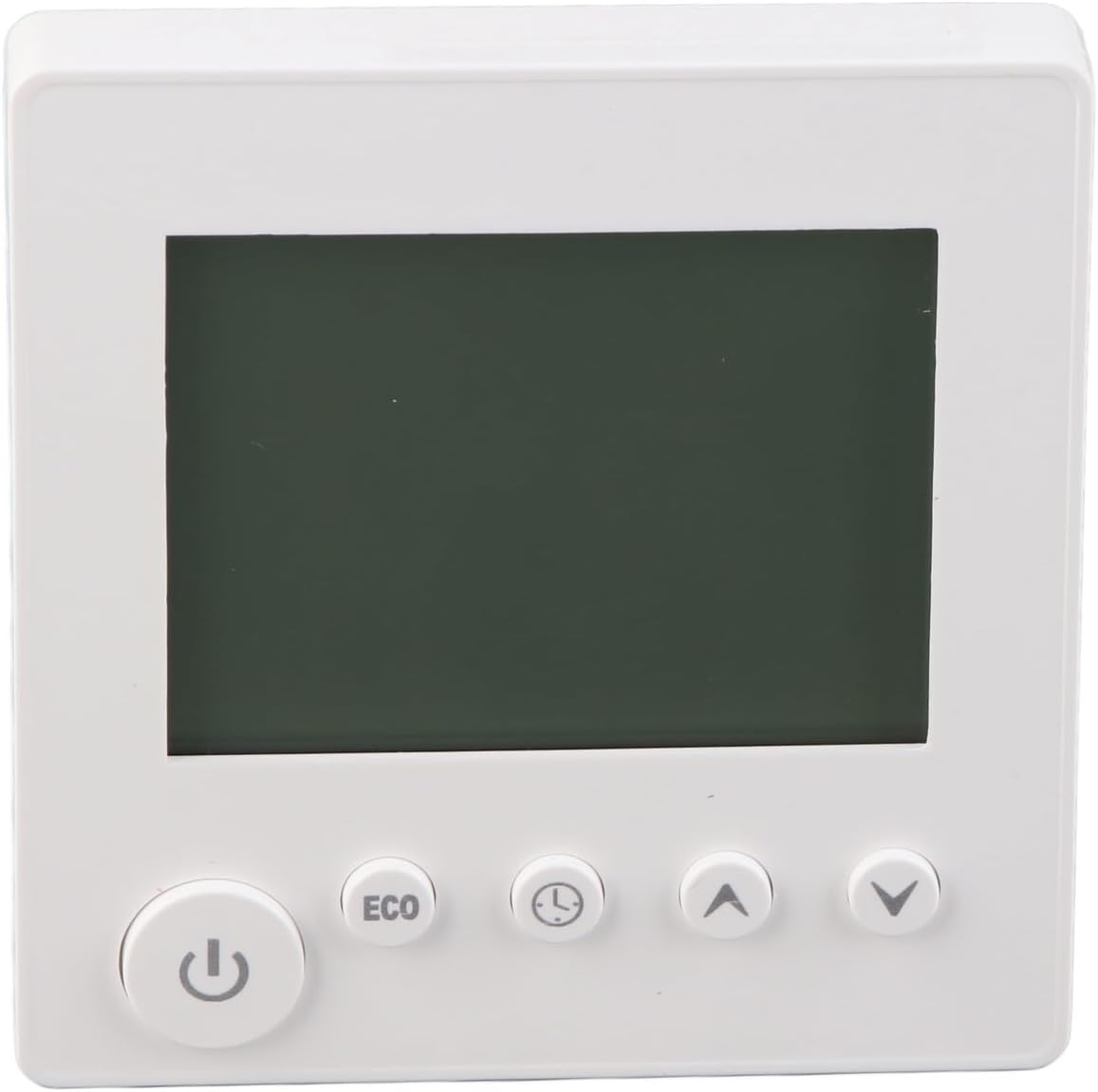
Figure 3: Front view of the thermostat showing the LCD and control buttons.
4.1 Power On/Off
- Press the Power button () to turn the thermostat on or off.
4.2 Setting the Temperature
- Use the Up arrow button () to increase the desired temperature.
- Use the Down arrow button () to decrease the desired temperature.
- The current and set temperatures will be displayed on the LCD screen.
4.3 ECO Mode
- Press the ECO button to activate or deactivate energy-saving mode. In ECO mode, the thermostat will adjust the temperature to a more energy-efficient setting.
4.4 Time/Program Settings
- Press the Clock/Timer button () to access time and programming settings. Follow the on-screen prompts to set the current time or schedule heating periods.
5. Maintenance
The Aramox Smart Thermostat requires minimal maintenance.
- Cleaning: The LCD screen is scratch-resistant and easy to clean. Use a soft, dry cloth to wipe the screen and the thermostat body. Avoid using abrasive cleaners or solvents.
- Inspection: Periodically check the wiring connections to ensure they remain secure.
6. Troubleshooting
If you encounter issues with your thermostat, refer to the following common problems and solutions:
| Problem | Possible Cause | Solution |
|---|---|---|
| Thermostat not powering on | No power supply; incorrect wiring; circuit breaker tripped. | Check circuit breaker; verify wiring connections; ensure power is supplied to the unit. |
| Incorrect temperature reading | Sensor obstruction; thermostat located near heat/cold source. | Ensure sensor is clear; relocate thermostat if exposed to extreme temperatures. |
| Heating system not responding | Incorrect wiring; heating system malfunction; thermostat settings. | Verify wiring to the heating system; check heating system for faults; confirm thermostat is set to heating mode and desired temperature is above ambient. |
| Display is blank or flickering | Power fluctuation; internal fault. | Cycle power to the thermostat at the circuit breaker. If the problem persists, contact support. |
7. Specifications
| Feature | Specification |
|---|---|
| Item Type | Thermostat |
| Model Number | Aramox6mfynvtsku |
| Material | ABS |
| Current | 16A |
| Measurement Error | ± 1 ℃ |
| Temperature Setting Range | 5-60 ℃ (upper limit adjustable) |
| Temperature Range | 0-50 ℃ |
| Control Mode | Key |
| Item Weight | Approx. 188g / 6.63oz |
| Package Dimensions | 4.33 x 3.94 x 2.76 inches |
8. Warranty Information
Specific warranty details for the Aramox Smart Thermostat (Model Aramox6mfynvtsku) may vary. Please refer to the warranty card included with your product or contact the seller/manufacturer directly for comprehensive warranty terms and conditions.
9. Support
For technical assistance, troubleshooting beyond this manual, or inquiries regarding your Aramox Smart Thermostat, please contact your point of purchase or the manufacturer directly. Ensure you have your model number (Aramox6mfynvtsku) and purchase date available when seeking support.