
Introduction
Thank you for choosing the niolina Smart Watch. This manual provides essential information to help you set up, operate, and maintain your device. The niolina Smart Watch is designed to enhance your daily life with features such as Bluetooth calling, comprehensive health monitoring, and diverse sports tracking. Please read this manual carefully to ensure optimal performance and longevity of your smartwatch.
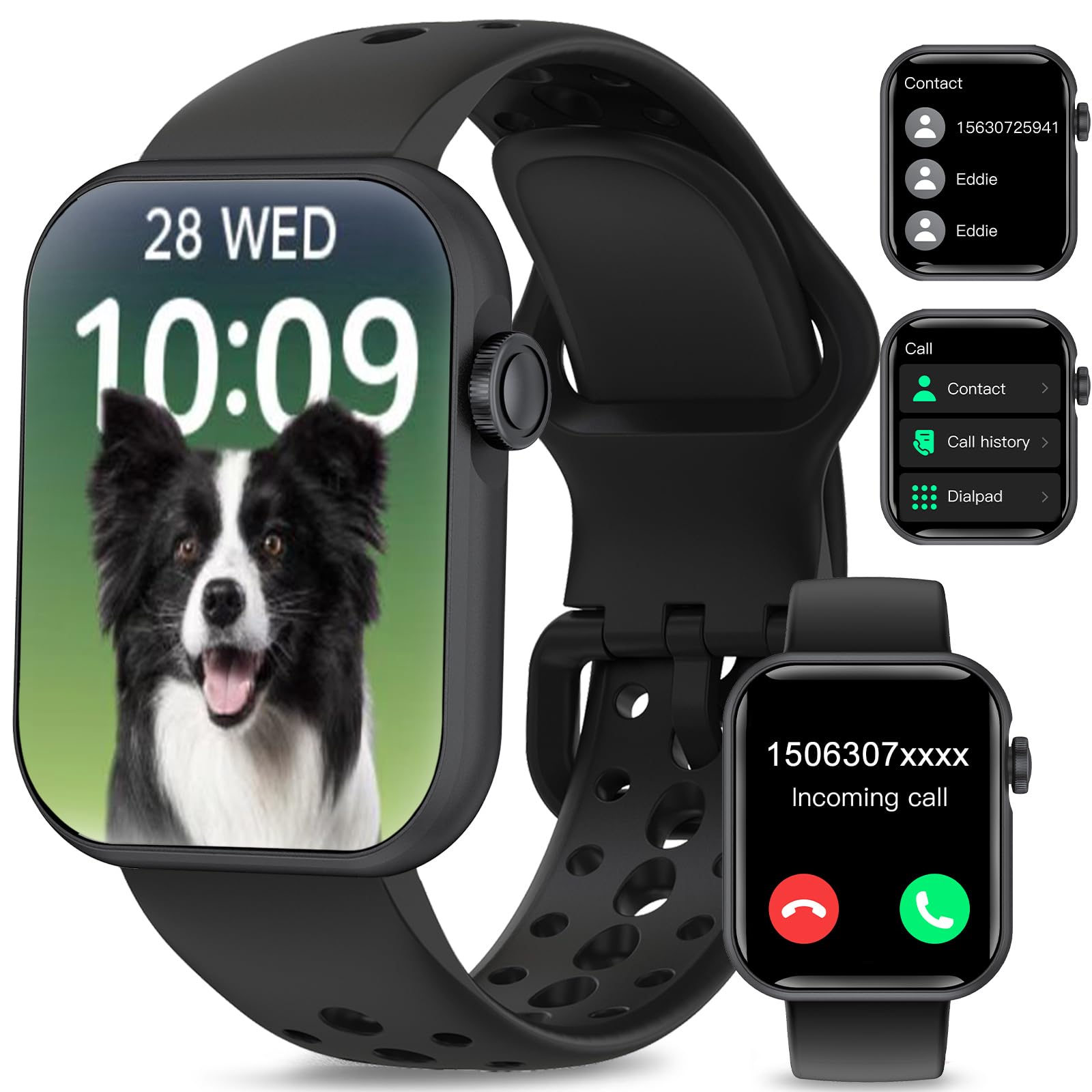
Image: The niolina Smart Watch featuring a sleek black design and a colorful digital display.
What's in the Box
Upon opening your niolina Smart Watch package, you should find the following items:
- niolina Smart Watch (with pre-installed strap)
- Magnetic Charging Cable
- User Manual

Image: A visual representation of the niolina Smart Watch package contents, showing the smartwatch, an additional strap, a charging cable, and the user manual.
Setup
1. Charging the Device
Before initial use, ensure your smartwatch is fully charged. Connect the magnetic charging cable to the charging points on the back of the watch and plug the USB end into a compatible power source. A full charge typically takes approximately 2 hours.

Image: The niolina Smart Watch connected to its magnetic charger, displaying a full battery icon.
2. Downloading and Pairing the App
To unlock the full potential of your niolina Smart Watch, download the companion app on your smartphone. The app is compatible with iOS 9.0 or above and Android 5.0 or above. Follow the in-app instructions to pair your device via Bluetooth.
3. Initial Power On/Off
To power on the watch, press and hold the side button for a few seconds until the screen illuminates. To power off, press and hold the side button, then select the power off option on the screen.
4. Language Settings
You can change the system language of your smartwatch through the settings menu. Navigate to 'Settings' > 'Language' and select your preferred language.
Video: Demonstration of how to change the system language on the niolina Smart Watch, navigating through the settings menu to select a new language.
Operating the Smart Watch
1. Basic Navigation
- Swipe Up/Down: Scroll through menus and notifications.
- Swipe Left/Right: Access quick functions or app lists.
- Tap: Select an item or confirm an action.
- Side Button: Press to return to the main screen or wake the device.
2. Changing Watch Faces
Personalize your smartwatch by choosing from over 100 watch faces available through the companion app. You can also set a custom photo as your watch face.

Image: The niolina Smart Watch showcasing several customizable watch face options, including digital and analog styles.
3. Bluetooth Calling
With Bluetooth 5.2, you can answer or make calls directly from your smartwatch when connected to your phone. The watch supports caller ID, dialing, syncing contacts, and viewing call records. Note: The watch cannot send or reply to messages directly.

Image: The niolina Smart Watch screen showing an incoming call with options to accept or reject the call.
Video: A demonstration of the niolina Smart Watch's Bluetooth calling feature, showing how to answer and make calls directly from the watch.
4. Message Notifications
Stay connected by receiving SMS and app notifications from platforms like Text, Facebook, WhatsApp, Instagram, Telegram, Tiktok, and Skype directly on your watch.
5. AI Voice Assistant
Utilize the built-in AI voice assistant to ask questions, check weather, control music, set timers, and alarms hands-free.

Image: The niolina Smart Watch screen showing the AI Voice Assistant, ready to receive voice commands.
6. Music and Camera Control
Control music playback on your phone and use the watch as a remote shutter for your phone's camera.
7. Other Utilities
The smartwatch includes various useful tools such as alarms, stopwatches, timers, weather forecasts, breathing training, and a 'Find Phone' feature.
Health Monitoring
The niolina Smart Watch is equipped with advanced sensors for comprehensive health monitoring:
- Heart Rate Monitoring: Continuously records your heart rate, providing real-time data and insights into your heart health.
- Blood Oxygen (SpO2) Monitoring: Monitors your blood oxygen saturation levels.
- Sleep Tracking: Provides detailed analysis of your sleep patterns, including sleep stages and duration.
- Blood Pressure Monitoring: Offers real-time monitoring of your blood pressure. Note: This device is not intended for medical use and should not replace professional medical advice.
- Menstrual Cycle Tracking: Helps track and predict menstrual cycles.
- Reminders: Set up drinking water and sedentary reminders to maintain healthy habits.

Image: The niolina Smart Watch screen showing icons and data for heart rate, blood pressure, blood oxygen, and sleep monitoring.
Fitness Tracking
The niolina Smart Watch supports over 120 sports modes to help you track your fitness activities accurately:
- Sports Modes: Includes Walking, Running, Hiking, Basketball, Football, Badminton, Climbing, Cycling, Yoga, and many more.
- Daily Activity Tracking: Records daily steps, distance covered, and calories burned.

Image: The niolina Smart Watch screen showing a list of exercise modes and a summary of fitness data such as calories burned and steps taken.
Maintenance
1. Water Resistance (IP67)
The niolina Smart Watch has an IP67 waterproof rating, meaning it is resistant to splashes, rain, and can withstand brief immersion in water. It is suitable for daily activities like washing hands or sweating during workouts. Do not wear the watch while showering, swimming, or diving, as prolonged exposure to water or high-pressure water jets may damage the device.

Image: The niolina Smart Watch shown with water splashing around it, highlighting its IP67 water resistance.
2. Cleaning
Regularly clean your smartwatch and strap with a soft, dry cloth to prevent skin irritation and maintain device hygiene. Avoid using harsh chemicals.
3. Battery Life and Charging
The watch offers 4-7 days of typical use and up to 25 days of standby time on a single charge. Always use the provided magnetic charging cable.
4. Changing Watch Bands
The watch bands are interchangeable. To remove a band, locate the small lever on the underside of the band where it connects to the watch body, slide it, and gently pull the band away. To attach a new band, align it with the watch body and slide the lever until it clicks into place.
Troubleshooting
- Device not turning on: Ensure the watch is fully charged. If it still doesn't turn on, try pressing and holding the side button for an extended period (10-15 seconds).
- Cannot pair with phone: Ensure Bluetooth is enabled on your phone and the watch is within range. Restart both devices and try pairing again. Check the app for specific pairing instructions.
- Inaccurate health data: Ensure the watch is worn snugly on your wrist, but not too tightly. Keep the sensors clean. For best results, remain still during measurements.
- Notifications not received: Check your phone's app settings to ensure notifications are enabled for the companion app and other desired applications. Ensure the watch is connected via Bluetooth.
- Short battery life: Adjust screen brightness, reduce notification frequency, and disable unnecessary features to extend battery life.
Specifications
| Feature | Specification |
|---|---|
| Screen Size | 1.83 Inches |
| Battery Capacity | 230 Milliamp Hours |
| Typical Use Battery Life | 4-7 days |
| Standby Time | 25 days |
| Charging Time | Approx. 2 hours |
| Water Resistance | IP67 |
| Connectivity | Bluetooth 5.2 |
| Compatibility | iOS 9.0+ / Android 5.0+ |
| Item Weight | 3.84 ounces |
| Dimensions | 5.67 x 3.7 x 0.87 inches (Package) |
Warranty & Support
niolina offers a one-year return or replacement policy for your smartwatch. If you encounter any problems or have questions regarding your niolina Smart Watch, please do not hesitate to contact our customer support team. We are committed to providing a worry-free experience and are always here to assist you.
For further assistance, please refer to the contact information provided in your product packaging or on the niolina official website.