
Denver SWC-185RO
Denver SWC-185RO Smartwatch User Manual
Model: SWC-185RO
1. Introduction
Thank you for choosing the Denver SWC-185RO Smartwatch. This manual provides essential information for setting up, operating, and maintaining your device. Please read it thoroughly before use to ensure optimal performance and safety.
The Denver SWC-185RO is a versatile smartwatch designed to track your fitness, monitor health metrics, and keep you connected. It features a vibrant 1.85-inch AMOLED touchscreen display, comprehensive health monitoring capabilities, and smart notifications.
2. Safety Information
Please observe the following safety guidelines to prevent damage to your device or injury to yourself:
- Do not attempt to disassemble, repair, or modify the device. This will void the warranty and may cause damage.
- Keep the device away from extreme temperatures, direct sunlight, and high humidity.
- Avoid exposing the device to strong impacts or vibrations.
- Clean the device with a soft, dry cloth. Do not use harsh chemicals or abrasive materials.
- This device is rated IP67 for water and dust resistance. It can withstand immersion in up to 1 meter of water for 30 minutes. However, it is not suitable for diving, hot showers, or saunas.
- Consult a medical professional before starting any new exercise regimen or if you have pre-existing health conditions that might be affected by heart rate or blood pressure monitoring.
3. What's in the Box
Upon opening your Denver SWC-185RO Smartwatch package, you should find the following items:
- Denver SWC-185RO Smartwatch (with pink strap)
- USB Charging Cable
- User Manual (this document)

Image: The retail packaging for the Denver SWC-185RO Smartwatch, showing the watch and its model number on the box.
4. Product Overview
Familiarize yourself with the main components of your Denver SWC-185RO Smartwatch:
- Display: 1.85-inch AMOLED touchscreen for interactive use.
- Side Button/Crown: Used for navigation, power on/off, and returning to the home screen.
- Sensors (underside): Heart rate, blood pressure, and blood oxygen sensors.
- Charging Contacts (underside): For connecting the USB charging cable.
- Microphone: For voice assistant and call functions.
- Speaker: For audio output, including calls and notifications.
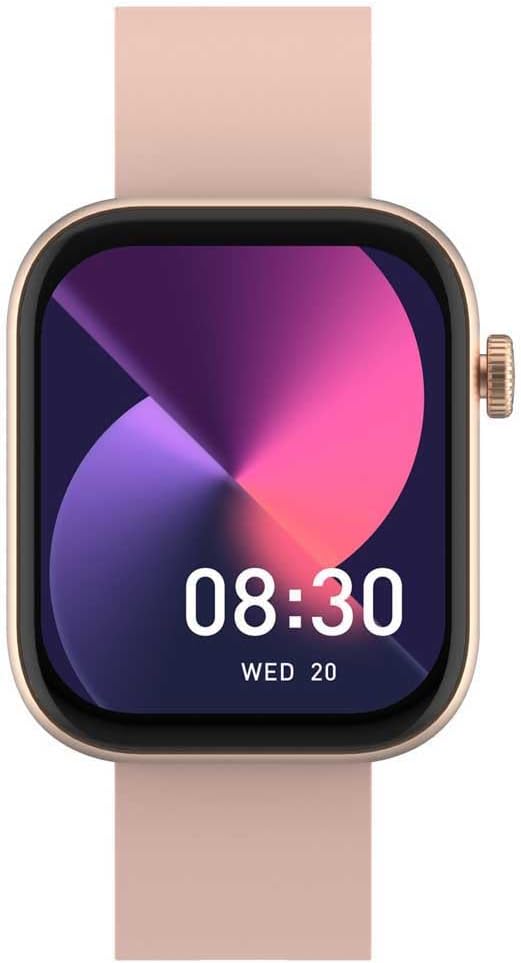
Image: Front view of the Denver SWC-185RO Smartwatch displaying the time (08:30) and date (WED 20) on its AMOLED screen.
5. Setup
5.1. Charging the Smartwatch
Before first use, fully charge your smartwatch. Connect the USB charging cable to the charging contacts on the back of the watch and plug the other end into a USB power adapter (not included) or a computer's USB port.
- Ensure the charging contacts are clean and dry.
- A full charge typically takes approximately 2-3 hours.
- The battery indicator on the screen will show charging progress.
5.2. Pairing with Your Smartphone
To unlock the full features of your Denver SWC-185RO, you need to pair it with your smartphone via Bluetooth using the dedicated app.
- Download the App: Search for the official "Denver Smart Home" or "Denver Smartwatch" app (refer to the packaging or quick start guide for the exact app name) on the Apple App Store or Google Play Store.
- Enable Bluetooth: Ensure Bluetooth is enabled on your smartphone.
- Open the App: Launch the app and follow the on-screen instructions to create an account or log in.
- Add Device: In the app, navigate to the "Add Device" or "Pair Device" section.
- Select Your Watch: The app will scan for nearby devices. Select "SWC-185RO" from the list.
- Confirm Pairing: A pairing request will appear on both your phone and the smartwatch. Confirm the pairing on both devices.
- Complete Setup: Once paired, the app will guide you through initial settings, such as personal profile, notification preferences, and watch face customization.
6. Operating Your Smartwatch
6.1. Basic Navigation
- Touchscreen: Swipe up, down, left, or right to navigate through menus and screens. Tap to select an item.
- Side Button/Crown:
- Press once from any screen to return to the home watch face.
- Press and hold to power on/off the device.
- Rotate (if applicable) to scroll through lists or adjust settings.
6.2. Health and Fitness Tracking
The SWC-185RO offers various health and fitness monitoring features:
- Heart Rate Monitor: Continuously tracks your heart rate. Access the heart rate widget or app on the watch to view real-time data.
- Blood Pressure Monitor: Measures your blood pressure. For accurate readings, ensure the watch is worn correctly and remain still during measurement.
- Blood Oxygen Sensor (SpO2): Estimates the oxygen saturation level in your blood.
- Activity Tracker: Records steps taken, distance covered, and calories burned throughout the day.
- Sleep Quality Monitor: Analyzes your sleep patterns, including deep sleep, light sleep, and awake times.
- Sports Modes: Select from various sports modes (e.g., running, walking, cycling) to track specific workouts with detailed metrics.

Image: The Denver SWC-185RO Smartwatch screen showing activity data including elapsed time, distance (05.33 km), and heart rate (160 bpm).

Image: The Denver SWC-185RO Smartwatch screen showing daily activity progress with colored rings for steps (08952), calories (0460), and distance (03.56).
6.3. Smart Features
- Notifications: Receive call, SMS, and app notifications directly on your wrist. Manage notification settings via the paired app.
- Caller ID: See who is calling without taking out your phone.
- Virtual Assistant: Supports Google Assistant and Apple Siri for voice commands (requires connection to smartphone).
- Bluetooth Calls: Make and receive calls directly from the smartwatch (requires Bluetooth connection to smartphone).
- Music Control: Control music playback on your smartphone from the watch.
7. Maintenance
- Cleaning: Regularly clean your smartwatch and strap with a soft, lint-free cloth. If necessary, dampen the cloth slightly with water. Do not use soap or other cleaning agents.
- Drying: Ensure the watch is completely dry before charging or prolonged storage.
- Strap Care: If the strap is removable, clean it separately. Avoid prolonged exposure to direct sunlight or extreme temperatures to prevent material degradation.
- Storage: When not in use for extended periods, store the smartwatch in a cool, dry place. It is recommended to charge the battery to about 50% before storing to prolong battery life.
8. Troubleshooting
| Problem | Possible Solution |
|---|---|
| Watch does not turn on. | Ensure the watch is fully charged. Connect it to the charger for at least 30 minutes. |
| Cannot pair with smartphone. |
|
| Health metrics (HR, BP, SpO2) are inaccurate. |
|
| Notifications are not received. |
|
9. Specifications
| Feature | Detail |
|---|---|
| Model Name | SWC-185RO |
| Display Type | AMOLED |
| Screen Size | 4.7 cm (1.85 inches) |
| Display Resolution | 390 x 450 Pixels |
| Touchscreen | Yes |
| Connectivity | Bluetooth |
| Battery Capacity | 300 mAh |
| Battery Life (Usage) | Up to 6 days (144 hours) |
| Standby Time | Up to 480 hours |
| Charging Time | Approx. 2-3 hours |
| Case Material | Acrylonitrile Butadiene Styrene (ABS), Aluminum |
| Strap Color | Pink |
| Shape | Rectangular |
| Water Resistance Rating | IP67 |
| Built-in Microphone | Yes |
| Built-in Speaker | Yes |
| Health Sensors | Heart Rate Monitor, Blood Pressure Monitor, Blood Oxygen Sensor, Activity Detector, Sleep Quality Monitor |
| Virtual Assistant Support | Google Assistant, Apple Siri |
| Dimensions (Width x Thickness) | 40 mm x 1 cm |
| Total Length (Strap + Watch) | 24.7 cm |
10. Warranty and Support
Denver products are covered by a limited warranty. For detailed warranty terms and conditions, please refer to the warranty card included with your product or visit the official Denver website.
For technical support, troubleshooting assistance, or service inquiries, please contact Denver customer support through their official website or the contact information provided in your product documentation.
Important: Keep your purchase receipt as proof of purchase for warranty claims.
You can visit the Denver store on Amazon for more information: Denver Store