
1. Introduction
This manual provides essential information for the Tivora Pressure Switch, designed as a direct replacement for specific Komatsu Wheel Loader models. A pressure switch is a device that operates an electrical contact when a certain set fluid pressure has been reached on its input. It is crucial for monitoring system pressures and ensuring the safe and efficient operation of heavy machinery.
2. Compatibility
The Tivora Pressure Switch (Part Numbers: 421-43-32912, 421-43-32911) is compatible with the following Komatsu equipment:
- Komatsu Wheel Loaders: WA150-6, WA150PZ-6, WA200-6, WA200PZ-6, WA250-6, WA250PZ-6, WA320-6, WA320PZ-6, WA380-6, WA430-6, WA470-6, WA480-6, WA500-6, WA500-6R, WA600-6, WA600-6R, WA800-3E0, WA900-3E0, WD600-6.
- Other Komatsu Models: A200-6, GD555-5, GD655-5, GD675-5, HD605-7E0, HD785-7.
Please verify the part number and compatibility with your specific equipment model before installation.
3. Features and Quality
This pressure switch is engineered to meet or exceed original equipment (OE) standards, ensuring reliable performance and durability. Key features include:
- High-Quality Construction: Manufactured from robust materials for optimum corrosion resistance and extended longevity in demanding operational environments.
- Precision Engineering: Designed for accurate pressure sensing and consistent electrical contact operation.
- Direct Replacement: Specifically designed to fit and function like the original Komatsu part, simplifying installation.
- Durable Materials: Features a metal contact material for reliable signal transmission.
4. Package Contents
Each package contains:
- 1 x Tivora Pressure Switch (Model: MKD146)
5. Setup and Installation
Installation of the pressure switch should be performed by a qualified technician. Incorrect installation can lead to system malfunction or damage.
- Safety First: Ensure the equipment is powered off and depressurized before beginning any work. Disconnect the battery to prevent accidental startup.
- Locate the Old Switch: Identify the existing pressure switch on your Komatsu equipment. Refer to your equipment's service manual for the exact location.
- Disconnect and Remove: Carefully disconnect the electrical connector and then unscrew the old pressure switch from its mounting point. Be prepared for any residual fluid leakage.
- Install New Switch: Apply a suitable thread sealant (if required by your equipment's manual) to the threads of the new Tivora pressure switch. Screw the new switch into place, tightening it to the manufacturer's specified torque.
- Connect Electrical: Reconnect the electrical connector to the new pressure switch, ensuring a secure connection.
- Test System: Reconnect the battery and carefully repressurize the system. Check for leaks and verify the proper operation of the pressure switch according to your equipment's diagnostic procedures.

Figure 1: Front view of the Tivora Pressure Switch, showing the sensor body, cable, and electrical connector.
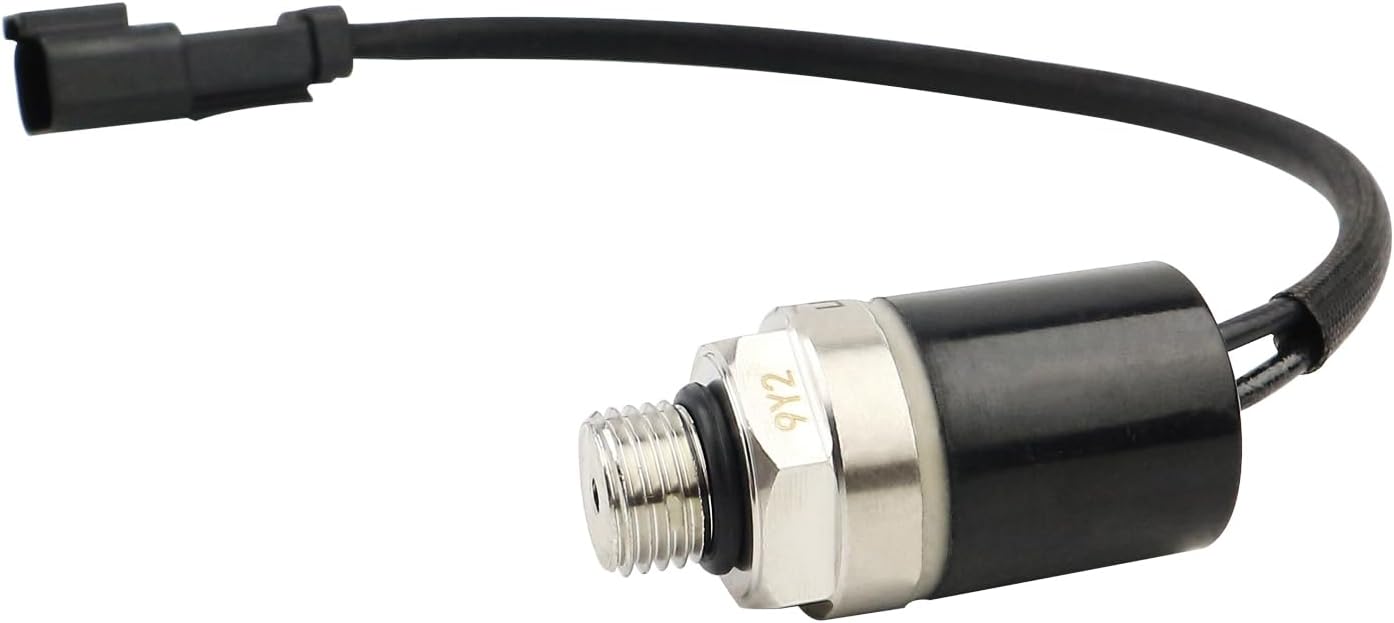
Figure 2: Angled view of the pressure switch, highlighting the threaded sensor end for secure installation.
6. Operation
The Tivora Pressure Switch operates automatically to monitor the pressure within the specified system (e.g., hydraulic, air, or oil system) of your Komatsu equipment. When the pressure reaches a predefined threshold, the switch's internal contacts will change state (e.g., normally open to closed, or vice versa), sending an electrical signal to the equipment's control unit. This signal can trigger various functions, such as activating a warning light, shutting down a system, or engaging a pump.

Figure 3: Top-down view of the pressure switch, showing the sensor tip and part markings.
7. Maintenance
The Tivora Pressure Switch is designed for minimal maintenance. However, regular inspection as part of your equipment's routine maintenance schedule is recommended:
- Visual Inspection: Periodically check the switch and its wiring for any signs of physical damage, corrosion, or loose connections.
- Cleanliness: Ensure the area around the switch is free from excessive dirt, debris, or fluid buildup that could impede its function or cause corrosion.
- Connection Integrity: Verify that the electrical connector remains securely attached and free of contaminants.

Figure 4: View of the pressure switch, highlighting the robust electrical connector and the sensor end.
8. Troubleshooting
If you suspect an issue with your pressure switch, consider the following general troubleshooting steps:
- Check Connections: Ensure all electrical connections to the switch are clean, tight, and free from corrosion.
- Verify System Pressure: Confirm that the system pressure is within the expected operating range for the switch.
- Consult Equipment Manual: Refer to your Komatsu equipment's service manual for specific diagnostic procedures related to pressure switch failures.
- Professional Diagnosis: If the issue persists, it is recommended to have the system diagnosed by a certified technician.

Figure 5: Close-up view detailing the electrical connector and the threaded sensor end of the pressure switch.
9. Specifications
| Specification | Detail |
|---|---|
| Model Number | MKD146 |
| Brand | Tivora |
| Operation Mode | Automatic |
| Contact Type | Normally Open |
| Connector Type | Molex |
| Terminal Type | Screw |
| Circuit Type | 1-way |
| Mounting Type | Panel Mount, Surface Mount |
| Actuator Type | Push Button |
| Contact Material | Metal |
| Control Method | Touch |
| Color | Black |
| Unit Count | 1.0 Count |
| Item Weight | 4.5 ounces |
| Package Dimensions | 3.94 x 3.94 x 1.57 inches |
| Replaces Part Numbers | 421-43-32912, 421-43-32911 |
10. Warranty and Support
For information regarding warranty coverage or technical support for your Tivora Pressure Switch, please refer to the product packaging or contact Tivora customer service directly. Keep your purchase receipt as proof of purchase for any warranty claims.