
1. Product Overview
The HOT KUP Heated Coffee Mug is a 14oz temperature-controlled smart cup designed for maintaining your beverage at an ideal temperature, from icy cold to boiling hot. It features double-wall stainless steel construction, vacuum insulation, and a non-stick coating for durability and ease of cleaning. This bundle includes a portable battery for on-the-go use.

Image 1.1: The HOT KUP Heated Coffee Mug shown with its charging base and the portable battery pack.
1.1 Key Features
- Total Temperature Control: Adjust beverage temperature from 0°C (32°F) to 100°C (212°F) via touch buttons or smartphone app.
- Durable Construction: 14oz capacity, double-wall stainless steel, vacuum insulation, and non-stick coating.
- Versatile Power Options: Use with the included AC adapter for home/work or the portable battery for mobility.
- Multi-functional: Capable of heating, brewing, warming milk, and purifying water.
- Portable Battery: 11.1V 4500mAh battery with LED power indicators and a secure twist-lock mechanism.
- Safety Features: Includes charge and discharge protection circuits and a safety cap for the AC charger port.
1.2 Package Contents
- 1 x HOT KUP 14oz Heated Coffee Mug
- 1 x Mug Cap
- 1 x AC Charging Base and Cord
- 1 x AC Adapter
- 1 x Portable Battery Pack

Image 1.2: All components included in the HOT KUP package.
2. Initial Setup
2.1 Charging the Portable Battery
- Connect the AC adapter to the charging base.
- Place the portable battery pack onto the charging base.
- Ensure the battery pack is securely seated. The LED indicators on the battery pack will illuminate to show charging status.
- Charge until all LED indicators are lit, indicating a full charge.

Image 2.1: The portable battery pack showing its LED power level indicators.
2.2 Attaching the Portable Battery to the Mug
- Align the tabs on the bottom of the HOT KUP mug with the slots on the top of the portable battery pack.
- Gently press the mug onto the battery pack.
- Twist the mug clockwise until it locks securely into place. This twist-lock feature ensures a stable connection for portable use.

Image 2.2: The HOT KUP mug securely attached to its portable battery base.
3. Operating Instructions
3.1 Basic Operation (Touch Buttons)
- Ensure the mug is connected to either the AC charging base or the portable battery pack.
- Fill the mug with your desired beverage. Do not overfill.
- Use the electronic touch buttons located at the base of the mug to adjust the temperature. Press the '+' or '-' buttons to increase or decrease the target temperature.
- The LED display will show the current temperature and the target temperature.

Image 3.1: The HOT KUP mug displaying temperature and showing the electronic touch buttons.
3.2 Smartphone App Control
The HOT KUP can be controlled via a dedicated smartphone application, offering enhanced temperature control and preset options.
- Download the HOT KUP app from your device's app store.
- Open the app and follow the on-screen instructions to sign in or skip for immediate use.
- Choose your device from the list of available HOT KUPs.
- Select your desired temperature or choose from various preset options for coffee, tea, hot chocolate, or water purification.
- Enable notifications for temperature alerts or other relevant information.
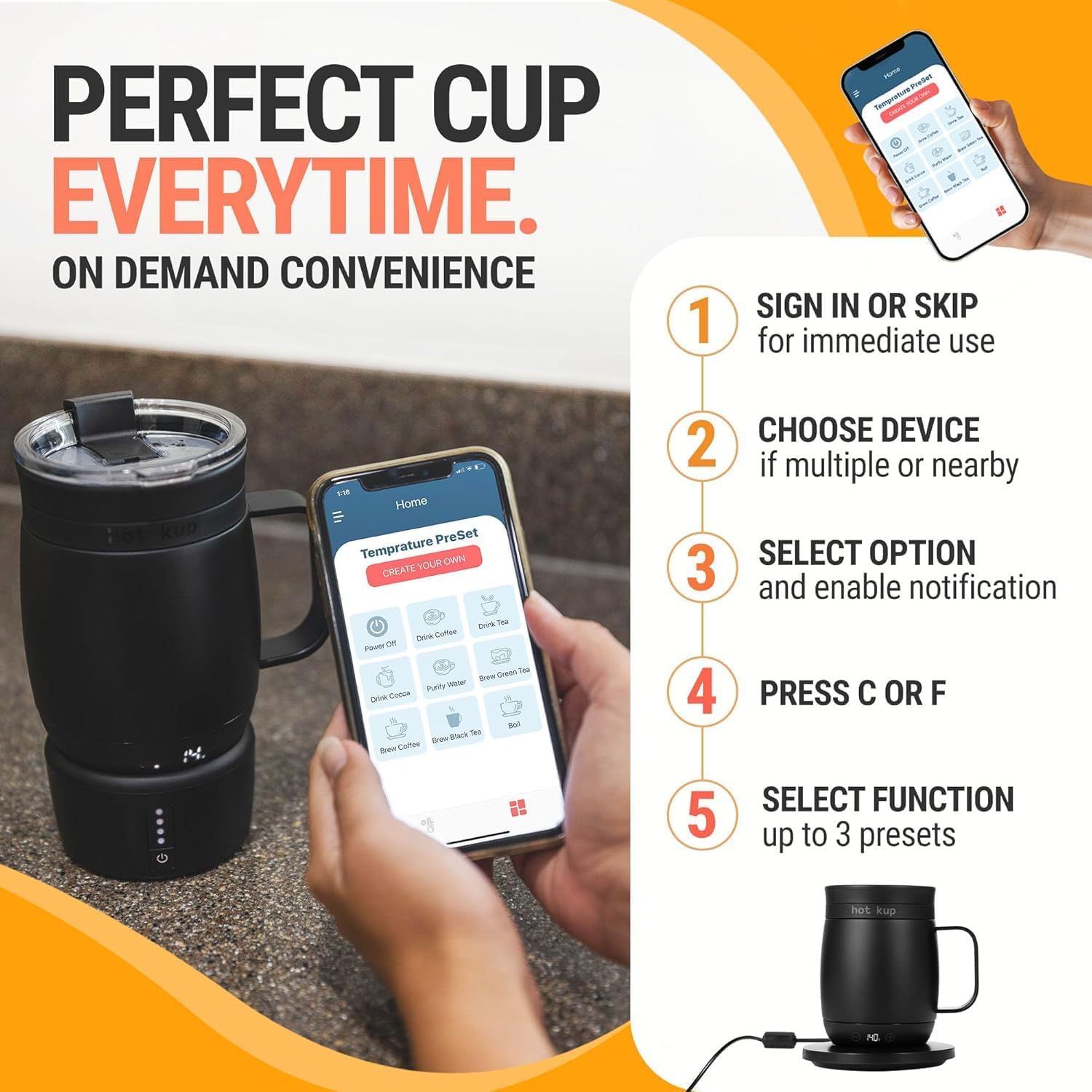
Image 3.2: The HOT KUP smartphone application showing device selection and function options.

Image 3.3: The HOT KUP app displaying various temperature presets for different beverages.
3.3 Using for Specific Functions
- Heating Beverages: Set your desired temperature using the touch buttons or app. The mug will actively heat and maintain the liquid at that temperature.
- Warming Milk: The non-stick coating makes it suitable for warming milk without scorching. Monitor temperature closely, especially for baby milk.
- Water Purification: The mug can boil water up to 100°C (212°F), which can be used for basic water purification.
4. Care and Maintenance
4.1 Cleaning the Mug
- Always ensure the mug is unplugged from the AC base or detached from the portable battery before cleaning.
- Allow the mug to cool completely before washing.
- The interior of the mug, with its non-stick coating, can be cleaned with warm soapy water and a soft sponge.
- Do not submerge the entire mug in water, especially the base where the electronic components are located. Wipe the exterior with a damp cloth.
- Do not use abrasive cleaners or scouring pads, as these can damage the non-stick coating and exterior finish.
- Ensure the mug is completely dry before reattaching to any power source.
4.2 Cleaning the Charging Base and Battery Pack
- Wipe the charging base and portable battery pack with a dry or slightly damp cloth.
- Do not submerge these components in water.
- Ensure all ports are dry before connecting to power.
5. Troubleshooting
- Mug is not heating:
- Ensure the mug is properly connected to the AC charging base or the portable battery pack.
- Verify that the AC adapter is plugged into a working power outlet.
- Check if the portable battery pack is charged. Refer to Section 2.1 for charging instructions.
- Confirm that a target temperature has been set on the mug or via the app.
- Portable battery pack does not stay attached:
- Ensure the mug is twisted clockwise until it locks securely onto the battery pack. A firm twist is required to engage the twist-lock mechanism.
- Inspect the tabs and slots for any obstructions or damage.
- Temperature setting changes unexpectedly:
- This may indicate a potential issue with the touch controls or app. Try resetting the mug by disconnecting and reconnecting its power source.
- Ensure the app is updated to the latest version and there are no conflicting commands from multiple devices.
- Mug stopped working after getting wet:
- Electronic components at the base of the mug are sensitive to moisture. If the base gets wet, immediately disconnect power and allow it to dry completely for an extended period (24-48 hours) before attempting to use it again.
- Avoid submerging the mug's base in water during cleaning.
- App is not connecting to the mug:
- Ensure Bluetooth is enabled on your smartphone.
- Make sure the mug is powered on and within range of your smartphone.
- Restart both the app and the mug (by disconnecting and reconnecting power).
6. Technical Specifications
| Specification | Detail |
|---|---|
| Model Number | HK Battery Bundle |
| Capacity | 14 oz (approximately 400 ml) |
| Material | Stainless Steel |
| Upper Temperature Rating | 212°F (100°C) |
| Voltage | 11.1 Volts (Battery) |
| Item Weight | 3 pounds |
| Product Dimensions | 5 x 5 x 7 inches |
| Power Source | Battery Powered / AC Adapter |
| GTIN | 00860012285877 |