Introduction
The Victron Energy Orion-Tr 12/48-8A (380W) Isolated DC-DC Converter is designed to provide a stable and isolated DC output from a DC input source. This converter is suitable for various applications requiring a reliable power conversion solution, such as in vehicles, boats, or off-grid systems. It features remote on/off capabilities, short-circuit protection, and the ability to be paralleled for increased output current.
Safety Instructions
- Read all instructions: Before installation and operation, carefully read and understand all instructions in this manual.
- Qualified personnel: Installation and maintenance should only be performed by qualified personnel familiar with electrical systems and safety procedures.
- Ventilation: Ensure adequate ventilation around the converter to prevent overheating. Do not block ventilation openings.
- Correct voltage: Verify that the input and output voltages match the specifications of your system. Incorrect voltage can damage the device and connected equipment.
- Wiring: Use appropriate wire gauges for all connections to prevent overheating and ensure efficient operation. Secure all connections tightly.
- Isolation: This is an isolated converter. Do not connect the input and output grounds unless specifically required by your system design and confirmed safe.
- Short circuit protection: While the unit is short-circuit proof, always exercise caution to avoid short circuits during installation and operation.
- Environmental conditions: Do not expose the converter to water, excessive moisture, or extreme temperatures outside its specified operating range.
Product Overview
The Orion-Tr 12/48-8A (380W) converter is a robust device designed for efficient DC-DC power conversion. Key features include:
- Remote On/Off: Eliminates the need for a high-current switch in the input wiring. Can be operated with a low-power switch or an engine run/stop switch.
- Short Circuit Proof: All models are protected against short circuits.
- Parallel Connection: Multiple units can be connected in parallel to increase the total output current.
- IP43 Protection: Provides protection against solid objects larger than 1mm and water spray when installed with screw terminals oriented downwards.
- Screw Terminals: Designed for easy installation without special tools.
- Input Fuse: Integrated input fuse on 12V and 24V input models for added protection.
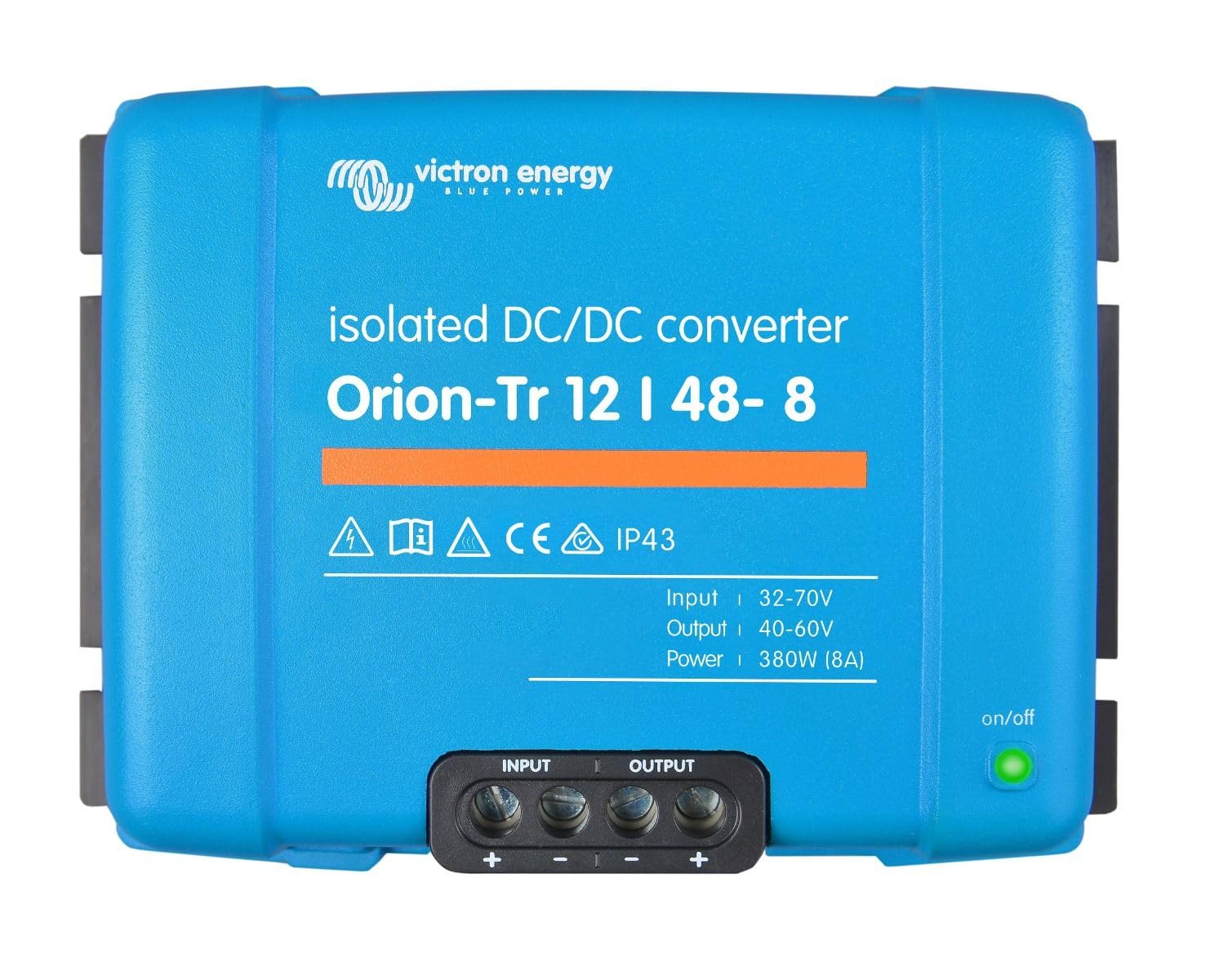
Image: Victron Energy Orion-Tr 12/48-8A (380W) Isolated DC-DC Converter. This image shows the compact design of the converter with its screw terminals visible for input and output connections.
Setup and Installation
Follow these general guidelines for installing your Victron Energy Orion-Tr converter:
- Mounting: Choose a dry, well-ventilated location for mounting the converter. For IP43 protection, ensure the screw terminals are oriented downwards. Use appropriate screws for secure mounting.
- Wiring Connections:
- Input Wiring: Connect the positive (+) and negative (-) terminals from your 12V DC input source to the corresponding input screw terminals on the converter. Ensure correct polarity.
- Output Wiring: Connect the positive (+) and negative (-) terminals from the converter's 48V DC output to your load. Maintain correct polarity.
- Remote On/Off: Connect a low-power switch or an engine run/stop switch to the remote on/off terminals as per the detailed wiring diagram in the full product manual (not provided here). This feature allows for convenient control without high-current switching.
- Parallel Operation (Optional): If increasing output current is required, multiple Orion-Tr units can be connected in parallel. Ensure all units are of the same model and follow the specific wiring instructions for parallel operation provided in the comprehensive product documentation.
- Input Fuse: The 12V input models include an internal input fuse. Verify its integrity before initial operation.
- Final Check: Before applying power, double-check all wiring connections for tightness and correct polarity. Ensure no loose strands of wire could cause a short circuit.
Operating Instructions
Once the converter is correctly installed and all connections are secure:
- Power On: Apply power to the 12V DC input source.
- Activate Converter: If using the remote on/off feature, activate the connected switch to turn on the converter. If not using the remote on/off, the converter will typically activate upon input power application.
- Monitor Output: Verify that the 48V DC output is present and stable using a multimeter.
- Connect Load: Connect your 48V DC load to the converter's output.
- Power Off: To turn off the converter, deactivate the remote on/off switch or disconnect the 12V DC input power.
Maintenance
The Victron Energy Orion-Tr converter is designed for minimal maintenance. However, periodic checks are recommended to ensure optimal performance and longevity:
- Visual Inspection: Regularly inspect the converter for any signs of physical damage, loose connections, or corrosion.
- Cleanliness: Keep the converter clean and free from dust and debris. Ensure ventilation openings are unobstructed. Use a dry, soft cloth for cleaning.
- Connection Integrity: Periodically check all screw terminals to ensure they remain tight and secure.
- Environmental Conditions: Confirm that the operating environment remains within the specified temperature and humidity ranges.
Troubleshooting
If you encounter issues with your Orion-Tr converter, consider the following common troubleshooting steps:
- No Output Voltage:
- Check the input voltage to ensure it is within the specified range (12V).
- Verify that the remote on/off switch is in the 'on' position, if applicable.
- Inspect all input and output wiring for loose connections or breaks.
- Check the internal input fuse (on 12V models) for continuity.
- Low Output Voltage:
- Ensure the input voltage is stable and not dropping under load.
- Check for excessive load on the output. The converter has a maximum output of 8A (380W).
- Verify wire gauges are sufficient for the current draw to prevent voltage drop.
- Overheating:
- Ensure adequate ventilation around the unit. Clear any obstructions.
- Reduce the load if it consistently operates near its maximum capacity in high ambient temperatures.
- Unit Not Turning On/Off with Remote Switch:
- Check the wiring of the remote on/off switch for correct connection and functionality.
If problems persist after performing these checks, contact Victron Energy customer support or a qualified technician.
Specifications
| Specification | Value |
|---|---|
| Brand | Victron Energy |
| Model Number | ORI124838110 |
| Input Voltage | 12V DC (Nominal) |
| Output Voltage | 48V DC |
| Current Rating | 8 Amps |
| Power Output | 380W |
| Isolation | Isolated |
| Mounting Type | Screw Mount |
| IP Protection | IP43 (when installed with terminals downwards) |
| Item Weight | 14.4 ounces |
| Package Dimensions | 1.1 x 0.9 x 0.7 inches |
| Specification Met | CE |
Warranty and Support
For detailed warranty information and technical support, please refer to the official Victron Energy website or contact their customer service directly. Keep your purchase receipt as proof of purchase for any warranty claims.
Victron Energy provides comprehensive support resources, including detailed manuals, software, and a network of distributors and service partners. For the most up-to-date information, visit www.victronenergy.com.


