
Relybo Relybo-A15-UK
Relybo A15 LED Torch User Manual
Model: Relybo-A15-UK
Introduction
This manual provides comprehensive instructions for the safe and effective use of your Relybo A15 LED Super Bright Rechargeable Flashlight. Please read this manual thoroughly before operating the device and retain it for future reference.
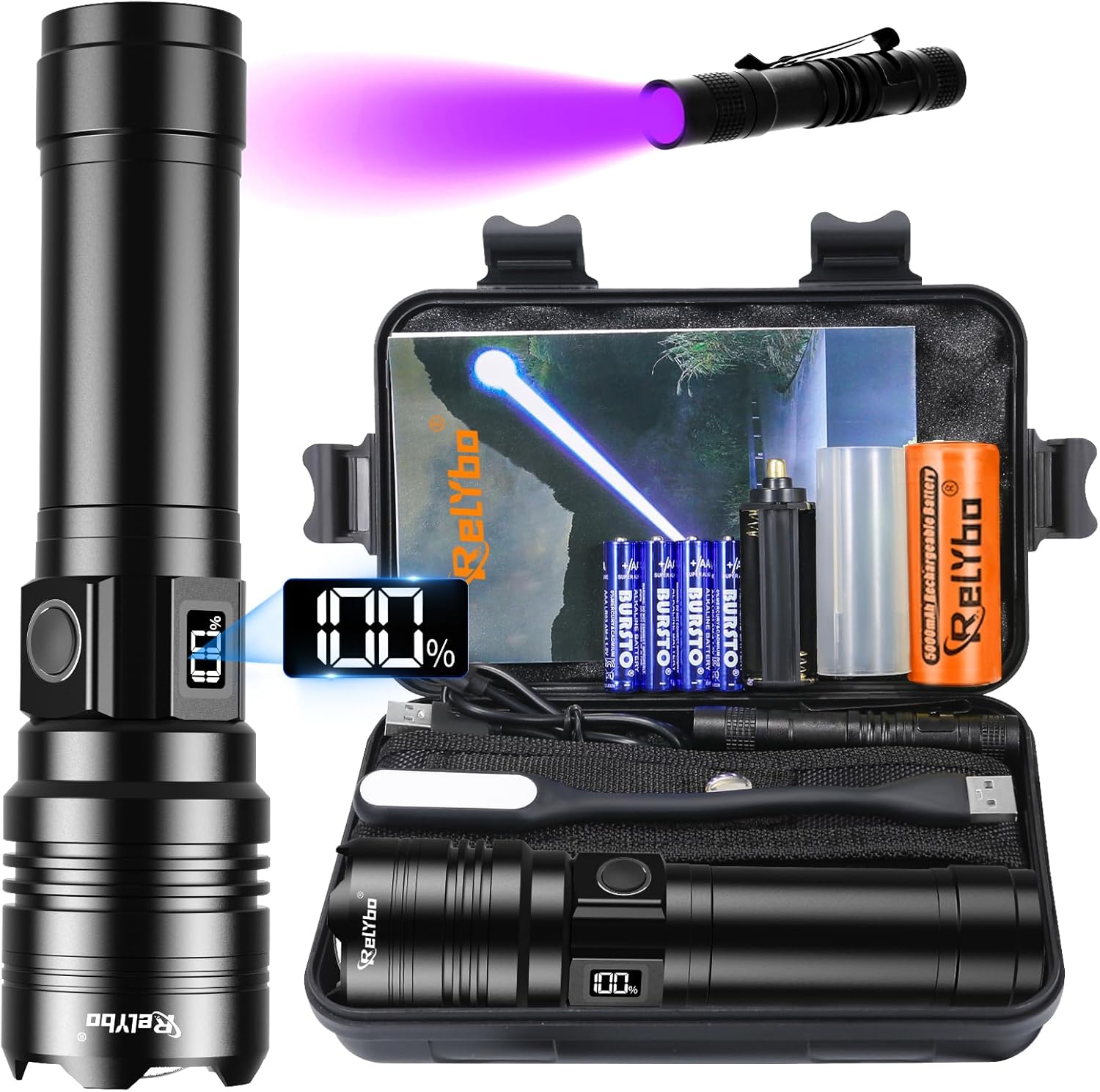
Image: The Relybo A15 LED Torch, showcasing its sleek design and the comprehensive kit including the mini UV torch, USB light, batteries, and charging cable, all neatly organized in a durable gift case.
What's in the Box
Verify that all components are present upon unboxing:
- 1 x Relybo A15 LED Torch (Rechargeable)
- 1 x Mini UV Torch
- 1 x USB Light
- 1 x Rechargeable Battery
- 1 x USB-C Charging Cable
- 4 x AAA Batteries
- 1 x Torch Holster
- 1 x Lanyard
- 1 x Battery Holder & Battery Tube
- 1 x Gift Case
- 1 x User Manual (this document)

Image: A visual representation of all items included in the Relybo A15 LED Torch kit, laid out clearly for identification.
Setup
Battery Installation
The Relybo A15 torch uses one rechargeable lithium-ion battery. It also supports 4 AAA batteries using the provided battery holder and tube as an alternative power source.
- Unscrew the rear cover of the torch by turning it counter-clockwise.
- Insert the rechargeable battery with the positive (+) end facing towards the head of the torch. If using AAA batteries, insert them into the battery holder, then place the holder into the torch with the positive (+) end facing the torch head.
- Screw the rear cover back on clockwise until securely tightened.

Image: A step-by-step guide illustrating how to open the rear cover, distinguish battery polarity, insert the battery, and tighten the cover for proper battery installation.
Charging the Torch
The torch features a USB-C charging port for convenient recharging.
- Locate the USB-C port on the side of the torch.
- Connect the provided USB-C charging cable to the torch and plug the other end into a compatible USB power source (e.g., wall adapter, car charger, power bank, computer USB port).
- The side LCD power display will indicate charging status.

Image: The Relybo A15 LED Torch connected to a USB-C power source, demonstrating its fast charging capability and the various compatible charging methods.
Operating Instructions
Power On/Off and Mode Selection
The torch features 5 lighting modes: High, Medium, Low, Strobe, and SOS.
- To Turn On/Change Mode: Briefly press the power button. Each press cycles through the modes (High → Medium → Low → Strobe → SOS).
- To Turn Off: Press and hold the power button for 3 seconds in any mode.

Image: Visual representation of the five distinct lighting modes (High, Medium, Low, Strobe, SOS) available on the Relybo A15 LED Torch, demonstrating their appearance in different environments.
Zoom Function
Adjust the beam from a wide floodlight to a focused spotlight by sliding the head of the torch up and down.

Image: Illustration of the torch's adjustable focus, showing both a wide floodlight beam for illuminating large areas and a concentrated spotlight for long-distance illumination.
Side LCD Power Display
The integrated LCD screen on the side of the torch provides a real-time display of the battery level, allowing you to monitor power status easily.

Image: Close-up view of the Relybo A15 LED Torch's side LCD power display, clearly showing the battery percentage for easy monitoring.
USB Output (Power Bank Function)
In emergency situations, the torch can be used to charge your mobile phone or other small electronic devices via its USB output port.

Image: The Relybo A15 LED Torch connected to a smartphone via its USB output, demonstrating its capability to function as an emergency power bank.
Mini UV Torch and USB LED Light
The included mini UV torch is useful for detecting pet urine stains, checking currency authenticity, and verifying documents. The flexible USB LED light provides soft illumination and can be powered by any USB port, ideal for reading or focused tasks.

Image: A composite image showcasing the mini UV torch's applications (document verification, counterfeit money detection, urine stain checking) and the 360° bendable USB light's flexibility and soft illumination.
Maintenance
Cleaning
Wipe the torch with a soft, damp cloth to remove dirt or debris. Do not use abrasive cleaners or solvents.
Storage
Store the torch in a cool, dry place away from direct sunlight and extreme temperatures. If storing for extended periods, remove the battery to prevent leakage.
Water Resistance
The torch is IPX6 waterproof, meaning it is protected against powerful water jets. It is suitable for use in rain and snow but should not be submerged in water.

Image: The Relybo A15 LED Torch being splashed with water, illustrating its IPX6 waterproof rating and resistance to harsh environments.
Cooling System
The torch incorporates a high-performance cooling system designed to dissipate heat efficiently, extending the lifespan of the LED chip and internal components.

Image: An illustration highlighting the high-performance cooling fins and airflow paths on the Relybo A15 LED Torch, designed to extend its operational life.
Troubleshooting
| Problem | Possible Cause | Solution |
|---|---|---|
| Torch does not turn on. | Battery is low or depleted. Battery inserted incorrectly. Loose connections. | Charge the battery. Ensure battery is inserted with correct polarity (+/-). Tighten the rear cap and ensure battery tube is secure. |
| Light is dim or flickers. | Low battery. Dirty contacts. | Recharge the battery. Clean battery contacts and torch terminals with a clean, dry cloth. |
| Torch does not charge. | Charging cable or adapter faulty. USB-C port obstructed. | Try a different USB-C cable and power adapter. Check the USB-C port for debris and clean if necessary. |
| Cannot change lighting modes. | Button malfunction. | Ensure the button is pressed briefly and firmly. If problem persists, contact customer support. |
Specifications
| Feature | Detail |
|---|---|
| Model Number | Relybo-A15-UK |
| Light Source | XHQ99 LED Chip |
| Luminous Flux | Up to 500,000 Lumens |
| Beam Distance | Up to 5000 ft (approx. 1524 m) |
| Illumination Area | Up to 2880 sq ft (approx. 267 sq m) |
| Lighting Modes | High, Medium, Low, Strobe, SOS |
| Battery Type | 1 x Rechargeable Lithium Ion (included), 4 x AAA (included, with holder) |
| Charging Port | USB-C |
| Run Time (Low Mode) | Up to 12 hours |
| Waterproof Rating | IPX6 |
| Material | Aircraft Grade Aluminium (Anodised Hardened Finish) |
| Dimensions | 16.8 x 3.3 x 4.2 cm |
| Weight | 200 g |
Warranty and Support
Relybo provides customer service for its products. If you encounter any problems with your Relybo A15 LED Torch, please contact us via Amazon email. We are committed to providing 7*24 hours customer service.
For more information or to register your product, please visit the official Relybo store on Amazon: Relybo Store
Ask a question about this manual
Ask about setup, troubleshooting, compatibility, parts, safety, or missing instructions. Manuals+ will review the question and use this page’s manual context to help answer it.