
TJYGO BJ029-WH
TJYGO Small Vanity Desk User Manual
Brand: TJYGO | Model: BJ029-WH
Introduction
This manual provides detailed instructions for the assembly, operation, and maintenance of your TJYGO Small Vanity Desk with Mirror and LED Lights. Please read thoroughly before use to ensure proper functionality and longevity of the product.
Product Features
- Multi-Functional Design: This vanity desk features a flip-up mirror, 3-color LED lights, desktop built-in jewelry storage, a charging station, a cushioned stool, and an acrylic hook.
- Flip-up Makeup Mirror: The integrated mirror makes it easy to apply makeup and access jewelry stored underneath.
- Integrated Charging Station: Equipped with 2 power outlets, USB, and Type-C ports for convenient charging of electronic devices.
- Space-Saving Design: Functions as a dresser, nightstand, and desk, offering great storage space in a compact form.
- Elegant and Stylish: Designed to blend seamlessly with various bedroom or cloakroom decors.

Image: Overview of the vanity desk highlighting its storage cabinet, adjustable jewelry space, wide desktop, storage stool, and drawers.

Image: Illustration showing the versatility of the flip-up mirror, transforming the vanity into a wide tabletop when closed and revealing jewelry storage when opened.
Assembly Instructions
Assembly is required for this vanity desk. Please follow the steps carefully. It is recommended to have two people for assembly to ensure stability and ease of construction.
- Unpack Components: Carefully remove all parts from the packaging. Verify all components against the parts list provided in your product packaging.
- Assemble Base Unit: Begin by constructing the main base frame of the vanity desk. Ensure all screws and fasteners are tightened securely.
- Install Drawers: Insert the drawer slides and assemble the storage drawers, then slide them into their designated compartments.
- Assemble and Position Stool: Put together the cushioned stool and place it within its designated space under the desk.
- Mount Upper Cabinet: Securely attach the upper storage cabinet to the main desk unit, ensuring it is level and stable.
- Install Mirror and LED Lights: Carefully position the flip-up mirror and connect the LED light system according to the wiring instructions.
- Integrate Charging Station: Install the charging station into its designated slot, ensuring all connections are firm.

Image: Product dimensions diagram, illustrating the overall height, width, and depth of the vanity desk and its components, useful for assembly planning and space allocation.
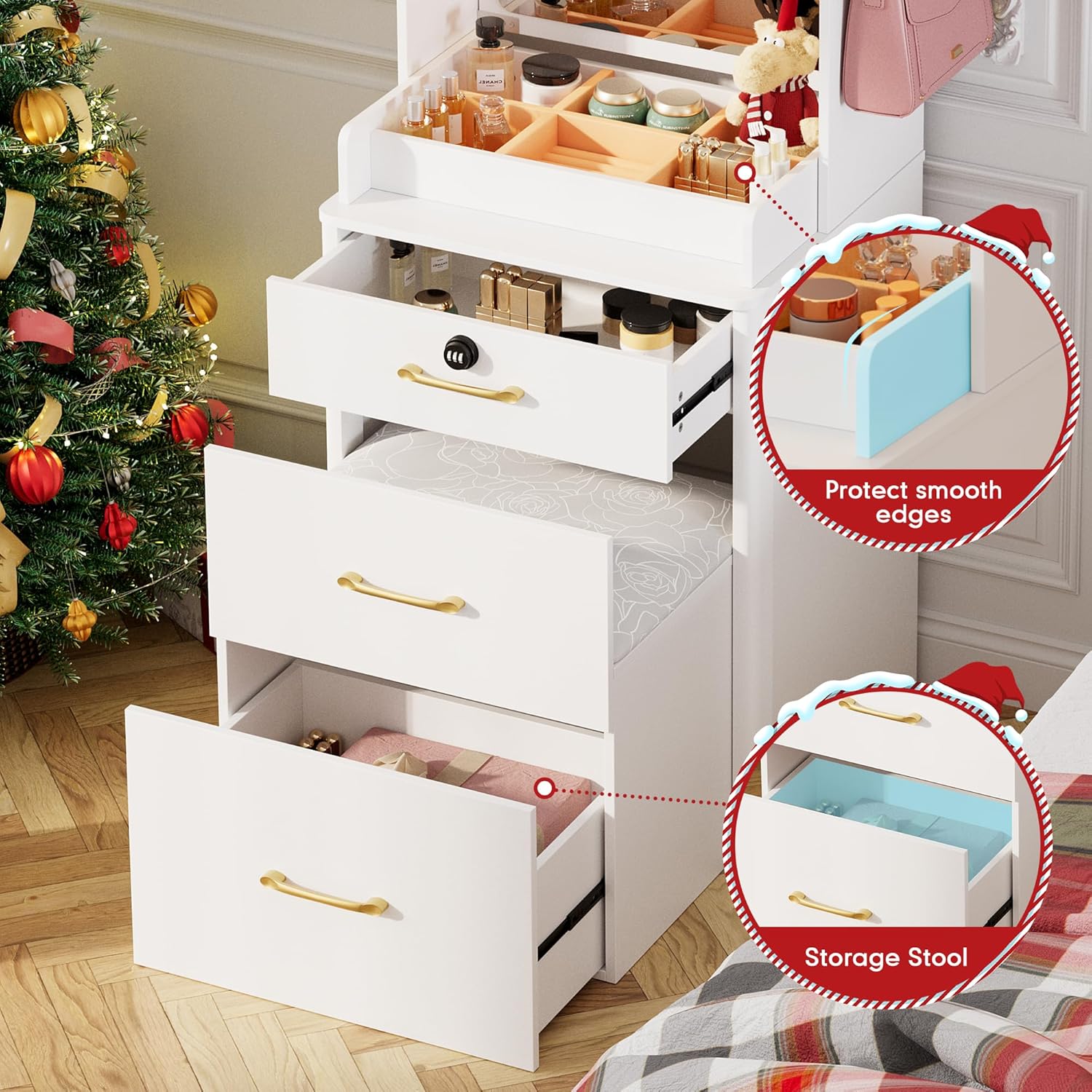
Image: Detailed view of the storage drawers and the integrated, pull-out cushioned stool, demonstrating the space-saving design and accessibility.
Operating Instructions
Using the LED Lights
The vanity desk features 3-color LED lights with adjustable brightness. To operate:
- Power On/Off: Locate the touch sensor (typically near the mirror or on the control panel). Tap once to turn the lights on or off.
- Change Color Temperature: Tap the sensor repeatedly to cycle through the available light settings: Cold White, Warm Yellow, and Cool Blue.
- Adjust Brightness: Press and hold the sensor to gradually dim or brighten the lights. Release when the desired brightness is achieved.

Image: Illustration of the vanity desk's LED lighting system, demonstrating the three available color temperatures (Cold White, Warm Yellow, Cool Blue) and the brightness adjustment feature.
Using the Charging Station
The built-in charging station provides convenient power access for your electronic devices.
- Power Outlets: Plug in your electronic devices into the 2 standard AC power outlets.
- USB/Type-C Ports: Use the dedicated USB and Type-C ports to charge compatible smartphones, tablets, and other gadgets.

Image: Detailed view of the built-in charging station, highlighting its 110V/12A AC outlets and 5V/2A USB & Type-C ports for convenient device charging.
Smart Human Induction (Motion Sensor)
The vanity desk features a smart human induction mode for power saving and convenience.
- When enabled, the lights will automatically turn on when a person approaches within approximately 3 meters.
- The lights will automatically turn off when no motion is detected for a period, conserving energy.
- Refer to the control panel or included quick start guide for activation/deactivation of this feature.

Image: A woman standing near the vanity desk, illustrating the smart human induction feature which automatically activates the lights when motion is detected within 3 meters, promoting power saving.
Maintenance and Care
To ensure the longevity and maintain the aesthetic appeal of your vanity desk, follow these care instructions:
- Cleaning: Wipe all surfaces with a dry, soft cloth. Avoid using abrasive cleaners, harsh chemicals, or excessive moisture, as these can damage the finish of the engineered wood.
- Spills: Immediately wipe up any liquid spills to prevent staining or water damage to the desk material.
- Heat and Moisture: Keep the desk away from direct heat sources, such as radiators or fireplaces, and areas with high humidity to prevent warping or damage.
- Mirror Care: Clean the mirror surface with a standard glass cleaner and a lint-free cloth to avoid streaks and scratches.
Troubleshooting
If you encounter any issues with your vanity desk, please refer to the following common problems and their potential solutions:
| Problem | Possible Cause | Solution |
|---|---|---|
| LED lights not turning on or flickering. | Loose power connection; sensor malfunction; power supply issue. | Check if the power cord is securely plugged into a functional wall outlet. Ensure the touch sensor is clean and unobstructed. If the problem persists, contact customer support. |
| Charging station (outlets/ports) not working. | Desk not powered; device incompatibility; circuit overload. | Verify the vanity desk is plugged in and receiving power. Ensure your device is compatible with the USB/Type-C ports. Avoid plugging in too many high-power devices simultaneously. |
| Drawers are stiff or do not slide smoothly. | Improper assembly of drawer slides; debris in tracks; overloaded drawer. | Review assembly instructions for drawer slides. Clear any dust or debris from the drawer tracks. Reduce the weight or contents within the drawer. |
| Smart human induction not responding. | Sensor obstructed; feature deactivated; insufficient light. | Ensure the sensor area is clear. Check if the smart induction feature is enabled. Some sensors may perform better in adequate lighting conditions. |
Specifications
| Attribute | Detail |
|---|---|
| Brand | TJYGO |
| Model Number | BJ029-WH |
| Product Dimensions (L x W x H) | 17.55 x 18.9 x 69.15 inches (44.58 x 48.01 x 175.64 cm) |
| Item Weight | 85 pounds (38.56 kg) |
| Frame Material | Engineered Wood |
| Color | White |
| Assembly Required | Yes |
| Product Care Instructions | Wipe with Dry Cloth |
| Stool Seat Height | 15.5 Inches (39.37 cm) |
| Charging Station | 2 AC Outlets, USB, Type-C Ports |
| LED Lights | 3 Color Temperatures (Cold White, Warm Yellow, Cool Blue), Adjustable Brightness |
Warranty and Support
Your TJYGO Vanity Desk is designed for quality and durability. For any questions, technical assistance, or support regarding your product, please refer to the following information:
- Returns: This product is eligible for 30-day easy returns from the date of purchase. Please refer to your retailer's return policy for detailed instructions.
- Customer Support: For direct assistance, please visit the TJYGO Store on Amazon or contact the seller directly through your purchase platform.
Ask a question about this manual
Ask about setup, troubleshooting, compatibility, parts, safety, or missing instructions. Manuals+ will review the question and use this page’s manual context to help answer it.