
Introduction
Thank you for choosing the BIAT AWGTD03 Rechargeable Headlamp. This manual provides essential information for the safe and effective use of your new headlamp. Designed for versatility, it features a 230° wide beam, motion sensor technology, and multiple lighting modes, making it ideal for various outdoor and indoor activities.
Safety Information
- Do not look directly into the LED light when it is active, as it may cause temporary vision impairment.
- Keep out of reach of children.
- Do not attempt to disassemble or modify the headlamp, as this may void the warranty and pose a safety risk.
- Avoid exposing the headlamp to extreme temperatures or direct sunlight for prolonged periods.
- Ensure the charging port cover is securely closed when not charging to maintain water resistance.
Package Contents
The BIAT AWGTD03 Rechargeable Headlamp package includes:
- 3 x BIAT Rechargeable Headlamps
- 3 x USB-C Charging Cables
- 12 x Hard Hat Clips

Product Overview & Features
The BIAT AWGTD03 Headlamp is designed for optimal visibility and convenience:
- 230° Wide Beam & Spotlight: Features a broad COB LED strip for wide-area illumination and an XPE LED spotlight for focused lighting.
- Motion Sensor Mode: Allows hands-free operation. Wave your hand within 10 cm of the sensor to switch the light ON/OFF.
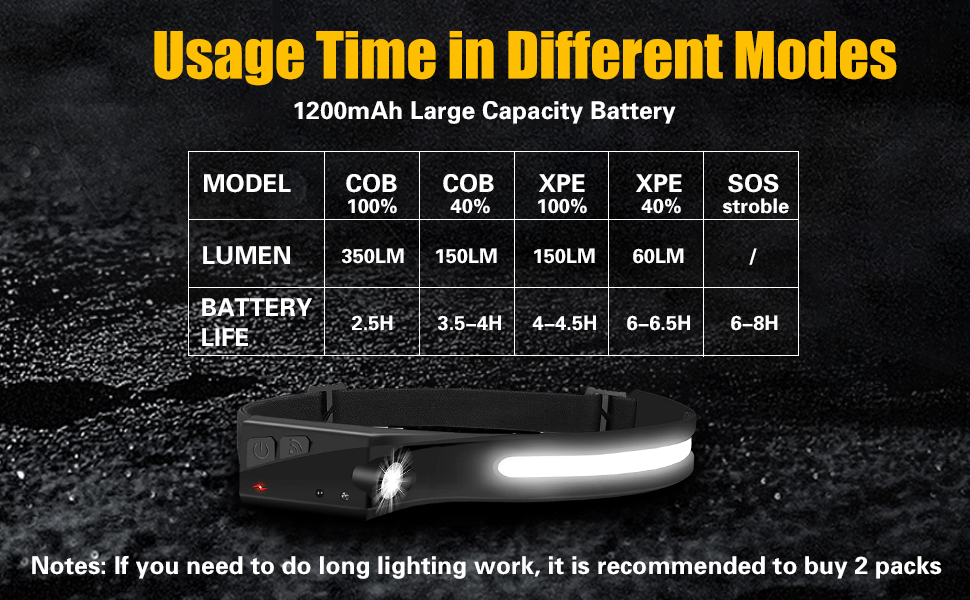
- 6 Light Modes: Easily cycle through COB high, COB low, XPE high, XPE low, Strobe Mode, and Motion Sensor.
- Lightweight & Comfortable: Constructed from soft silicone with an adjustable elastic headband, weighing only 2.47oz for extended wear.
- IPX4 Waterproof: Protects against splashing water from all angles, making it suitable for various weather conditions.


Setup
Charging the Headlamp
Before first use, fully charge the headlamp. The headlamp is equipped with a 1200mAh Lithium Polymer battery.
- Locate the USB-C charging port, usually covered by a silicone flap for water resistance.
- Connect the provided USB-C charging cable to the headlamp's port and the other end to a compatible USB power source (e.g., wall adapter, computer USB port).
- The power indicator light will show charging status (e.g., red for charging, green for fully charged).
- A full charge typically takes approximately 2.5 hours.
- Note: The headlamp does not support USB-C to USB-C PD (Power Delivery) charging.
Adjusting the Headband
The elastic headband is adjustable to ensure a comfortable and secure fit for various head sizes.
- Place the headlamp on your head with the light strip positioned across your forehead.
- Use the adjustable buckle on the elastic strap to tighten or loosen the headband until it feels secure without being too tight.
Using Hard Hat Clips (Optional)
If using with a hard hat, attach the provided clips to the edges of your hard hat to secure the headlamp in place.

Operating Instructions
Power On/Off and Mode Selection
The headlamp features a main power button to control its various lighting modes:
- Press 1: Activates COB light (wide-angle) at high brightness (350 Lumens).
- Press 2: Switches to COB light (wide-angle) at low brightness (150 Lumens).
- Press 3: Activates XPE light (spotlight) at high brightness (150 Lumens).
- Press 4: Switches to XPE light (spotlight) at low brightness (60 Lumens).
- Long Press (3 seconds): Activates Strobe Mode, where both COB and XPE lights flash simultaneously.
- Press again after Strobe: Turns the headlamp off.

Motion Sensor Mode
The motion sensor allows for convenient hands-free operation:
- Locate the motion sensor button (often indicated by a wave icon) on the side of the headlamp.
- Press this button to activate the motion sensor mode. A small indicator light (e.g., red or green) will illuminate to confirm activation.
- Once activated, simply wave your hand in front of the sensor (within approximately 10 cm) to turn the light ON or OFF without needing to press the power button.

Maintenance
- Cleaning: Wipe the headlamp with a soft, damp cloth. Do not use abrasive cleaners or solvents.
- Water Resistance: The headlamp is IPX4 waterproof, meaning it is resistant to splashing water. Do not submerge it in water.
- Storage: Store the headlamp in a cool, dry place away from direct sunlight and extreme temperatures.

Troubleshooting
- Motion Sensor Inconsistency: If the motion sensor is unreliable or activates unexpectedly, ensure there are no obstructions near the sensor. Try manually cycling through the modes using the power button.
- Charging Issues: If the headlamp is not charging, verify that the USB-C cable is securely connected to both the headlamp and the power source. Confirm that the power source is active. Remember, USB-C to USB-C PD charging is not supported.
- Light Not Turning On: Ensure the battery is charged. If fully charged and still not working, try pressing the power button multiple times to cycle through all modes.
Specifications
| Brand | BIAT |
| Model Number | AWGTD03 |
| Special Feature | Rechargeable, Motion Sensor, Wide Beam |
| Color | Black |
| Power Source | Battery Powered |
| Light Source Type | LED (COB & XPE) |
| Material | Silicone |
| Brightness | 350 Lumens (Max) |
| Beam Angle | 230 Degrees |
| Battery Cell Composition | Lithium Polymer |
| Number of Batteries | 3 Lithium Ion batteries (included) |
| Working Time | 2.5 - 8 hours (depending on mode) |
| Water Resistance Level | IPX4 Waterproof |
| Item Weight | 7.47 Ounces |
| Product Dimensions | 1.25"D x 11.57"W x 0.7"H |
Warranty and Support
For warranty information, technical assistance, or any questions regarding your BIAT AWGTD03 Rechargeable Headlamp, please refer to the product packaging or contact BIAT customer service through your retailer or the official BIAT website. Please have your purchase details and model number ready when contacting support.