
Introduction
This manual provides essential instructions for the safe and efficient operation of your Kobb KB220 12V/220V 150 PSI Digital Tire Inflator. Please read this manual thoroughly before first use and retain it for future reference.
The Kobb KB220 is a versatile air compressor designed for inflating various items, including automobile, motorcycle, bicycle tires, sports balls, and other inflatables. It features a powerful 150 PSI / 10.3 Bar inflation capability and dual power input (12V DC for vehicles and 220V AC for household outlets).
Safety Instructions
Always observe the following safety precautions to prevent injury or damage to the device:
- Ensure the power source matches the device's requirements (12V DC or 220V AC).
- Do not leave the inflator unattended during operation.
- Keep out of reach of children.
- Avoid over-inflating items. Always check the recommended pressure for the item being inflated.
- Do not operate the device in wet conditions or near flammable liquids/gases.
- If the device makes unusual noises or becomes excessively hot, turn it off immediately and disconnect the power.
- Do not attempt to disassemble or repair the unit yourself. Contact qualified service personnel.
Product Components and Overview
Familiarize yourself with the components of your Kobb KB220 tire inflator:

Image Description: A detailed diagram of the Kobb KB220 digital tire inflator, highlighting its key components and dimensions. Labels indicate: (1) Power On/Off Button, (2) Pressure Adjustment Buttons, (3) LED Light, (4) Light On/Off Button, (5) LCD Screen, (6) Pressure Unit Selection Button. The diagram also shows the AC Cable Socket and DC Cable Socket, along with overall dimensions of 16.5cm width, 9cm depth, and 24cm height.
- Power On/Off Button: Activates and deactivates the device.
- Pressure Adjustment Buttons: Used to set the desired inflation pressure.
- LED Light: Provides illumination for use in low-light conditions.
- Light On/Off Button: Controls the LED light.
- LCD Screen: Displays current and set pressure, and selected pressure unit.
- Pressure Unit Selection Button: Toggles between PSI, BAR, and KG/CM².
- AC Cable Socket: For connecting to a 220V AC power source.
- DC Cable Socket: For connecting to a 12V DC vehicle power source (cigarette lighter).
Setup
Package Contents:
Before starting, ensure all components are present:
- Kobb KB220 Digital Tire Inflator
- 1 x 3m 12V DC Power Cable (for vehicle cigarette lighter)
- 1 x 1.5m 220V AC Power Cable (for household outlets)
- 3 x Inflation Nozzles (various adapters for different inflatables)
- Fabric Carry Bag

Image Description: The Kobb KB220 digital tire inflator displayed with its complete set of accessories, including the fabric carry bag, 12V DC and 220V AC power cables, and various inflation nozzles.
Power Connection:
The Kobb KB220 offers two power options:
- 12V DC (Vehicle Power): Connect the 3m 12V DC power cable to the DC cable socket on the inflator and then plug the other end into your vehicle's cigarette lighter socket.
- 220V AC (Household Power): Connect the 1.5m 220V AC power cable to the AC cable socket on the inflator and then plug the other end into a standard 220V household electrical outlet.
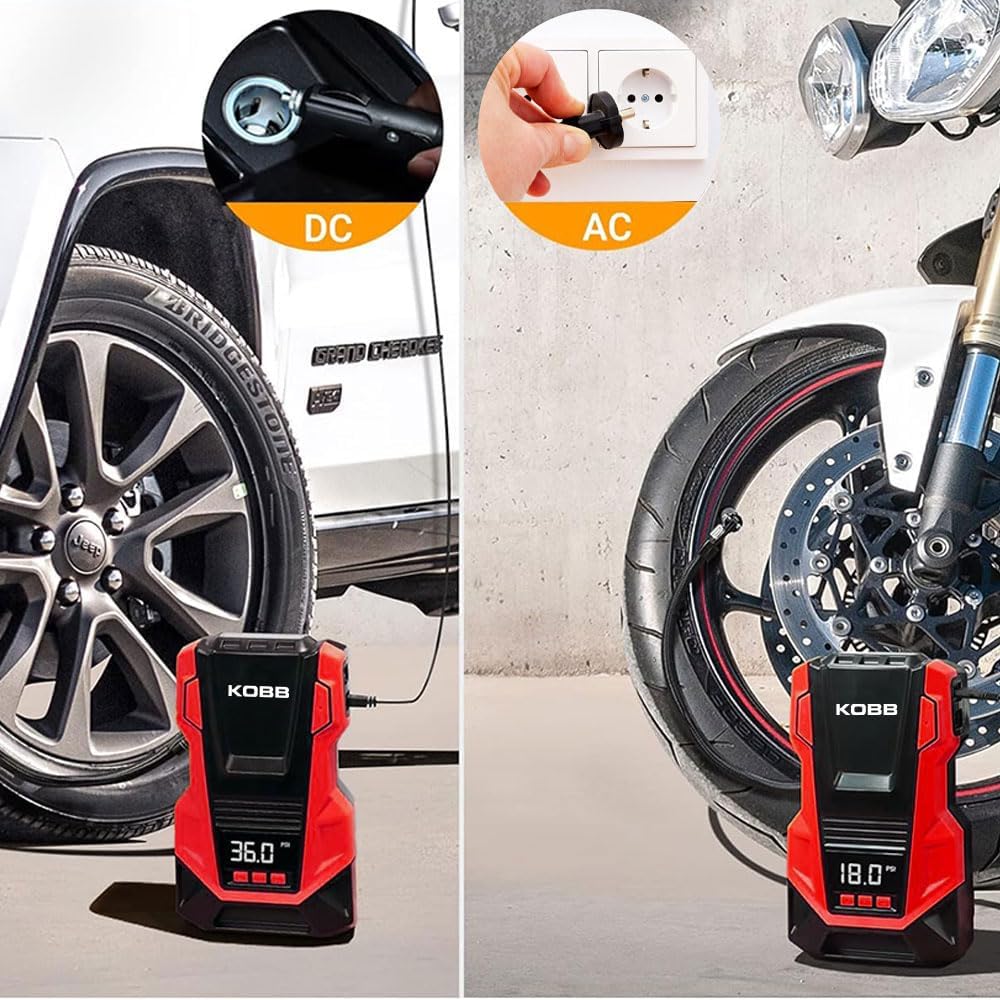
Image Description: Two scenarios demonstrating power connection: on the left, the inflator is connected to a car's 12V DC cigarette lighter socket to inflate a car tire; on the right, it is connected to a 220V AC wall outlet to inflate a motorcycle tire.
Operating Instructions
1. Power On and Unit Selection:
- Connect the inflator to the appropriate power source (12V DC or 220V AC).
- Press the Power On/Off button (1) to turn on the device. The LCD screen (5) will illuminate.
- Press the Pressure Unit Selection button (6) to cycle through available units: PSI, BAR, or KG/CM². Select the desired unit.
2. Setting Desired Pressure:
- Use the Pressure Adjustment buttons (2) to set the target inflation pressure. The digital display will show the set value.
- Refer to the item's manufacturer recommendations for correct pressure levels.
3. Attaching the Nozzle:
- Select the appropriate inflation nozzle from the included accessories.
- Securely attach the nozzle to the item's valve. For tire valves, use the latching mechanism for a firm connection.

Image Description: A collage demonstrating the versatility of the Kobb KB220 inflator. It shows the inflator being used for car tires, sport balls, inflatable beds, and swim rings, highlighting the different nozzle types for each application.
4. Inflation Process:
- Once the desired pressure is set and the nozzle is attached, press the Power On/Off button (1) again to start inflation.
- The inflator will automatically stop when the preset pressure is reached.
- Monitor the inflation process on the digital display.

Image Description: The Kobb KB220 inflator connected to a bicycle tire valve, actively inflating it. An overlay indicates an inflation speed of "1 MIN" for "29-36 PSI", demonstrating its efficiency for bicycle tires.
5. Using the LED Light:
For operation in dark environments, press the Light On/Off button (4) to activate the integrated LED light (3).

Image Description: The Kobb KB220 inflator positioned next to a car tire in a dark setting, with its integrated LED light brightly illuminating the tire and surrounding area, demonstrating its utility for night-time use.
Maintenance
- Cleaning: Wipe the exterior of the inflator with a soft, dry cloth. Do not use harsh chemicals or abrasive cleaners.
- Storage: Store the inflator and its accessories in the provided fabric carry bag in a cool, dry place, away from direct sunlight and extreme temperatures.
- Hose and Nozzles: Ensure the inflation hose and nozzles are free from kinks, blockages, or damage before each use.
- Fuse Replacement: The device includes a spare fuse. If the inflator stops working, check the fuse in the 12V DC plug and replace it if necessary.

Image Description: The Kobb KB220 inflator and its various accessories, including power cables and nozzles, are shown neatly organized within the provided fabric carry bag, illustrating proper storage.
Troubleshooting
| Problem | Possible Cause | Solution |
|---|---|---|
| Inflator does not turn on. | No power connection or faulty fuse. | Ensure power cables are securely connected. Check and replace the fuse in the 12V DC plug if necessary. |
| Inflator runs but does not inflate. | Nozzle not securely attached or hose/nozzle blockage. | Ensure the nozzle is firmly attached to the valve. Check the hose and nozzles for any obstructions. |
| Inflator does not stop at preset pressure (for small items). | Digital gauge sensitivity for very low pressure ranges. | For very small items (e.g., some balls), manually monitor pressure and stop inflation when desired level is reached. The auto-stop feature is most accurate for larger volumes like tires. |
| Device becomes excessively hot. | Prolonged continuous operation. | Turn off the inflator and allow it to cool down for at least 10-15 minutes before resuming operation. Avoid continuous use for more than 10 minutes. |
Specifications
| Feature | Detail |
|---|---|
| Model | KB220 |
| Power Input | 12V DC / 220V AC |
| Max. Air Pressure | 150 PSI / 10.3 Bar |
| Air Output Volume | 25 Liters/minute |
| Pressure Units | PSI, BAR, KG/CM² |
| Max. Current (12V) | 15A |
| 12V DC Cable Length | 3 meters |
| 220V AC Cable Length | 1.5 meters |
| Dimensions (L x W x H) | 12.5 x 6.5 x 22 cm |
| Weight | 2.15 kg |
| Material | Plastic |
| Color | Red/Black |
| Special Features | Digital display, Auto-stop function, Integrated LED light |
Warranty and Support
For warranty information or technical support, please refer to the documentation included with your purchase or contact KOBB customer service. Keep your purchase receipt as proof of purchase.
You can visit the KOBB store for more information: KOBB Official Store