
1. Introduction
Thank you for choosing the VivaEase Vacuum Beard Trimmer. This manual provides essential information for the safe and effective use, maintenance, and troubleshooting of your new grooming device. Please read these instructions thoroughly before first use and retain them for future reference.
2. Safety Instructions
- This appliance is not intended for use by persons (including children) with reduced physical, sensory or mental capabilities, or lack of experience and knowledge, unless they have been given supervision or instruction concerning use of the appliance by a person responsible for their safety.
- Children should be supervised to ensure that they do not play with the appliance.
- Do not use the trimmer if the blades are damaged or broken, as this may cause injury.
- Keep the charging cable away from heated surfaces.
- Do not immerse the charging adapter in water or other liquids.
- Ensure the trimmer is completely dry before charging.
- Only use the provided charging cable and adapter.
- Do not attempt to repair the appliance yourself. Contact qualified service personnel for repairs.
3. Package Contents
Carefully unpack your VivaEase Vacuum Beard Trimmer and check for the following items:
- VivaEase Vacuum Beard Trimmer Unit
- Long Hair Comb Attachment (11-20mm)
- Short Hair Comb Attachment (1-10mm)
- USB Charging Cable
- Cleaning Brush
- User Manual
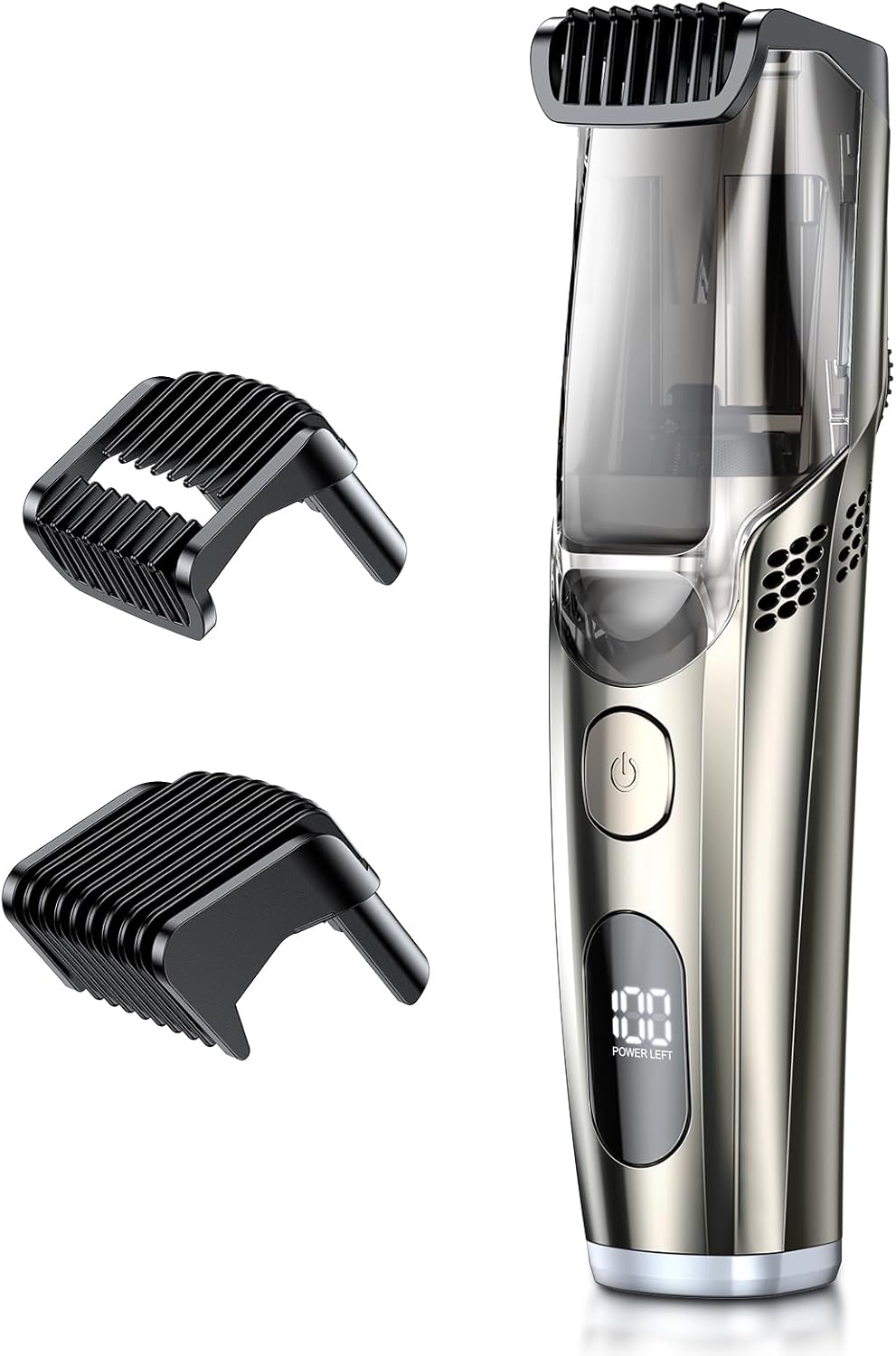
This image displays the VivaEase Vacuum Beard Trimmer unit alongside its two included comb attachments, designed for varying beard lengths.
4. Product Features
- Revolutionary Vacuum Technology: The built-in vacuum system captures trimmed hairs, minimizing mess during grooming. It features a two-speed adjustment for strong adsorption and stores hairs in an internal compartment for easy disposal.
- Adjustable Length Settings: Two comb attachments allow for 20 length settings, ranging from 1mm to 20mm, controlled by a precise calibration dial.
- Powerful Battery Performance: Enjoy over 90 minutes of continuous cordless operation on a single charge. The trimmer is conveniently rechargeable via USB.
- IPX6 Waterproof Design: The trimmer is fully washable under running water for easy cleaning and hygiene.
- Cleaning Reminder Function: An innovative feature provides timely notifications to clean the equipment, ensuring optimal performance and longevity.
- Precision Blades: High-precision blades are designed for smooth, close cutting and are gentle on the skin.

This image focuses on the trimmer's integrated dial for precise length adjustments (1-20mm) and showcases the two distinct comb attachments: one for long hair (11-20mm) and one for short hair (1-10mm).
5. Setup
5.1 Charging the Trimmer
- Ensure the trimmer is switched off before charging.
- Insert the small end of the USB charging cable into the charging port at the bottom of the trimmer.
- Connect the larger end of the USB cable to a compatible USB power source (e.g., PC/MAC, USB charger, power bank, car charger).
- The LED display will indicate the charging status. A full charge provides over 90 minutes of cordless use.

The trimmer is shown connected to a USB power source, illustrating its rechargeable battery and the LED display which indicates battery life, charging status, and cleaning reminders.
5.2 Attaching Comb Attachments
- Select the desired comb attachment (long or short) based on your preferred trimming length.
- Align the comb attachment with the trimmer head and gently push it down until it clicks securely into place.
- To remove, gently pull the comb attachment upwards from the trimmer head.
6. Operating Instructions
6.1 Power On/Off
Press the power button once to turn the trimmer on. Press it again to turn it off.
6.2 Adjusting Trimming Length
- Ensure a comb attachment is securely in place.
- Rotate the length adjustment dial on the trimmer body to select your desired trimming length from 1mm to 20mm. The selected length will be indicated on the dial.
6.3 Trimming Technique
- Before trimming, ensure your beard is clean and dry.
- Start with a longer length setting if you are unsure, and gradually reduce it until you achieve the desired look.
- Hold the trimmer with the comb attachment flat against your skin.
- Move the trimmer against the direction of hair growth for an even trim.
- For precision trimming without a comb, use the bare blades carefully for detailing edges and lines.

A user is shown performing precision trimming, with an enlarged inset demonstrating the trimmer's sharp, skin-fit blades designed for smooth and close cutting.
6.4 Vacuum Function
The vacuum function activates automatically when the trimmer is turned on. It collects trimmed hairs into an internal chamber, reducing mess. The trimmer offers two vacuum speeds for optimal hair collection.

A man is shown using the trimmer on his beard, with an overlay indicating the vacuum mechanism actively drawing in trimmed hair for a clean grooming experience.
7. Maintenance and Cleaning
Regular cleaning ensures optimal performance and extends the lifespan of your trimmer. The trimmer features an innovative cleaning reminder function on its LED display.
7.1 Emptying the Hair Collection Chamber
- Ensure the trimmer is switched off.
- Locate the hair collection chamber on the trimmer body.
- Open the chamber and empty the collected hairs into a waste bin.
- Close the chamber securely.
7.2 Rinsing the Trimmer
- Ensure the trimmer is switched off and disconnected from any charging cable.
- Remove any comb attachments.
- Rinse the trimmer head and blades under running tap water. The IPX6 waterproof rating allows for thorough rinsing.
- Use the provided cleaning brush to remove any stubborn hair particles from the blades and vacuum intake.
- Shake off excess water and allow the trimmer to air dry completely before storing or recharging.

The trimmer is depicted under a stream of water, highlighting its IPX6 waterproof rating which allows for easy rinsing and cleaning.
7.3 Blade Care
Periodically, a small drop of light machine oil (not included) can be applied to the blades to maintain their sharpness and smooth operation. Apply oil only after cleaning and drying the blades.
8. Troubleshooting
| Problem | Possible Cause | Solution |
|---|---|---|
| Trimmer does not turn on. | Battery is depleted. | Charge the trimmer fully. |
| Poor trimming performance. | Blades are dull or clogged with hair. | Clean the blades thoroughly. Consider applying a drop of oil. |
| Vacuum function is weak. | Hair collection chamber is full or vacuum intake is blocked. | Empty the hair collection chamber and clean the vacuum intake area. |
| Trimmer makes unusual noise. | Blades are not properly aligned or lubricated. | Clean and lubricate the blades. Ensure comb attachments are correctly seated. |
9. Specifications
- Brand: VivaEase
- Model: B0DBLM3VQB
- Power Source: Battery Powered (Rechargeable via USB)
- Material: Stainless Steel blades
- Waterproof Rating: IPX6
- Battery Life: Approximately 90 minutes of continuous use
- Trimming Length Settings: 1-20mm (with two comb attachments)
- Package Dimensions: 8.78 x 5.47 x 2.48 inches
- Weight: 15.17 ounces
10. Warranty and Support
For warranty information or technical support, please refer to the product packaging or contact VivaEase customer service directly through their official channels. Please have your product model (B0DBLM3VQB) and purchase date available when contacting support.