
1. Product Overview
The BISHKJOK E27 Light Bulb Security Camera offers comprehensive home surveillance with its 1080P high-definition video and advanced night vision capabilities. It features dual light source technology, providing clear infrared night vision in low light and automatically switching to strong white light upon detecting movement for enhanced visibility and deterrence. The camera supports 360-degree pan and tilt functionality, ensuring wide area coverage without blind spots.
Key features include intelligent human motion tracking with real-time alerts sent to your device, two-way audio communication via a built-in speaker and microphone, and secure video storage options on a micro SD card (not included) or cloud service. The camera's design allows for easy installation by simply replacing a standard E27 light bulb, making it a discreet and efficient security solution for indoor environments.
2. What's in the Box
Upon opening the product packaging, please verify that all components listed below are present and in good condition:
- BISHKJOK E27 Light Bulb Security Camera
- E27 Socket Adapter
- User Manual
- Mounting Toolkit (screws, wall anchors)
- Poly Bag
- Protective Foam Packaging
Video: Unboxing and initial setup of the BISHKJOK Light Bulb Security Camera. This video demonstrates the contents of the package and the first steps of installation.
3. Specifications
| Feature | Detail |
|---|---|
| Model Name | E27 |
| Video Capture Resolution | 1080p |
| Connectivity Technology | Wireless (Wi-Fi, 2.4GHz supported, 5GHz NOT supported) |
| Power Source | E27 Light Socket (110V-240VAC) |
| Indoor/Outdoor Usage | Indoor |
| Viewing Angle | 360 Degrees (Pan/Tilt) |
| Special Features | Motion Detection, Night Vision (Infrared & Full Color), Two-Way Talk, Cloud/SD Card Storage (up to 128GB) |
| Dimensions (L x W x H) | 6.6 x 2.8 x 2.8 inches |
| Item Weight | 8.1 ounces |
4. Setup Guide
Follow these steps to set up your BISHKJOK Light Bulb Security Camera:
- Install the Camera: Screw the light bulb camera into a standard E27 light socket. Ensure the socket is powered on. If you need to install a new socket, use the provided E27 socket adapter and toolkit.
- Download the App: Download the "Tuya Smart" app from your device's App Store (iOS) or Google Play Store (Android). Register an account and log in to the app.
- Add Device: In the Tuya Smart app, tap the "+" icon or "Add Device" to begin the pairing process. Select "Security Camera (Wi-Fi)" or similar option from the device list.
- Reset the Device: Power on the device and ensure the indicator light is flashing rapidly, or a prompt tone is heard. Confirm this in the app and proceed.
- Connect to Wi-Fi: Select your 2.4GHz Wi-Fi network and enter the password. Note: 5GHz Wi-Fi networks are NOT supported.
- Scan QR Code: The app will display a QR code. Hold your phone with the QR code approximately 15-20 cm (6-8 inches) in front of the camera lens until you hear a prompt tone indicating successful scanning.
- Connecting Device: The camera will begin connecting to your Wi-Fi network. Keep the network stable during this process.
- Device Added Successfully: Once connected, the app will confirm that the device has been added successfully. You can then customize the device name and room scene.

Image: Visual guide for the quick connection process via the Tuya Smart app.
Video: Detailed demonstration of the installation and app setup process for the BISHKJOK Light Bulb Security Camera. This includes connecting the camera, downloading the app, and pairing the device.
5. Operating Instructions
Once your camera is set up and connected to the Tuya Smart app, you can access various features to monitor and secure your home:
- Live View: Open the app and select your camera to view the live feed. You can switch between HD and SD quality.
- Pan/Tilt Control: Use the directional controls within the app to remotely rotate the camera 360 degrees horizontally (pan) and 95 degrees vertically (tilt) to cover almost every corner of the room.
- Two-Way Audio: Tap the microphone icon in the app to speak through the camera's built-in speaker, allowing you to communicate with people or pets in the monitored area. You can also listen to audio from the camera's microphone.
- Motion Detection & Alerts: Enable motion detection in the app settings. When movement is detected, the camera will send real-time alerts to your phone. The camera also features intelligent human motion tracking, focusing only on human bodies for more accurate alarms.
- Night Vision Modes: The camera supports both infrared night vision (black and white) and full-color night vision. In low light, it can automatically switch to infrared. When a moving person is detected, the strong white LED lights can automatically activate to provide full-color vision and deter intruders.
- Video Recording & Storage: The camera supports continuous recording or event-triggered recording. Videos can be saved to a local micro SD card (up to 128GB, not included) or to the cloud storage service (subscription may be required).
- Light Control: The integrated LED lighting can be controlled via the app, allowing you to turn the light on or off as needed.
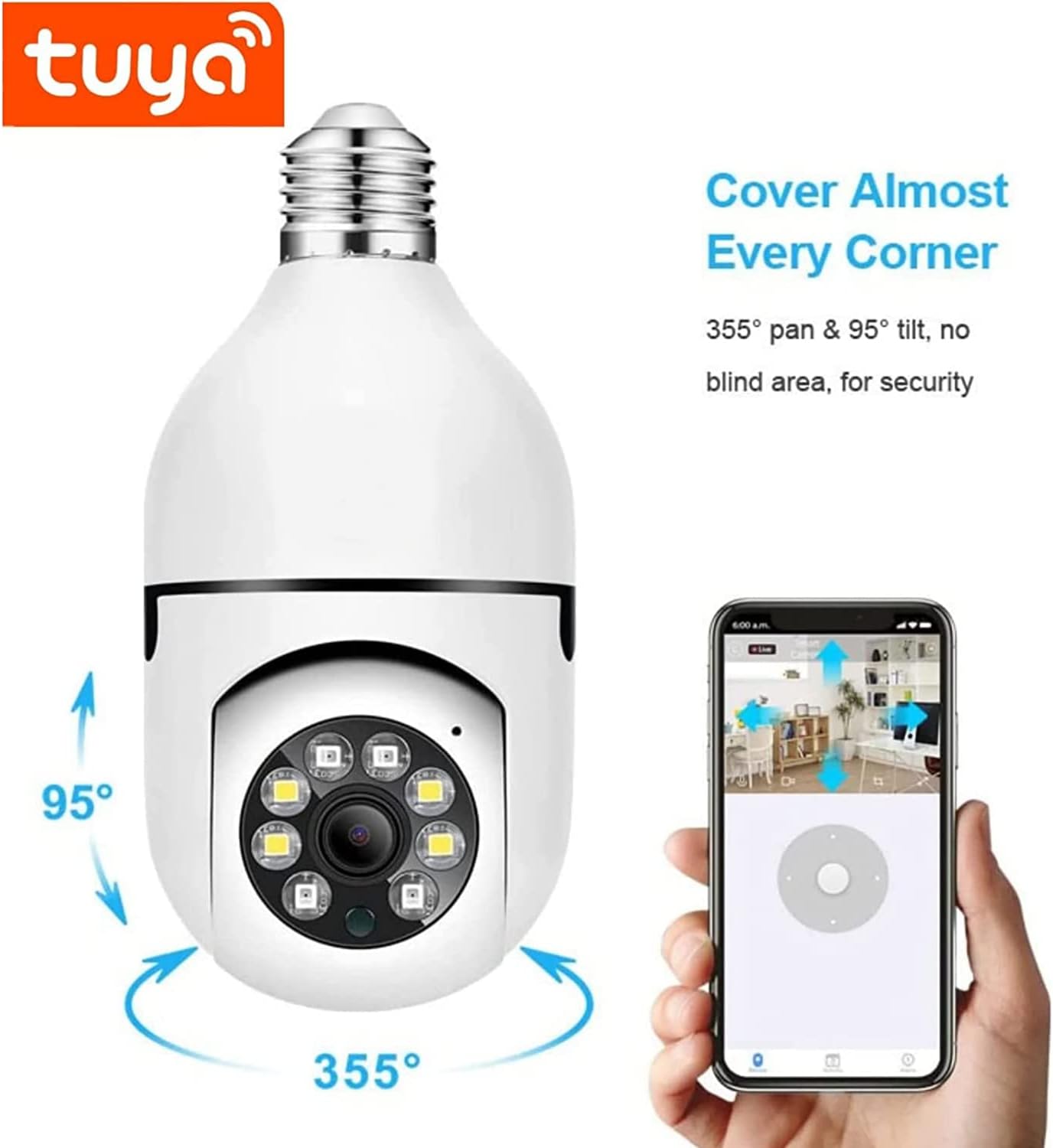
Image: The camera's pan and tilt functionality allows for comprehensive coverage.

Image: Demonstration of the camera's dual night vision modes: infrared and full color.

Image: Illustrates the two-way audio feature, enabling communication through the camera.
6. Maintenance
To ensure optimal performance and longevity of your BISHKJOK Light Bulb Security Camera, follow these maintenance guidelines:
- Regular Cleaning: Gently wipe the camera lens and exterior with a soft, dry cloth to remove dust and smudges. Avoid using harsh chemicals or abrasive materials.
- Software Updates: Periodically check the Tuya Smart app for firmware updates. Keeping the camera's software up-to-date ensures access to the latest features and security enhancements.
- Power Cycle: If the camera experiences connectivity issues or unusual behavior, try power cycling it by turning off the light switch for a few seconds and then turning it back on.
- SD Card Management: If using a micro SD card for storage, regularly back up important footage and format the card periodically (e.g., monthly) to maintain performance and prevent data corruption.
- Environmental Considerations: Ensure the camera is used within its specified operating temperature and humidity ranges. Avoid exposing it to direct water or extreme conditions, as it is designed for indoor use.
7. Troubleshooting
If you encounter issues with your BISHKJOK Light Bulb Security Camera, refer to the following common troubleshooting steps:
| Problem | Solution |
|---|---|
| Camera offline or unable to connect. |
|
| Poor video quality. |
|
| Motion detection alerts are too frequent or not working. |
|
| Two-way audio is unclear or not working. |
|
8. Warranty and Support
BISHKJOK provides lifetime technical support and service for your Light Bulb Security Camera. If you encounter any issues that cannot be resolved using the troubleshooting guide, or require further assistance, please contact our customer support team.
For support, please refer to the contact information provided on the product packaging or within the Tuya Smart app's help section. Please have your product model number (E27) and purchase details ready when contacting support.