
1. Introduction
Thank you for choosing the Hoomace HB641 2-in-1 Humidifier Dehumidifier Combo. This versatile appliance is designed to optimize your indoor air quality by effectively managing humidity levels. It features both humidification and dehumidification functions, an auto shut-off for safety, a quiet sleep mode, and customizable 7-color LED lighting. Please read this manual thoroughly before operation to ensure proper use and maintenance.

Image 1: Hoomace HB641 2-in-1 Humidifier Dehumidifier Combo, gray model.
2. Product Features
- 2-in-1 Functionality: Seamlessly switch between humidification and dehumidification to maintain optimal indoor humidity.
- Efficient Dehumidification: Utilizes semiconductor condensation technology to effectively remove moisture, ideal for small spaces like bedrooms, basements, and bathrooms.
- Auto Shut-Off Protection: Automatically powers off when the 102 OZ (3L) water tank is full, indicated by a red LED light, preventing overflow.
- Quiet Sleep Mode: Operates at less than 40 dB with LED lights off, ensuring a peaceful sleeping environment.
- 7-Color LED Light: Features customizable ambient lighting with 7 different colors to enhance your space.
- Continuous Drain Option: Includes a drain hose for continuous dehumidification without manual tank emptying, especially useful in high-humidity areas like bathrooms.

Image 2: Overview of the Hoomace HB641's key features.
3. Package Contents
- Hoomace HB641 2-in-1 Humidifier Dehumidifier Combo Unit
- 102 OZ (3L) Water Tank
- Power Adapter
- Drain Hose
- User Manual (this document)
4. Setup
- Unpack the Unit: Carefully remove all components from the packaging.
- Choose Water Drainage Method:
- Manual Emptying: Ensure the drain plug is securely in place at the bottom of the water tank. The unit will automatically shut off when the tank is full.
- Continuous Drainage: Remove the drain plug from the water tank. Connect the provided drain hose to the drainage outlet on the unit. Ensure the hose is positioned to drain into a suitable sink or drain, allowing gravity to facilitate continuous water flow.
- Place the Unit: Position the dehumidifier on a flat, stable surface in the desired room. Ensure there is adequate space around the air inlets and outlets for optimal airflow.
- Connect Power: Plug the power adapter into the unit and then into a standard electrical outlet.

Image 3: Detailed view of the Hoomace HB641's components and dimensions.
Video 1: Official Hoomace product video demonstrating the 2-in-1 Humidifier and Dehumidifier Combo.
5. Operating Instructions
5.1 Power On/Off
- Press the Power button on the control panel to turn the unit on or off.
5.2 Dehumidification Mode
- Press the 'DRY' button to activate dehumidification. The unit will begin to extract moisture from the air.
- The unit is designed to maintain humidity below 45% for a comfortable environment.

Image 4: Illustration of the dehumidifier's efficiency in reducing humidity.
5.3 Humidification Mode
- Press the 'HUM' button to activate humidification. The unit will release mist to increase humidity.
- Ensure the water tank is filled with clean water for humidification.
5.4 Sleep Mode
- Press the 'SLEEP' button to enter sleep mode. The unit will operate at a reduced noise level (less than 40 dB) and all LED lights will turn off for undisturbed rest.

Image 5: Comparison of noise levels during day and night modes.
5.5 LED Light Control
- Press the 'LIGHT' button to cycle through the 7 different LED colors.
- Press and hold the 'LIGHT' button to fix the light on a specific color or to turn the lights off.
5.6 Auto Shut-Off Feature
- The unit is equipped with an automatic shut-off function. When the water tank is full during dehumidification, the unit will stop operating, and a red LED light will illuminate to indicate that the tank needs to be emptied.
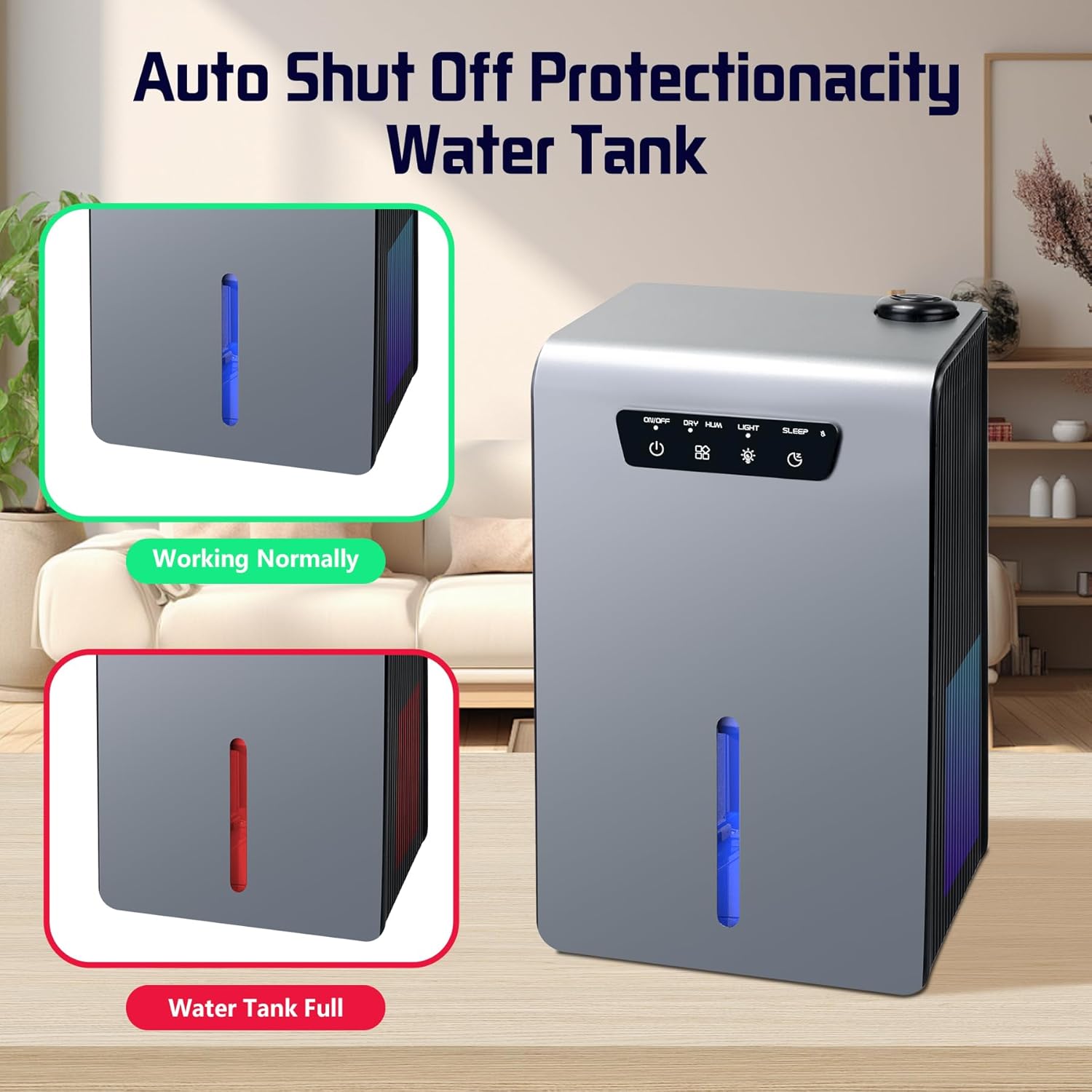
Image 6: Visual indicator for normal operation versus full water tank.
6. Maintenance
6.1 Emptying the Water Tank
- When the red LED light indicates a full tank, carefully pull out the water tank from the unit.
- Discard the collected water.
- Slide the empty tank back into the unit until it clicks securely into place.
6.2 Cleaning the Unit
- Wipe the exterior of the unit with a soft, damp cloth.
- Clean the water tank regularly with mild soap and water to prevent mold or mildew buildup. Rinse thoroughly.
- Ensure the unit is unplugged before any cleaning.
7. Specifications
| Feature | Specification |
|---|---|
| Brand | Hoomace |
| Model Name | HB641 (102OZ) |
| Product Dimensions | 14"D x 6"W x 8"H |
| Item Weight | 6.2 Pounds |
| Water Tank Capacity | 102 Fluid Ounces (3 Liters) |
| Dehumidification Capacity | 1 Liters per Day |
| Floor Area Coverage | 25 Meters |
| Wattage | 70 watts |
| Special Features | Automatic Moisture Removal, Automatic Shutoff, Continuous Draining, Removable Tank, Sleep Mode |
| Material | Plastic |
| Color | Gray |
8. Troubleshooting
If the unit is not operating as expected, please check the following:
- Unit not turning on: Ensure the power adapter is securely plugged into both the unit and a working electrical outlet.
- Dehumidification/Humidification not working: Check if the water tank is correctly inserted. For dehumidification, ensure the tank is not full (red light indicator). For humidification, ensure the tank has sufficient water.
- Red LED light is on: The water tank is full and needs to be emptied.
- Excessive noise: Ensure the unit is placed on a flat, stable surface. Check for any obstructions around the air inlets/outlets.
9. Warranty and Support
For warranty information or technical support, please refer to the contact details provided with your purchase documentation or visit the official Hoomace website.