
1. Introduction and Overview
The FTVOGUE ETCR3200C is a versatile Ground Soil Resistivity Meter designed for accurate measurement of ground resistance, DC resistance, AC resistance, and soil resistivity. This instrument features a USB interface for data communication and storage, making it suitable for various industrial and scientific applications. It supports multiple testing methods for convenience and precision.
The device is housed in a durable, portable case, ensuring protection and ease of transport. Its intuitive interface and clear display facilitate straightforward operation.
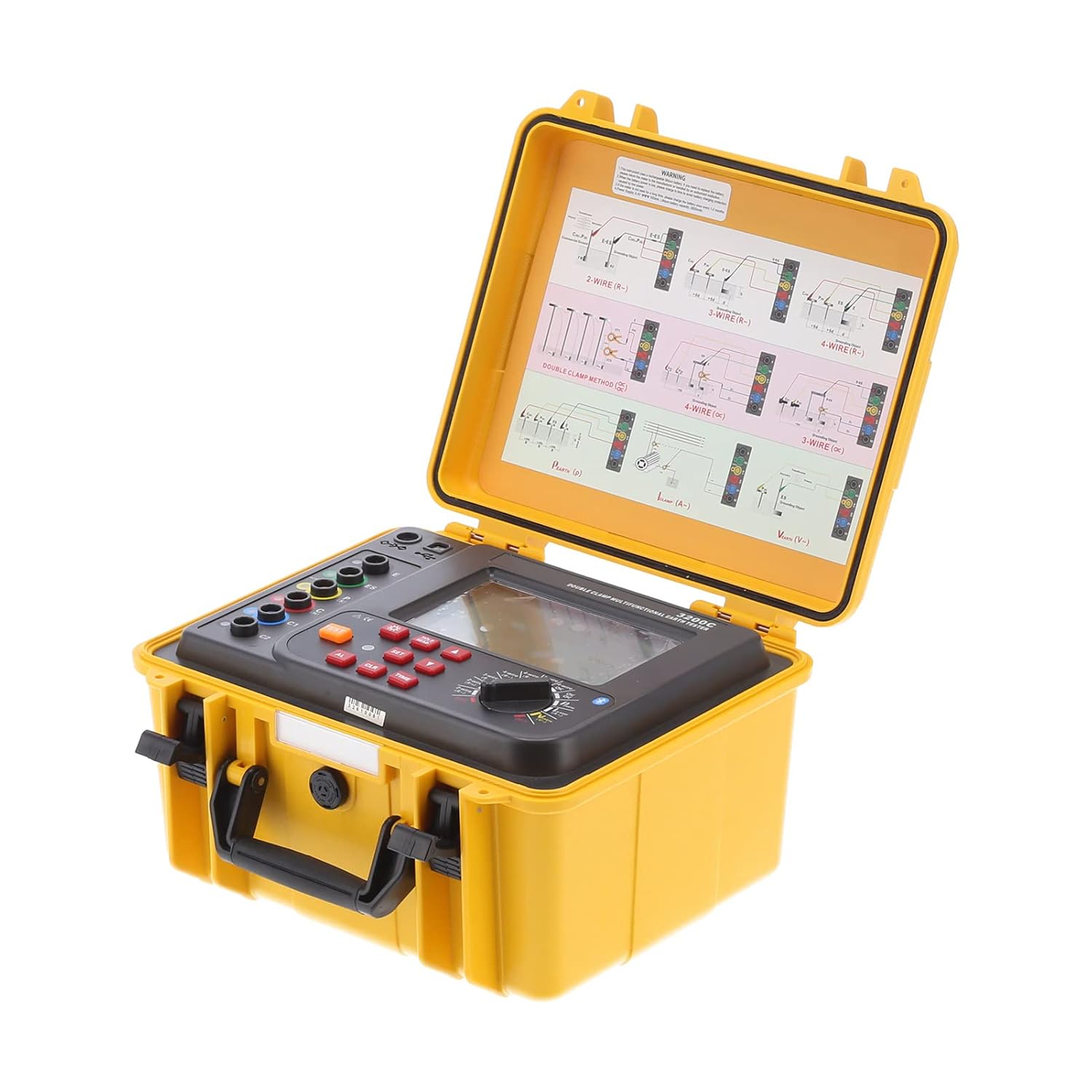
Image 1.1: The ETCR3200C meter opened, displaying the control panel and internal wiring diagrams.
2. Safety Information
Please read and understand all safety instructions before operating the ETCR3200C meter. Failure to follow these instructions may result in injury or damage to the instrument.
- Always ensure proper grounding connections before conducting any tests.
- Do not operate the device in wet conditions or in the presence of flammable gases or vapors.
- Verify that the battery voltage is sufficient before use. A low battery prompt will indicate when charging is required.
- Avoid exceeding the specified measurement ranges to prevent overload and potential damage to the device.
- Only use accessories and components supplied or approved by FTVOGUE.
- Keep the instrument clean and dry.
3. Package Contents
Upon unpacking, please verify that all items listed below are present and in good condition:
- 1 x ETCR3200C Tester Unit
- 1 x User Manual
- 1 x Software CD
- 1 x Instrument Bag
- 4 x Ground Pins
- 4 x Test Lines (various colors)
- 2 x Current Clamps
- 2 x Simple Test Lines
- 1 x Data Line (USB)

Image 3.1: Complete package contents of the ETCR3200C.
4. Setup
Before performing any measurements, ensure the meter is properly set up.
4.1 Powering On
- Open the protective yellow case.
- Locate the power button on the control panel.
- Press the power button to turn on the device. The display should illuminate.
- Check the battery indicator on the display. If low, recharge the unit before use.
4.2 Connecting Test Leads and Ground Pins
The ETCR3200C supports various connection methods depending on the test type. Refer to the diagrams on the inside lid of the case and the following general guidelines:
- For Grounding Resistance (3-wire or 4-wire method): Connect the test leads to the corresponding terminals (E, P, C, H) on the meter. Insert the ground pins into the earth at appropriate distances as per the specific test method requirements.
- For Soil Resistivity (4-pole method): Connect the four test leads to the C1, P1, P2, C2 terminals. Position the four ground pins (electrodes) in a straight line at equal distances for the Wenner method.
- For Double Clamp Method: Connect the two current clamps to the designated clamp inputs on the meter.

Image 4.1: Connection diagrams for different testing methods.
5. Operating Instructions
The ETCR3200C offers multiple testing modes. Select the appropriate mode using the rotary switch and function buttons.

Image 5.1: Front panel of the ETCR3200C meter.
5.1 Ground Resistance Testing
This method uses the rated current pole changing method. The measuring current is a maximum of 20mA.
- Connect the test leads and ground pins according to the 3-wire or 4-wire method as shown in the diagrams.
- Turn the rotary switch to the 'Grounding' position.
- Press the TEST button to initiate the measurement.
- The result will be displayed on the LCD screen.
5.2 Soil Resistivity Testing (Quadrupole Method)
This method utilizes the Wenner method for accurate soil resistivity measurements.
- Connect the four test leads to the C1, P1, P2, C2 terminals and position the ground pins at equal distances.
- Turn the rotary switch to the 'Soil Resistivity' position.
- Set the electrode spacing range (1m to 100m) using the appropriate buttons if adjustable.
- Press the TEST button.
- The soil resistivity value will be displayed in Ωm.
5.3 AC Current Testing
The meter can measure AC current up to 600.0A using the provided current clamps.
- Connect the current clamps to the meter.
- Clamp the current clamps around the conductor carrying the AC current.
- Turn the rotary switch to the 'AC Current' position.
- The AC current value will be displayed.

Image 5.2: ETCR3200C with current clamps for AC current and double clamp testing.
5.4 Data Storage and Communication
The ETCR3200C can store up to 300 groups of data. It also features a USB interface for connecting to a computer.
- To save data, press the MEM button after a measurement. The display will show 'MEM' and the storage group number. A 'PULL' symbol indicates full storage.
- To access stored data, press the READ button.
- Use the provided USB data line and software CD to connect the meter to a computer. This allows for monitoring, uploading, saving, and printing of stored data.
5.5 Auto Shutdown
The device is equipped with an auto-shutdown feature that activates after 10 minutes of inactivity to conserve battery life.
6. Maintenance
Proper maintenance ensures the longevity and accuracy of your ETCR3200C meter.
- Cleaning: Use a soft, dry cloth to clean the exterior of the instrument. Do not use abrasive cleaners or solvents.
- Storage: Store the meter in its protective case in a cool, dry place when not in use. Avoid extreme temperatures and humidity.
- Battery Care: Recharge the battery regularly, especially if the device will be stored for an extended period. Do not allow the battery to fully discharge for long durations.
- Calibration: For continued accuracy, periodic calibration by qualified personnel is recommended.
7. Troubleshooting
If you encounter issues with your ETCR3200C, refer to the following common problems and solutions:
| Problem | Possible Cause | Solution |
|---|---|---|
| Device does not power on. | Low or depleted battery. | Charge the battery using the appropriate power adapter. |
| Display shows "OL" (Overload). | Measurement exceeds the device's range. | Check the input signal or adjust the measurement range if applicable. Ensure connections are correct. |
| Inaccurate readings. | Poor connection, incorrect setup, or environmental interference. | Verify all test lead connections are secure. Ensure ground pins are properly inserted. Minimize external electrical interference. |
| Data not saving. | Memory full. | Upload stored data to a computer and clear the device memory. |
If the problem persists after attempting these solutions, please contact customer support.
8. Specifications
Detailed technical specifications for the FTVOGUE ETCR3200C Ground Soil Resistivity Meter:
- Model: ETCR3200C
- Material: ABS
- Measurement Methods:
- Grounding: Rated current pole changing method, measuring current 20mA maximum
- Soil Resistivity: Quadrupole method (Wenner method)
- AC Current: AC current test, DC test, soil resistivity test, double clamp method test ground, three-four-wire selection method test, four-wire accuracy test, three-wire test, and two-wire simple test.
- Test Frequency: 128Hz/111Hz/105Hz/9Hz (AFC)
- Short Circuit Test Current: AC 250mA maximum
- Electrode Spacing Range: Approx. 1m~100m / 3.3~328.1ft
- Measurement Ranges:
- Grounding, DC: 0.00~30.00kΩ
- Soil Resistivity: 0.00Ωm~9000kΩm
- Alternating Current: AC 0mA~600.0A
- Measurement Time:
- Grounding, Soil Resistivity: About 15 seconds/time
- Measurement Cycles: More than 5000 times (short-circuit test, test once, stop for 30 seconds and then test)
- Communication Interface: USB interface, with software monitoring; stored data can be uploaded to computer, saved, and printed.
- Data Storage: 300 groups, 'MEM' storage indication, 'PULL' symbol indicates full storage.
- Data Retention: 'HOLD' symbol indicates when data is retained.
- Data Access: 'READ' symbol indicates when accessing data.
- Overflow Display: 'OL' symbol indication when over-range overflow.
- Auxiliary Grounding Test: With auxiliary grounding value test function, 0.00KΩ~30kΩ (100R+rC)
- Auto Shutdown: After 10 minutes of inactivity.
- Parcel Dimensions: 35 x 30 x 28 cm; 6.71 kg
- Country of Origin: China
9. Warranty and Support
9.1 Warranty Information
This FTVOGUE ETCR3200C Ground Soil Resistivity Meter comes with a manufacturer warranty for 90 days from the date of purchase. This warranty covers defects in materials and workmanship under normal use. It does not cover damage caused by misuse, accident, unauthorized modification, or improper operation.
9.2 Customer Support
For technical assistance, troubleshooting not covered in this manual, or warranty claims, please contact FTVOGUE customer support through your retailer or the official FTVOGUE website. Please have your product model number (ETCR3200C) and purchase date available when contacting support.
