1. Safety Information
Please read this manual thoroughly before installation and retain it for future reference. Incorrect installation may result in product damage or personal injury.
- Weight Capacity: Do not exceed the maximum weight capacity of 110 lbs (50 kg).
- TV Size Compatibility: Designed for most 32-70 inch flat and curved TVs.
- VESA Compatibility: Supports VESA patterns from 75x75mm to 400x400mm.
- Wall Type: This mount is designed for installation on 8"/12"/16" wood studs, solid concrete, or brick walls.
- WARNING: Do not mount on drywall alone.
- Installation: Ensure all screws are tightened securely. Do not overtighten.
- Maintenance: Periodically check the mount for any loose screws or signs of wear.
2. Product Specifications
- Brand: IWORKBOARD
- Model: Full Motion 32-70 inch & 16'' Studs
- Material: Heavy-duty steel
- Color: Black
- TV Size Range: 32-70 inches
- Weight Capacity: Up to 110 lbs (50 kg)
- VESA Compatibility: 75x75mm to 400x400mm
- Wall Compatibility: 8"/12"/16" wood studs, concrete, brick
- Tilt Angle: +5° / -15°
- Swivel Angle: +/-45°
- Screen Level Adjustment: +/-4°
- Extension from Wall: 3.43" to 15.07"
Visual Guide to Compatibility
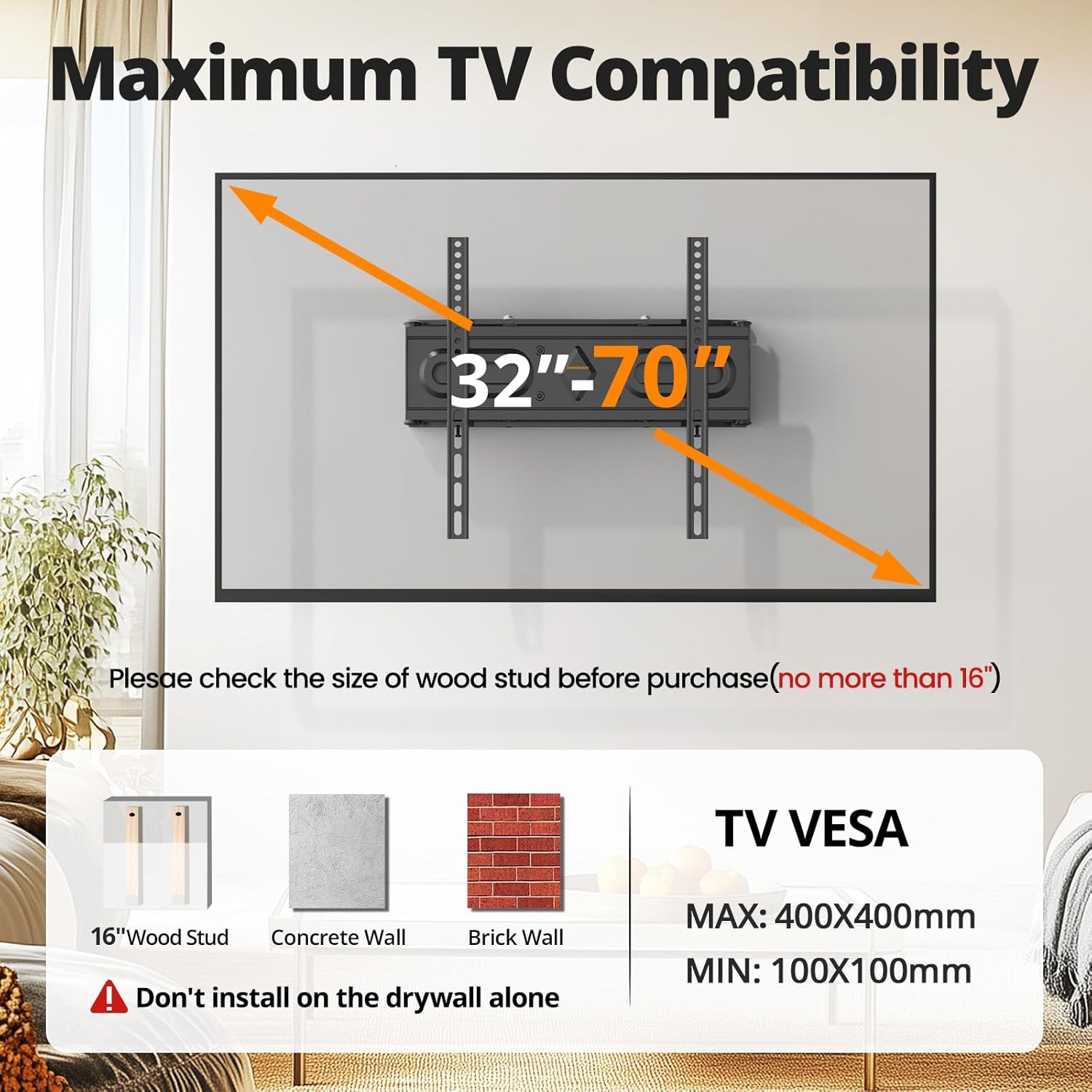
Image: Visual guide for TV size (32-70 inches), VESA compatibility (Max 400x400mm, Min 100x100mm), and supported wall types (16" wood stud, concrete, brick). Includes a warning against drywall-only installation.
3. Package Contents
Verify that all components are present and undamaged before beginning installation. If any parts are missing or damaged, please contact customer support.
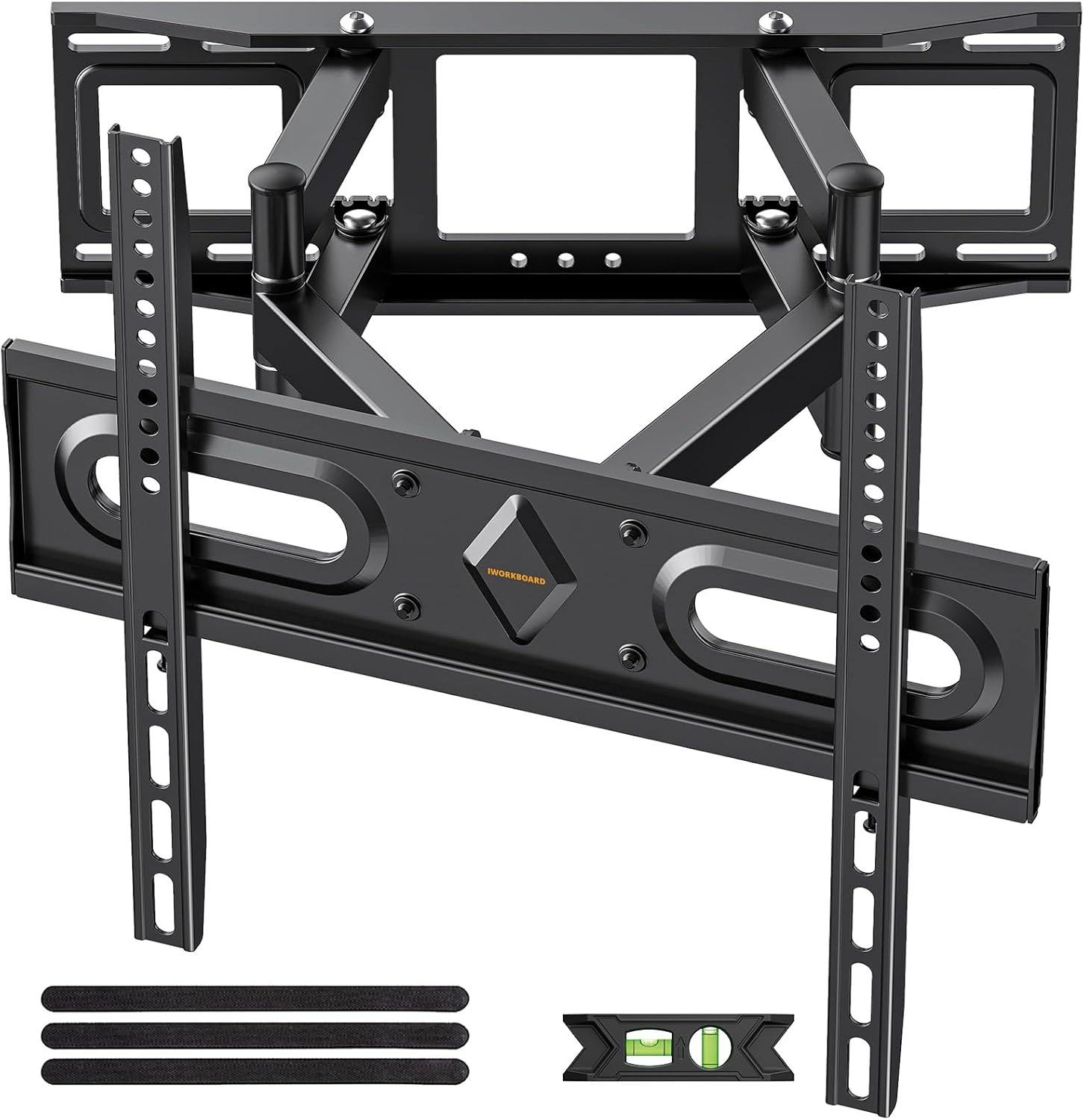
Image: All components of the IWORKBOARD Full Motion TV Wall Mount, including the main wall plate, dual articulating arms, TV mounting brackets, and a small bubble level for installation.
Hardware Included:
- Wall plate assembly
- TV mounting brackets
- Various screws, washers, and spacers for TV attachment
- Lag bolts and concrete anchors for wall mounting
- Bubble level
- Allen wrench
- Drilling template
4. Setup and Installation Guide
Pre-Installation Checks:
- Identify Wall Type: Determine if your wall is wood stud, concrete, or brick. Do not install on drywall alone.
- Locate Studs (for wood stud installation): Use a stud finder to locate the center of your wood studs. Mark the locations.
- Check VESA Pattern: Ensure your TV's VESA pattern (mounting holes on the back) is compatible with the mount (75x75mm to 400x400mm).
- Verify TV Weight: Confirm your TV's weight does not exceed 110 lbs (50 kg).
Step-by-Step Installation:
- Attach TV Brackets to TV:
- Carefully place your TV face-down on a soft, clean surface.
- Select the appropriate screws, washers, and spacers for your TV's VESA holes.
- Attach the two vertical TV brackets to the back of your TV. Ensure they are centered and securely fastened. Do not overtighten.
Refer to the included hardware bags for various screw sizes to match your TV.
- Mount Wall Plate to Wall:
- Use the provided drilling template to mark the pilot hole locations on your wall. Ensure the template is level using the included bubble level.
- Drill pilot holes at the marked locations. For wood studs, use a 7/32 in. (5.5mm) drill bit. For concrete/brick, use a 3/8 in. (10mm) drill bit and insert the concrete anchors.
- Attach the wall plate assembly to the wall using the appropriate lag bolts (for wood studs) or concrete anchors and bolts (for concrete/brick). Tighten securely.

Image: Using the drilling template and level to accurately mark wall mounting points.
- Hang TV on Wall Mount:
- With assistance, carefully lift the TV and hook the TV brackets onto the wall plate assembly.
- Ensure the TV is securely seated on the mount.
- Tighten the locking screws on the bottom of the TV brackets to prevent accidental dislodging.
Installation Video:
Video: Official IWORKBOARD installation guide demonstrating the steps to mount the TV wall bracket and hang the television.
5. Operating Instructions
The IWORKBOARD Full Motion TV Wall Mount offers versatile adjustments for optimal viewing.
Adjusting Your TV:
- Tilt: Gently push the top or bottom of your TV to adjust the tilt angle between +5° and -15°. This helps reduce glare and optimize viewing from different heights.
- Swivel: Carefully push the side of your TV to swivel it left or right up to +/-45°. This allows for flexible viewing from various seating positions in the room.
- Extension/Retraction: Pull the TV gently away from the wall to extend it up to 15.07 inches, or push it back towards the wall to retract it to a minimum of 3.43 inches. This feature provides easy access to cables and saves space when not extended.
- Level Adjustment: After installation, you can fine-tune the TV's level by +/-4° to ensure a perfectly straight display.
Visual Guide to Adjustments:

Image: Illustration of the TV mount's extension (up to 15.07 inches) and retraction (to 3.43 inches) capabilities, along with tilt angles (+5° to -12°).

Image: Illustration of the TV mount's swivel capability, allowing rotation up to +/-45 degrees for flexible viewing.

Image: Demonstrates the +/-4 degree level adjustment feature, allowing for fine-tuning of the TV's horizontal position after installation.
6. Maintenance
Regular maintenance ensures the longevity and safe operation of your TV wall mount.
- Cleaning: Wipe the mount with a soft, dry cloth to remove dust. Avoid using abrasive cleaners or solvents.
- Periodic Checks: Every few months, inspect all mounting points and connections to ensure screws are still tight. Re-tighten if necessary.
- Lubrication: The articulating joints are designed for smooth movement and generally do not require lubrication. If movement becomes stiff, contact customer support.
7. Troubleshooting
If you encounter any issues during or after installation, refer to the following common problems and solutions:
| Problem | Possible Solution |
|---|---|
| TV is not level after installation. | Use the +/-4° level adjustment feature to fine-tune the TV's position. |
| Mount feels unstable. | Ensure all lag bolts/anchors are fully tightened into the wall studs or masonry. Verify TV weight is within limits. |
| Difficulty with full motion (tilt/swivel/extension). | Check for any obstructions. Ensure all joint bolts are tightened enough to hold position but loose enough to allow movement. |
| Cables are messy or getting pinched. | Utilize cable ties or management clips (not included) to route cables along the articulating arms. Ensure cables have enough slack for full motion. |
8. Warranty & Support
IWORKBOARD is committed to providing high-quality products and excellent customer service.
- Warranty: This product is covered by a 10-year support warranty.
- Customer Support: If you have any questions, concerns, or require assistance with installation, please contact IWORKBOARD customer support.
- Contact Information: Please refer to the product packaging or the official IWORKBOARD website for the most up-to-date contact details.