
Philips EP5544/94
Philips 5500 Series Fully Automatic Espresso Machine
Model: EP5544/94 - User Manual
Introduction
Welcome to the comprehensive user manual for your Philips 5500 Series Fully Automatic Espresso Machine. This guide provides essential information to help you set up, operate, maintain, and troubleshoot your new coffee machine, ensuring you get the best possible coffee experience. With its advanced features like the LatteGo milk system, integrated ceramic grinder, and SilentBrew technology, your machine is designed for convenience and exceptional flavor.

Image: The Philips 5500 Series Fully Automatic Espresso Machine, showcasing its sleek design and integrated milk system.
Video: An official overview of the Philips 5500 Series Fully Automatic Espresso Machine, highlighting its key features and ease of use.
Safety Information
Always read and follow all safety instructions provided in this manual to prevent injury or damage. Keep the appliance out of reach of children. Do not immerse the machine in water. Use only as intended for brewing coffee and frothing milk. Ensure the power cord is not damaged and is properly connected to a grounded outlet.
Setup
1. Unpacking and Initial Placement
Carefully remove all packaging materials. Place the machine on a stable, level surface away from heat sources and direct sunlight. Ensure adequate ventilation around the appliance.
2. Initial Cleaning
Before first use, wash the LatteGo milk system, drip tray, and coffee grounds container with warm water and a mild detergent. Rinse thoroughly.
3. Filling the Water Tank
Remove the water tank from the machine. Fill it with fresh, cold tap water up to the MAX indication. Reinsert the water tank securely into the machine.
4. Filling the Bean Hopper
Open the lid of the bean hopper. Pour fresh coffee beans into the hopper. Do not overfill. Close the lid to maintain bean freshness.

Image: Close-up view of the 100% ceramic grinders, where coffee beans are poured for grinding.
5. Power Connection
Plug the power cord into a grounded wall socket. The machine will perform an automatic rinse cycle upon first power-on or after a period of inactivity.
Operating
1. Control Panel Overview
The intuitive touch display allows for easy navigation and selection of your desired coffee. Icons represent various drink options, settings, and maintenance alerts.

Image: A hand interacting with the touch display of the Philips 5500 Series, showing the ease of selecting and brewing coffee.
2. Selecting Your Drink
Choose from 20 hot and iced coffee varieties directly from the display. Simply tap the icon for your preferred drink, such as Espresso, Coffee, Americano, Cappuccino, Latte Macchiato, Iced Coffee, or Iced Latte.

Image: A collection of various hot and iced coffee beverages that can be prepared by the Philips 5500 Series machine.
3. Customizing Your Coffee
Adjust the strength, coffee length, and milk volume to your taste using the on-screen sliders. You can save your personalized preferences in one of two user profiles for quick access to your favorite customized drinks.
4. Using the LatteGo Milk System
The LatteGo system automatically prepares silky smooth milk froth for your milky coffees. Simply fill the milk container with your desired milk (dairy or plant-based) and attach it to the machine. The powerful cyclonic frothing technology ensures consistent results.

Image: The LatteGo milk system dispensing perfectly frothed milk into a glass for a latte macchiato.
5. QuickStart Function
The QuickStart function allows the machine to heat up swiftly, enabling you to brew your coffee almost instantly without prolonged waiting times.
6. SilentBrew Technology
Experience quieter coffee preparation thanks to SilentBrew Technology, which significantly reduces machine sounds during grinding and brewing through sound shielding.
Maintenance
1. LatteGo System Cleaning
The LatteGo milk system is designed for effortless cleaning. It consists of only two parts and no tubes, making it easy to rinse under the tap or clean in the dishwasher after each use.

Image: A user cleaning the two-part LatteGo milk system under running water, demonstrating its simple and quick cleaning process.
2. Drip Tray and Grounds Container
Regularly empty and clean the drip tray and coffee grounds container to prevent overflow and maintain hygiene. The machine will prompt you when these need attention.
3. AquaClean Filter
The integrated AquaClean filter allows you to enjoy up to 5,000 cups of coffee without the need for descaling, provided the filter is replaced as indicated by the machine.
4. General Cleaning
Wipe the exterior of the machine with a soft, damp cloth. Do not use abrasive cleaning agents or solvents.
Troubleshooting
If you encounter any issues with your Philips 5500 Series Espresso Machine, please refer to the following common solutions:
- No Coffee Dispensed: Check if the water tank is filled and correctly inserted. Ensure the coffee bean hopper has enough beans.
- Watery Coffee: Adjust the grind setting to a finer level (consult the operating section for ceramic grinder settings). Increase the aroma strength setting.
- No Milk Froth: Ensure the LatteGo system is clean and correctly assembled. Use fresh, cold milk.
- Error Messages: The display will show specific error codes or messages. Refer to the on-screen instructions or the full product manual for detailed explanations and solutions.
- Machine Not Turning On: Verify the power cord is securely plugged into both the machine and a working electrical outlet.
For persistent issues or problems not covered here, please contact Philips customer support.
Specifications
Detailed technical specifications for your Philips 5500 Series Fully Automatic Espresso Machine:
| Feature | Detail |
|---|---|
| Brand | Philips |
| Model Name | EP5544/94 |
| Color | Black, chromed |
| Product Dimensions (D x W x H) | 9.69"D x 14.61"W x 17.05"H (246mm x 371mm x 433mm) |
| Coffee Maker Type | Espresso Machine |
| Special Feature | LatteGo |
| Filter Type | Metal |
| Operation Mode | Fully Automatic |
| Voltage | 120 Volts |
| Item Weight | 18.26 pounds |
| Water Tank Capacity | 1.8L |
| Grinder Type | 100% Ceramic Grinders (12 settings) |
| Temperature Settings | 3 settings (190F-210F / 87.7C-98.8C) |
| Power | 230W |

Image: Product dimensions in inches, providing a clear visual reference for placement.
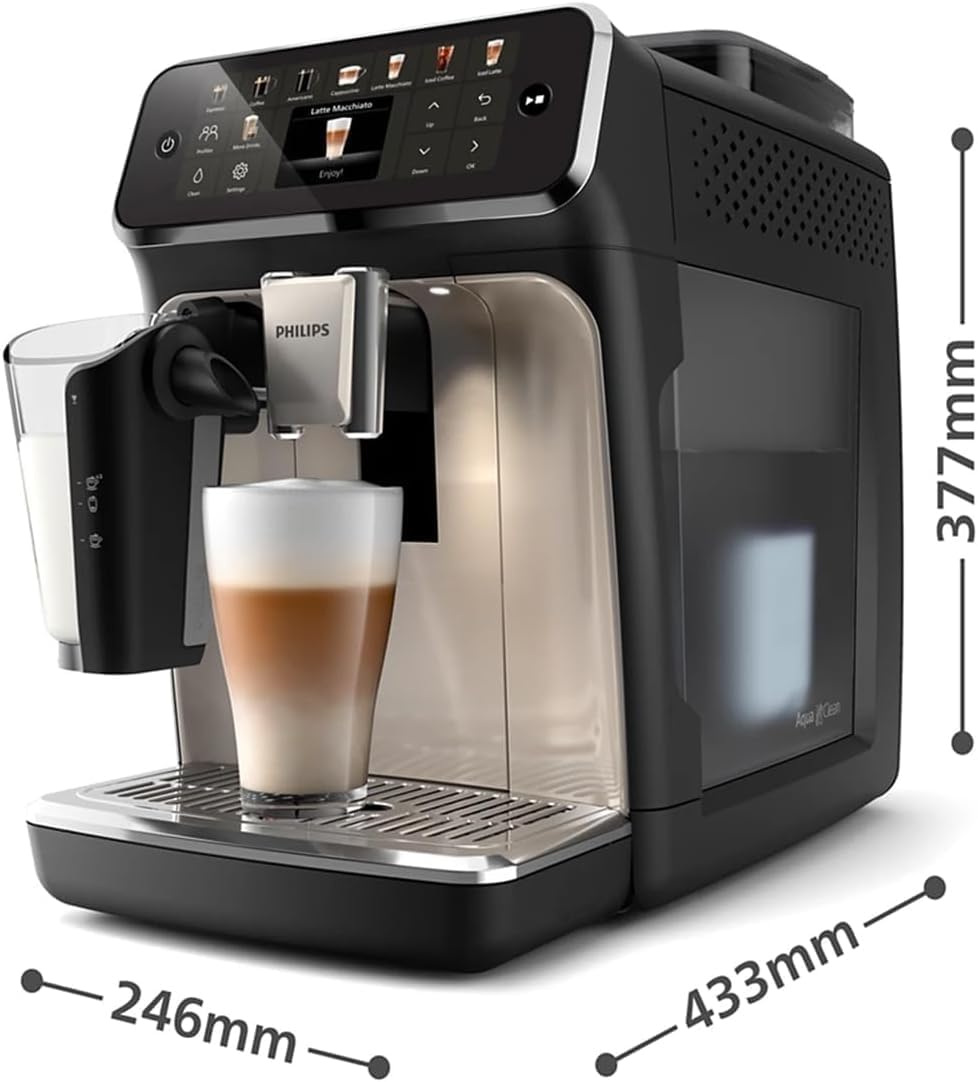
Image: Product dimensions in millimeters, offering precise measurements for installation.
Warranty and Support
Your Philips 5500 Series Fully Automatic Espresso Machine comes with a manufacturer's warranty. For detailed information regarding warranty terms and conditions, please refer to the warranty card included with your product or visit the official Philips website. For technical support, service, or to order spare parts, please contact Philips customer service through their official channels. Keep your proof of purchase for warranty claims.
Protection plans are also available for extended coverage, offering peace of mind beyond the standard warranty period. These plans typically cover repairs and replacements for a specified duration.
Related documentsEP5544/94


Ask a question about this manual
Ask about setup, troubleshooting, compatibility, parts, safety, or missing instructions. Manuals+ will review the question and use this page’s manual context to help answer it.