
HOMCOM A91-134BK
HOMCOM Home Gym Equipment User Manual
Model: A91-134BK
Introduction
The HOMCOM Multi Gym Workout Station is designed to provide a comprehensive full-body workout experience within the comfort of your home. This versatile equipment allows for a wide range of exercises targeting various muscle groups, including arms, legs, waist, hips, and abdomen. With its robust construction and integrated weight stack, it offers a reliable and effective solution for strength training.
Please read this manual thoroughly before assembly and operation to ensure safe and correct usage. Keep this manual for future reference.
Safety Information
- Always consult with a healthcare professional before starting any new exercise program.
- Ensure all bolts, nuts, and connections are securely tightened before each use.
- Do not exceed the maximum user weight of 120 kg.
- Keep children and pets away from the equipment during operation.
- Use the equipment on a flat, stable surface.
- Wear appropriate athletic footwear and clothing during workouts.
- Stop exercising immediately if you feel pain, dizziness, or nausea.
Setup and Assembly
Assembly of the HOMCOM Multi Gym Workout Station is required. Please follow the detailed instructions provided in the included assembly manual. It is recommended to have at least two people for assembly to ensure safety and ease of construction.
Before beginning assembly, unpack all components and verify that all parts listed in the assembly manual are present. Organize the hardware to simplify the process. Ensure you have the necessary tools, typically wrenches and screwdrivers, as specified in the assembly guide.

Image: The HOMCOM Home Gym Equipment fully assembled, showcasing its compact design and various stations.
Pay close attention to the orientation of parts and the sequence of steps. Do not fully tighten all bolts until instructed, as some flexibility may be needed for alignment. Once assembled, double-check all connections for tightness and stability before initial use.

Image: A close-up view of the non-slip foot pad, highlighting the stability feature of the equipment.
Operating Instructions
The HOMCOM Multi Gym offers a variety of exercises to target different muscle groups. The 45kg weight stack, composed of 4.5kg plates, allows for adjustable resistance to suit your fitness level.
Weight Stack Adjustment
To adjust the resistance, simply insert the selector pin into the desired weight plate on the stack. Ensure the pin is fully inserted before beginning your exercise.
Exercise Functions
- Back Pull Bar: Utilise the top pulley system for lat pulldowns and tricep pushdowns.
- Butterfly Arm: Engage your chest muscles with the butterfly press station.
- Lower Pull Bar Function: Use the lower pulley for seated rows, bicep curls, and upright rows.
- Bend Arm Training: Perform various arm exercises using the dedicated arm curl pad.
- Kick Training / Leg Developer: Target your quadriceps and hamstrings with leg extensions and curls using the padded leg developer. The feet roller is two-level adjustable for comfort.
- Chest Press: The dual-function press arm allows for effective chest presses.

Image: A user demonstrating the chest press exercise on the multi-gym, highlighting the dual-function press arm.
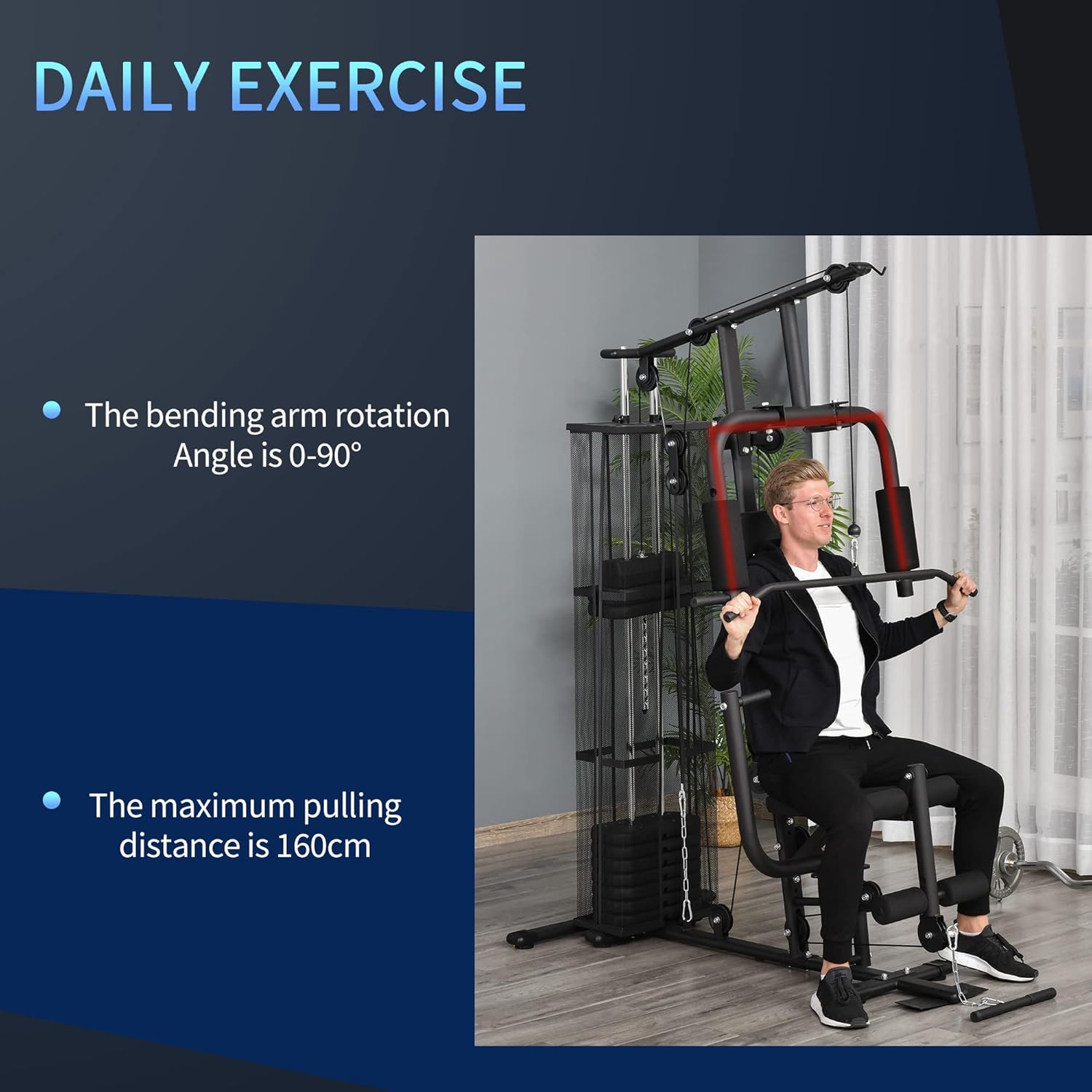
Image: A user performing a lat pulldown, illustrating the use of the upper pulley system for back exercises.

Image: A detailed view of the two-level adjustable feet roller on the leg developer, allowing for customized comfort during leg exercises.
Maintenance
Regular maintenance will prolong the life of your HOMCOM Multi Gym and ensure safe operation.
- Cleaning: Wipe down the frame, seat, and pads with a damp cloth after each use to remove sweat and dirt. Avoid abrasive cleaners.
- Lubrication: Periodically apply a silicone-based lubricant to the guide rods of the weight stack and any moving pulley axles to ensure smooth operation.
- Inspection: Regularly inspect all cables, pulleys, bolts, and connections for signs of wear, fraying, or loosening. Tighten any loose bolts immediately.
- Storage: Store the equipment in a dry, clean environment away from direct sunlight and extreme temperatures.

Image: A close-up of a pulley system, illustrating the smooth roller mechanism essential for fluid exercise movements.
Troubleshooting
If you encounter any issues with your HOMCOM Multi Gym, please refer to the following common troubleshooting tips:
- Difficulty during Assembly: If parts do not align or seem to be missing, re-check the assembly manual carefully. Ensure all parts are oriented correctly as per diagrams. Sometimes, a part may appear missing but is already pre-attached or part of another component.
- Cable Not Reaching: If a cable does not reach its intended connection point or the weight stack selector, verify that all cables are routed correctly through all pulleys as shown in the assembly diagrams. Ensure there are no kinks or obstructions.
- Unstable Equipment: Check that the equipment is placed on a flat, level surface. Ensure all non-slip feet are properly installed and making full contact with the floor. Re-tighten all frame bolts.
- Weight Stack Pin Issues: If the selector pin does not fully insert or the weight plates do not move smoothly, inspect the guide rods for debris or damage. Ensure the pin is not bent and the weight plates are aligned. Lubricate the guide rods if necessary.
- Squeaking Noises: Apply lubricant to any moving parts, such as pulleys and pivot points, that are producing noise. Ensure all connections are tight.
If the problem persists after attempting these solutions, please contact HOMCOM customer support for further assistance.
Specifications
| Feature | Specification |
|---|---|
| Overall Dimensions | 150L x 110W x 210H cm |
| Seat Dimensions | 35L x 32W x 4T cm |
| Weight Stack | 45 kg (10 x 4.5 kg plates) |
| Maximum Load Capacity | 120 kg |
| Material | Steel, Polyurethane |
| Color | Black |
| Model Number | A91-134BK |
| Certification | EN20957-1-2 |
| Item Weight | 25 Kilograms |
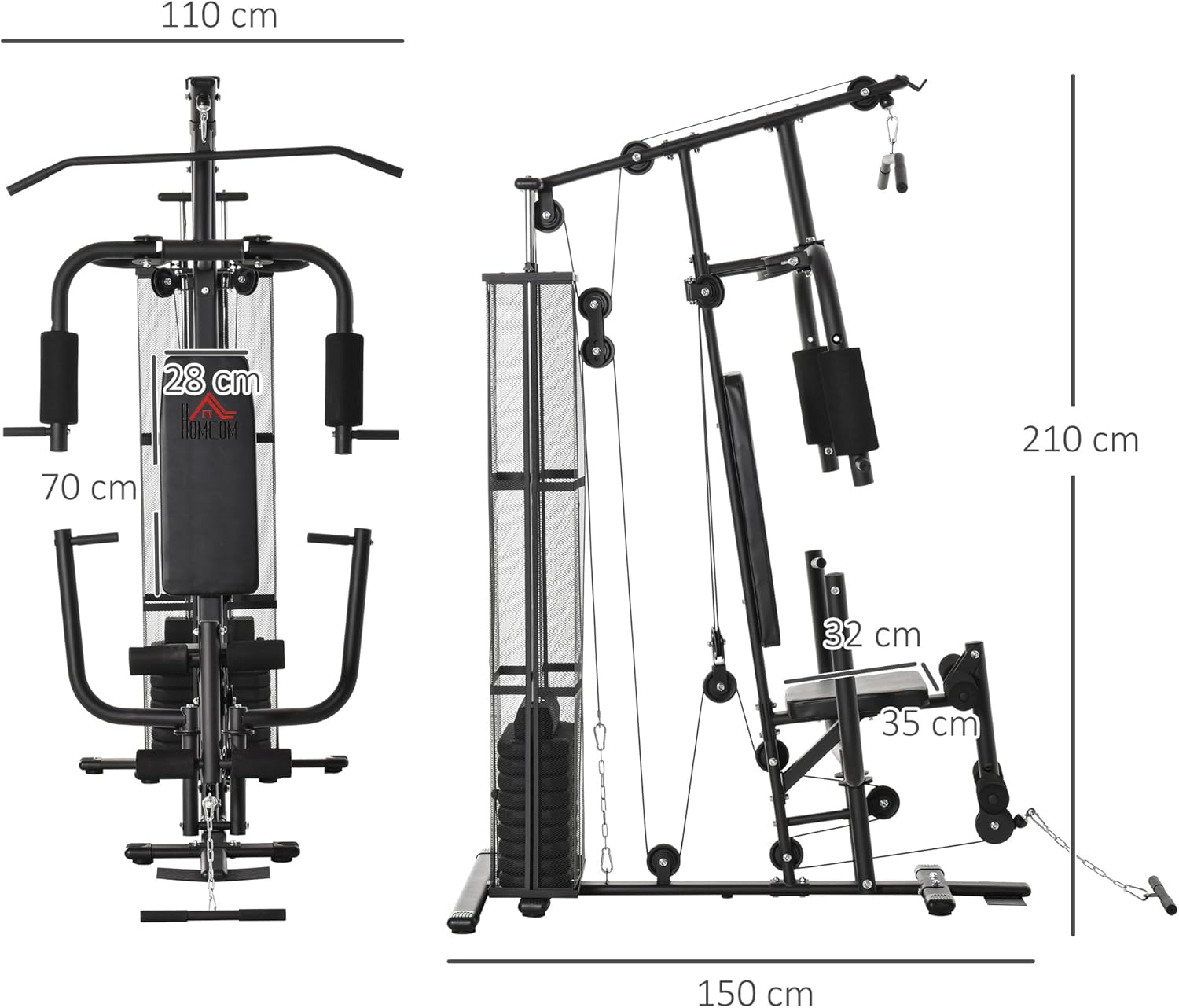
Image: A technical diagram illustrating the key dimensions of the HOMCOM Multi Gym, including height, width, and depth.
Warranty and Support
For information regarding warranty coverage and terms, please refer to the documentation included with your purchase or the retailer's website where the product was acquired.
If you require technical assistance, have questions about parts, or need support for your HOMCOM Multi Gym, please contact HOMCOM customer service. Contact details can typically be found on the product packaging, the official HOMCOM website, or through your point of purchase.
When contacting support, please have your model number (A91-134BK) and purchase date readily available to expedite the process.
Ask a question about this manual
Ask about setup, troubleshooting, compatibility, parts, safety, or missing instructions. Manuals+ will review the question and use this page’s manual context to help answer it.