
Introduction
This manual provides comprehensive instructions for the setup, operation, and maintenance of your Ascenty OSJ Smart Padlock SMlock-1. This smart padlock offers advanced security features, including Bluetooth app control and traditional passcode entry, designed for outdoor use on gates, lockers, and storage units.
Key features include mobile app unlocking, remote E-key and passcode sharing, and access record viewing. It supports up to 50 user codes and offers various password types: permanent, one-time, and time-limited. The padlock is equipped with a rechargeable battery and a low battery reminder system.
Package Contents
- Ascenty OSJ Smart Padlock SMlock-1
- USB Charging Cable
- User Manual (this document)
Setup
1. Initial Charging
Before first use, fully charge the padlock using the provided USB charging cable. Connect the cable to the charging port on the padlock and a standard USB power source. The padlock has a rechargeable Li-Ion battery with a life of up to 6+ months or 2000 unlocks on a full charge.

Figure 1: Charging the Smart Padlock. The image shows the padlock with a USB cable connected to its side, and an overlay graphic indicating a charging battery.
2. App Download and Installation
The Ascenty OSJ Smart Padlock operates with a mobile application (iOS/Android). Search for the official application in your device's app store (e.g., "Smart Life" or "Tuya Smart" as indicated by user reviews for similar products) and install it.
3. Device Pairing (Bluetooth)
- Ensure Bluetooth is enabled on your smartphone.
- Open the installed mobile application.
- Press the 'ON' button on the padlock to activate it.
- Follow the in-app instructions to add a new device. The app should detect the padlock via Bluetooth.
- Complete the pairing process as prompted by the application.
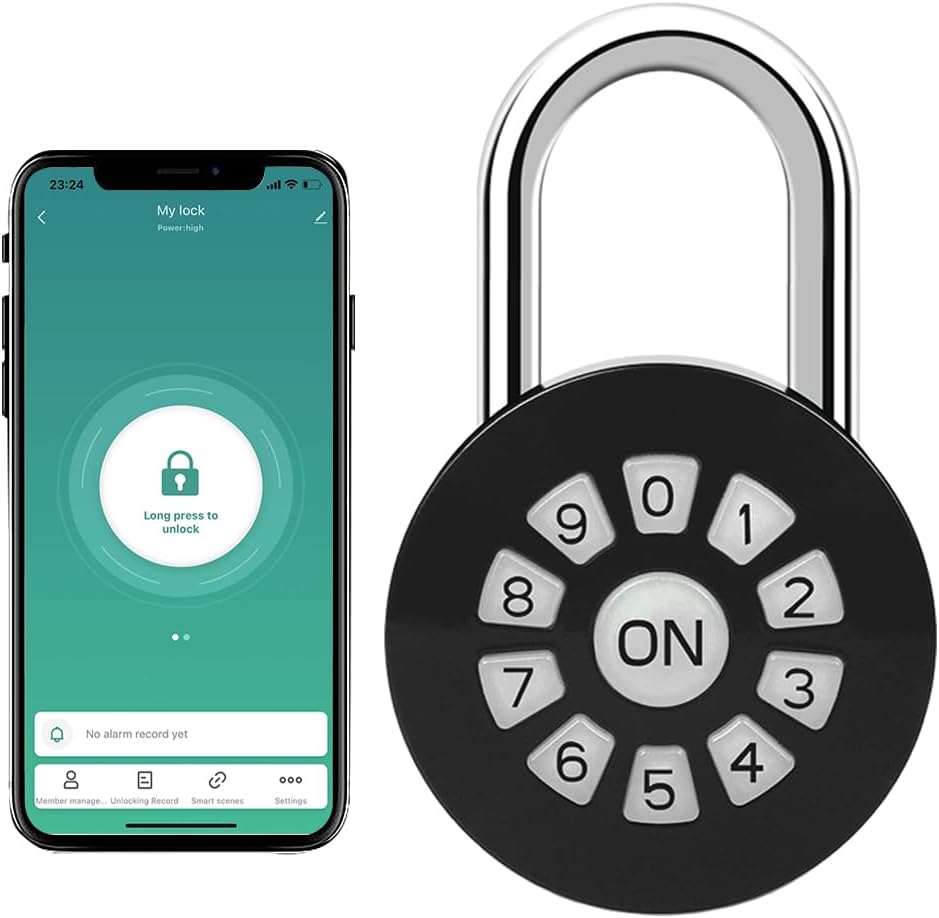
Figure 2: Padlock with mobile app interface. The image shows the padlock alongside a smartphone screen, illustrating the app's unlock function.
Operating Instructions
1. Unlocking via Mobile App
Once paired, open the mobile application and select your padlock. Press and hold the unlock icon within the app to unlock the padlock. Ensure you are within Bluetooth range of the padlock.
2. Unlocking via Passcode
Enter your pre-set passcode using the keypad on the padlock. Press the 'ON' button after entering the code to confirm and unlock.
3. Anti-Peeping Passcode Feature
To enhance security and prevent others from guessing your code, you can enter random digits before or after your actual passcode. For example, if your passcode is 123456, you can enter XXX123456XXX (where X represents any random digit) to unlock the padlock. The system will recognize the correct sequence within the longer input.

Figure 3: Anti-Peeping Passcode. The image illustrates how to use random digits before and after the actual passcode for enhanced security.
4. Managing Passcodes and Access
The mobile application allows you to manage various access methods:
- Permanent Passwords: Set codes for regular users.
- One-Time Passwords: Generate codes for single-use access, which are automatically deleted after use.
- Time-Limited Passwords: Create codes that are valid only for a specific duration.
- Share E-Keys: Grant temporary or permanent access to other users via the app.
- Access Records: View a history of unlock events within the application.

Figure 4: One-Time PIN Code usage. The image depicts a scenario where a user receives a temporary access code via phone.

Figure 5: Smart Padlock Features. This image highlights the key functionalities and design aspects of the padlock.
Recommended Uses
The Ascenty OSJ Smart Padlock SMlock-1 is versatile and suitable for a variety of applications, both indoors and outdoors. Its robust design and smart features make it ideal for securing personal belongings and property.
- School & Gym Lockers: Secure personal items in public or private lockers.
- Fences & Gates: Provide access control for property boundaries.
- Chains: Lock bicycles, motorcycles, or other equipment secured with chains.
- Hasps: Secure sheds, storage units, or cabinets equipped with hasps.
- Toolboxes: Protect tools and equipment from unauthorized access.

Figure 6: Versatile Applications. This image demonstrates various practical uses for the smart padlock.
Maintenance
Battery Management
The padlock is powered by a rechargeable Lithium-Ion battery. A low battery reminder will be displayed on the mobile application when the charge is critically low. It is recommended to charge the padlock promptly when this alert appears to ensure continuous operation.
To charge, use the provided USB cable and connect it to the charging port on the padlock. A full charge can provide up to 6 months of standby time or approximately 2000 unlocks.
Weather Resistance
The padlock is designed for outdoor use and offers a degree of weather resistance. While it can withstand exposure to rain and dust, prolonged exposure to extreme weather conditions may affect its durability over time. Ensure the charging port cover is securely closed when not charging to prevent water ingress.
Troubleshooting
- Padlock not unlocking:
- Check battery level via the app. If low, charge the padlock.
- Ensure the correct passcode is entered. Remember the anti-peeping feature allows extra digits.
- If using the app, ensure Bluetooth is enabled on your phone and you are within range.
- Restart the mobile application and try again.
- Battery not charging:
- Verify the USB cable is securely connected to both the padlock and the power source.
- Try a different USB cable or power adapter.
- Ensure the charging port is clean and free of debris.
- App connectivity issues:
- Confirm Bluetooth is active on your device.
- Ensure the padlock is powered on (press the 'ON' button).
- Move closer to the padlock to ensure you are within Bluetooth range.
- Close and reopen the app, or restart your smartphone.
- If issues persist, try unpairing and re-pairing the device in the app settings.
Specifications
| Brand | Ascenty OSJ |
| Model Name | SMlock-1 |
| Lock Type | Keypad, Bluetooth Smart Lock |
| Special Feature | Passcode Unlock, App Control |
| Connectivity Protocol | Bluetooth |
| Material | Metal |
| Color | Black |
| Item Dimensions (L x W x H) | 3.7 x 2 x 0.8 inches (9.4 x 5.1 x 2.0 cm) |
| Item Weight | 7.2 ounces (204 grams) |
| Battery Type | 1 Lithium Ion battery (included) |
| Battery Life | Up to 6+ months standby or 2000 unlocks per charge |
| Recommended Uses | Outdoor use, securing gates, lockers, storage |
| Included Components | Padlock, Charge cable, User manual |
| UPC | 762736699681 |

Figure 7: Padlock Dimensions. The image provides a visual representation of the padlock's measurements.
Warranty and Support
Warranty information for the Ascenty OSJ Smart Padlock SMlock-1 is typically provided at the point of purchase or within the product packaging. Please refer to your purchase documentation for specific warranty terms and conditions.
For technical support or further assistance, please contact the seller or manufacturer directly through their official channels. Contact information can usually be found on the product packaging or the seller's website.