Introduction
The Maoo Titan smartwatch is a robust and advanced wearable designed for men, offering comprehensive health monitoring, extensive sport tracking, and seamless connectivity. This manual provides detailed instructions on how to set up, operate, maintain, and troubleshoot your Maoo Titan smartwatch to ensure optimal performance and user experience.
What's in the Box
Upon opening the package, verify that all the following components are present:
- 1x Maoo Titan Smartwatch
- 1x Stainless Steel Wristband
- 1x Tool for Shortening Stainless Steel Wristband
- 1x TPU Wristband
- 1x USB Charging Cable
- 1x User Manual

Image: The package contents of the Maoo Titan smartwatch, showing the watch, two types of bands, charging cable, and a small tool.
Setup
1. Charging the Smartwatch
Before initial use, fully charge your Maoo Titan smartwatch. Connect the USB charging cable to the charging port on the back of the watch and plug the other end into a standard USB power adapter (not included). A full charge typically takes approximately 2 hours. The watch display will indicate charging status.
2. Installing the FitCloudPro App
The Maoo Titan smartwatch requires the FitCloudPro app for full functionality. Download the app from your smartphone's app store (Google Play Store for Android or Apple App Store for iOS). Ensure your smartphone meets the compatibility requirements: Android 9.0 and higher, or iOS 10.0 and higher.
3. Pairing with Your Smartphone
- Ensure Bluetooth is enabled on your smartphone.
- Open the FitCloudPro app and follow the on-screen instructions to create an account or log in.
- In the app, navigate to the device pairing section and search for your Maoo Titan smartwatch.
- Select your smartwatch from the list of discovered devices. Confirm the pairing request on both your phone and the watch if prompted.
- Once paired, the app will synchronize data with your watch.
4. Adjusting the Wristband
The Maoo Titan comes with both a Stainless Steel and a TPU wristband. Use the provided tool to adjust the length of the Stainless Steel band by removing or adding links as needed. The TPU band can be adjusted using its buckle mechanism. Ensure the watch fits snugly but comfortably on your wrist for accurate health monitoring.
Operating
Display and Navigation
The Maoo Titan features a 1.43-inch AMOLED Full Touchscreen with a resolution of 466*466 pixels. Navigate the watch interface by swiping across the screen and tapping icons. The watch also supports Always-on-display functionality, which can be configured in the settings or via the FitCloudPro app.

Image: The 1.43-inch AMOLED full touchscreen display of the Maoo Titan smartwatch.
Full Call Functionality
With Bluetooth 5.2, the Maoo Titan allows you to answer incoming calls and make calls directly from your wrist without needing to use your phone. Ensure your watch is connected to your smartphone via Bluetooth.

Image: Demonstrating the full call function of the Maoo Titan smartwatch, allowing users to answer and make calls directly from the watch.
Notifications
Receive notifications from various apps such as WhatsApp, Instagram, and Twitter directly on your wrist. Configure which app notifications you wish to receive through the FitCloudPro app settings.
Watch Faces
Customize your watch face from over 300 options available through the FitCloudPro app. You can also create a custom watch face using your own photos.
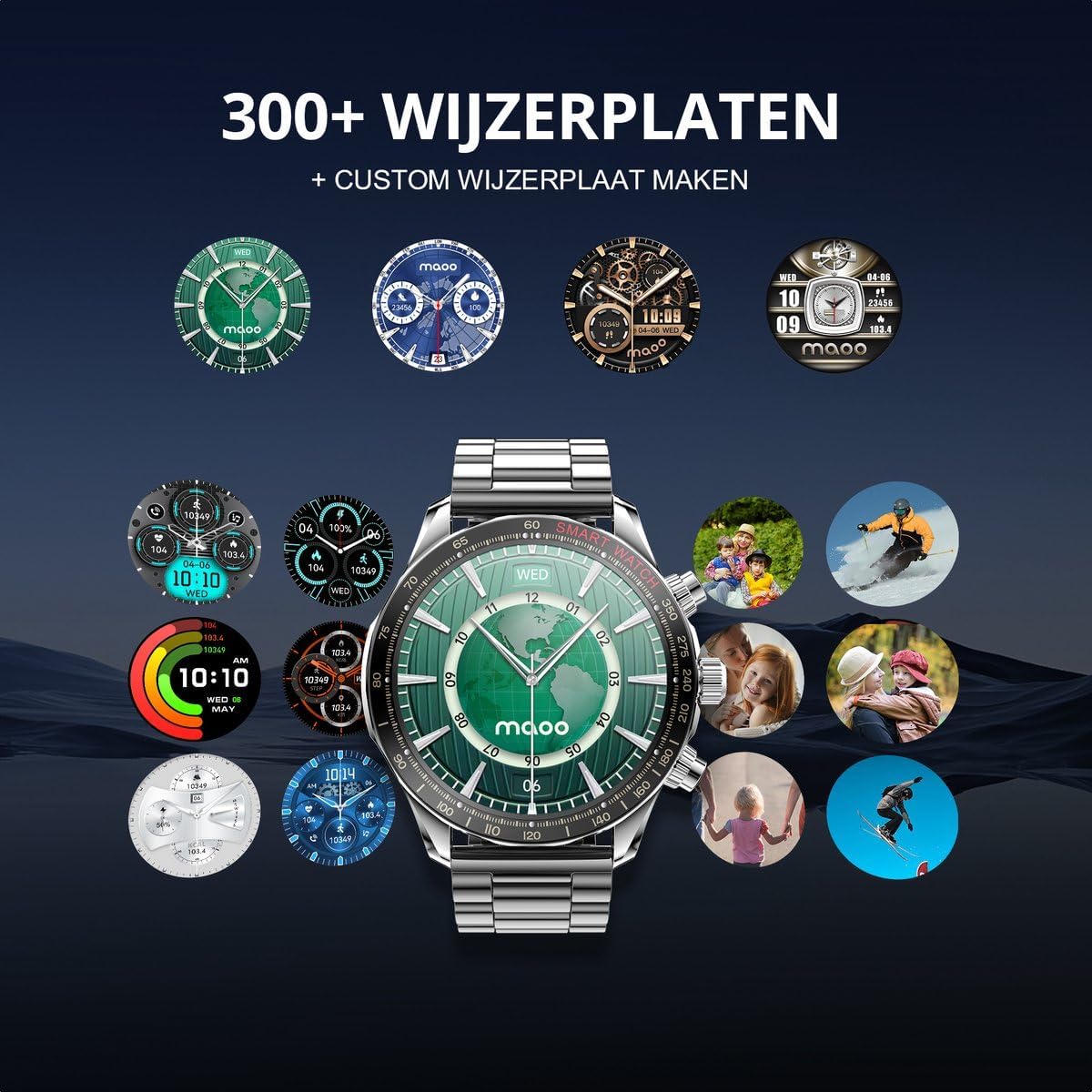
Image: A selection of over 300 watch faces available for the Maoo Titan, including options for custom photo backgrounds.
Additional Features
- Music Control: Control music playback on your smartphone directly from the watch.
- Stopwatch, Alarm, Timer: Access these utility functions from the watch menu.
- Calendar: View your schedule and appointments.
- Weather Report: Get real-time weather updates.
- Internal Compass: Utilize the built-in compass for navigation.

Image: The internal compass feature of the Maoo Titan smartwatch, showing directional readings.
- Find My Phone: Use this feature to locate your paired smartphone.
Health Monitoring
The Maoo Titan acts as a personal health assistant, providing insights into your well-being through advanced sensors.
- Heart Rate Monitor: Continuously tracks your heart rate throughout the day.
- Blood Oxygen (SpO2) Monitor: Measures your blood oxygen saturation levels.
- Blood Pressure Monitor: Provides estimates of your blood pressure.
- Sleep Monitor: Analyzes your sleep patterns, including deep sleep, light sleep, and awake times, to help improve sleep quality.

Image: The sleep monitoring function of the Maoo Titan smartwatch, tracking sleep duration and quality.
- Stress Meter: Helps you understand your stress levels.
- Breathing Exercises: Guided breathing exercises to help you relax and manage stress.
Note: The health monitoring features are for informational purposes and should not be used for medical diagnosis or treatment. Consult a healthcare professional for any health concerns.
Sport & Activity Tracking
The Maoo Titan supports your fitness journey with comprehensive activity tracking features.
- 100+ Sport Modes: Track various activities such as running, cycling, swimming, and more. Select the appropriate mode for accurate data collection.
- Pedometer: Counts your daily steps.
- Calorie Tracker: Estimates calories burned based on your activity.
- Distance Meter: Records the distance covered during your activities.
- GPS (via smartphone): Utilizes your smartphone's GPS to map your routes and track outdoor activities.
- Reminders: The smartwatch can remind you to stay hydrated and move regularly to encourage an active lifestyle.
Specifications
Detailed technical specifications for the Maoo Titan smartwatch:
| Feature | Detail |
|---|---|
| Model | Maoo Titan |
| Target Audience | Men |
| Display | 1.43 inch AMOLED Full Touchscreen |
| Screen Resolution | 466*466 |
| Case Dimensions | 45*45 mm |
| Case Material | Galvanized Steel and Plastic |
| Wristband Material | Stainless Steel, TPU |
| Available Colors | Black, Silver |
| Compatibility | Android 9.0 and higher, iOS 10.0 and higher |
| Bluetooth Version | 5.2 |
| App | FitCloudPro |
| Protection Level | IP68 Water Resistant |
| Battery Capacity | 300 mAh |
| Battery Life (Normal Use) | 5-7 days |
| Battery Life (Always-on-display) | 2-3 days |
| Stand-by Time | 40 days |
| Charging Time | Approx. 2 hours |
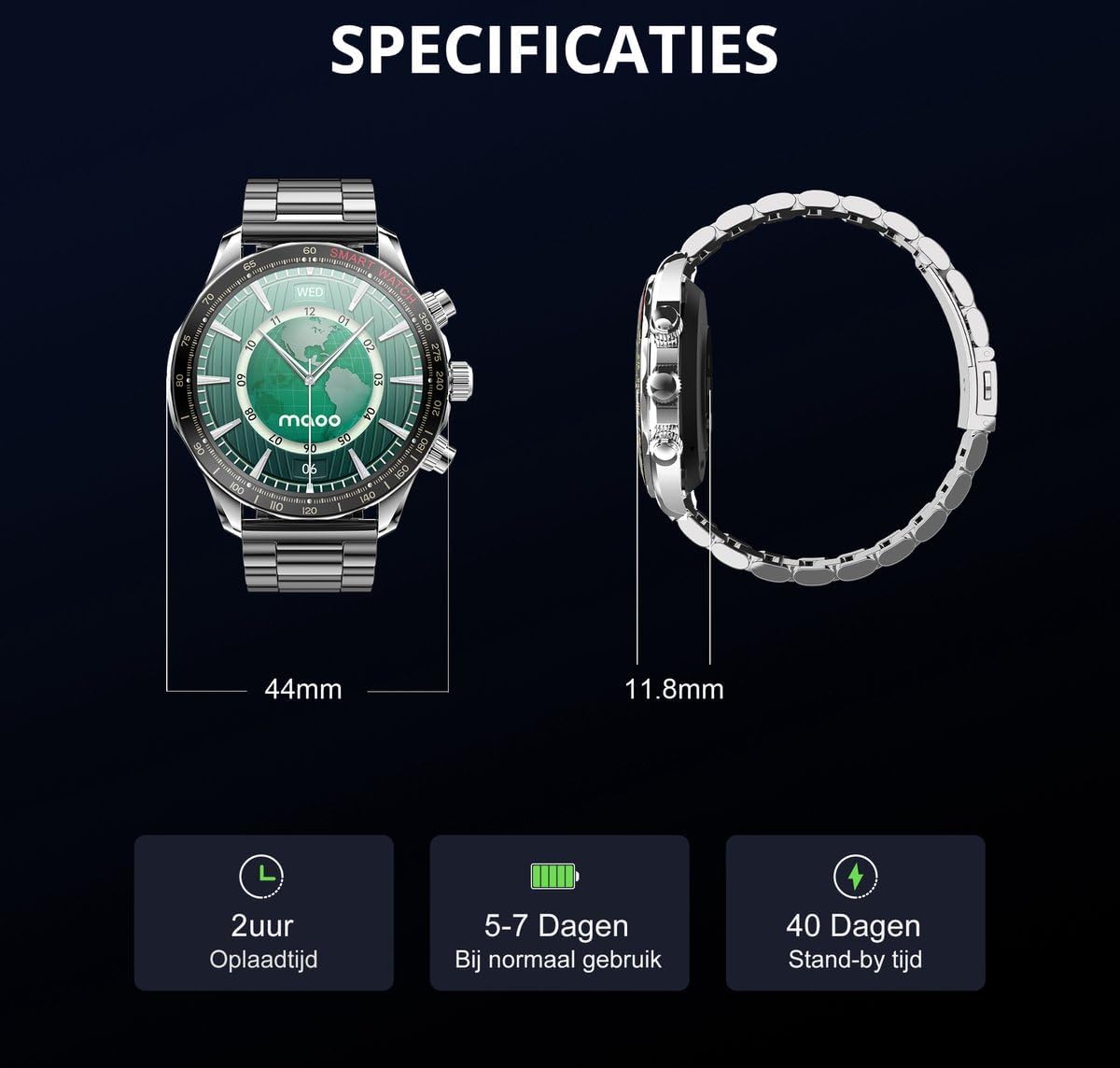
Image: Key specifications of the Maoo Titan smartwatch, including dimensions and battery performance.
Maintenance
Water Resistance (IP68)
The Maoo Titan smartwatch is IP68 water resistant, meaning it is protected against dust ingress and can withstand immersion in water up to 1.5 meters for 30 minutes. It is suitable for daily use, hand washing, and light rain. However, it is not recommended for hot showers, saunas, or diving, as steam and hot water can compromise the seals.
Cleaning
Regularly clean your smartwatch and wristbands to prevent skin irritation and maintain hygiene. Use a soft, damp cloth to wipe the watch face and case. For the wristbands, follow specific cleaning instructions based on the material (stainless steel or TPU). Avoid using harsh chemicals or abrasive materials.
Battery Care
To prolong battery life, avoid fully discharging the battery frequently. Charge the watch when the battery level is low. Store the watch in a cool, dry place when not in use for extended periods.
Troubleshooting
- Watch not turning on: Ensure the watch is fully charged. Connect it to the charging cable and allow it to charge for at least 30 minutes before attempting to power it on again.
- Cannot pair with smartphone:
- Ensure Bluetooth is enabled on your smartphone and the watch.
- Make sure the FitCloudPro app is installed and running.
- Restart both your smartphone and the smartwatch.
- Ensure the watch is within the Bluetooth range of your phone.
- If previously paired, try unpairing and re-pairing the device through your phone's Bluetooth settings and the app.
- Notifications not received:
- Check if the watch is properly connected to the FitCloudPro app.
- Verify that app notifications are enabled in the FitCloudPro app settings.
- Ensure your phone's notification settings allow the FitCloudPro app to access and display notifications.
- Inaccurate health data:
- Ensure the watch is worn snugly on your wrist, not too loose or too tight.
- Clean the sensors on the back of the watch.
- Avoid excessive movement during measurements.
- Short battery life:
- Reduce screen brightness.
- Disable Always-on-display if not needed.
- Limit the number of apps sending notifications to the watch.
- Ensure the watch is fully charged each time.
Warranty and Support
For warranty information and customer support, please refer to the documentation provided with your purchase or visit the official Maoo website. Keep your proof of purchase for warranty claims.
If you encounter issues not covered in this manual, please contact Maoo customer support for assistance. Provide your product model (Maoo Titan) and a detailed description of the problem.