
Lenyes LH80
LENYES LH80 Wireless Headset
User Manual
Introduction
This manual provides detailed instructions for the operation, setup, and maintenance of your LENYES LH80 Wireless Headset. Please read this manual thoroughly before using the product to ensure proper functionality and to maximize your listening experience.
The LENYES LH80 is a versatile wireless headset designed for seamless audio connectivity. It features Bluetooth 5.1 technology, a long-lasting battery, and support for multiple audio input modes, including TF card and AUX. It also integrates with Google Assistant for enhanced convenience.
Product Overview
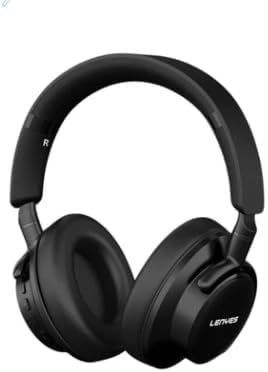
Figure 1: Front view of the LENYES LH80 Wireless Headset, showcasing its sleek black design and over-ear cups.

Figure 2: Illustration highlighting the wireless pairing technology of the LH80 headset, emphasizing its 10-meter accessibility.
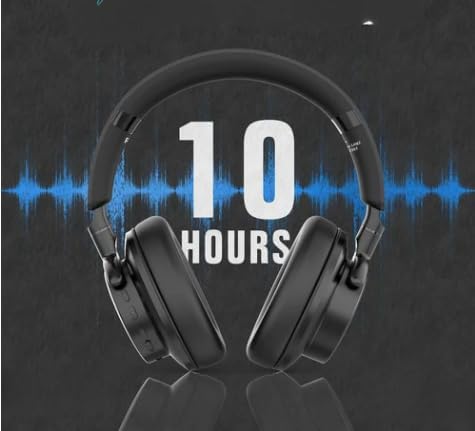
Figure 3: Image depicting the impressive 10-hour battery life of the LH80 headset, indicating extended usage on a single charge.
Key Features:
- Wireless Connectivity: Equipped with Bluetooth 5.1 for seamless connectivity and a transmission range of up to 10 meters.
- Long Battery Life: Enjoy up to 10 hours of continuous music playback with the 300 mAh battery.
- Versatile Functionality: Supports Bluetooth headphone mode, TF card mode, AUX mode, and Google Assistant integration.
- Rapid Charging: The Type-C interface allows for a quick 2-hour charging time.
Setup
1. Initial Charging:
Before first use, fully charge your LENYES LH80 headset. Connect the provided Type-C charging cable to the headset's charging port and the other end to a USB power source (e.g., computer USB port, wall adapter). The charging indicator light will illuminate during charging and turn off or change color once fully charged. A full charge takes approximately 2 hours.
2. Bluetooth Pairing:
- Ensure the headset is powered off.
- Press and hold the Power button on the headset until the indicator light flashes blue and red alternately, indicating it is in pairing mode.
- On your device (smartphone, tablet, computer), enable Bluetooth and search for available devices.
- Select "LENYES LH80" from the list of found devices.
- Once connected, the indicator light on the headset will flash blue slowly or remain solid blue, and you will hear a confirmation tone.
Note: The headset will automatically attempt to reconnect to the last paired device when powered on, if that device is within range and has Bluetooth enabled.
Operating Instructions
Basic Controls:
- Power On/Off: Press and hold the Power button for 3 seconds.
- Play/Pause: Short press the Multi-function button (often the Power button or a dedicated play/pause button).
- Volume Up: Short press the "+" button.
- Volume Down: Short press the "-" button.
- Next Track: Long press the "+" button.
- Previous Track: Long press the "-" button.
- Answer/End Call: Short press the Multi-function button during an incoming call.
- Reject Call: Long press the Multi-function button during an incoming call.
- Activate Google Assistant: Double-press the Multi-function button.
Mode Switching:
- Bluetooth Mode: Default mode after pairing.
- TF Card Mode: Insert a TF (microSD) card with audio files into the designated slot. The headset will automatically switch to TF card playback.
- AUX Mode: Connect an audio cable (3.5mm jack) to the AUX input port on the headset and your audio source. The headset will automatically switch to AUX mode.
Maintenance
- Cleaning: Use a soft, dry cloth to clean the headset. Do not use abrasive cleaners, alcohol, or chemical solvents, as these may damage the surface.
- Storage: When not in use, store the headset in a cool, dry place, away from direct sunlight and extreme temperatures.
- Battery Care: To prolong battery life, avoid fully discharging the battery frequently. Charge the headset regularly, even if not in frequent use.
- Water Resistance: The LENYES LH80 is not waterproof. Avoid exposure to water, rain, or excessive moisture.
Troubleshooting
| Problem | Possible Cause | Solution |
|---|---|---|
| Headset does not power on. | Low battery. | Charge the headset fully. |
| Cannot pair with device. | Headset not in pairing mode; device Bluetooth off; too far from device. | Ensure headset is in pairing mode (flashing blue/red). Turn on device Bluetooth. Move headset closer to device (within 10m). |
| No sound. | Volume too low; incorrect mode; device not connected. | Increase headset and device volume. Ensure correct mode (Bluetooth, TF, AUX). Re-pair or reconnect the headset. |
| Short battery life. | Battery not fully charged; aging battery. | Ensure full charge before use. If battery life significantly degrades, contact customer support. |
Specifications
| Feature | Detail |
|---|---|
| Model Name | LH80 |
| Brand | Lenyes |
| Connectivity Technology | Bluetooth 5.1 |
| Wireless Range | Up to 10 meters |
| Battery Capacity | 300 mAh |
| Music Playback Time | Up to 10 hours |
| Charging Time | Approximately 2 hours |
| Charging Interface | Type-C |
| Supported Modes | Bluetooth, TF Card, AUX |
| Voice Assistant | Google Assistant integration |
| Color | Black |
| Form Factor | True Wireless (On-Ear) |
Warranty and Support
Specific warranty details for the LENYES LH80 Wireless Headset are typically provided at the point of purchase or within the product packaging. Please refer to your purchase receipt or the official Lenyes website for comprehensive warranty information.
For technical support, troubleshooting assistance beyond this manual, or warranty claims, please contact Lenyes customer service through their official channels. Contact information can usually be found on the product packaging or the manufacturer's website.
Ask a question about this manual
Ask about setup, troubleshooting, compatibility, parts, safety, or missing instructions. Manuals+ will review the question and use this page’s manual context to help answer it.