
Morelax M858
Morelax Mini Electric Under-Desk Elliptical User Manual
Model: M858
Introduction
The Morelax Mini Electric Under-Desk Elliptical (Model M858) is designed to provide a convenient and effective low-impact exercise solution for home or office use. This motorized elliptical offers both manual and automatic modes, a quiet operation, and a portable design, making it suitable for various users, including those seeking rehabilitation or gentle fitness.
This manual provides essential information for the safe and efficient operation, maintenance, and troubleshooting of your Morelax elliptical machine. Please read it thoroughly before first use and keep it for future reference.
What's in the Box
Upon opening the package, please verify that all the following components are included:
- 1 x Morelax Mini Electric Under-Desk Elliptical (Main Unit)
- 1 x Power Cord
- 2 x Foot Straps
- 1 x PVC Anti-Slip Pad
- 1 x Remote Control
- 1 x User Manual (this document)

Image: All components included in the Morelax Mini Electric Under-Desk Elliptical package.
Setup
The Morelax Mini Electric Under-Desk Elliptical comes fully assembled and ready to use. No complex installation is required.
- Placement: Place the elliptical on a flat, stable surface. Ensure there is enough space around the unit for comfortable use and to prevent obstruction.
- Anti-Slip Pad: For enhanced stability and to protect your floor, place the provided PVC anti-slip pad underneath the elliptical.
- Power Connection: Connect the power cord to the elliptical's power input port and then plug it into a standard electrical outlet.
- Foot Straps (Optional): If desired, attach the foot straps to the pedals to secure your feet during exercise. This can improve stability and control.

Image: Close-up of the elliptical pedals with foot straps for secure placement.

Image: The elliptical placed on an anti-slip mat for stability during use.
Operating Instructions
Power On/Off
Press the POWER button on the remote control or the main unit's display to turn the elliptical on or off.
Manual Mode (HR Mode)
In Manual Mode, you have full control over the speed and direction of the pedals.
- Activation: Press the MANUAL button on the display or the MODE button on the remote until "HR" appears on the screen.
- Speed Adjustment: Use the SPEED+ and SPEED- buttons on the display or remote to adjust the speed from 1 to 12 levels.
- Direction Change: Press the DIRECTION button on the display or remote to switch between forward and backward motion.
- Start/Stop: Press the START/STOP button to begin or pause your exercise.
Automatic Modes (P1, P2, P3)
The elliptical offers three pre-programmed automatic modes with fixed speeds and directions.
- Activation: Press the AUTO button on the display or the MODE button on the remote to cycle through P1, P2, and P3.
- P1 - Gentle: A low-intensity program suitable for warm-up or gentle exercise.
- P2 - Walk: A moderate-intensity program simulating a walking pace.
- P3 - Sport: A higher-intensity program for more vigorous exercise.
- Note: In automatic modes, speed and direction are pre-set and cannot be manually adjusted.

Image: Visual representation of Manual (HR) and Automatic (P1/P2/P3) modes and their controls.
Display and Remote Control
LCD Display
The built-in LCD screen provides real-time feedback on your workout:
- SCAN: Cycles through all metrics automatically.
- TIME: Duration of your exercise session.
- DISTANCE: Distance covered (in 10-meter units).
- SPEED: Current speed of the pedals.
- COUNTER: Total number of pedal rotations.
- CALORIE: Estimated calories burned.
Press the DISPLAY button on the unit or remote to manually cycle through these metrics.

Image: The large LCD screen displaying workout data such as time, distance, speed, and calories.
Remote Control
The remote control allows for convenient operation without bending down.
- POWER: Turns the unit on/off.
- START/STOP: Starts or pauses the exercise.
- MODE: Switches between Manual (HR) and Automatic (P1/P2/P3) modes.
- SPEED +/-: Adjusts speed in Manual mode.
- DIRECTION: Changes pedal direction.
- FUNCTION: Cycles through display metrics.
Important: When using the remote control, aim it directly at the elliptical's display for optimal responsiveness.
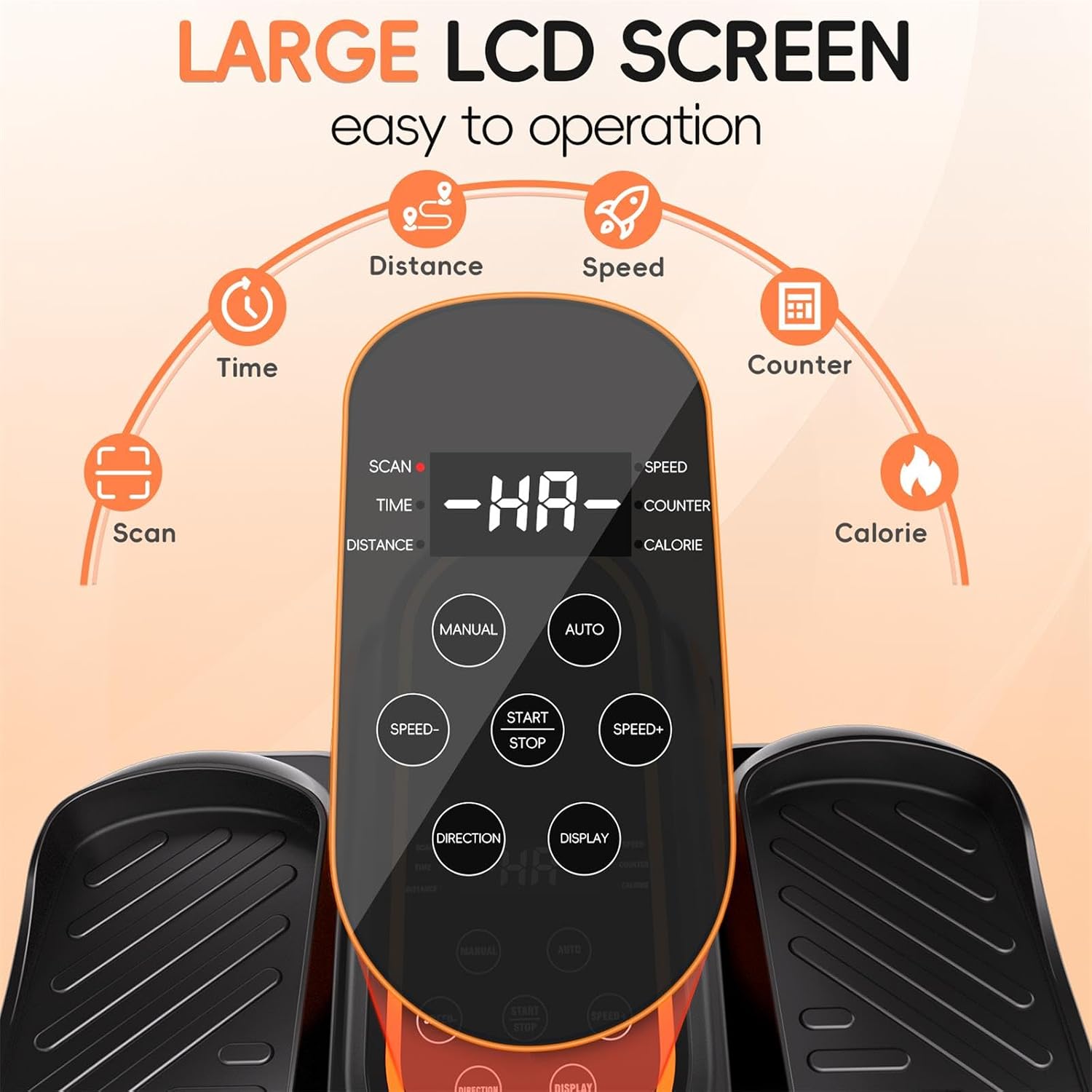
Image: The remote control, allowing users to adjust settings without bending down.
Safety Information
WARNING: To prevent injury, always adhere to the following safety guidelines.
- Seated Use Only: This elliptical is designed exclusively for seated use. DO NOT STAND ON THE ELLIPTICAL. Standing on the unit can cause serious injury and damage the machine.
- Stable Seating: Always use the elliptical while sitting comfortably in a stable chair or sofa. Ensure your feet are firmly placed on the pedals.
- Clear Surroundings: Ensure the area around the elliptical is clear of obstructions before and during use.
- Children and Pets: Keep children and pets away from the elliptical during operation.
- Medical Conditions: Consult a physician before starting any new exercise program, especially if you have pre-existing medical conditions or are undergoing rehabilitation.
- Proper Footwear: Wear appropriate footwear to ensure a secure grip on the pedals.
- Unplug When Not in Use: Always unplug the elliptical from the power outlet when not in use or before cleaning.

Image: Important safety warning illustrating that the elliptical is for seated use only, not for standing.
Maintenance
Regular maintenance helps ensure the longevity and optimal performance of your Morelax elliptical.
- Cleaning: Wipe down the unit with a soft, damp cloth after each use. Do not use abrasive cleaners or solvents. Ensure the unit is unplugged before cleaning.
- Storage: Store the elliptical in a cool, dry place away from direct sunlight and extreme temperatures. Its compact design and built-in handle make it easy to move and store.
- Inspection: Periodically inspect the power cord for any damage. Check pedals and straps for wear and tear.

Image: The elliptical's portable design with a built-in handle for easy movement and storage.
Troubleshooting
| Problem | Possible Cause | Solution |
|---|---|---|
| Unit does not power on. | Power cord not properly connected; Power outlet not working. | Ensure power cord is securely plugged into the unit and a working outlet. Try a different outlet. |
| Pedals are not moving. | Unit is paused; Incorrect mode selected; Motor issue. | Press START/STOP. Ensure a mode (Manual or Auto) is selected. If problem persists, contact customer support. |
| Remote control not responding. | Remote not aimed at display; Low battery in remote. | Aim remote directly at the elliptical's display. Replace remote batteries if needed. |
| Unit is making unusual noise. | Obstruction; Internal component issue. | Ensure no objects are obstructing the pedals. If noise persists, discontinue use and contact customer support. |
Specifications
- Model Number: M858
- Dimensions (L x W x H): 44 x 40 x 25 cm (17.32 x 15.75 x 9.84 inches)
- Weight: 5.2 kg (11.46 lbs)
- Material: Acrylonitrile Butadiene Styrene (ABS)
- Color: Black
- Speed Levels (Manual Mode): 12
- Automatic Modes: P1 (Gentle), P2 (Walk), P3 (Sport)
- Display: LCD (Time, Distance, Speed, Counter, Calories)
- Control: On-unit buttons, Remote Control
- Origin: China
Warranty and Support
Morelax is committed to providing high-quality products and excellent customer service.
- Return Policy: All Morelax under-desk ellipticals are eligible for a 90-day free return service.
- Customer Support: For any questions, concerns, or assistance, please contact Morelax customer support. We aim to respond to all inquiries within 24 hours.
- Contact Information: Please refer to the contact details provided on the Morelax official website or your purchase platform for the most up-to-date support channels.

Image: Morelax's commitment to customer satisfaction, including quick response times and a generous return policy.
Ask a question about this manual
Ask about setup, troubleshooting, compatibility, parts, safety, or missing instructions. Manuals+ will review the question and use this page’s manual context to help answer it.