
IDUTEX TS710
IDUTEX TS710 Heavy Duty Truck Scanner User Manual
Model: TS710 | Brand: IDUTEX
Introduction
The IDUTEX TS710 is a professional heavy-duty truck diagnostic tool designed for 12V and 24V semi-trucks, pickup trucks, and commercial vehicles. It offers comprehensive system diagnostics, over 42 special functions, and bi-directional control capabilities. This manual provides detailed instructions for setting up, operating, and maintaining your TS710 scanner.
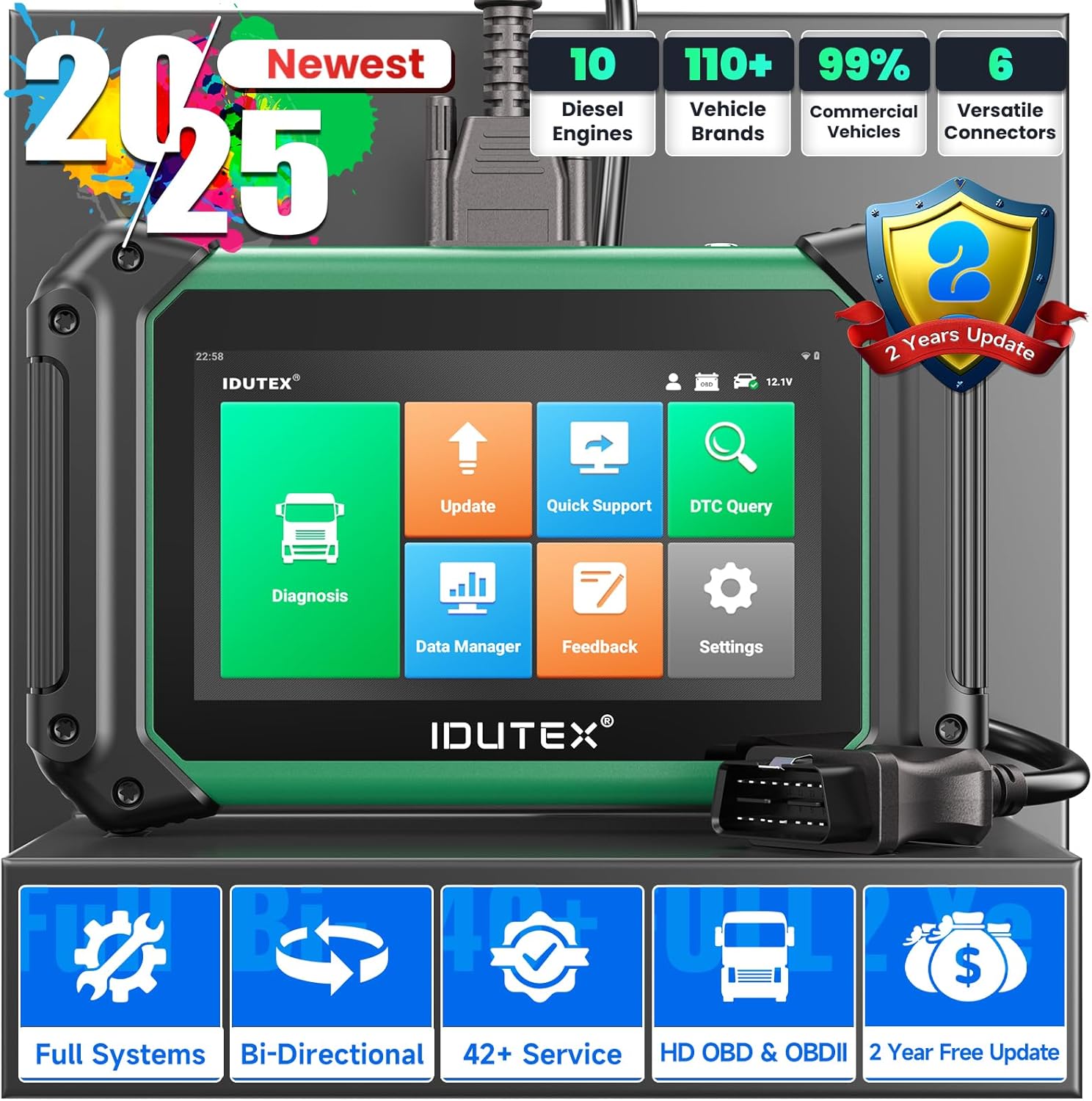
Figure 1: IDUTEX TS710 Heavy Duty Truck Scanner main unit.
1. Setup
1.1 Package Contents
Verify all items are present in the package:
- IDUTEX TS710 Main Unit
- User's Manual
- OBD Extension Cable (3.28 inches)
- USB Cable (4.28 inches)
- Power Adapter
- Various Diagnostic Connectors (DEUTSCH-9, DEUTSCH-6, CAT-9, BENZ-14, OBD-R16, VOLVO-8)
- Storage Box
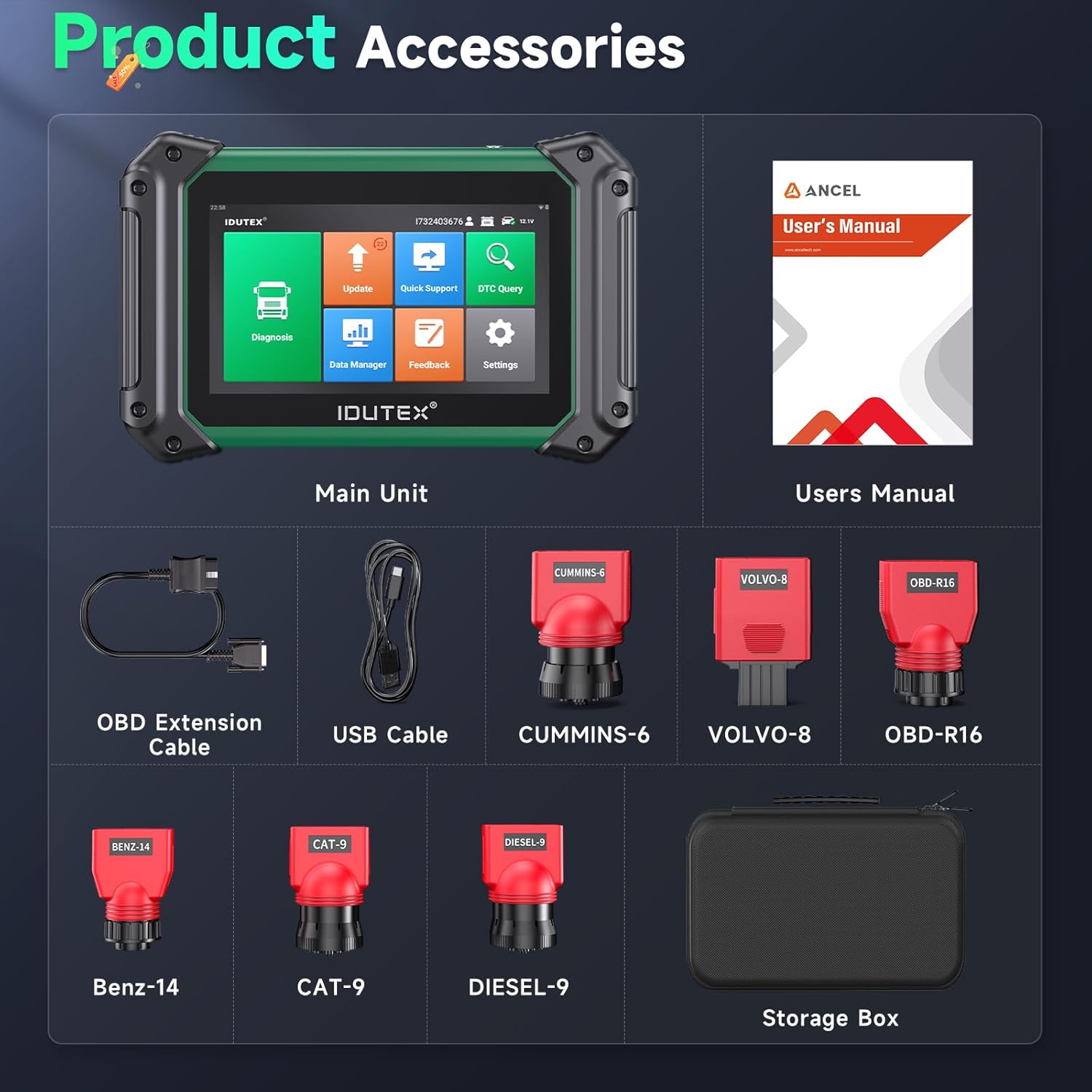
Figure 2: Included product accessories for the TS710 scanner.
1.2 Physical Features and Ports
Familiarize yourself with the main unit's physical components:
- 7-inch LCD Touch Screen: Primary interface for operation.
- Collapsible Kickstand: Located on the back for convenient viewing.
- OTG Port (Type-C): For connecting external devices.
- TF Port (32G): For expandable storage.
- OBD Port: Main diagnostic connection port.
- Start Button: For powering on/off the device.

Figure 3: The TS710 unit displaying its 42+ hot service functions menu.
Video 1: An unboxing video of the IDUTEX TS710, demonstrating the package contents, various diagnostic connectors, and the physical features of the main unit, including its ports and kickstand.
2. Operating Instructions
2.1 Initial Power On and Navigation
Press the Start Button to power on the device. The main interface provides access to various functions such as Diagnosis, Update, Quick Support, DTC Query, Data Manager, Feedback, and Settings.

Figure 4: The TS710 main screen showing options for diagnosis, updates, and data management, alongside a list of supported vehicle brands.
2.2 All System Diagnostic
The TS710 can quickly diagnose full systems for a wide range of commercial vehicles, including Light/HD Trucks, Buses, Construction Vehicles, and Agriculture Machines. It supports reading/erasing codes, viewing live data, retrieving ECU information, and performing active tests across systems like ECM, TCM, ABS, SRS, BCM, BMS, TPMS, SAS, Fuel System, Light System, Suspension, and A/C system.

Figure 5: Visual representation of the TS710 performing an OE-level full system diagnosis on a truck, highlighting various modules like ECM, TCM, ABS, and SRS.
2.3 Special Functions (42+ Resets)
The scanner features over 42 reset functions to address various vehicle needs. These include, but are not limited to, Oil/EPB/SAS/SRS/ETC Reset, DPF Regen, Urea Drive, Parameter Setting, Idle Speed Adjustment, and Fuel Injector Code. Function availability may vary by vehicle model and requires support by the vehicle itself.
Figure 6: A detailed view of the 42+ hot service functions available on the TS710, including DPF Regen, Fuel Injector Code, and Idle Speed Adjustment.
2.4 Bi-directional Control / Active Test
The TS710 offers full-featured bi-directional control, allowing you to send commands to the ECU and monitor component operation to precisely locate vehicle issues. This includes tests such as Aftertreatment Test, Injector Test, Fuel Pump Test, Cylinder Test, Engine State Monitor, A/C Compressor Test, Heated Oxygen Sensor Test, Fuel System Leakage Test, Intake Air Heater Override, and VGT Test.

Figure 7: Illustration of the bi-directional control capabilities, showing the scanner sending commands and receiving data from a truck's ECU, with examples of active tests like Cylinder Balance Test and EGR Solenoid Valve test.
2.5 DPF Regeneration
The TS710 supports forced DPF regeneration, which is crucial for maintaining optimal engine performance and avoiding costly repairs due to clogged DPFs. This function helps restore full DPF function quickly, minimizing downtime.

Figure 8: Visual detailing of the DPF Regeneration process, showing real-time monitoring and options for forced/manual/active regeneration and DPF health checks.
2.6 Speed Limit Adjustment
The built-in speed limit adjustment feature helps keep your vehicle operating within a safe and efficient speed range. This reduces mechanical stress, extends overall vehicle lifespan, and cuts down on maintenance frequency and expenses.
Video 2: Demonstration of the speed limit adjustment function on the IDUTEX TS710, showing how to access and modify the maximum speed setting.
2.7 Full HD OBD/OBD2 Functions
The TS710 supports full HD OBD and OBD2 modes, allowing for comprehensive engine diagnostics on both cars and trucks. This includes functions like reading ECU info, showing live data, reading and clearing codes, I/M readiness, freeze frame data, EVAP system test, and DTC lookup.

Figure 9: Overview of the full OBD2 functions available on the TS710, applicable to both cars and trucks, including reading codes, clearing codes, and viewing live data.
2.8 Data Management and Reporting
The device allows for powerful data management, including saving images, videos, and diagnostic reports. You can generate, share, and print diagnostic reports for your records or for customers.
Video 3: Demonstration of the DTC Query function, screenshot, and screen recording capabilities of the IDUTEX TS710, useful for data management and reporting.
2.9 Software Update
The TS710 supports one-click free updates for two years, ensuring regularly updated vehicle coverage, new features for specific models, and improved software performance.
Video 4: Illustrates the two-tap update process for the IDUTEX TS710, showing how to download and install the latest software versions.
2.10 Language Settings
The device supports over 13 languages, providing a multilingual option for non-native English speakers.
Video 5: Shows how to manage data and change language settings on the IDUTEX TS710, highlighting the multilingual support.
3. Maintenance
3.1 General Care
Keep the device clean and free from dust and moisture. Store it in the provided storage box when not in use to protect it from physical damage.
3.2 Battery Information
The TS710 is equipped with a 5000mAh rechargeable battery, providing up to 15 hours or more of battery life. Ensure the device is charged using the provided adapter. The device can be charged while plugged in.
4. Troubleshooting
4.1 DTC Query
Use the DTC Query function on the main interface to look up diagnostic trouble codes and their descriptions. This can help in identifying the root cause of vehicle issues.
4.2 Quick Support
The self-developed "Quick Support Function" provides fast online diagnostic help. This feature allows for remote assistance from technical support personnel.
4.3 Feedback
If you encounter issues not covered in this manual or require further assistance, utilize the Feedback function to communicate directly with technical support.
5. Specifications
| Feature | Detail |
|---|---|
| Brand | IDUTEX |
| Model Number | TS710 |
| Item Weight | 4.8 pounds |
| Product Dimensions | 9.25 x 1.18 x 5.75 inches |
| Operating System | Android (with Bi-directional Test, 42+ Reset Service, Full Systems, DPF Regen capabilities) |
| Display | 7'' LCD Touch Screen |
| Processor | 1.8GHz Octa-core CPU |
| Storage | 32GB |
| Battery | 5000mAh (up to 15+ hours) |
| Wi-Fi | 2.4GHz & 5GHz dual-band |
| Vehicle Coverage | 110+ brands, 99% commercial vehicles (12V & 24V) |
| Supported Engines | 10 Diesel Engines (e.g., Cummins, Caterpillar, Detroit) |
6. Warranty and Support
The IDUTEX TS710 comes with a 2-year warranty and 2-year free updates. For any questions or technical assistance, you can contact customer support via the "Quick Support Function" on the device or by emailing autoscope@163.com. A 60-day refund and exchange policy is also available.
Ask a question about this manual
Ask about setup, troubleshooting, compatibility, parts, safety, or missing instructions. Manuals+ will review the question and use this page’s manual context to help answer it.