
1. Introduction
The Brilliant Evolution LED Wireless Ultra Thin Light provides versatile and convenient lighting solutions for various indoor applications. Featuring RGB multi-color settings, adjustable brightness, and a remote control with timer functions, these battery-operated lights are designed for easy installation and enhanced ambiance in spaces such as cabinets, closets, and work areas.
2. Safety Information
- Do not mix old and new batteries.
- Do not mix alkaline, standard (carbon-zinc), or rechargeable (nickel-cadmium) batteries.
- Always insert batteries correctly with regard to polarity (+ and -).
- Remove batteries if the product is not used for an extended period.
- Keep batteries out of reach of children.
- This product is for indoor use only. Do not expose to water or high humidity.
- Do not attempt to disassemble or modify the light unit or remote control.
3. Package Contents
Please verify that all items are present in your package:
- LED Wireless Ultra Thin Light units (2 pack)
- Remote Control
- Pilot discs (adhesive mounting discs)
4. Product Components
The Brilliant Evolution LED Wireless Ultra Thin Light system consists of the light bar units and a dedicated remote control. Each light bar is designed to be ultra-thin for discreet placement and houses multiple LEDs capable of producing white and RGB colors. The remote control allows for comprehensive management of light functions.

Figure 4.1: Complete product package showing light bars, remote, and mounting discs.

Figure 4.2: Light bar dimensions and adhesive disc details.
5. Setup and Installation
5.1 Battery Installation
Each light unit requires 3 AAA batteries (not included). The remote control also requires batteries (typically 2 AAA, check remote compartment for specific type). Ensure correct polarity when inserting batteries.
- Locate the battery compartment on the back of each light unit and the remote control.
- Open the compartment cover.
- Insert the required batteries, matching the + and - indicators.
- Close the compartment cover securely.
5.2 Mounting the Lights
The lights are designed for tool-free installation using the included pilot discs.
- Choose a clean, dry, and smooth surface for mounting.
- Peel the protective backing from one side of a pilot disc.
- Adhere the disc firmly to the desired mounting location. Apply pressure for several seconds to ensure good adhesion.
- The light unit has integrated magnets. Align the light unit with the adhered pilot disc so that the magnets attach to the disc.
- Ensure the infrared eye on the light unit (if present) is facing a direction where it can receive signals from the remote control.
6. Operating Instructions
The Brilliant Evolution LED Wireless Ultra Thin Light is operated using the provided remote control.
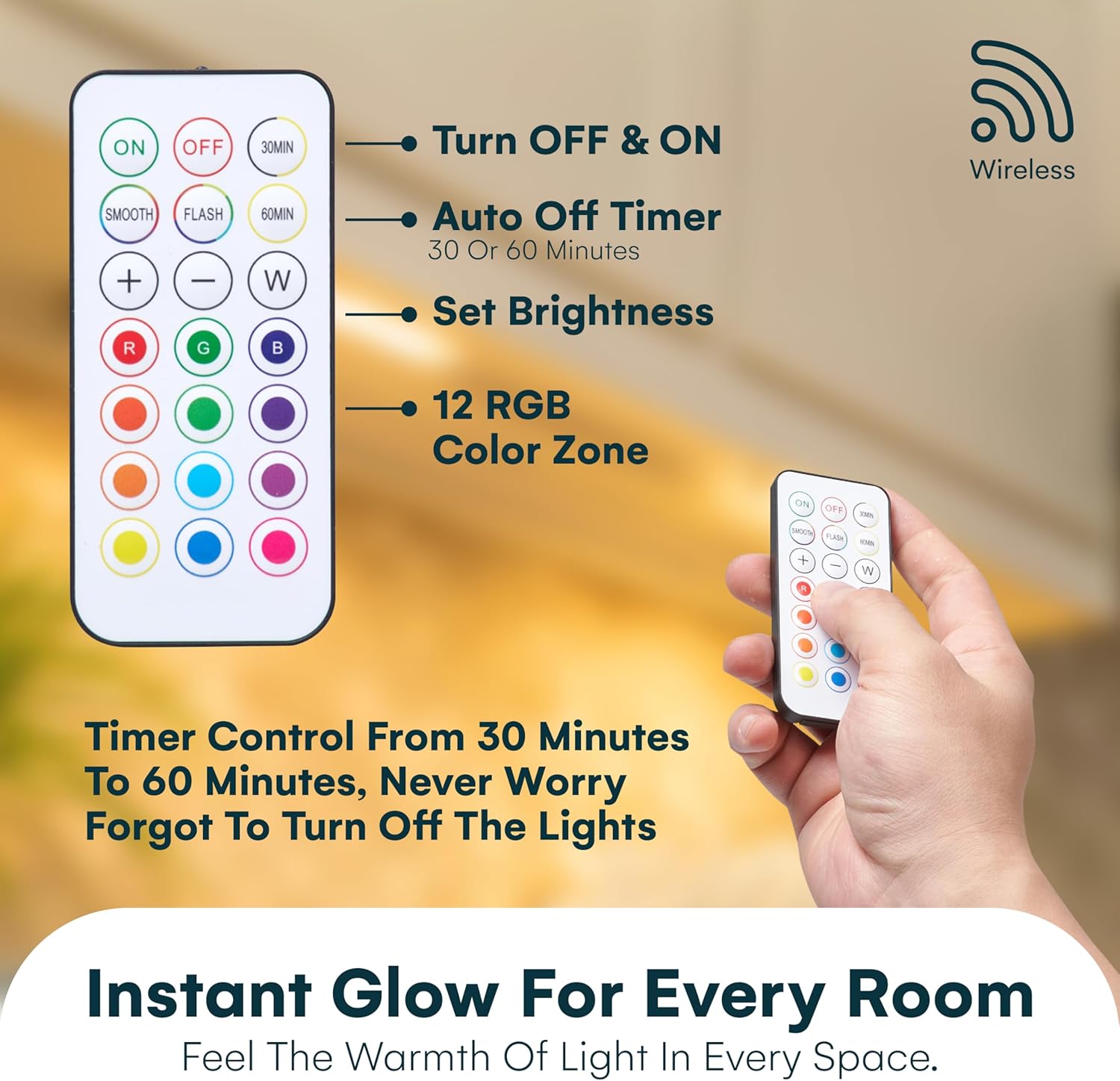
Figure 6.1: Remote control layout and functions.

Figure 6.2: Using the remote control.
6.1 Basic Functions
- ON/OFF: Press the ON button to turn the lights on, and the OFF button to turn them off.
- Brightness Adjustment: Use the + and - buttons to increase or decrease the light brightness.
- White Light: Press the W button to switch to white light mode.
6.2 Color Control
- RGB Colors: Select from a variety of pre-set RGB colors by pressing the corresponding color buttons on the remote (e.g., R for Red, G for Green, B for Blue, and other color circles).
- Smooth Mode: Press SMOOTH for a gradual transition between colors.
- Flash Mode: Press FLASH for a rapid cycling through colors.
6.3 Timer Function
Set the lights to automatically turn off after a specified duration:
- Press 30MIN to set the lights to turn off after 30 minutes.
- Press 60MIN to set the lights to turn off after 60 minutes.

Figure 6.3: Demonstrating the smart auto-off timer function.
7. Maintenance
7.1 Cleaning
To clean the light units and remote control, gently wipe with a soft, dry cloth. Do not use abrasive cleaners, solvents, or immerse in water.
7.2 Battery Replacement
When the lights begin to dim or the remote control becomes unresponsive, it is time to replace the batteries. Follow the battery installation steps in Section 5.1.
8. Troubleshooting
- Lights not turning on: Check battery polarity and ensure batteries are fresh. Verify the remote control has working batteries.
- Remote not working: Ensure there are no obstructions between the remote and the light unit's infrared receiver. Check remote battery. Ensure you are within the 15ft remote range.
- Lights dimming prematurely: This indicates low battery power. Replace all batteries in the affected light unit.
- Lights falling off: Ensure the mounting surface is clean and smooth. Apply firm pressure to the adhesive discs during installation. Consider using stronger adhesive if necessary for rough or porous surfaces.
9. Specifications
| Feature | Specification |
|---|---|
| Brand | Brilliant Evolution |
| Model Name | PXBR-000069-FBA |
| Color | White |
| Material | Plastic |
| Style | Remote Control - Color Lights |
| Product Dimensions | 8.5"L x 2"W x 0.5"H |
| Power Source | Battery Powered (AAA) |
| Light Source Type | LED |
| Number of Light Sources | 6 LEDs per light bar |
| Beam Angle | 120° |
| Lumen Output | 50 Lumens |
| Control Method | Remote Control |
| Remote Range | 15ft |
| Timer Functions | 30 / 60 minutes auto-off |
| Indoor/Outdoor Usage | Indoor |
| Water Resistance Level | Not Water Resistant |
| Item Weight | 8.1 ounces (total for 2 pack) |
| UPC | 810031588770 |

Figure 9.1: Versatile applications of the LED lights.
10. Warranty and Support
For warranty information or technical support, please refer to the manufacturer's official website or contact their customer service department. Keep your purchase receipt for proof of purchase.