
1. Introduction
This manual provides essential information for the safe and efficient installation, operation, and maintenance of the CSCPEXCZ SU900 series Variable Frequency Drive (VFD). The SU900 VFD is designed to control the speed of AC motors, offering precise control and energy efficiency for various industrial applications. Please read this manual thoroughly before installation and operation to ensure proper use and to prevent damage or injury.
2. Safety Information
WARNING: Improper installation or operation can lead to serious injury or death. Only qualified personnel should install, operate, and maintain this equipment.
- Always disconnect power before performing any installation, wiring, or maintenance. Wait at least 5 minutes after power-off for capacitors to discharge.
- Ensure proper grounding of the VFD and the motor.
- Do not touch electrical components when power is applied.
- Verify that the input voltage matches the VFD's rated voltage.
- Protect the VFD from moisture, dust, and corrosive gases.
- Install the VFD in a well-ventilated area to prevent overheating.
3. Specifications
The CSCPEXCZ SU900 VFD series offers various power ratings. This manual focuses on the 18.5KW 380V model, which is a high-power, high-performance VFD with 485 communication capability.

Figure 3.1: SU900 VFD Product Information and Dimensions. This image displays key specifications including weight, adapted motor power, and physical dimensions.
- Model: SU900 Series (Specific model: 18.5KW 380V)
- Input Voltage: 380V Three-phase
- Output Voltage: 380V Three-phase
- Rated Power: 18.5KW (25-30 HP adapted motor)
- Weight: Approximately 5 KG
- Dimensions (H x W x D): 297mm x 165mm x 206mm
- Communication: RS485 (Modbus RTU)
4. Product Features and Components
The SU900 VFD features an intuitive control panel for easy operation and monitoring. Key components include the display, control buttons, and terminals for power and control wiring.
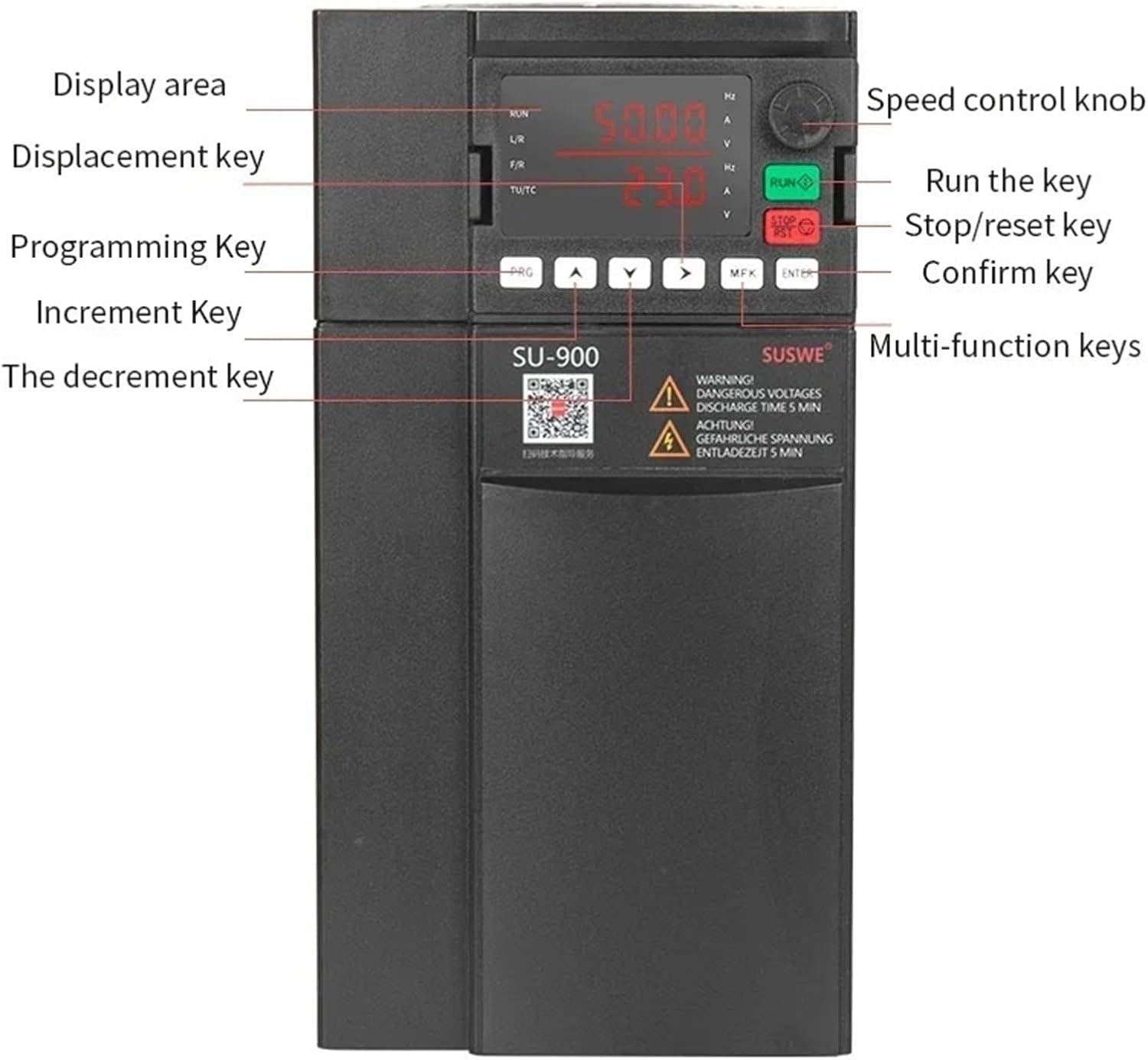
Figure 4.1: SU900 VFD Control Panel. This image highlights the display area, speed control knob, and various function keys.
- Display Area: Shows operational parameters such as frequency (Hz), voltage (V), and current (A).
- Speed Control Knob: Used for manual adjustment of output frequency/motor speed.
- RUN Key: Initiates motor operation.
- STOP/RESET Key: Stops motor operation or clears fault codes.
- PRG (Programming) Key: Enters or exits parameter programming mode.
- Arrow Keys (Up/Down/Left/Right): Used for navigating menus and adjusting parameter values. The 'Displacement key' (left arrow) moves the cursor, 'Increment Key' (up arrow) increases value, 'Decrement key' (down arrow) decreases value.
- MFK (Multi-function) Keys: Programmable keys for specific functions.
- ENTER Key: Confirms parameter settings or menu selections.
5. Installation
5.1 Mounting
Mount the VFD vertically on a sturdy, non-flammable surface in an environment free from excessive vibration, dust, moisture, and direct sunlight. Ensure adequate clearance around the unit for proper ventilation and heat dissipation. Refer to the dimensions in Section 3 for space planning.
5.2 Wiring
All wiring must comply with local and national electrical codes. Use appropriate wire gauges for the VFD's power rating. Ensure all connections are tight and secure.
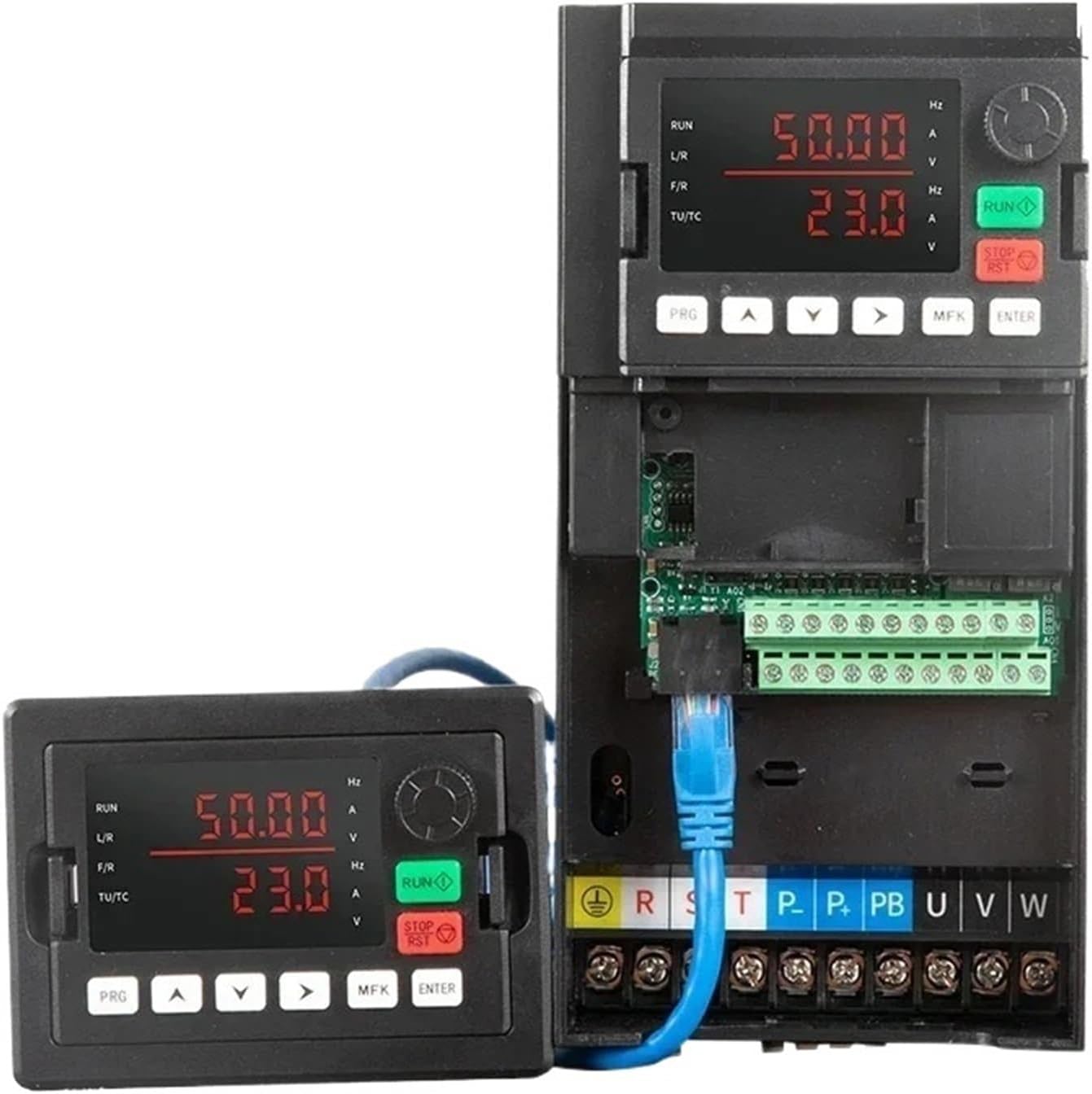
Figure 5.1: SU900 VFD Wiring Terminals. This image shows the main power terminals and control wiring connections.
- Power Input (R, S, T): Connect the three-phase 380V AC power supply to these terminals.
- Ground (PE): Connect the protective earth ground to the PE terminal. This is critical for safety.
- DC Bus (+, -): These terminals are for connecting external DC components or braking resistors (if applicable).
- Braking Resistor (PB): Connect an optional braking resistor here if dynamic braking is required.
- Motor Output (U, V, W): Connect the three-phase motor leads to these terminals. Ensure correct phase sequence for desired motor rotation.
- Control Terminals: The VFD includes various control terminals for external start/stop signals, analog inputs for speed reference, and digital inputs/outputs. Refer to the detailed wiring diagram in the full product manual for specific connections.
- RS485 Communication: The VFD supports RS485 communication for remote control and monitoring. Connect the communication cable to the designated terminals.
6. Operating Instructions
6.1 Basic Operation
- Power On: After verifying all wiring is correct and secure, apply power to the VFD. The display will illuminate.
- Set Speed: Use the Speed Control Knob to set the desired output frequency (motor speed). Alternatively, if configured for external control, provide the speed reference via analog input or communication.
- Start Motor: Press the RUN key on the control panel. The motor will accelerate to the set speed.
- Stop Motor: Press the STOP/RESET key. The motor will decelerate and stop.
6.2 Parameter Programming
The SU900 VFD has a comprehensive set of parameters to customize its operation. Refer to the full programming manual for a complete list and detailed descriptions.
- Enter Programming Mode: Press the PRG key. The display will show a parameter group or number.
- Navigate Parameters: Use the Up/Down arrow keys to scroll through parameter groups or individual parameters. Use the Left/Right (Displacement) keys to move between digits when editing a value.
- Select/Edit Parameter: Press ENTER to select a parameter for editing. Use the Up/Down arrow keys to change its value.
- Save Setting: Press ENTER again to save the new value.
- Exit Programming Mode: Press the PRG key to exit programming mode and return to the main display.
7. Maintenance
Regular maintenance ensures the longevity and reliable operation of your VFD.
7.1 Cleaning
Periodically clean the VFD to prevent dust accumulation, especially on the cooling fins and fan. Dust can impede heat dissipation and lead to overheating.

Figure 7.1: SU900 VFD Cooling Fan. Regular cleaning of the fan and vents is crucial for thermal management.
- Frequency: Clean at least once every six months, or more frequently in dusty environments.
- Procedure: Disconnect all power. Use compressed air to blow dust out of the cooling fan and heat sink. Use a soft, dry cloth to wipe down the exterior. Do not use liquid cleaners.
7.2 Inspection
- Check for loose connections, damaged wiring, or signs of overheating (discoloration).
- Inspect the cooling fan for proper operation and any unusual noises.
- Ensure the VFD's environment remains within specified temperature and humidity ranges.
8. Troubleshooting
This section provides guidance for common issues. For complex problems or persistent faults, contact technical support.
| Problem | Possible Cause | Solution |
|---|---|---|
| VFD does not power on | No input power; Blown fuse; Incorrect wiring | Check power supply; Inspect fuses; Verify wiring connections. |
| Motor does not run | Stop command active; Fault condition; Incorrect motor parameters | Check STOP/RESET key; Clear fault (if any); Verify motor parameters (e.g., frequency, voltage). |
| Overcurrent fault | Motor overload; Short circuit in motor wiring; Rapid acceleration | Reduce motor load; Check motor wiring; Increase acceleration time parameter. |
| Overvoltage fault | High input voltage; Rapid deceleration; Regenerative load | Check input voltage; Increase deceleration time parameter; Install braking resistor if needed. |
| Overheat fault | Insufficient ventilation; Dirty heat sink/fan; High ambient temperature | Ensure proper airflow; Clean fan and heat sink; Reduce ambient temperature. |
9. Warranty and Support
The CSCPEXCZ SU900 VFD comes with a standard manufacturer's warranty against defects in materials and workmanship. For specific warranty terms, please refer to your purchase documentation or contact your supplier.
For technical assistance, troubleshooting beyond this manual, or spare parts inquiries, please contact CSCPEXCZ customer support through the contact information provided with your product or on the official CSCPEXCZ website.