
1. Product Overview
The VINABTY RH-18A is a replacement infrared remote control designed to operate various Mitsubishi Electric air conditioner models. This remote control requires no programming or pairing; simply insert batteries to begin operation. It provides essential functions for controlling your air conditioning unit.
1.1. Compatibility
This remote control is compatible with the following Mitsubishi Electric air conditioner models:
- MSZ-HR25VF-E1, MSZ-HR25VF-E2, MSZ-HR25VF-E6, MSZ-HR25VF-E7, MSZ-HR25VF-ER1, MSZ-HR25VF-ET1
- MSZ-HR35VF, MSZ-HR35VF-E1, MSZ-HR35VF-E2, MSZ-HR35VF-E6, MSZ-HR35VF-E7, MSZ-HR35VF-ER1, MSZ-HR35VF-ET1
- MSZ-HR42VF, MSZ-HR42VF-E1, MSZ-HR42VF-E2, MSZ-HR42VF-E6, MSZ-HR42VF-E7, MSZ-HR42VF-ER1, MSZ-HR42VF-ET1
- MSZ-HR50VF, MSZ-HR50VF-E1, MSZ-HR50VF-E2, MSZ-HR50VF-E6, MSZ-HR50VF-E7, MSZ-HR50VF-ER1, MSZ-HR50VF-ET1
2. Setup
2.1. Battery Installation
The remote control requires two AAA batteries (not included). Follow these steps to install them:
- Locate the battery compartment cover on the back of the remote control.
- Slide the cover downwards to open the compartment.
- Insert two new AAA batteries, ensuring the positive (+) and negative (-) terminals match the diagrams inside the compartment.
- Slide the battery compartment cover back into place until it clicks securely.
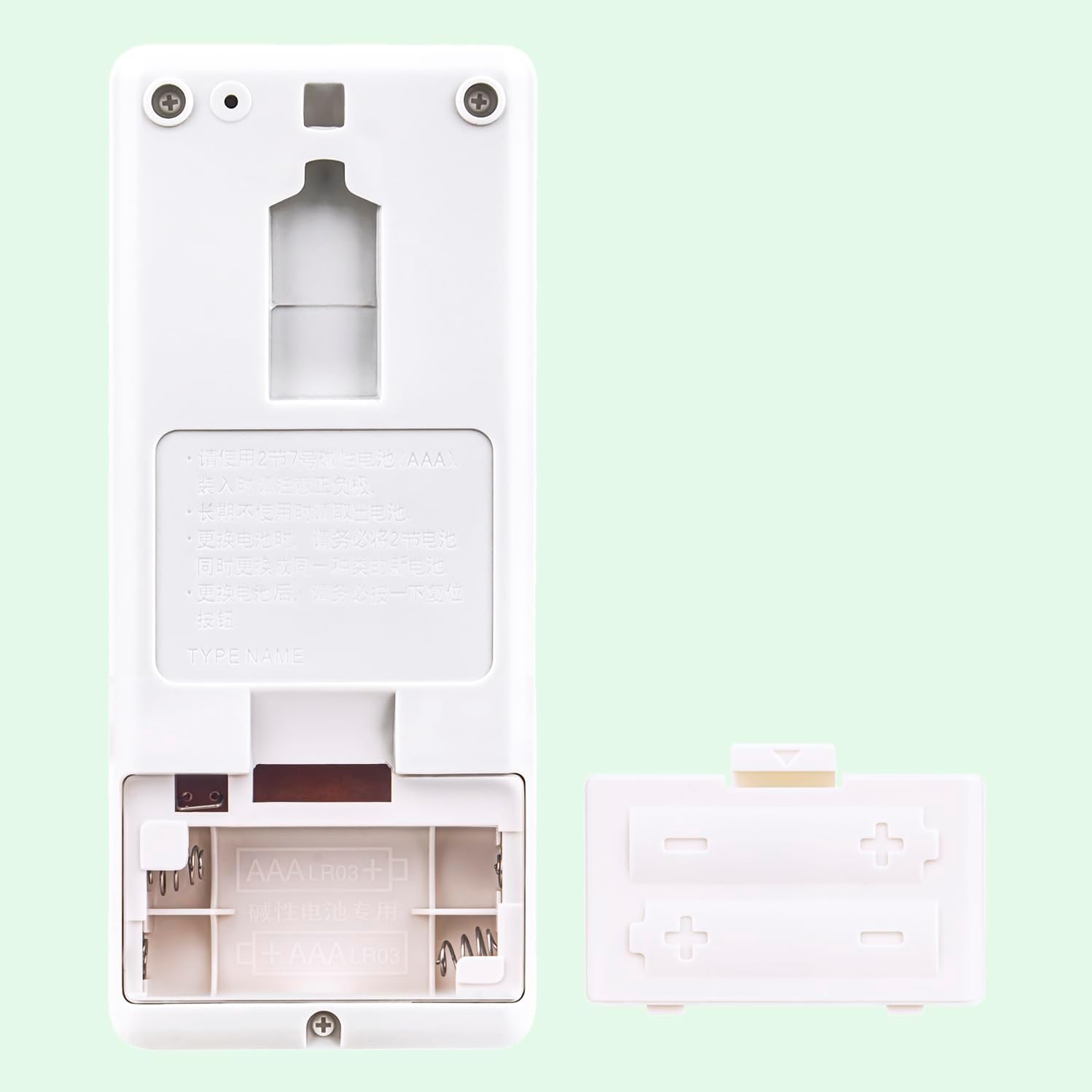
Figure 1: Battery compartment with batteries. Ensure correct polarity when inserting batteries.
After installing the batteries, the remote control is ready for use. No further programming is required.
3. Operating Instructions
Point the remote control directly at the indoor unit of your air conditioner. The maximum effective range is approximately 10 meters.

Figure 2: Front view of the RH-18A remote control.
3.1. Button Functions
- OFF/ON: Press to turn the air conditioner ON or OFF.
- TOO WARM / TOO COOL: These buttons are typically used for quick temperature adjustments or comfort settings.
- COOL: Activates cooling mode.
- DRY: Activates dehumidification mode.
- FAN: Activates fan-only mode.
- HEAT: Activates heating mode.
- MODE: Cycles through available operating modes (Cool, Dry, Fan, Heat).
- FAN SPEED (Fan icon): Adjusts the fan speed (e.g., Low, Medium, High, Auto).
- VANE (Vane icon): Controls the direction of the airflow (louvers).
- ECONO COOL: Activates energy-saving cooling operation.
- SELECT: Used for confirming selections in certain settings.
- TIME (Up/Down arrows): Adjusts timer settings.
- RESET: Resets the remote control settings. This may be required after battery replacement or if the remote malfunctions.
4. Troubleshooting
If you encounter issues with your remote control, refer to the following table for common problems and solutions.
| Problem | Possible Cause | Solution |
|---|---|---|
| Remote control does not respond. |
|
|
| AC unit does not respond to specific commands. |
|
|
| Display on remote is dim or blank. | Low battery power. | Replace batteries with new AAA batteries. |
5. Specifications
- Model: RH-18A
- Brand: VINABTY
- Connectivity Technology: Infrared
- Compatible Devices: Mitsubishi Electric Air Conditioners (MSZ-HR series)
- Number of Buttons: 15
- Maximum Range: 10 meters
- Special Feature: No programming required
- Power Source: 2 x AAA Batteries (not included)
- Color: Black/White
- Dimensions: Approximately 13 cm (length) x 5.5 cm (width) x 2.17 cm (thickness)
Figure 3: RH-18A Remote Control Dimensions.
6. Care and Maintenance
- Keep the remote control clean by wiping it with a soft, dry cloth. Do not use liquid cleaners.
- Avoid dropping the remote control or subjecting it to strong impacts.
- Do not expose the remote control to direct sunlight, high temperatures, or high humidity.
- If the remote control will not be used for an extended period, remove the batteries to prevent leakage.
7. Warranty and Support
Specific warranty information for this replacement remote control is not provided in the product details. For any issues or support inquiries, please refer to the seller's return policy or contact the seller directly through your purchase platform.