
Introduction
Thank you for choosing the Queemie Wireless Bluetooth Headphones. This multi-functional headset offers versatile audio experiences, including wireless connectivity via a USB transmitter for non-Bluetooth devices, standard Bluetooth pairing, an integrated FM radio, and a wired audio option. Designed for comfort and high-fidelity sound, these headphones are suitable for various uses, from watching TV to listening to music on the go.

Image: The Queemie Wireless Bluetooth Headphones shown alongside its USB transmitter, highlighting the primary components of the system.
Package Contents
Please verify that all items are present in your package:
- Wireless Over-ear Headphones
- HD Bluetooth Audio Transmitter (USB)
- Micro USB Charging Cable
- 3.5mm Audio Cable
- RCA Audio Cable
- User Manual (this document)

Image: A visual representation of all items included in the product package, such as the headphones, USB transmitter, and various cables.
Controls and Ports Overview
Familiarize yourself with the control buttons and ports on your headphones:

Image: A close-up view of the right earcup, labeling the functions of each button and port, including volume control, power, track navigation, charging port, 3.5mm audio input, and microphone.
- ON / OFF Button: Powers the headphones on or off. Double-tap to switch between wireless modes (Bluetooth/FM Radio).
- Volume Control (+/-): Adjusts the audio volume.
- Previous / Next Song Button: Skips to the previous or next track in Bluetooth mode.
- Micro USB Charge Port: For charging the internal battery.
- 3.5mm Audio-in Port: For wired connection using the included audio cable.
- Microphone: For voice communication during calls (Bluetooth mode).
Setup and Initial Use
1. Charging the Headphones
Before first use, fully charge the headphones. Connect the Micro USB Charging Cable to the headphone's Micro USB Charge Port and the other end to a USB power source (e.g., computer USB port, USB wall adapter). The charging time is approximately 1-2 hours, providing 8-10 hours of endurance.
2. Ergonomic Design and Comfort
The headphones feature an ultra-lightweight design (approximately 0.3 lbs) and an adjustable headband with angled-swivel earcups for a perfect fit. The earcups are made of soft memory protein foam for extended comfort during long listening sessions.

Image: A collage illustrating the comfort features of the headphones, including their lightweight design, ultra-soft protein leather and memory foam earcups, and adjustable headband with angled-swivel earcups.

Image: A detailed view of the headphone's adjustable mechanism, showing the metal bracket and telescopic design for a customized fit.
Operating Modes
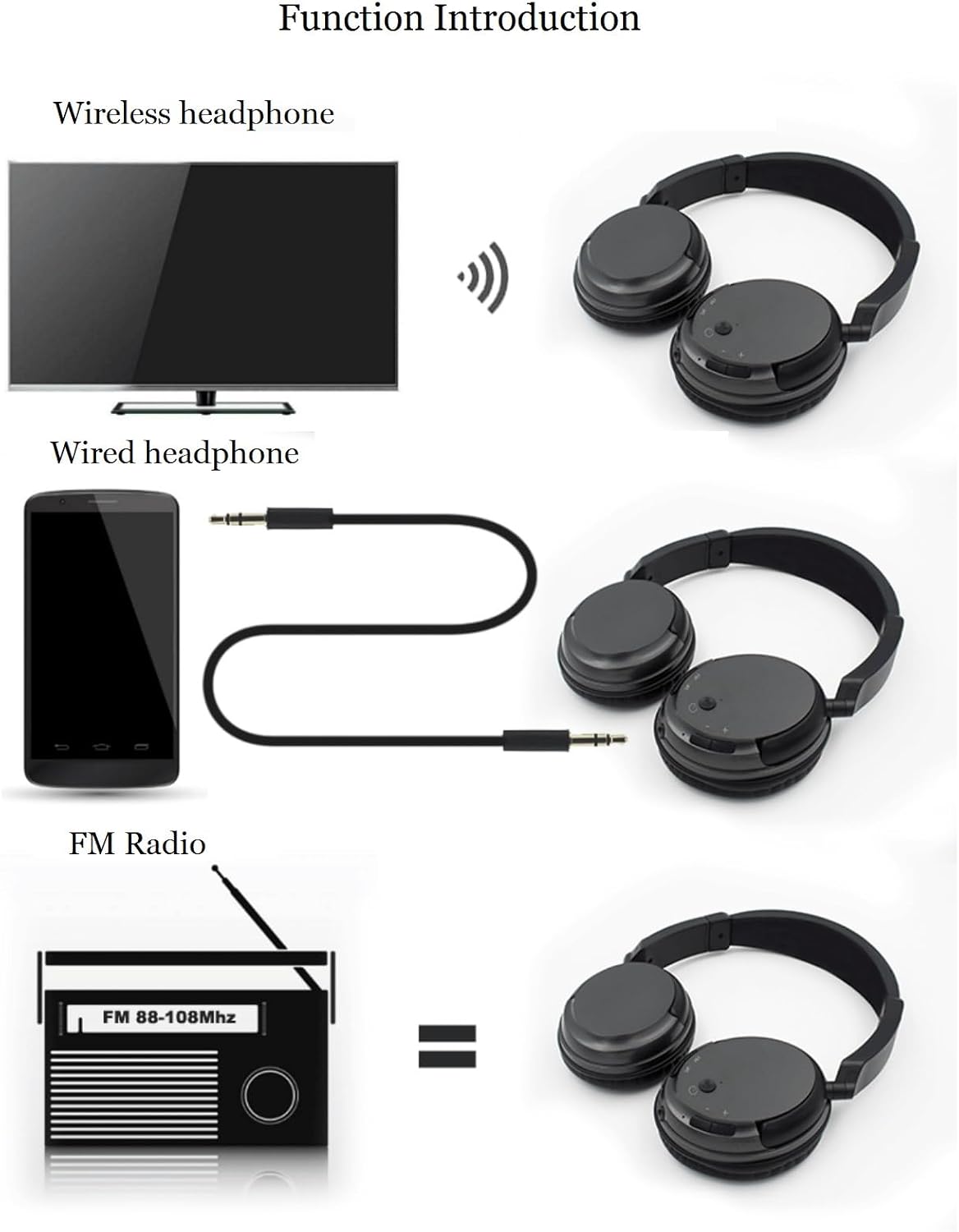
Image: An illustration demonstrating the three primary functions of the headphones: wireless connection to a TV, wired connection to a smartphone, and standalone FM radio operation.
1. FM Wireless Headset Function (with USB Transmitter)
This mode allows you to connect the headphones wirelessly to devices without Bluetooth, such as TVs or computers, using the included USB transmitter. The transmission range is up to 30 meters, providing a delay-free audio experience.
- Ensure your TV or device has an audio output port (e.g., RCA audio output, 3.5mm audio output, or USB audio output).
- Connect the USB transmitter to the audio output port of your device. Use the appropriate audio cable (RCA or 3.5mm) if connecting to analog audio outputs.
- Power on the headphones. They will automatically connect to the USB transmitter.

Image: Diagrams illustrating how to connect the headphones using the USB transmitter to a computer (via USB) and to a TV (via USB audio-out or RCA audio-out).
2. Bluetooth Mode
Connect the headphones to your mobile phone or other Bluetooth-enabled devices.
- Power on the headphones.
- If the headphones are in another mode, double-tap the ON/OFF button to switch to Bluetooth mode.
- On your device, enable Bluetooth and search for available devices.
- Select "Queemie Headphones" (or similar name) from the list to pair.
- Note: When connecting a new device, ensure the Bluetooth function of any previously connected device is turned off to avoid interference. The Bluetooth transmission distance is 10-15 meters.
3. FM Radio Function
The headphones have a built-in FM radio for listening to local broadcasts.
- Power on the headphones.
- Double-tap the ON/OFF button to switch to FM radio mode.
- Searching and Saving Channels: Long press the FM button (often integrated with the ON/OFF or a dedicated button) for 1.5 seconds to automatically search and save all available FM channels (frequency range: 88-108Mhz). During the search, you can long press the FM button again for 1.5 seconds to pause the search manually.
- Switching Saved Channels: Click the FM button to cycle through the saved channels. Ensure you have performed a channel search and save before attempting to switch channels.
4. Wired Headset Function
Use the headphones as a traditional wired headset when battery is low or for devices without wireless capabilities.
- Connect one end of the 3.5mm audio cable to the 3.5mm Audio-in Port on the headphones.
- Connect the other end of the 3.5mm audio cable to the audio output jack of your device.
- Note: When using the wired headset function, the control buttons on the headphones (e.g., volume, track skip) will not be active. Audio control will be managed by the connected device.
Maintenance
- Cleaning: Use a soft, dry cloth to clean the headphones. Avoid using harsh chemicals or abrasive materials.
- Storage: Store the headphones in a cool, dry place away from direct sunlight and extreme temperatures.
- Battery Care: To prolong battery life, avoid fully discharging the battery frequently. Charge the headphones regularly, even if not in use for extended periods.
- Water Resistance: These headphones are not water resistant. Avoid exposure to liquids.
Troubleshooting
- No Power: Ensure the headphones are charged. Connect the charging cable and allow it to charge for at least 15 minutes before attempting to power on again.
- No Sound (Wireless FM Mode):
- Verify the USB transmitter is correctly connected to an active audio output port on your device.
- Check the volume level on both the headphones and the connected device.
- Ensure the headphones are in the correct wireless mode (double-tap ON/OFF button to cycle modes).
- No Sound (Bluetooth Mode):
- Ensure Bluetooth is enabled on your device and the headphones are paired.
- Check if the headphones are connected to another device. Disconnect from other devices if necessary.
- Verify the volume level on both the headphones and the connected device.
- No Sound (Wired Mode):
- Ensure the 3.5mm audio cable is securely connected to both the headphones and the audio source.
- Check the volume level on the connected device.
- FM Radio Not Working:
- Ensure the headphones are in FM radio mode (double-tap ON/OFF button).
- Perform an automatic channel search and save by long-pressing the FM button.
- Move to an area with better FM signal reception.
Specifications
| Feature | Specification |
|---|---|
| Model Name | Wireless FM Bluetooth headphones |
| Brand | Queemie |
| Color | Black |
| Wearing Style | Over-Ear Headset |
| Material | ABS, Leather, Metal |
| Connectivity Technology | Bluetooth, FM, Wireless (via USB Transmitter), Wired (3.5mm) |
| Bluetooth Version | 5.3 |
| Bluetooth Range | 10-15 meters |
| Wireless FM Transmission Range | Up to 30 meters |
| FM Radio Frequency Range | 88-108 Mhz |
| Speaker Size | 40mm |
| Speaker Impedance | 32 Ω |
| Battery Type | Lithium Polymer Battery |
| Charging Time | 1-2 hours |
| Battery Life (Endurance) | 8-10 hours |
| Noise Control | Sound Isolation |
| Item Weight | 11 ounces (approx. 0.3 kg) |
| Compatible Devices | Cellphones, Desktops, Laptops, Tablets, Television |
| Special Features | Adjustable Headband, Lightweight, Rechargeable Battery, Surround Sound, Volume Control |
Support
If you encounter any issues or have questions regarding your Queemie Wireless Bluetooth Headphones, please do not hesitate to contact our customer support. We aim to reply to all inquiries within 24 hours.