
1. Introduction
Thank you for choosing the MZZYG Automatic Window Cleaning Robot. This device is designed to simplify window cleaning tasks, providing an efficient and hands-free solution for various glass surfaces. Please read this manual thoroughly before operating the robot to ensure safe and optimal performance. Keep this manual for future reference.
2. Product Overview and Components
Familiarize yourself with the components included in your MZZYG Window Cleaning Robot package.

Image 2.1: The MZZYG Window Cleaning Robot and its accompanying accessories. This includes the main robot unit, two sets of cleaning pads, two black rings for attaching pads, a power adapter, a remote control, a safety rope with a carabiner, and a bottle for cleaning solution.
2.1. Robot Parts Diagram
Refer to the diagram below to identify the different parts of your window cleaning robot.
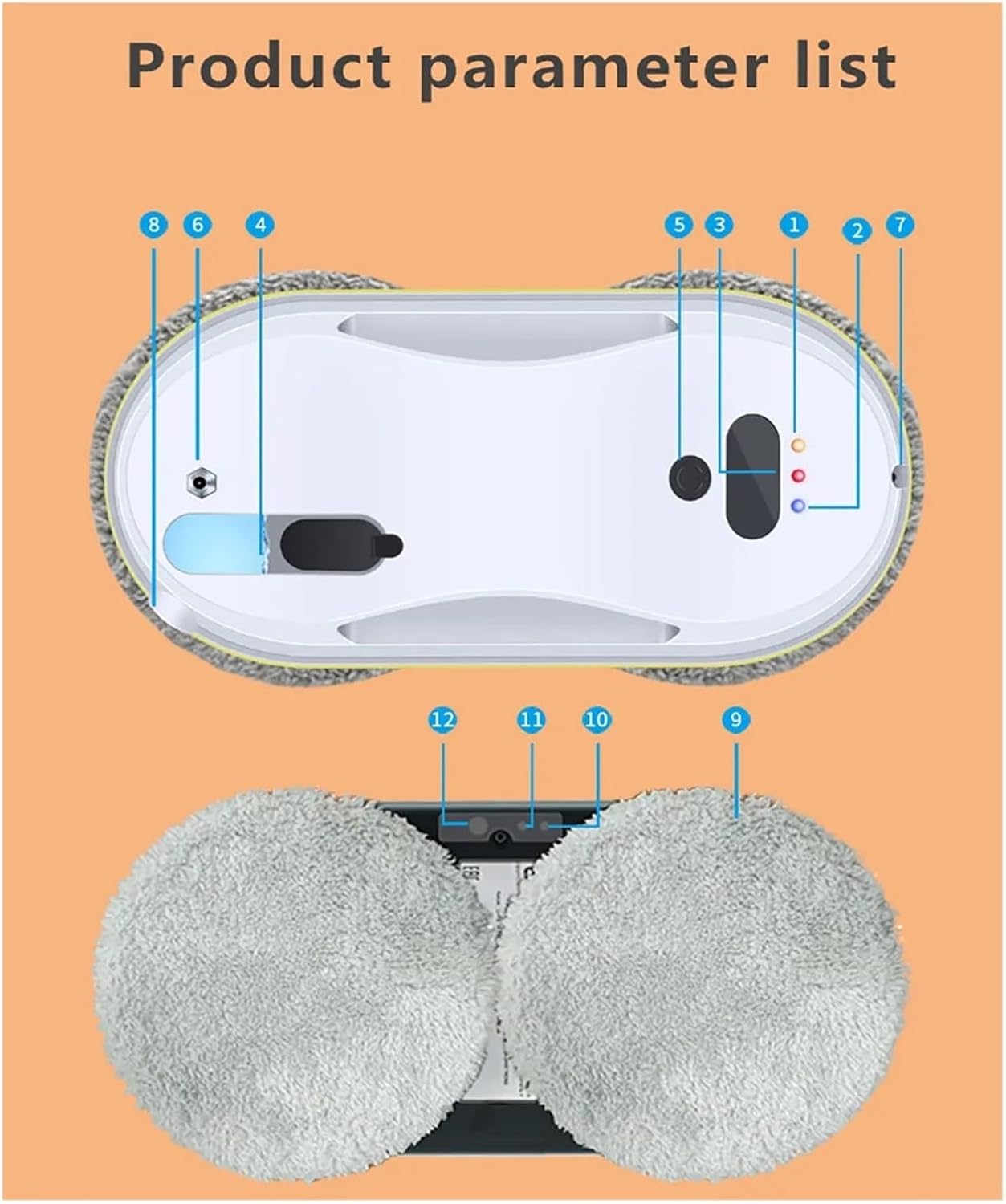
Image 2.2: A detailed diagram illustrating the various components of the MZZYG Window Cleaning Robot. Key parts are numbered for easy identification, including power indicators, control buttons, water spray nozzle, water tank, and cleaning pad attachment points.
2.2. Water Spray System
The robot features an intelligent water spray system for effective cleaning.
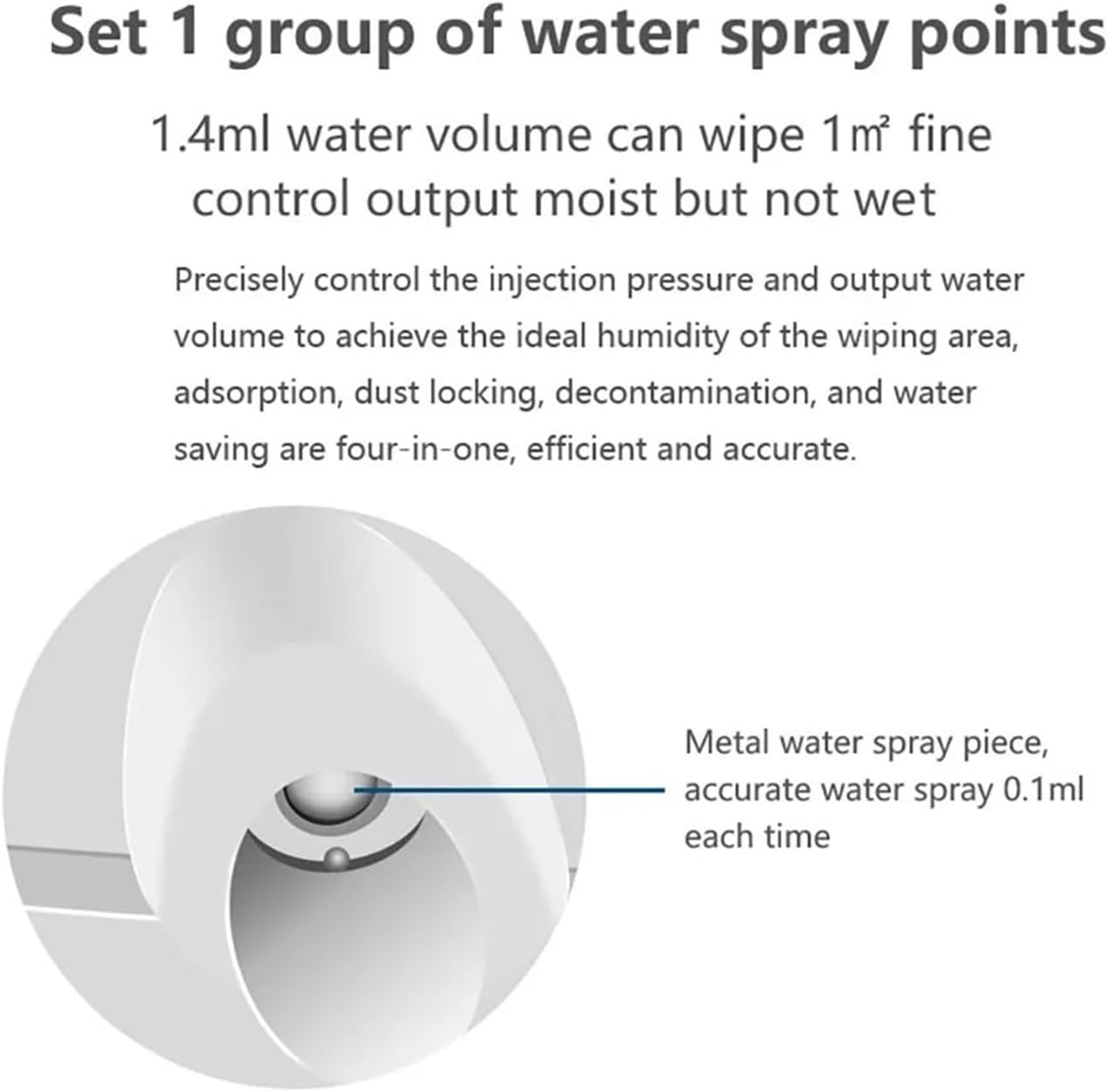
Image 2.3: Close-up view of the robot's metal water spray nozzle. This nozzle precisely controls the output, delivering approximately 0.1ml of water each time to ensure optimal moisture for cleaning without over-wetting the surface.
The robot applies water in a controlled manner to achieve ideal humidity for wiping, ensuring efficient dust removal, decontamination, and water saving.

Image 2.4: Illustration of the robot's alternating water spray function. The robot accurately covers the entire cleaning path by strategically spraying water, ensuring thorough cleaning across the surface.
2.3. Cleaning Mechanism
The robot utilizes a unique alternating cycle for effective cleaning.

Image 2.5: Diagram showing the alternating suction and wiping motion of the robot's cleaning pads. The pads perform a twisting and swinging motion, similar to manual cleaning, to effectively suck up floating dust and wipe away stubborn stains.
3. Safety Instructions
WARNING: Failure to follow these safety instructions may result in injury or damage to the product.
- Always attach the safety rope to a secure anchor point before operating the robot, especially when cleaning high windows.
- Ensure the power adapter is securely connected and the power cord is not tangled or obstructing the robot's movement.
- Do not use the robot on cracked, damaged, or uneven glass surfaces.
- Keep hands, hair, and loose clothing away from the moving parts of the robot.
- Do not allow children or pets near the robot during operation.
- Use only the provided cleaning solution or distilled water in the water tank. Do not use corrosive liquids.
- The robot has a built-in UPS (Uninterruptible Power Supply) for power failure protection, allowing it to remain attached for approximately 20 minutes while alarming. However, always use the safety rope.

Image 3.1: This image highlights the robot's safety features, including the recommendation to tie up the safety rope before cleaning. It also illustrates the 20-minute UPS power failure protection and the robot's ultra-thin body design, which allows it to clean various window types.
4. Setup
- Attach Cleaning Pads: Securely attach the cleaning pads to the rotating wheels on the underside of the robot. Ensure they are flat and cover the entire surface of the wheels.
- Fill Water Tank: Open the water tank cap and fill it with clean water or a recommended window cleaning solution. Do not overfill.
- Connect Power: Plug the power adapter into the robot and then into a power outlet. Ensure the connection is firm.
- Attach Safety Rope: Attach one end of the safety rope to the robot and the other end to a sturdy anchor point indoors, such as a heavy piece of furniture or a window frame. This is crucial for preventing falls.
- Place Robot on Window: Hold the robot firmly against the glass surface. Press the power button on the robot or the remote control to activate the suction. The robot should firmly adhere to the window.
5. Operating Instructions
5.1. Power On/Off
- Power On: Press and hold the power button on the robot or the remote control until the indicator lights illuminate.
- Power Off: Press and hold the power button again. The robot will release suction after a few seconds. Carefully remove it from the window.
5.2. Using the Remote Control
The remote control allows you to manage the robot's functions:
- Start/Pause: Initiate or pause the cleaning cycle.
- Directional Arrows: Manually control the robot's movement (up, down, left, right).
- Automatic Modes: Select different automatic cleaning patterns (e.g., Z-path, N-path).
- Water Spray: Manually activate the water spray function.
5.3. Cleaning Modes and Path Planning
The robot is designed for intelligent path planning to ensure comprehensive cleaning.

Image 5.1: This image illustrates the robot's automatic cleaning path, showing a typical "Auto clean up and then down" pattern. The robot starts from a designated point, cleans upwards, then moves across and cleans downwards, ensuring systematic coverage of the window surface.
Upon starting, the robot will automatically detect the window edges and plan an optimal cleaning path, typically a bow-shaped or Z-shaped pattern, to cover the entire surface efficiently.
6. Maintenance
Regular maintenance ensures the longevity and optimal performance of your robot.
6.1. Cleaning Pads
- After each use, remove the cleaning pads from the robot.
- Wash the pads with mild detergent and water. They can typically be machine washed.
- Allow the pads to air dry completely before reattaching them or storing them.
- Replace worn or heavily soiled pads to maintain cleaning effectiveness.
6.2. Robot Body
- Wipe the exterior of the robot with a soft, damp cloth.
- Do not immerse the robot in water or spray water directly onto its electronic components.
- Clean the suction vents and sensors regularly to ensure proper adhesion and navigation.
6.3. Water Tank
- Empty any remaining water from the tank after each use.
- Rinse the tank with clean water periodically to prevent residue buildup.
7. Troubleshooting
| Problem | Possible Cause | Solution |
|---|---|---|
| Robot does not adhere to the window. |
|
|
| Robot stops during cleaning. |
|
|
| Poor cleaning performance. |
|
|
8. Specifications
- Brand: MZZYG
- Model Number: 1005004493665374
- Package Dimensions: 2.54 x 2.54 x 2.54 cm (Note: This seems like placeholder data, actual product dimensions are likely larger)
- Item Weight: 10 g (Note: This seems like placeholder data, actual product weight is likely heavier)
- Power Failure Protection: UPS backup for approximately 20 minutes.
- Water Spray Volume: Approximately 0.1ml per spray.
9. Warranty and Support
Information regarding product warranty and customer support is not available in the provided data. Please refer to the product packaging or contact your retailer for details on warranty coverage and technical assistance.