
Merax 246AAK
Merax Wood Loft Bed with Desk and Shelves: Full Size Instruction Manual
Model: 246AAK | Brand: Merax
1. Introduction and Safety Information
This manual provides essential information for the assembly, operation, and maintenance of your Merax Wood Loft Bed with Desk and Shelves. Please read all instructions carefully before assembly and use to ensure safe and proper functioning of the product.
Important Safety Warnings:
- Do not exceed a weight limit of 250 pounds.
- Always assemble according to the instructions to prevent instability.
- Be cautious when using the loft bed and keep the area underneath clear of objects to prevent falls.
- Ensure all connections are securely fastened before and during use.
- Regularly inspect the bed for loose parts or damage.
2. Product Overview
The Merax Wood Loft Bed with Desk and Shelves is designed to maximize space in any bedroom, offering a comfortable sleeping area combined with a functional workstation and ample storage. Constructed from solid wood and MDF, this bed is built for durability and stability.
Key Features:
- Integrated workstation with a spacious desk.
- Four built-in storage shelves for books, decor, and other items.
- Sturdy construction from solid wood and MDF for long-lasting use.
- Space-saving loft design, ideal for smaller rooms.
- Full-size bed compatibility.
Product Dimensions:
- Overall Dimensions: 79.7"L x 57.2"W x 68.3"H
- Weight Capacity: 250 pounds
- Recommended Mattress Thickness: 6 inches
Product Images:



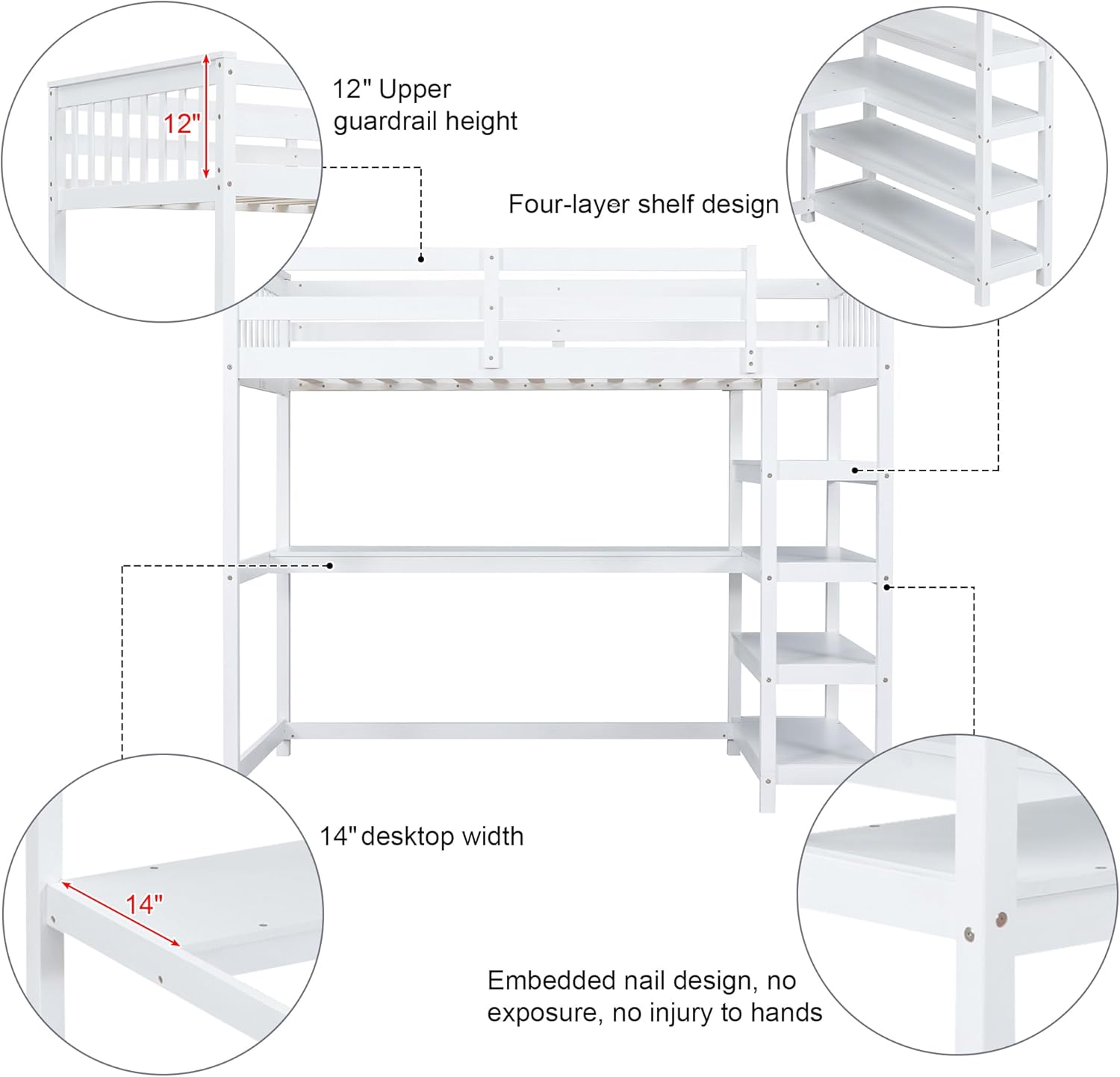



Product Videos:
No official seller videos are available for this product at this time.
3. Setup and Assembly
The Merax Wood Loft Bed requires assembly. Detailed step-by-step instructions and all necessary hardware are included with your product packaging. Please ensure you have sufficient space and the recommended tools before beginning assembly.
Before You Begin:
- Unpack all components and verify against the parts list provided in the assembly guide.
- Clear a spacious area for assembly to prevent damage to parts or injury.
- Familiarize yourself with the assembly steps by reviewing the entire manual first.
- A drill may be helpful for certain steps, such as attaching bed slats, as some holes may not be pre-drilled.
- Assembly is recommended with two people for ease and safety.
For optimal stability, consider anchoring the bed to wall studs if possible, using appropriate hardware (anchors may be included or purchased separately).
4. Operating and Usage
Once assembled, your Merax Loft Bed provides a versatile living and sleeping solution. The upper bunk is designed for sleeping, while the area underneath serves as a functional workspace and storage area.
Using the Loft Bed:
- Sleeping Area: The top bunk accommodates a full-size mattress. Ensure the mattress thickness allows for adequate guardrail height for safety.
- Desk Area: The integrated desk provides ample space for studying, working, or creative activities. A standard desk chair can be easily rolled underneath.
- Storage Shelves: Utilize the four shelves for organizing books, school supplies, decorative items, or personal belongings.
- Weight Limit: Adhere strictly to the 250-pound weight limit for the bed to ensure safety and structural integrity.
- Ladder Access: Use the built-in ladder (integrated into the shelving unit) for safe access to the upper bunk. Always maintain three points of contact when climbing or descending.
5. Maintenance and Care
Regular maintenance will help prolong the life and appearance of your Merax Loft Bed.
General Care:
- Cleaning: Wipe surfaces with a soft, damp cloth. Avoid harsh chemicals or abrasive cleaners that could damage the finish.
- Hardware Check: Periodically check all bolts and screws to ensure they are tight. Re-tighten as necessary to maintain stability and prevent creaking.
- Surface Protection: Use coasters or mats on the desk surface to protect against spills and scratches.
- Paint Care: Be aware that the painted finish may be susceptible to rubbing off with excessive friction or impact. Handle with care.
6. Troubleshooting
If you encounter any issues with your Merax Loft Bed, refer to the following common troubleshooting tips:
Common Issues and Solutions:
- Instability or Wobbling:
- Ensure all bolts and screws are fully tightened.
- Verify that the bed is placed on a level surface.
- If applicable, ensure the bed is securely anchored to wall studs.
- Creaking Noises:
- Re-tighten all hardware connections.
- Ensure the mattress is properly seated on the slats.
- Misaligned Parts During Assembly:
- Carefully review the assembly instructions for the specific step.
- Ensure components are oriented correctly as shown in the diagrams.
- If holes do not align, double-check that you are using the correct parts for that step. Minor adjustments or pre-drilling may be necessary for some components like bed slats.
- Paint Chipping/Rubbing:
- This can occur with normal use. For minor touch-ups, consult with Merax customer support for recommended repair kits or paint codes.
If issues persist, please contact Merax customer support for further assistance.
7. Specifications
| Attribute | Detail |
|---|---|
| Brand | Merax |
| Model Number | 246AAK |
| Size | Full |
| Product Dimensions | 79.7"L x 57.2"W x 68.3"H |
| Special Feature | With desk and shelves |
| Color | White |
| Finish Type | Painted |
| Included Components | Bookcase |
| Compatible Mattress Size | Full |
| Furniture Finish | Pine |
| Assembly Required | Yes |
| Item Weight | 82.2 pounds |
| Country of Origin | Vietnam |
| Date First Available | July 26, 2024 |
8. Warranty and Customer Support
For information regarding product warranty, please refer to the documentation included with your original purchase or visit the official Merax website. Warranty terms and conditions may vary.
If you require further assistance, have questions about assembly, or need to report a missing/damaged part, please contact Merax customer support. Contact details can typically be found on the product packaging or the official Merax website.
Please retain your proof of purchase for any warranty claims or support inquiries.
Ask a question about this manual
Ask about setup, troubleshooting, compatibility, parts, safety, or missing instructions. Manuals+ will review the question and use this page’s manual context to help answer it.