
1. Introduction
This document provides operational guidelines and important information for your Generic Replacement Remote Control. This remote is designed to function as a replacement for specific Honeywell Portable Air Conditioner models. Please verify compatibility by comparing your original remote with the images provided in this manual.
This remote control utilizes infrared (IR) technology and requires a clear line of sight to the air conditioner's IR receiver for proper operation.
2. Setup
2.1 Battery Installation
The remote control requires two (2) AAA batteries (not included) for operation. Follow these steps to install the batteries:
- Locate the battery compartment cover on the back of the remote control.
- Slide the cover downwards or press the latch and lift to open the compartment.
- Insert two AAA batteries, ensuring the positive (+) and negative (-) terminals align correctly with the markings inside the compartment.
- Replace the battery compartment cover by sliding it back into place until it clicks securely.

Figure 1: Battery compartment with cover removed, showing battery slots.
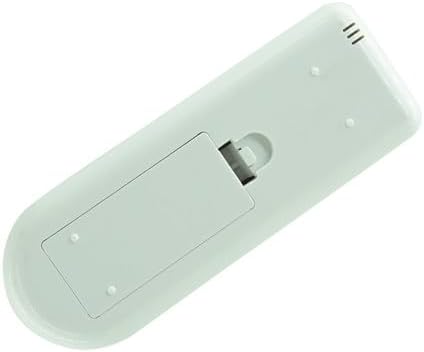
Figure 2: Remote control with battery cover installed.
2.2 Compatibility Note
This remote is a replacement unit. For optimal functionality, ensure your original remote control matches the appearance of this replacement. Some advanced or specific functions of your original air conditioner might not be fully supported by this generic replacement.
3. Operating Instructions
Point the remote control directly at the infrared receiver on your Honeywell Portable Air Conditioner. Ensure there are no obstructions between the remote and the air conditioner.

Figure 3: Front view of the remote control.
3.1 Button Functions
| Button | Function |
|---|---|
| Power (Red Button) | Turns the air conditioner ON or OFF. |
| Mode | Cycles through operating modes (e.g., Cool, Fan, Dry, Heat - if applicable). |
| Fan Speed | Adjusts the fan speed (e.g., Low, Medium, High, Auto). |
| Temperature Up (+) | Increases the set temperature. |
| Temperature Down (-) | Decreases the set temperature. |
| Timer | Sets the timer for automatic ON/OFF operation. |
| Sleep | Activates or deactivates sleep mode for quieter operation and energy saving. |
| LED | Controls the display light on the air conditioner unit. |
| Swing | Controls the louver swing function (if available on your unit). |
| °C/°F | Switches the temperature display between Celsius and Fahrenheit. |
4. Maintenance
4.1 Battery Replacement
When the remote control's range decreases or it becomes unresponsive, it is time to replace the batteries. Refer to Section 2.1 for battery installation instructions.
4.2 Cleaning
To clean the remote control, wipe it gently with a soft, dry cloth. Do not use liquid cleaners, abrasive materials, or chemical solvents, as these may damage the remote's surface or internal components.
5. Troubleshooting
- Remote not responding:
- Ensure fresh AAA batteries are correctly installed.
- Check for a clear line of sight between the remote and the air conditioner's IR receiver.
- Verify that the remote is within the maximum operating range (approximately 8 meters).
- Limited functionality:
- As a generic replacement, this remote may not offer all the exact functions or advanced features of your original air conditioner's remote. Refer to your air conditioner's original manual for specific functions.
- Ensure your air conditioner model is listed as compatible.
6. Specifications
| Feature | Detail |
|---|---|
| Brand | Generic |
| Model Number | Easytry11456 |
| Color | Black |
| Connectivity Technology | Infrared (IR) |
| Maximum Range | 8 Meters |
| Number of Supported Devices | 1 |
| Compatible Devices | Honeywell Portable Air Conditioners (various models including HM0CESAWK6, HM2CESAWK8, HT12CESAWK, HT12CESVWK, HT09CESVWK, HM2CESSWK8, HM4CESAWK0, HT09CESAWK, HT13CESAWK, HT13CESVWK) |
| Batteries Required | 2 x AAA (not included) |
| Special Features | Ergonomic design, Direct replacement functionality |
7. Warranty and Support
7.1 Warranty Information
This product comes with a 90-day warranty, offering hassle-free returns for manufacturing defects or malfunctions under normal use. Please retain your proof of purchase for warranty claims.
7.2 Customer Support
For any questions regarding compatibility, specific functions not covered in this manual, or troubleshooting assistance, please contact the seller or refer to the original user manual of your Honeywell Portable Air Conditioner.


