
1. Introduction
This manual provides essential instructions for the proper use and maintenance of your findtime FSSRWY06 Smart Ring. Please read this manual thoroughly before using the device to ensure optimal performance and safety.
Package Contents:
- findtime FSSRWY06 Smart Ring x 1
- Charging Cable x 1
- Charging Case x 1
- Instruction Manual x 1
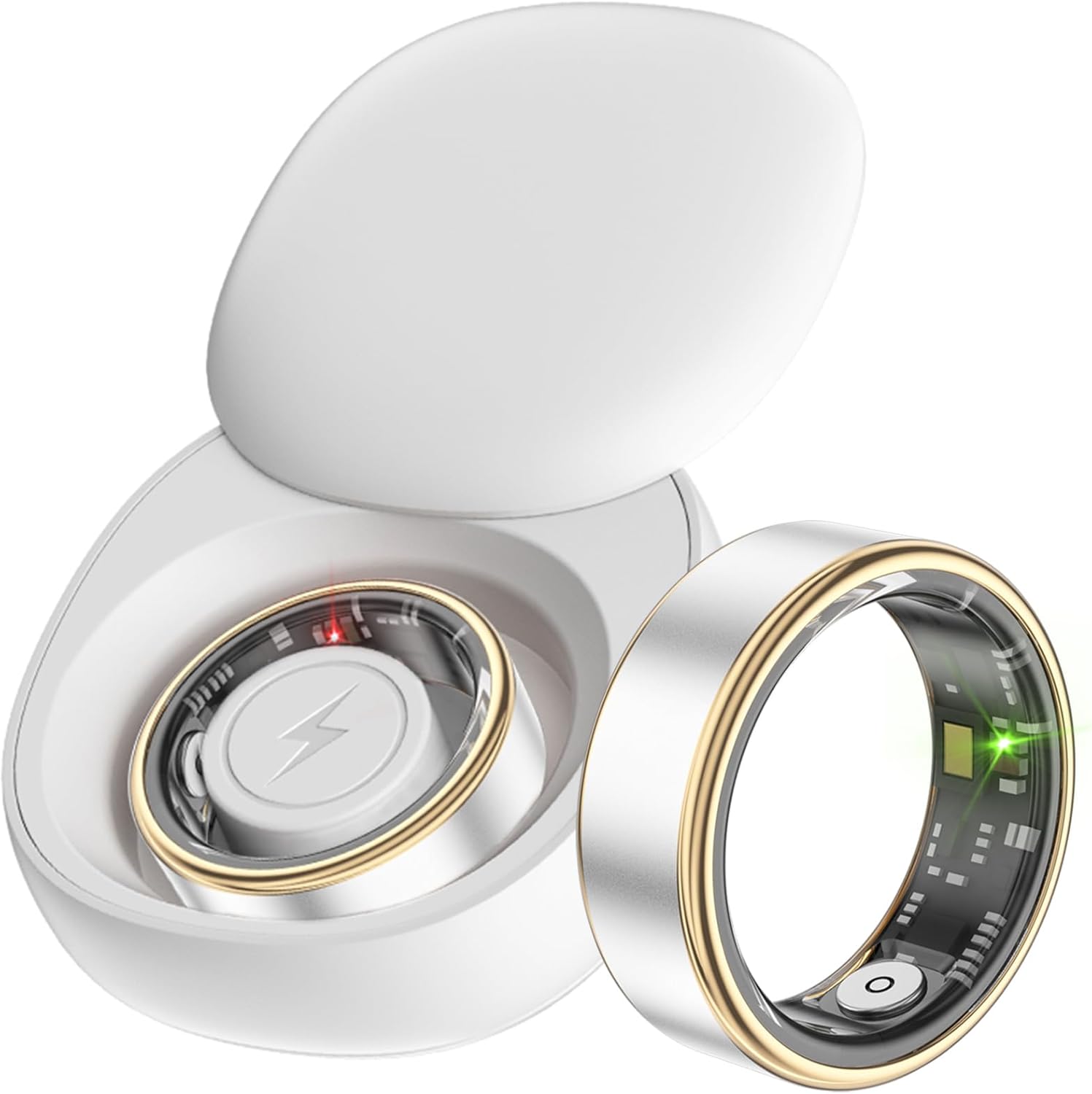
Figure 1.1: findtime FSSRWY06 Smart Ring and its charging case.
2. Safety Information
Observe the following safety guidelines to prevent damage to the device or personal injury:
- Do not attempt to disassemble or modify the smart ring.
- Keep the device away from extreme temperatures and direct sunlight.
- Avoid exposing the charging contacts to conductive materials.
- Consult a medical professional before starting any new exercise regimen or if you have pre-existing health conditions.
Water Resistance (5ATM)
The findtime FSSRWY06 Smart Ring is rated 5ATM waterproof, meaning it can withstand pressures equivalent to a depth of 50 meters. This makes it suitable for daily use, including showering, swimming, and snorkeling. It is not recommended for high-velocity water sports or deep-sea diving.

Figure 2.1: The smart ring's 5ATM water resistance allows for use in various water activities.
3. Getting Started and Setup
3.1 Charging the Smart Ring
- Place the smart ring into its charging case. Ensure the charging contacts on the ring align with those in the case.
- Connect the charging cable to the charging case and a compatible USB power source.
- The indicator light on the charging case will show the charging status. A full charge typically takes approximately 2 hours.
3.2 App Download and Pairing
The findtime FSSRWY06 Smart Ring operates with the "JRing" application. It is compatible with Android 5.0 and above, and iOS 10.0 and above.
- Download the "JRing" app from your device's app store (Google Play Store for Android, Apple App Store for iOS).
- Ensure Bluetooth is enabled on your smartphone.
- Open the JRing app and follow the on-screen instructions to create an account or log in.
- Navigate to the device pairing section within the app and select your FSSRWY06 Smart Ring from the list of available devices.
- Confirm the pairing request on both your phone and, if prompted, on the ring.
3.3 Confirming Ring Size
Accurate sizing is crucial for comfortable wear and precise data collection. Before wearing, measure your finger circumference to select the appropriate ring size.
- Select a thin, non-elastic string or paper strip.
- Wrap the string or paper around the base of the finger where you intend to wear the ring. Mark the point where it overlaps.
- Straighten the string or paper and measure its length with a ruler.
- Refer to the size comparison table below to find your corresponding ring size. It is recommended to measure in the afternoon or evening to account for potential slight finger swelling.

Figure 3.1: Guide for measuring finger circumference and international ring size comparison table.
4. Operating Instructions
4.1 Activity Tracking
The smart ring tracks various activity data throughout your day. Wear the ring during your workouts to record:
- Pedometer (step count)
- Calories burned
- Distance traveled
Review your daily activity summaries and detailed workout reports within the JRing app. The app can also support map-based tracking for activities like walking, running, and cycling.

Figure 4.1: The JRing app displaying activity data including steps, distance, and calories, with map tracking.
4.2 Health Monitoring
The FSSRWY06 Smart Ring continuously monitors key health metrics:
- Heart Rate Monitoring: Real-time heart rate data is collected throughout the day and during exercise.
- Sleep Monitoring: The ring tracks your sleep patterns, identifying sleep duration, deep sleep, and light sleep phases. This helps in understanding and improving sleep habits.
- Blood Oxygen Monitoring: The device can monitor blood oxygen saturation levels.
All monitored health data can be viewed and analyzed within the JRing app on your smartphone.

Figure 4.2: Overview of the smart ring's health monitoring capabilities, including sleep, heart rate, blood oxygen, and all-weather motion tracking.

Figure 4.3: Example of the JRing app interface displaying heart rate and blood oxygen data.
4.3 Remote Camera Control
The smart ring can be used as a remote shutter for your smartphone camera. This allows you to take photos or record videos from a distance without needing to touch your phone.
- Open your smartphone's camera application.
- Ensure the smart ring is connected via Bluetooth to your phone.
- Perform the designated gesture (e.g., a slight wiggle or tap, as defined in the app settings) with the ring to trigger the camera shutter.

Figure 4.4: Using the smart ring to remotely control a smartphone camera for taking photos.
5. Maintenance
5.1 Cleaning the Ring
To maintain hygiene and ensure accurate sensor readings, clean your smart ring regularly:
- Wipe the ring with a soft, damp cloth.
- Avoid using harsh chemicals, abrasive cleaners, or solvents, as these can damage the device.
- Ensure the charging contacts are clean and dry before placing the ring in the charging case.
5.2 Battery Care
The smart ring uses a Lithium Ion battery. Follow these guidelines for optimal battery life:
- Charge the device fully before first use.
- Avoid completely draining the battery frequently.
- Store the device in a cool, dry place if not used for extended periods.
6. Troubleshooting
Common Issues and Solutions:
- Device not turning on: Ensure the ring is fully charged. Place it in the charging case and connect to power.
- Cannot connect to app: Check if Bluetooth is enabled on your phone. Ensure the ring is charged and within range. Try restarting both the ring (by placing it in the charging case and removing it) and your phone.
- Inaccurate data: Ensure the ring is worn correctly and snugly on your finger. Clean the sensors regularly.
- Charging issues: Verify the charging cable and adapter are working. Ensure the charging contacts on both the ring and case are clean and free of debris.
If you encounter persistent issues not covered here, please refer to the support section or contact customer service.
7. Specifications
| Feature | Specification |
|---|---|
| Model | FSSRWY06 |
| Brand | findtime |
| Operating System Compatibility | Android 5.0+, iOS 10.0+ |
| Water Resistance | 5ATM (up to 50 meters) |
| Weight | Approximately 2.5g |
| Charging Time | Approx. 2 Hours |
| Battery Type | Lithium Ion |
| Connectivity | Bluetooth |
| Special Features | Pedometer, Calories, Heart Rate Monitor, Sleep Monitoring, Remote Camera |
8. Warranty and Support
For warranty information or technical support, please refer to the documentation provided with your purchase or contact findtime customer service. Contact details are typically available on the manufacturer's official website or within the JRing application.
Please retain your proof of purchase for any warranty claims.

Figure 8.1: Regulatory markings (FC, CE, RoHS) and manufacturer contact information.