
EITAI EITAI6300
EITAI6300 Digital Leakage Current Clamp Meter User Manual
Model: EITAI6300 | Brand: EITAI
1. Introduction
The EITAI6300 Digital Leakage Current Clamp Meter is a high-precision instrument designed for measuring AC leakage current and AC current. It features an ultra-high resolution of 1uA and a measurement range from 0.001mA to 60.0A. The device incorporates a contact-less clamp-on design, eliminating the need to cut wires for measurement. Its compact and lightweight form factor ensures portability for various applications.
Key functions include peak capture, data hold, and data storage, ensuring comprehensive and accurate measurement results. The meter is equipped with a backlit LCD display for clear visibility of readings. Additionally, it offers USB communication capabilities for real-time monitoring and data analysis on a PC using dedicated software.

Image: The EITAI6300 Digital Leakage Current Clamp Meter, highlighting its 1uA resolution, 0.001mA-60A leakage current range, and 1.2-inch (30mm) clamp jaw size. The meter is shown with its red clamp jaw and digital display.
Video: An overview of the EITAI6300 Leakage Current Clamp Meter, demonstrating its contact-less design, 1uA LCD digital display, real-time display of results, and functions such as peak hold, data hold, and data storage. The video also shows the measurement range and resolution.
2. What's in the Box
Upon opening the package, verify that all the following items are included:
- 1 x EITAI6300 Clamp Meter
- 1 x USB Cable
- 1 x Software Disk (for PC communication)
- 1 x User Manual
- 1 x Storage Bag

Image: The EITAI6300 Clamp Meter package contents laid out, showing the meter, USB cable, user manual, and a black storage bag within a cardboard box.
Video: An unboxing video of the EITAI6300 Leakage Current Clamp Meter, showing the process of opening the box and revealing the included accessories such as the meter, USB cable, manual, and storage bag.
3. Setup
3.1 Battery Installation
The EITAI6300 Clamp Meter requires batteries for operation (not included due to import regulations). Typically, this device uses standard AAA batteries. Follow these steps to install them:
- Locate the battery compartment cover on the back of the meter.
- Use a screwdriver (if necessary) to open the battery compartment.
- Insert the required batteries, ensuring correct polarity (+ and - terminals).
- Replace the battery compartment cover and secure it.
3.2 Powering On/Off
To power on the device, press the POWER button. The LCD display will illuminate. To power off, press and hold the POWER button until the display turns off. The meter also features an auto-shutdown function to conserve battery life after a period of inactivity.
4. Operating Instructions
4.1 Basic Current Measurement
To measure AC leakage current or AC current:
- Ensure the meter is powered on.
- Press the trigger to open the clamp jaw.
- Carefully position the clamp jaw around a single conductor (not a bundle of wires) through which the current to be measured flows. Ensure the jaw is fully closed.
- Read the current value displayed on the LCD screen.
4.2 Data Hold Function
Press the HOLD button to freeze the current reading on the display. This is useful for recording measurements in difficult-to-view locations. Press the HOLD button again to release the reading and resume live measurement.
4.3 Peak Capture Function
The meter can capture peak current values. Refer to the detailed user manual (included in the box) for specific instructions on activating and using the peak capture mode.
4.4 Data Storage and USB Communication
The EITAI6300 can store measurement data internally. For advanced data management, connect the meter to a PC using the provided USB cable. Install the software from the included disk to monitor real-time data, view historical records, set alarm values, and perform data analysis. Detailed instructions for software installation and usage are provided in the software manual.
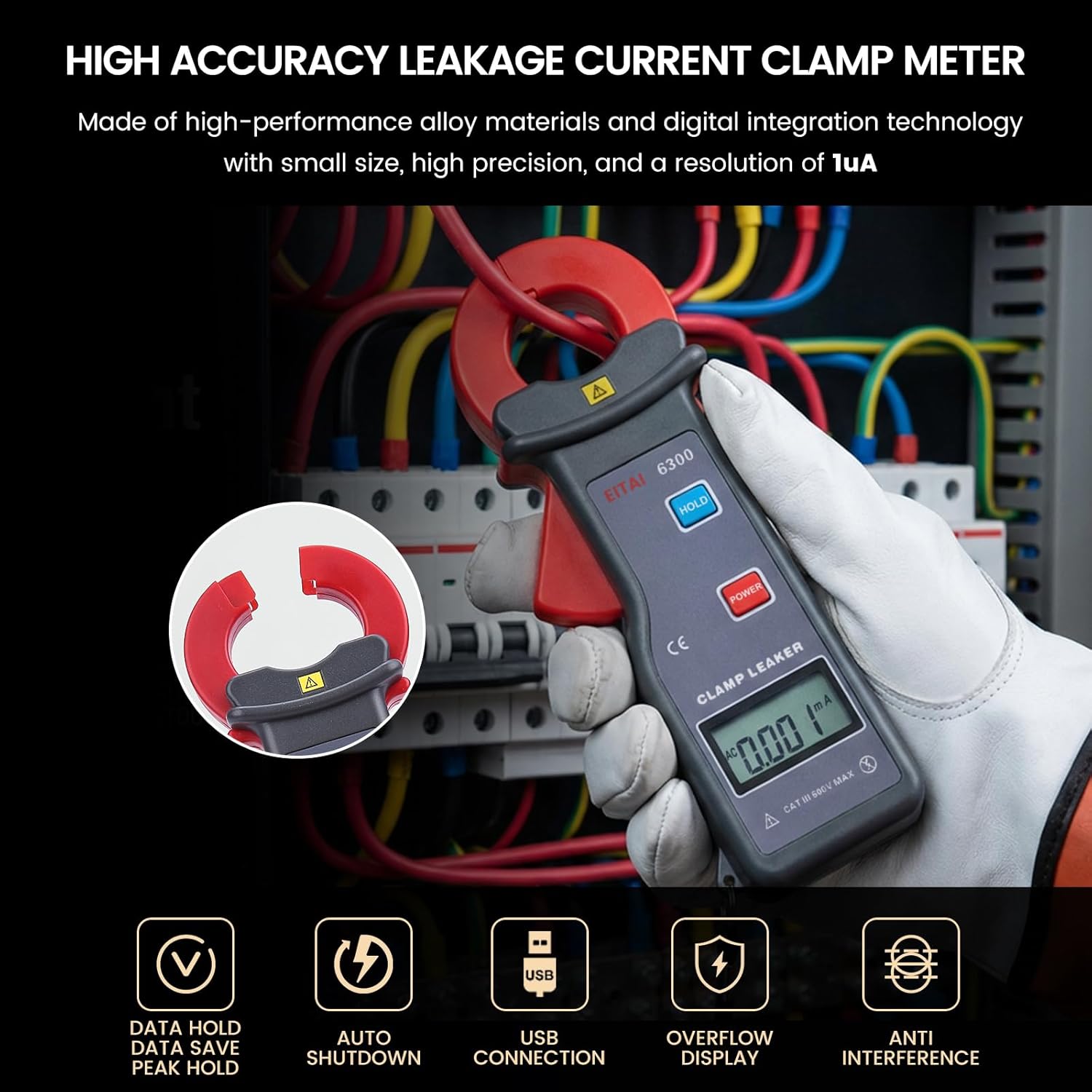
Image: The EITAI6300 Clamp Meter being held by a gloved hand, clamped around electrical wiring. Icons below highlight its features: Data Hold, Data Save, Peak Hold, Auto Shutdown, USB Connection, Overflow Display, and Anti-Interference.
5. Maintenance
5.1 Cleaning
To ensure optimal performance and longevity, keep the meter clean. Wipe the exterior with a soft, damp cloth. Do not use abrasive cleaners or solvents, as these may damage the casing or display. Ensure the device is powered off and disconnected from any circuits before cleaning.
5.2 Storage
When not in use for extended periods, store the EITAI6300 in its provided storage bag in a cool, dry place, away from direct sunlight and extreme temperatures. Remove batteries if storing for several months to prevent leakage.
6. Troubleshooting
| Problem | Possible Cause | Solution |
|---|---|---|
| Meter does not power on. | Dead or incorrectly installed batteries. | Check battery polarity; replace with fresh batteries. |
| "OL" or "OVER" displayed (Overflow). | Measurement exceeds the meter's range. | Ensure the current being measured is within the 0.001mA-60A AC range. |
| Inaccurate readings. | Jaw not fully closed; external magnetic fields; incorrect measurement technique. | Ensure the clamp jaw is fully closed around a single conductor. Avoid strong magnetic fields. Refer to operating instructions. |
| USB communication failure. | Incorrect cable connection; software not installed or configured properly. | Verify USB cable connection. Ensure software is correctly installed and drivers are up to date. Consult the software manual. |
7. Specifications
| Feature | Detail |
|---|---|
| Model | EITAI6300 |
| Measurement Type | AC Leakage Current, AC Current |
| Measurement Range | 0.001mA - 60.0A AC |
| Resolution | 1uA AC |
| Clamp Jaw Size | Φ1.2 inch / 30mm |
| Display | Backlit LCD Digital Display |
| Functions | Peak Capture, Data Hold, Data Storage, Auto Shutdown |
| Connectivity | USB Communication (for PC monitoring and analysis) |
| Material | Acrylonitrile Butadiene Styrene (ABS) |
| Product Dimensions | 6.89 x 2.76 x 1.5 inches |
| Item Weight | 200 Grams (7.05 ounces) |

Image: A collage showing the EITAI6300 Clamp Meter being used in diverse environments such as power grids, communication towers, meteorological stations, oil fields, commercial buildings, and industrial settings, illustrating its wide range of applications.
8. Warranty and Support
EITAI provides English customer service and technical support to ensure a smooth user experience. As a manufacturer direct sales product, after-sales service is guaranteed.
For warranty claims, technical assistance, or any inquiries regarding your EITAI6300 Digital Leakage Current Clamp Meter, please contact EITAI customer support directly. Refer to the contact information provided in the product packaging or on the official EITAI website.

Image: An illustration emphasizing EITAI's commitment to customer support, featuring icons for factory direct sales, maintenance service, and English technical support. A modern building with the EITAI logo is shown in the background.
Ask a question about this manual
Ask about setup, troubleshooting, compatibility, parts, safety, or missing instructions. Manuals+ will review the question and use this page’s manual context to help answer it.